Ask Devialet your question. I have no interest other than waiting for their conclusions on the cause of the problem and any possible solution. Audirvana gentlemen are way too busy on turning beta’s into a production release to focus on this issue, and rightly so. In the interim i have other options to listen to my local files over the Devialets without noise or play count annoyances.
1 Like
I understand your position… Keep it simple…
Will you please post a link to the Devialet Forum (Devialet Chat) thread that you referenced this statement:
Thank you… I am curious… as this network configuration is not ever specifically described by Devialet and in the context of Audirvāna UPnP transmission.

The best source for this is Devialet support. Here were their initial recommendations after raising the issue: you will note that they recommended if using WiFi try wired Ethernet connection in the “check network stability” paragraph.
customer care
Freddy David (Devialet)
Jan 19, 2026, 6:05 PM GMT+1
Hello Mooredj,
Thanks for sharing the details of your setup and the issue you’re encountering with your Phantom speakers.
Based on what you’ve outlined, it seems that the intermittent dropouts occur when playing 24/192 kHz files over UPnP, but the issue resolves when the sample rate in Audirvana Studio is capped at 24/96 kHz, which matches the Phantom Ultimate’s internal downsampling. Is that correct?
The Dropout Issue: The dropouts occurring during the playback of high-resolution (24/192 kHz) files could be related to either the network performance or a limitation in the way UPnP (Universal Plug and Play) handles high-resolution audio streams over time. Sometimes, continuous high-bitrate streams like 24/192 can overwhelm the network or cause buffer issues, especially if there’s a fluctuation in network speed or performance.
Internal Downsampling: Since the Phantom Ultimate 98 dB downsamples 24/192 kHz content to 24/96 kHz internally, setting the maximum PCM rate to 24/96 in Audirvana Studio is a smart workaround. It ensures that Audirvana is sending files at a resolution that the speakers can comfortably handle without any processing or transmission strain.
Check Network Stability: Although this seems to only occur after extended playback, ensuring that your network connection (wired or Wi-Fi) is stable and can handle higher bitrate streams over UPnP is key. If you’re using Wi-Fi, you might want to test a wired Ethernet connection to rule out any wireless interference or congestion.
Buffer Size in Audirvana Studio: Audirvana Studio offers advanced settings for buffering. Increasing the buffer size could potentially smooth out any interruptions by allowing the system to store more audio data in advance. Try adjusting the buffer settings in the Audio preferences and see if it affects the dropouts.
UPnP Server Settings: If you’re using a dedicated UPnP server, you might also want to explore any settings related to streaming performance and buffering in the UPnP server software. Some UPnP servers might have limits on the resolution of audio streams or how they handle high-bitrate files over time.
Audirvana Update: As you are using version 2.99.15 of Audirvana, it’s always worth checking for any new software updates. Sometimes, minor bugs or performance issues are addressed in newer releases, which could resolve your problem without needing to change settings.
Could you also share with me a bug report following these instructions?
Looking forward to your reply.
With regards,
Freddy David | Customer service & support Devialet
I think you are reading too much into the Ethernet application for stereo playback via Audirvāna UPnP… It appears in ‘Multi-room’ mode using the Devialet App, the APP is the server and manages the signals being transmitted to the pair…
Otherwise, I believe the speakers are connected to one and other in a pairing, via a proprietary wireless protocol, which would make sense… maybe a variant of Devialet “AIR”.
The Audirvāna UPnP/Devialet stereo pair configuration that you want to use should not be so difficult to find reference to… it is non-existent.
Have you even tried to just connect one with Ethernet and add the second (not connected to the network) subsequently using the App?
Totally disagree will leave it at that! Followed all instructions from Devialet in the support communications. My system is configured correctly according to Devialet Support. Have now removed AS from my daily driver MacBook Pro and am using Roon. No need to try anything different, it just works…..
Ok to indulge your interest
Playback to Ultimates Using “Plays with Audirvana” settings. 192 KHZ Podger Art of the Fugue album
Both speakers wireless - white noise and stuttering
Both speakers Ethernet - white noise and stuttering
One wireless one Ethernet - no playback, Audirvana loads first track but does not play. Same if left or right speaker is the one connected via Ethernet. Track time counter remains at zero
Rinse and repeat with Plays with Audirvana overridden and only setting changed being Universal Gapless Playback mode turned off.
Both speakers wireless - perfect playback
Both speakers Ethernet - perfect playback
One Ethernet one wireless - does not play track. Loads but playback freezes at 00:00
Conclusion once again Universal Gapless Playback mode triggers the issue.
Conclusion on “one wired and one connected by Ethernet” in Audirvana, system does not play at all. Same happens with Apple Music and airplay attempts to play but then stops.
My personal trouble-shooting approach would be to connect a single speaker to the network via Ethernet with the other completely disconnected wirelessly and Ethernet and powered-down, then play files to the active speaker via Audirvāna UPnP, to get a baseline reference. After establishing playback with the one speaker, then establish the pair, where the added speaker is not connected via Wifi or Ethernet or BT or Airplay.
I will leave it here… It is an interesting dilemma created by a lack of technical insight/support from the Devialet folks… It’s unfortunate that the company is so vague about how a stereo pairing is managed through a UPnP transmission scheme from any player… but especially Audirvāna…
The speakers when setting up individually have to be connected by WiFi or Ethernet. Tha app finds the one and guides you through the setup. Once done and yes tested. You set up the second one and the same way. Once complete the app asks you if you want to set them up as a stereo pair. Very simple process of identifying the left and right speakers which is easy as a tone is played through one speaker and you identify it as left or right. Once done that is the end of the interaction with the app. The app uploads the settings to the speakers. You can close the app or even switch your phone off and the speaker pair will still be functioning in Audirvana or any other music app via UPnP, RAAT, Chromecast or AirPlay.
The issue in this case is clearly related to Audirvana’s universal Gapless playback mode being on. When this is off playback never suffers white noise or stuttering. Additionally in the last two months of liaison with Devialet I have confirmed with them that none of the other playback software I have available (J River, Roon, Apple Music) suffer from this issue. JRiver also uses UPnP as the transmission protocol. So I don’t think this is related to UPnP itself which makes me think it is the processing done for the gapless workaround.
Either way I can switch to alternatives that don’t suffer this issue and check back with Audirvana before my licence expires in November to see if it is resolved or earlier if I hear from Devialet Support sooner. You are correct that the information they provide is pathetic but then I am convinced that they consider routine information confidential IP.
Last questions…
Have you ever technically verified the speakers are actually a stereo pair by using test signals to verify L-channel, R-channel under UPnP protocol… And what happens when after pairing, one of the speakers has the Ethernet connection physically removed?
I use Belief, acoustic version from the Village Sessions EP. Two guitars, Mayer and Robbie Macintosh. Mayers vocals and his rhythm arpeggio is centred, constant slide fills from Macintosh come out of the right channel, the lead break by Mayer occupies the left channel, very good stereo image track.
In the Devialet app it has a network status page. It reports wireless or wired status plus MAC addresses and IP. When disconnecting Ethernet from one speaker it shows the speaker as missing for a few seconds before registering it again but with the status set as wireless. As stated in this mode I can not play to the speakers with any app/protocol only when both are wireless or wired.
Thank you for the insights…
I appears that latency created in the pairing of two Devialet speakers connected to a network either with Ethernet or WiFi, is something to consider… There is no real-time status feedback in UPnP…
It also appears that when paired, there is a proprietary communication between the speakers that synchronizes the two, and the communication determines channel orientation. This alone, induces latency that Audivāna cannot account-for and does not expect. The digital-audio data is totally dependent on the Devialet system to account-for any timing deviations in the packet flow. The system must buffer a proper level of packets in-order to extract the digital-audio signal and present the system master clock with the sample-rate metadata, which then attempts to synchronize the slave-clock in the symbiotic speaker, through the proprietary feedback-loop, and this induces more latency. Generally, this latency is transparent in the playback under controlled conditions such as with the Devialet App/Multi-room, Roon RAAT and apparently some UPnP implementations…
Since, Audirvāna implements UPnP as stated here below, we can presume that the Devialet system needs to compliment and be compliant with the Audirvāna UPnP data flow.
Audirvāna mindfully chose the Universal Plug and Play (UPnP) standard.
By design, it guarantees lossless data transmission over a computer network, including WiFi. Even better, it’s an open and comprehensive standard, accessible to all manufacturers for free.
This common language allows devices and programs to talk to each other in the best interest of users who don’t have to change their entire system because they change a component. It is a critical infrastructure in our industry and a brake on obsolescence.
Yet UPnP remains little known and is often accused of not working well. The standard has nothing to do with it.
It is its integration that is to blame. Implementing it properly requires skills, and they exist: more than 7 billion devices worldwide can use it!
So, customers must demand quality integration from manufacturers; otherwise, the temptation of proprietary protocols - supposedly more reliable - will flourish to the detriment of their long-term interests. Audirvāna rigorously and fully integrates the UPnP standard, and we will continue to defend it.
What is 'Plāys with Audirvāna'?
I don’t see that any Devialet device is certified as “Plays with Audirvāna”
Addendum: I wonder how the system performs when delivering 24/44.1kHz and 24/48kHz signals via UPnP.
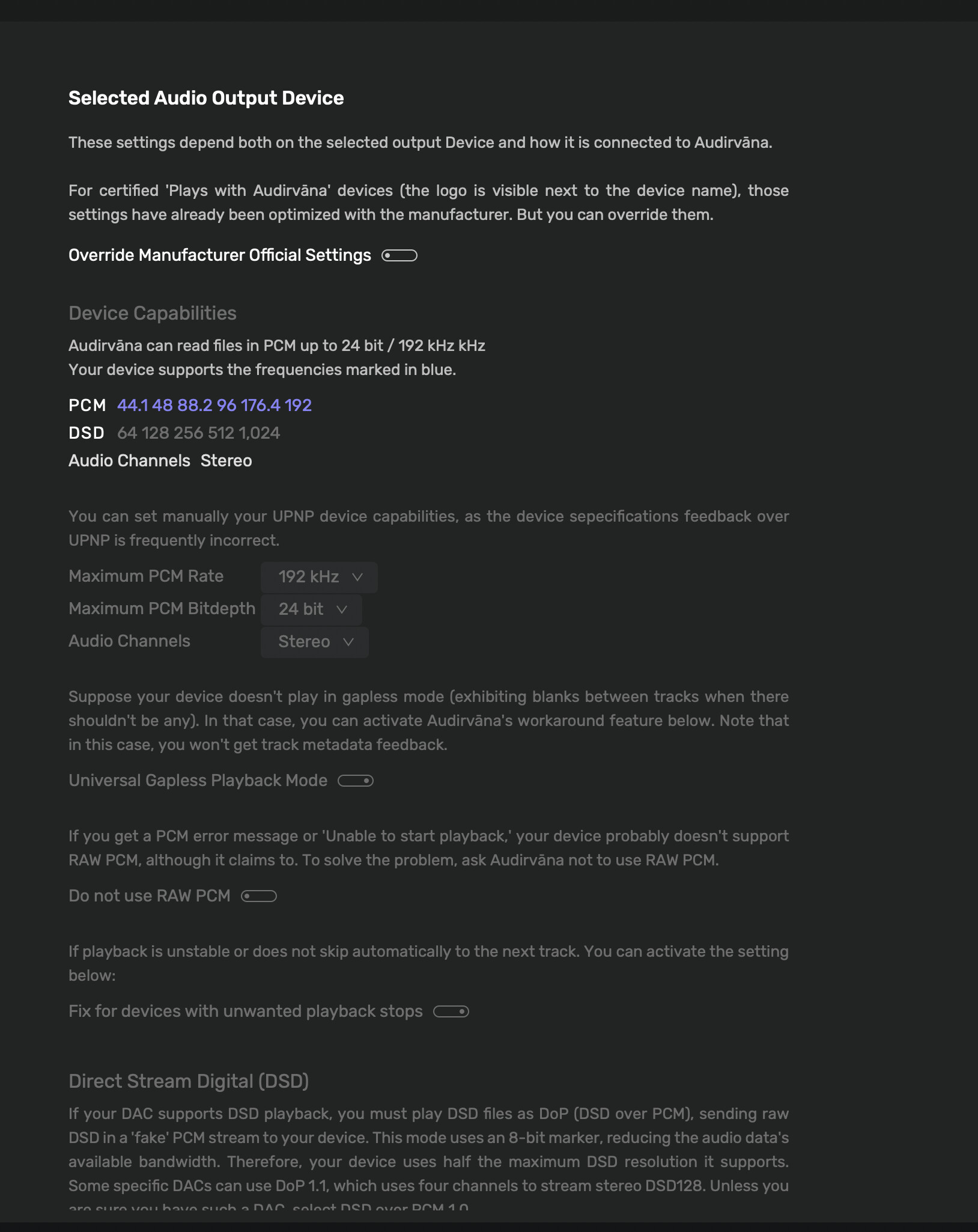
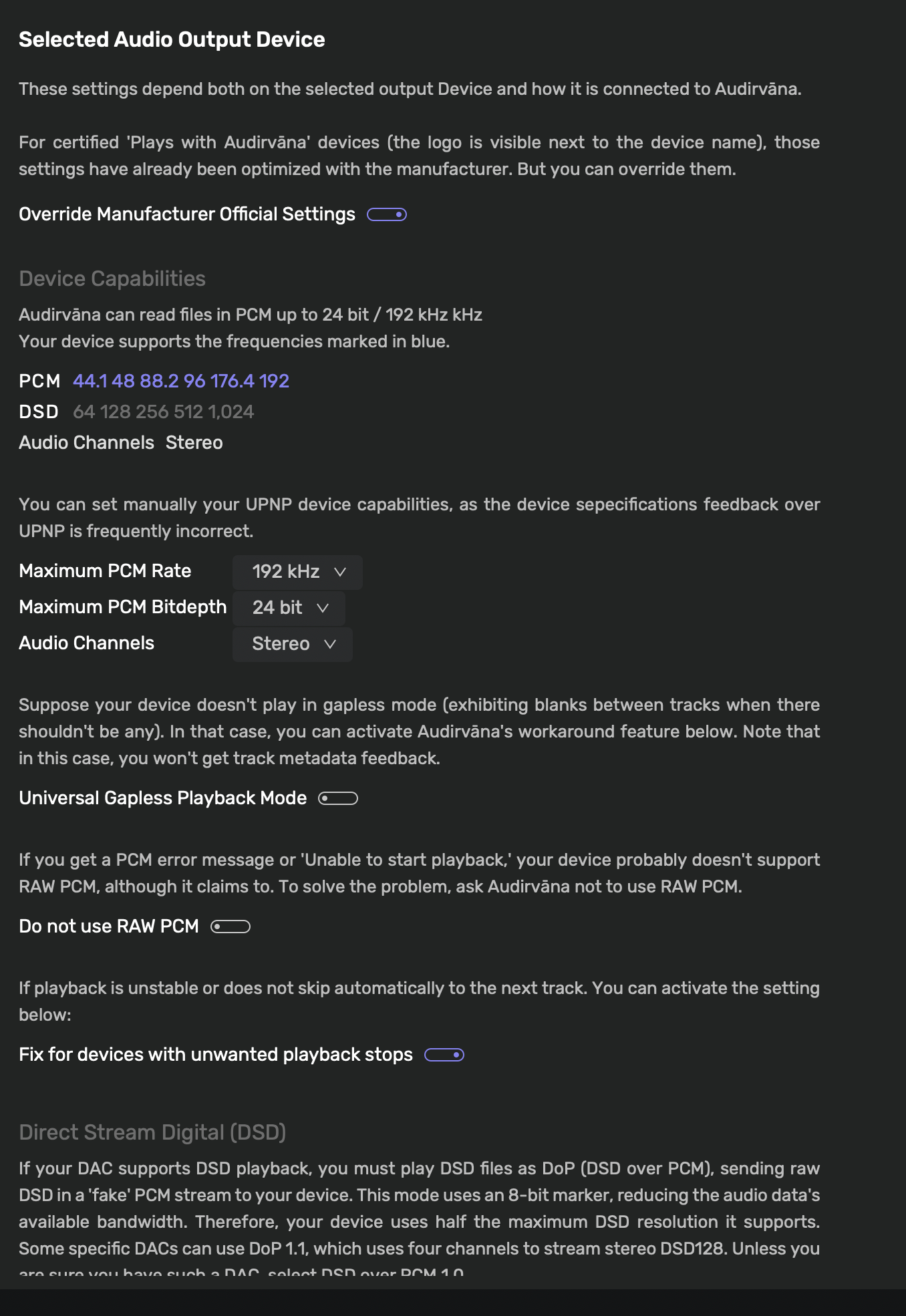
It was announced in a newsletter last October that the Phantom Ultimate’s and another device would be “Plays With Audirvana”. Apparently only applies to new products running DOS3. The old DOS2 devices cannot be upgraded to DOS3 as the new devices use a totally different and more powerful processor. It was the reason I bought them. In January I decided to sell the old Phantom II’s which could only be used over airplay with AS for me, multiple issues with UPnP. After setting up they appeared with the splash screen. Screenshots of the device settings page etc attached. The only thing I changed in the settings when I overide the defaults are turning off UGPM (final screenshot).
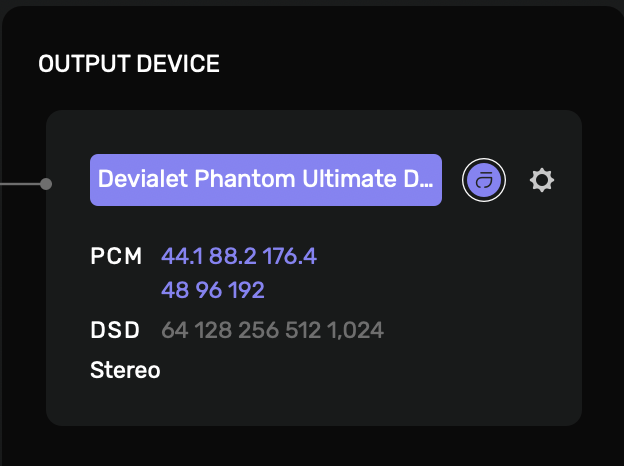
Default settings
Overidden settings to remove stuttering and white noise.
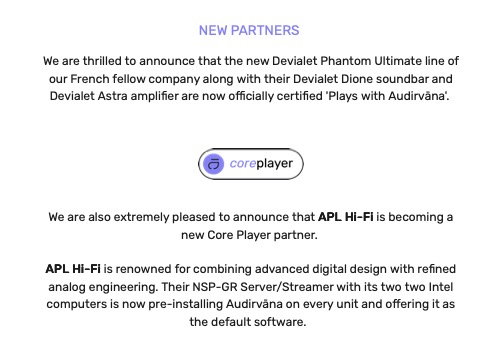
This Audirvāna Knowledge base article needs updating:
Other brands are USB or UPnP compatible with Audirvāna but are not yet certified or in the process, such as:
Ayon
Boulder
Devialet
Dutch & Dutch
MSB
Which brands are 'Plays with Audirvāna'?
Does Audirvāna show both speakers connected to the network? I see there is an option for the Audio Channels setting… My DAC is a stereo DAC and it displays Audio Channels as ‘Stereo’ with no other option.. This leads me to believe that the DAC recognized by Audirvāna is the ‘Master’ and the other speaker is the ‘Slave’ in the symbiotic pair, where they communicate via the proprietary communication protocol and feed-back loop for synchronization…
And why would Audirvāna see the Ultimate 98dB capable to 192kHz if it is ‘certified’ and especially given the information Devialet reported to you in the response below?
Since the Ultimate 98dB DAC is really capable to 96kHz, it is possible the sample-rate is divided between the symbiotic pair and 24/44.1kHz and 24/48kHz is the correct signal bandwidth(s) for best performance in the context of stereo Audirvāna UPnP playback… What is your experience with 24/44.1/48kHz playback?
You would set ‘Maximum PCM Rate’ ( limited to 48kHz ) and use a ‘Custom’ sample-rate conversion strategy and convert DSD to PCM…
You clearly do not read posts before responding. I have detailed all the information previously in respect the sample rates of affected files and also that removing the gapless workaround settings in Audirvana results in flawless playback of all 24/192 files.
Tribalism is a common occurrence on the forums of playback software. You only have to look at the Roon forum to see some of the more vitriolic posts from the devotees of the software in response to reported issues. I sense some responses here show a similar trait.
I will wait for Devialet to respond with their findings which will take the form of 1) Can’t reproduce your issue, or 2) the cause is X and will be fixed in a firmware update or 3) the fault lies with Audirvana.
Until then this conversation is largely pointless as neither you nor I understand the specific details of the code in Audirvana or the Devialet Operating System 3. As such best not to waste each others time and leave it to the people who do……….
I’m not defending the Audirvāna team… If playing 24/44.1kHz/48kHz files via UPnP to the Devialet system does not exhibit the behaviors you are experiencing and not finding to produce unexpected behaviors in operation, then you have a baseline… if the behavior persists, you have another piece of information to work with… I don’t need to know anything more… Hopefully, you get what you are looking for from the system in the context of stereo playback from Audirvāna, because it has been plainly obvious from the initial posting until now, that you are not satisfied with the work-around.
Hi @Djm1960 , I will try my best to reproduce your issue this week at home.
Hi @Antoine, thanks for that.
Symptoms are either
- First few notes of a track play followed by burst of white noise then track plays or;
- No white noise but consistent frequency stutter throughout track.
- Always occurs from start of a track. Never starts at any other point in track.
- Impacts 1-2 tracks in a full album.
- Impacts 24/192 ALAC or FLAC tracks. Have heard the issue only once with 24/96 file.
- More prevalent on classical albums but have heard it on one or two contemporary albums. Examples Rachel Podger Vivaldi 4 Seasons or her Tutta Sola album but most classical albums exhibit this issue.
- Issue DOES NOT occur if default “Plays With Audirvana” setting of Universal Gapless Playback Mode is turned OFF (the default is on)
Unfortunately turning off UGPM results in an old issue of failure to record the last track as being played on typically 2in5 play queues. (Maybe a clue to this separate issue is that it never occurs with UGPM turned on.)
Have tried adjusting latency to no effect. Network can play 768 kHz files from MBP to router then to Chord 2Go over Ethernet with no issues. The Devialet Ultimate pair are also connected via Ethernet to the same router.
Hi @Antoine i would keep your evenings for some chill time. You probably need some free time amongst all the beta’s!
Received a response from Devialet today which suggests they are actively looking at this. We will see what conclusions they come to…..response below….
Freddy David (Devialet)
Mar 16, 2026, 7:06 PM GMT+1
Hello Mooredj,
Thank you for following up and providing such specific details regarding your findings. Please accept our apologies for the delay in our response.
The information you shared about the “Universal Gapless Playback Mode” and its impact on the 24/192 kHz streams to your Devialet Phantoms is incredibly helpful. Your observation that turning this setting OFF eliminates the stuttering and white noise bursts suggests a potential conflict between this mode and the default “Plays With Audirvana” profile for these specific speakers.
I have passed these technical details directly to our QA and engineering teamfor a thorough investigation. They will look into whether the default settings for the Devialet Phantom Ultimates need to be adjusted in a future update to prevent this behavior.
We are investigating the root cause and will get back to you as soon as we have more information or a permanent fix. In the meantime, we recommend keeping that option disabled since it has stabilized your playback.
Thank you for your patience and for your proactive help in improving the experience for the community.
Best regards,
Freddy David | Customer service & support Devialet
1 Like