
At least I have something to say with the lexicon of my choice… rather than the ad hominem attack that seems to appease your egos, as it appears you have nothing relevant to add… The cognitive bias that compels your attacks is insipid. 
My belief is that posters on here are getting a little tired of your ‘cleverer/more informed/of a higher intelligence’ attitude that you seem to possess. So as you say, I have nothing relevant to add. Apart from show some humility, you absolute and total wet-wipe👍
Thank you, your highness…. 


I am trying to get my head around upsampling in general. To visualise, at least for me, what upsampling does, I took a 16/44.1 track from Stanley Turrentine’s album Ballads (Willow Weep for Me) and extracted with SoX a 15 second portion from the middle of the track to get a sizeable file to be able to analyse. I then upsampled the file from 16/44.1 to 24/88.2 and 24/292 kHz, respectively. The command I used for 4 times upsampling was
sox input.wav -b 24 output.wav rate -v 176400 dither -S
I took this command from
I then constructed spectrograms of the 44, 88.2 and 192.4 files in R by using the packages ‘tuneR’ and ‘seewave’. The frequency output was limited to 3 kHz. I also upsample the same 16/44.1 file with the software from Audio Inventory to 24/88.2.
What I see in the output spectrograms is that the 44.1 kHz file has well-defined features, that get more and more blurred the higher the upsampling is. From a layman’s view, I would say, upsampling seems to ‘smear’ a lot of details, but I do not know if the effect I am seeing is attrubutable to the process of analysis, or whether it’s real. Then it would mean, leave your hands off from upsampling.
Any ideas if I am completely on the wrong track?
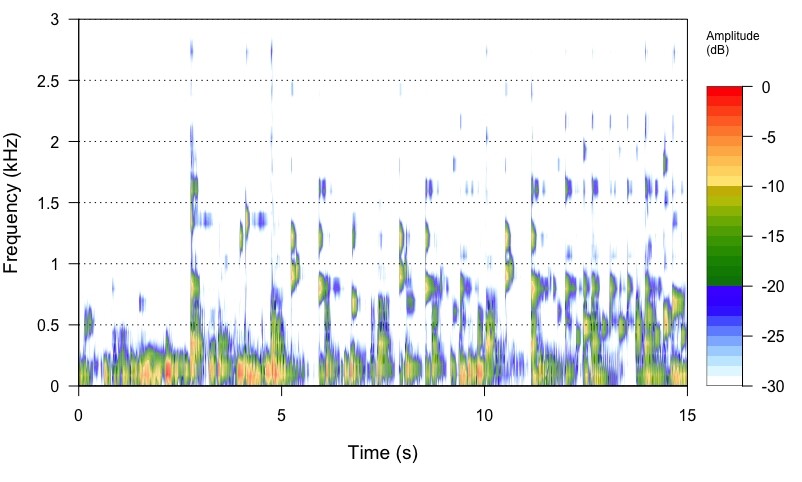
16/44.1 file
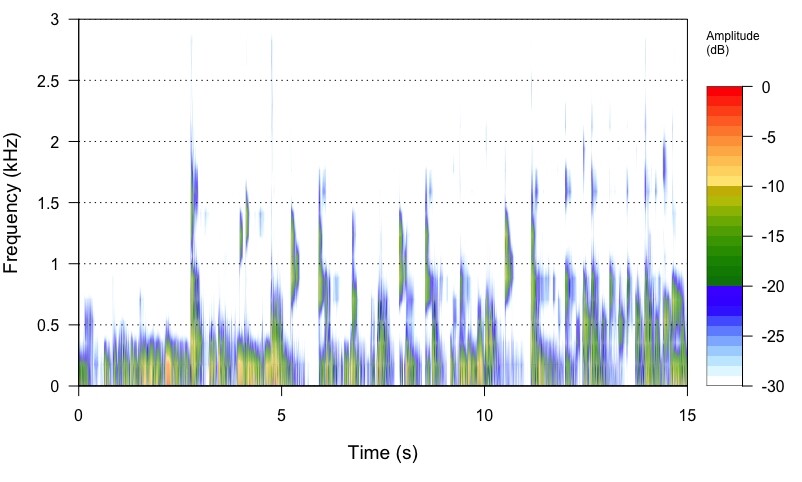
24/88.2 file
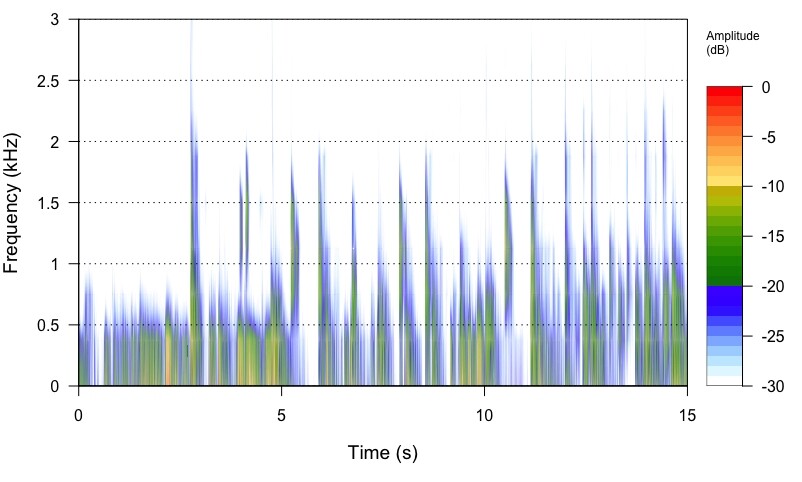
24/176.4 file

24/88.2 upsmapled by Audiophle Inventory software
You can see the two 24/88.2kHz files are virtually identical… We see no smearing… We see a wider frequency spectrum in relationship to the amplitude of those frequencies and in relationship to the Frequency of Sampling (Fs), that were masked by the noise and sample-rate of the 16bit/44.1kHz file… The Nyquist Frequency Cutoff (Fc) of the 16/44.1kHz file will remain unchanged as it is codified by virtue of the Nyquist Filter employed in the mastering encoding process… You are also seeing the effective increase in resolution and dynamic range of the 24bit 88.2kHz signal.
The spectrograph of the 24/176.4kHz file is revealing more energy that was masked in the noise of the 16/44.1kHz file encoding by virtue of the frequency of sampling and dynamic range of the increase to 24bit.
Also if you squint while looking at the 24/176.4kHz spectrograph, it will start to look more like an analog waveform, than the choppy 16/44.1kHz spectrograph. 
Did you mean 24/176.4kHz? 
Yes. 
First, there is no such thing as “leav[ing] your hands off from upsampling.” With vanishingly few exceptions, your DAC will do it internally if you don’t do it before sending the file to the DAC (and with many DACs, internal upsampling or modulation will be done even if you do upsampling externally).
Second, it’s important to understand why the engineers who design DACs have built upsampling into them since before separate DACs existed (that is, they built upsampling into the DAC chips in early CD players). Here is why:
Filtering is essential to digital audio, and upsampling is done to make good filtering easier.
What does this mean at a practical level?
Let’s take a CD resolution file, 44.1kHz sample rate. Everything above the Nyquist frequency (22.05kHz) is spurious noise from the sampling process and must be filtered out. So without upsampling, you need a filter that passes absolutely everything in the audible range (20kHz and below), but passes absolutely nothing above 22.05kHz, the Nyquist frequency. This gives you only a couple of kHz to work with to do the job of minimizing frequency-based errors (aliasing and imaging, caused by a filter that cuts insufficiently sharply), while also minimizing time-based errors (ringing, caused by a filter that cuts too sharply). This is very, very difficult.
But if you upsample - for example, 8x to 352,8kHz - now, suddenly, you have far more room to balance the two objectives of cutting sharply enough but not too sharply. So good filtering has become easier.
One last thing: We’ve been talking about upsampling with 16-bit (or higher) “word length.” This type of signal is known as PCM. But most DACs these days go a step further and perform a step called “delta-sigma modulation” that produces a type of signal known as DSD. Why? (There are hybrid forms that are not strictly DSD, but for the sake of keeping things simple we’ll only be talking about “pure” DSD.)
There’s a simple answer: Money. In a DAC the final conversion to analog must be done by an analog filter comprised of physical electrical components. This final filter can be done much more cheaply for a DSD signal than for a PCM one. So virtually all recording studios (analog to digital conversion, ADC) and DACs now use DSD or some related hybrid format, rather than PCM. (The Schiit “multibit” DACs and a few others are exceptions.) A pure DSD signal uses a 1-bit word length. How can one possibly get decent sound from a signal composed only of 1-bit words?
The following explanation is not original with me. It comes from a seminar given by Mark Mallinson of ESS, a DAC chip maker. I think it may resonate with you, @Sailor, because it involves a boating metaphor. 
Think of a PCM signal as setting out marker buoys the boat (waveform) must steer toward. Each PCM word strictly defines frequencies and amplitudes for the waveform at a given time.
Think of a DSD signal, on the other hand, as the steering wheel on the boat. Yes, you only have a series of 1s (turn toward higher amplitude) and 0s (turn toward lower amplitude), but these “steering corrections” come so fast (with DSD256, over 11 million per second) that the waveform can be tracked with extreme precision.
If you have questions, please feel free to ask, though I may well not know the answer!
I always run SoX with the -R option… A quick cut and paste from the man page… Pardon the formatting…
-R Run in repeatable' mode. When this option is given, where applicable, SoX will embed a fixed time-stamp in the output file (e.g. AIFF) and will seed’ pseudo random number generators
(e.g. dither) with a fixed number, thus ensuring that succes-
sive SoX invocations with the same inputs and the same parame-
ters yield the same output.
Could this be why you are seeing some small differences? After all you are specifying “dither”…
What do things look like if you don’t change word length (if you start with 24/44.1, or if you upsample to 16/88.2, etc.)?
The topic is about SoX, but I preferred to use r8brain, because I found it to be better comparatively.
My UPSAMPLING files in PCM I have been using like this:
UPSAMPLING:
r8brain custom frequencies
44100Hz → 352800Hz
48000Hz → 384000Hz
88200Hz → 352800Hz
96000Hz → 384000Hz
176400Hz → 352800Hz
192000Hz → 384000Hz
352800 Hz → 352800Hz
384000Hz → 384000Hz
DSD files do not have UPSAMPLING, until Audirvana can add one.
Mac Mini with Audirvana Origin - USB - DAC IFi Neo iDSD 2
Why do you not use the ‘Power of Two’ up-sampling strategy? This would up-sample to the maximum sample-rate of your DAC 705.6kHz (16 x 44.1kHz) and 768kHz (16 x 48kHz)
Or… Just modulate all PCM to DSD256 like @Jud does with his iFi DAC?
This is all well and good in the mastering process where the theoretical cut-off frequency is 1/2 the sample-rate… However, in the up-sampling of codified 16/44.1kHz signals the Nyquist Fc of the 44.1kHz signal is not changed and no other harmonic energy is added in the up-sampling process… What might be revealed is the residual low-level stop band noise in the file, however is this audible? Because it does not get folded-back… only the harmonic energy beyond the Nyquist Fs in the case of a 24/176.4kHz file Fc where the filter is placed at 88.2khz. and the 16/44.1kHz file has already been castrated at 22.2khz.
I would like to see some quantifiable evidence that the ringing of a Nyquist filter at 88.2kHz or above, is audible in the context of music playback from a codified recording by a human subject.
Oh no!!! Don’t tell me that you are reconsidering the issue of…
Maybe Rob Watts is not so far off the mark after all… 
@Sailor
Don’t forget that those bit signals are analog voltages of varying levels… in the case of 1-bit PDM (DSD) the density of bit-signal voltages is very similar to the interpolated ‘pure analog’ signal that is output from the DAC and needs no further interpolation as is the case for multi-bit DSD-Wide.
The final output sound-quality of a high-resolution signal is especially beholding to the slew-rate of the output components. In any case the slew-rate of the interpolator will have dramatic impact on the output quality. (actually true for all digital-audio signals)
Interesting aspect, thanks! I presume the -R option works with wav files just as well? I have to work with wav files as the downstream processing with tuneR/seewave works only with wav files.
I‘ll try the -R option later today.
Thanks to all the valuable inputs! I‘ll try to respond to your replies later. We are packing up our household and will move to another house at the end of this month. You can imagine that things are rather turbulent for us at the moment  . But I try my best to digest all the information you provided, thanks again!
Just one thought: as a scientist (and engineers all the more), you habe a hypothesis: mine was that upsampling retains all details that one sees, say, in a 16/44.1 file. I was expecting that bundles of signals remain the same, except with more data points. What I see instead, is the narrowing of bundles with a wider frequency range, and a decrease in intensity in the centre of the bundle.
Does this mean that the intensity of a signal is distributed over more data points? And what about the narrowing of bundles on the time axis? Does it mean that upsampling resolves a signal into finer details previously not visible at lower resolution?
I am sorry for all those dumb questions!
You‘re a fine bunch of people.
I hear exactly the same…
on a youtube video, through my old macbook pro, into my simple headphone amp, and AT headphones…
This is not a dis,just a suggestion that if the recording is good, the hearing will be good, on pretty much any half decent system.
Let’s narrow things down.
First, you’re going to want to separate what’s happening on the left side of the resolution description (16 or 24, usually) from the right side (44.1, 88.2, etc.), because these are two different things.
The number on the left tells you how many dynamic range (amplitude) steps are theoretically available to you. (Theoretically, because by the time you get to 21 steps or so, you are already down into the heat noise of the electronics.) That’s a different topic than we’ve been discussing so far, and I’m going to leave it aside for the moment in the interest of simplicity. You can try to reduce the effect of this side of the resolution description by either starting and ending with a 24-bit file, or staying with 16-bit.
On the right side of the resolution description, as you create more samples you do not create more detail. As Shannon, Nyquist et al. proved mathematically, 44.1kHz is enough to completely describe a signal up to 22.05kHz. Rather, the entire reason to create more samples is, as noted in my previous comment, to make it easier to do the necessary filtering at high quality.
Regarding the left side of the resolution description, the article below will give you a start. “Quantization noise” is just a fancy name for the noise created by the sampling process.