I know. Still you may gather some insights from additional information which could be helpful.
You are the final arbiter of the perceived sound-quality… nobody can honestly answer the question for you… Any perspective will be ‘speculative’ at best… I believe the question was posed so to affirm or confirm your presumptions. You already know that a 2.7GHz Intel macOS platform with 16GB (My previous platform) will provide a host for Audirvāna Studio that delivers exceptional playback sound-quality when the platform is exploited properly and Audirvāna is configured to deliver the digital-audio data signal to your DAC with the highest possible signal integrity… Beyond that point, the signal integrity is subject to a myriad of influences that will induce noise that precipitates jitter…


Chill out, you’re making too much out of it. I rather agree with Leibniz for whom subjectivism is the refuge of feeble minds and wicked souls… not saying you are one, but I’d be careful…
Thanks for the previous help with memory allocation. That stuff should be made clear by audirvana. There’s no info about it in their help menu.
The performance balance is described in the online Help manual found in the right-hand corner of the pre-load buffer module pop-up window… the (i) icon:
This step allows you to define the size of the buffer used for preloading. The larger the size of this memory, the better the transmission quality is guaranteed. On the other hand, it reduces the size of the RAM available for other tasks performed by your computer outside the application.
Let’s talk about subjectivism… especially when your question about macOS platform was entirely subjectively biased… 
*The Apple comparison tool is the objective tool I used in making my last decision to purchase a M2 Max Mac Studio, with 64GB RAM and the focal-point aspect of the system performance that concerns me the most, in concert with an abundance of System RAM, that will allow Audirāna Studio relatively unfettered performance, today and into the future .
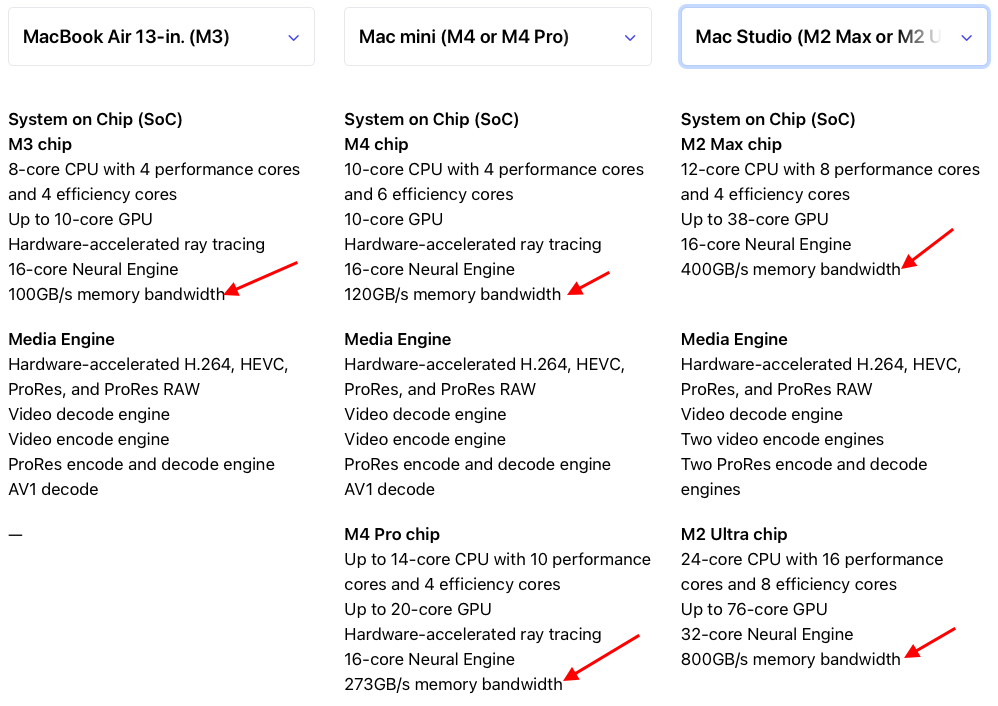
If you believe that fan operation has consequences on the digital-audio signal integrity, I will tell you that my Mac Studio is dead-silent and cooling strategy is well thought out and highly advanced… Don’t underestimate the engineering acumen of Apple folks when it comes to supporting the arts at the most discreet levels of detail. 
Right, I had seen that, but precisely it can be read as basically the opposite of what you’re doing … even in the case of a 16gb ram machine, according to what you said, if we follow their terse description we will allocate too much memory to audirvana and too little to the system, no?
It is plainly clear as to the implications… experimentation will provide the answer in the case of one’s playback strategy and system performance.
Let us agree to disagree then. I think it’s insufficient and ambiguous.
To say the larger the better implies no limit. They should add a line saying how much is plenty for the app
What we can agree upon is the subjectiveness of interpretation and the hubris of expectation…
If the app needs no more than 8gb in the most demanding case and if allocating say 16 gb to it has no advantage, they should be clear about it
You are reframing the context of that statement to fit your narrative…
This is the context…
This step allows you to define the size of the buffer used for preloading. The larger the size of this memory, the better the transmission quality is guaranteed. On the other hand , it reduces the size of the RAM available for other tasks performed by your computer outside the application.
You’re in love with subjectivism. That won’t get you anywhere. I said what I think about it…
Your interpretation of the value of this information is subjectively biased.
Over and out, this is getting really silly
This is relevant…
Naïve realism (psychology)