No it does not… padding is related to sample-rate conversion… the internal DSP calculations are using 64 bit math and data buffering in the algorithmic operations of the plug-in.


A digital-audio sample is a quantified measure of voltage (amplitude) and time…
ChatGPT says sample-rate conversion uses interpolation and bit depth increases involve zero padding.
Thinking of the waveform as a chart if you have more X values (frequencies) you can interpolate between the Y values.
If you have more Y values (resolution) you can just add zeros to the end of existing samples.
Anyway I really think this issue is a real one - how can we get some Audirvana input?
Algorithmic bit-depth/sample-rate conversion is different than the functional employment of 64 bit mathematics resolution of the DSP… You continue to conflate these things…
1 Like
From the article/resource documentation linked below:
Computer Numbers
Digital computers are very proficient at storing and recalling numbers; unfortunately, this process isn’t without error. For example, you instruct your computer to store the number: 1.41421356. The computer does its best, storing the closest number it can represent: 1.41421354. In some cases this error is quite insignificant, while in other cases it is disastrous. As another illustration, a classic computational error results from the addition of two numbers with very different values, for example, 1 and 0.00000001. We would like the answer to be 1.00000001, but the computer replies with 1. An understanding of how computers store and manipulate numbers allows you to anticipate and correct these problems before your program spits out meaningless data.
These problems arise because a fixed number of bits are allocated to store each number, usually 8, 16, 32 or 64. For example, consider the case where eight bits are used to store the value of a variable. Since there are 28 = 256 possible bit patterns, the variable can only take on 256 different values. This is a fundamental limitation of the situation, and there is nothing we can do about it.
Number Precision
The errors associated with number representation are very similar to quantization errors during ADC. You want to store a continuous range of values; however, you can represent only a finite number of quantized levels. Every time a new number is generated, after a math calculation for example, it must be rounded to the nearest value that can be stored in the format you are using.
As an example, imagine that you allocate 32 bits to store a number. Since there are exactly 232 ’ 4,294,967,296 different bit patterns possible, you can represent exactly 4,294,967,296 different numbers. Some programming languages allow a variable called a long integer, stored as 32 bits, fixed point, two’s complement. This means that the 4,294,967,296 possible bit patterns represent the integers between -2,147,483,648 and 2,147,483,647. In comparison, single precision floating point spreads these 4,294,967,296 bit patterns over the much larger range: &3.4 × 1038 to 3.4 × 1038 .
With fixed point variables, the gaps between adjacent numbers are always exactly one. In floating point notation, the gaps between adjacent numbers vary over the represented number range. If we randomly pick a floating point number, the gap next to that number is approximately ten million times smaller than the number itself (to be exact, 2&24 to 2&23 times the number). This is a key concept of floating point notation: large numbers have large gaps between them, while small numbers have small gaps. Figure 4-3 illustrates this by showing consecutive floating point numbers, and the gaps that separate them.
https://www.analog.com/media/en/technical-documentation/dsp-book/dsp_book_Ch4.pdf
Need a third opinion.
Someone from Audirvana please: does a 16-bit FLAC that’s been equalised in a 64-bit VST3 plugin lose any detail when Audirvana subsequently (and with no user option) bit depth reduces the signal back to 16-bit to match the input file before output to the DAC? (Please see the screenshot below.)
And would having the option to instead forcibly bit depth reduce it to the greater resolution of 32-bit or 24-bit retain more detail (introduced by the 64-bit plugin)?
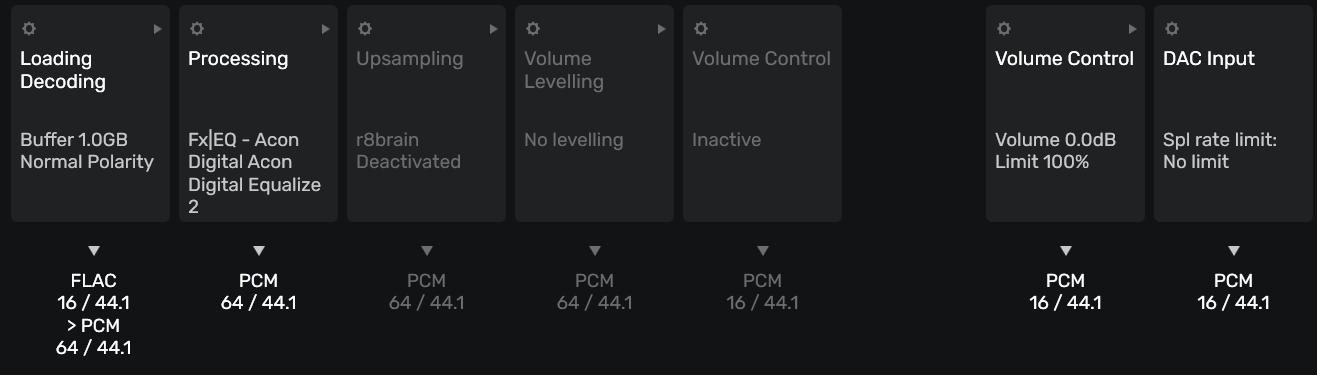
Bit-depth is relative to the dynamic range of the signal, not the resolution of the signal… If the source signal is 16bit when delivered to the plug-in architecture and subsequently output as 16bit no dynamic range is lost… When the EQ DSP alters the file bit-data by virtue of employing parametric controls over frequency response, etc, the file is changed and no longer represents the original source file harmonic profile, but no operation on bit-depth is performed by the EQ DSP unless you add or subtract gain… If you don’t believe this, then insert the plug-in into any other DAW and see if you get a file with a bit-depth of 64bits and a sample-rate of 44.1kHz… 
If you want to increase the bit-depth of the 16bit file, this will need to be recalculated by a separate operation… What you are asking is that the plug-in itself, incorporates dynamic range expansion without truncation… The EQ plug-in is operating within the constrains of its own dynamic range by design, and is limited by the bit-depth of the file it is operating upon, and this is not a 64 bit-depth file…
Again you are conflating DSP processing precision with encoded bit-depth. 
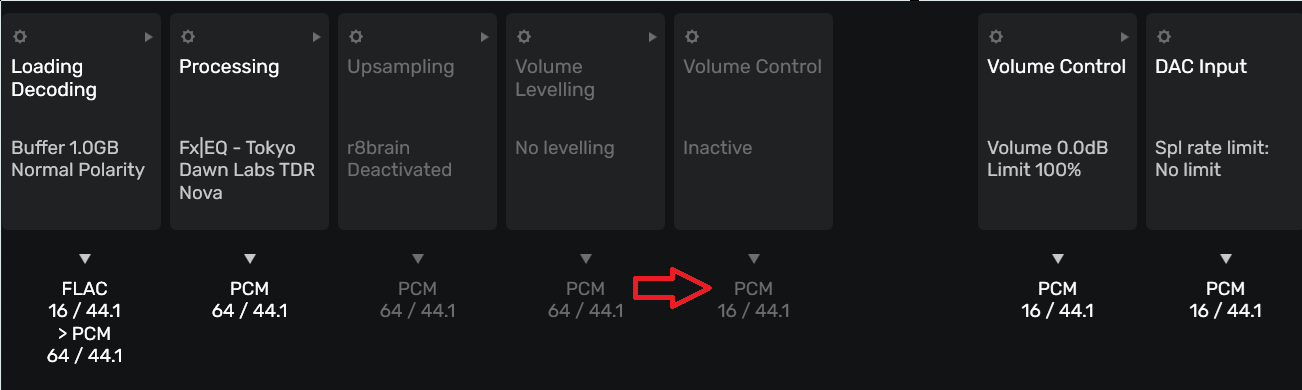
How do you define “detail”? I define it as the resolution of the contextual harmonic, contextual dynamics and spatial information imbued in the recording… Using EQ will alter these relationships… You must remember that in the case of the dynamic range of the file, a change of 1-bit is equal to 6dB of level/amplitude…
I’d define “detail” as any audio information that I would notice during a critical listening session (with a very resolving DAC, amp, and speakers): detail that’s (potentially?) added in the green areas below and potentially(?) lost in the red area below, that might instead be retained if the red area was 64 → 32 rather than 64 → 16.
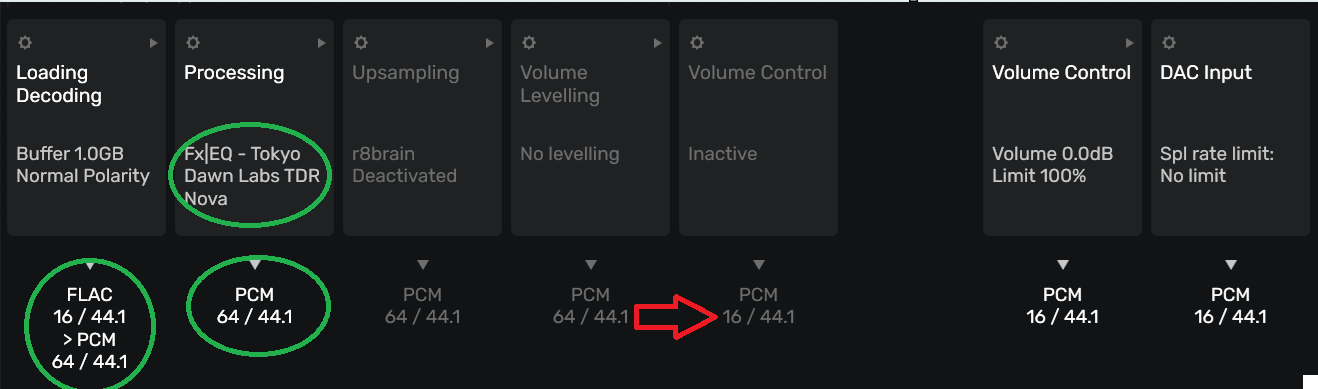
No detail is gained or lost unless you alter the file bit-data with EQ processing which adds or subtracts relational harmonic information… You can increase level or subtract level… the issue with gain is in the potentials for signal distortion in the DAC topology.
So assuming the EQ was 100% perfect (eliminating it from the equation), the signal would be audibly identical whether the red area was 64 → 16 or 64 → 32?
Yes… We are talking about DSP precision, not bit-depth… Obviously, the 32bit file will have greater dynamic range as compared to a 16bit file (Theoretical: 192dB versus 96dB ) the dynamic range of a 32bit file is unrealistic in the real-world application in modern DAC architecture… There are no playback components that have this level of dynamic range… you will find that the most sophisticated speakers and headphones, can barely reach 115dB of dynamic range…
Note:
The fundamental dynamic range of the file is codified in the ADC or original mastering bit-depth of the encoding.
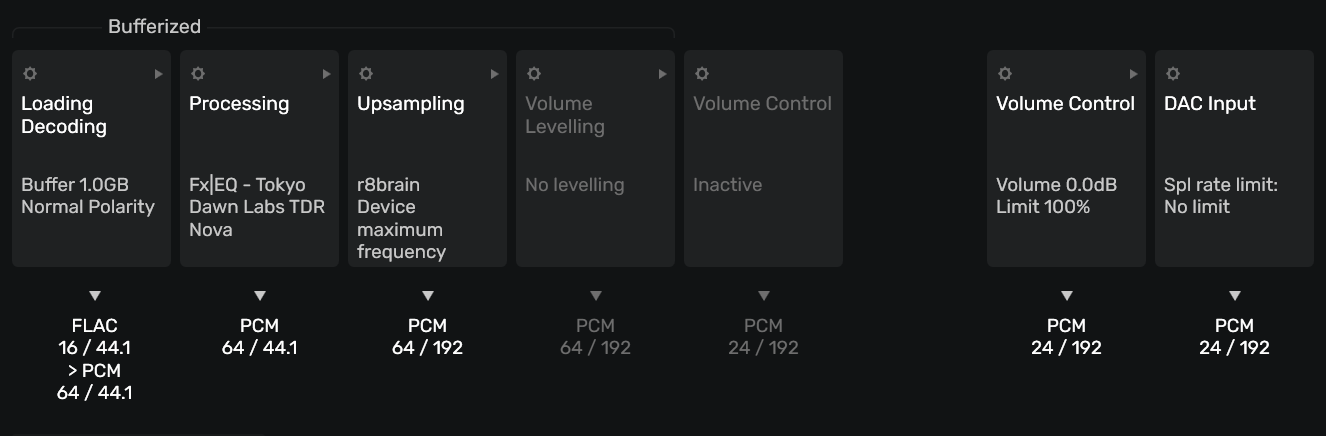
Why not just add an upscale with r8brain into the processing pipeline and call it a day?
1 Like
Thank you! I didn’t realise it also maintained the bitness in addition to up-sampling the frequency.
It now outputs in 24-bit. I might be imagining it but it does sound a bit clearer…
2 Likes
You are now revealing the details hidden in the low level noise of the 16bit file and producing a more refined signal waveform to the DAC output circuitry… 
1 Like
I’ll have to ask ChatGPT about the science behind upsampling…
It hasn’t detracted from the listening as far as I can tell…
Another question re VST processing that you might know the answer to.
I’ve tried several equaliser plugins and it was hit and miss as to which worked or not. Some didn’t show the UI correctly (it was cropped or missing elements) and FabFilter Pro-Q 3 just didn’t process (I’ve read other posts with other people experiencing this).
Two EQ plugins that do work:

Processes absolutely fine but limited filter selection.

Excellent UI and filter selection but on every other song it takes exactly 4.5 seconds for the EQ to kick in.
My EQ looks like this (based on relative loudness for low volume listening):
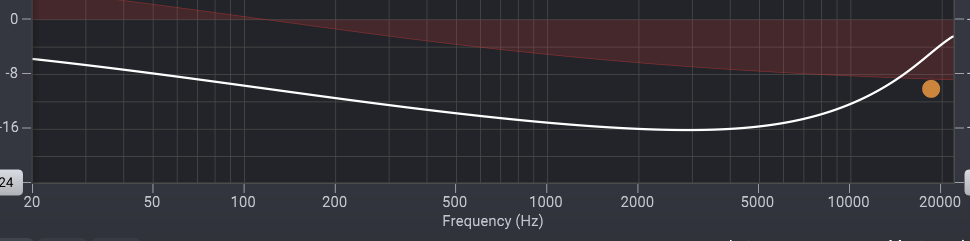
So for 4.5 seconds I get a loud mid-range (no EQ is being applied) and then the EQ kicks in for my low volume listening (bass and treble boosted).
Are plug-ins a bit hit and miss in general do you know?
There are literally hundreds if not thousands of EQ plugins… Just like studio hardware EQ boxes there are the good and the bad… From the surgical to the broad strokes and sterile to colorful and analogue emulations… Tracking/mixing/mastering EQs pick your poison… Google is your frenemy…
After DSP room correction, some of my favorites are Manly Massive Passive, GML 8200 and Hendy Amps Michelangelo… These are hardware mastering EQs and there are some nice plugin emulations available…
1 Like
Thanks for the info.
1 Like