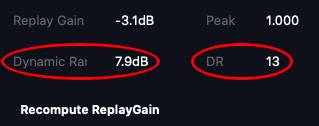
I’ve never understood what the DR stands for in the lower right corner of the Audirvana interface. After all, DR usually refers to Dynamic Range but in the interface it seems not.
Welcome…
From the online User Manual information found in the (i) in upper right of the “Audio Volume” pop-up window:
The Replay Gain function allows you to automatically adjust the volume of tracks to maintain a consistent playback level within a playlist. This adjustment is made according to a sound level reference specific to each song according to EBU R128 and DR standards.
If this reference is not available in the metadata of a piece in your local library, Audirvāna can calculate it.
You can start the analysis of the albums in your library by pressing the ‘start’ button. You will then open a view that displays all the albums that do not have this information. You can select all or some of them, and launch the analysis in background.The Replay Gain can also be applied to songs streamed from a partner service, provided that this service makes this information available (e.g. TIDAL).
It is advisable to start with the “Preserve album dynamics” option which preserves the dynamic variations desired by the artist within an album.
The ‘DR’ reading is the difference between the ‘average’ and the ‘peak’ levels in the encoding derived from a database. (Edit: … It appears this is also calculated by ‘Replay Gain’ analysis.)
https://www.stereophile.com/content/unofficial-dynamic-range-database


