Audirvana can not read Multi-Channel Files?
Via USB or via SERVIIO I can read the multichannel DSD files on my SSONU STR-DN1080 but with Audirvana I can not change the “stereo” setting.!
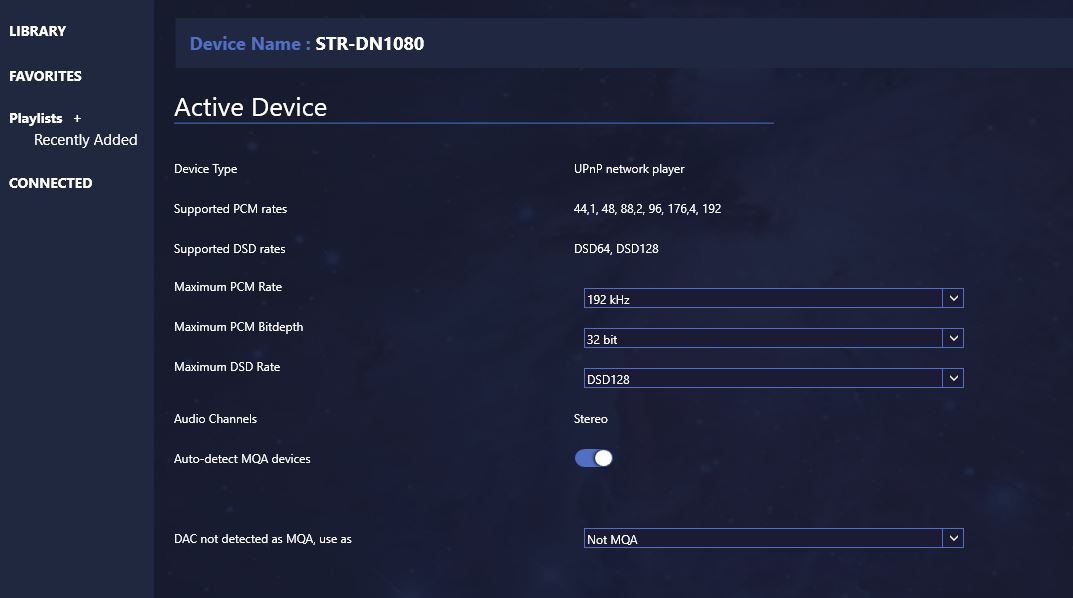
Can you send me by PM the Debug Info when your STR-DN1080 is connected (using the command in the General section of the preferences page) so I can see how it describes itself its UPnP features ?
I sent it by mail but I’m not sure if you received the Debug. Confirm Please. Thank you
I’ve sent you a PM so that you can reply to it.
Bonjour Damien !
Je cherche également la réponse à la question posée.
Je suis nouveau sur ce forum et c’est mon 1er post. Je suis sur le point d’acheter un Exasound E38 mk 2. Il m’a été conseillé d’acheter avec un Sigma streamer pour lire du DSD 256 multicanal viaUpNp mon Mac mini server mid 2011 quadcore 2Ghz ne serait paraît il pas à la hauteur de la tâche en puissance et vitesse par usb.
Or sur le site Exasound il est dit que A+ actuellement ne lit via UpNp qu’en stéréo.
Merci pour votre aide
Hello! I have the same question. On our Yamaha RX-A3060 I can stream DSD from Audirvana in stereo (and it sounds gorgeous) but not multichannel/surround/5.1 DSD. I read that the Sony STR-DN1080 was supposed to allow playback of multichannel DSD over DLNA. Did you get this to work with the latest version of Audirvana?
Hello @mhsmit,
Can you send me in private message your Debug info while you are connected to your Yamaha? To do so you have to go to Audirvana Settings>General>Debug Info then paste it in private message since Audirvana do the copy for you 
Hi again Damien,
here’s the Debug Info when I select the Yamaha receiver over the network instead of HDMI. Here, I can (VERY successfully) play stereo DSD from Audirvana from our Mac mini or from Audirvana on my MacBook Pro. The sound is gorgeous and while the Yamaha’s DSD playback isn’t as ultimately clean as that from our UltraRendu, it is as good as any sound I’ve ever heard from our receiver. The only big “wish” I have, is for us to be able to play multichannel DSD over the network in the same way. But given my experiment this evening, it seems that the limitation is in the receiver and not in Audirvana…
I highly appreciate you looking into this though! Do you know of other home theater receivers that can play multichannel DSD over the network? I read the rumors about the inexpensive Sony DN1080 being capable of it, but I have not seen any messages confirming that it actually works…
Audirvana Mac Version 3.5.26 (3556)
macOS 10.14.6 with 16384MB RAM
Registered to Mark Smit
SIGNAL PROCESSING:
Polarity Inversion:
	Globally: OFF
	Per track: ON
Effects plugins NOT ACTIVE
UPSAMPLING:
SoX not in use
SoX filter parameters
Bandwidth at 0dB = 94.5
Filter max length = 24000
Anti-aliasing = 100
Phase = 75
AUDIO VOLUME:
Max allowed volume: 100
Replay Gain: None
SW volume control: OFF
LIBRARY SETTINGS:
Sync list: 1 folders
AUTO: /Volumes/Sagan Fast/Audirvana
iTunes/Music library synchronization: not synchronized
Library database path: /Users/smit/Library/Application Support/Audirvana/AudirvanaPlusDatabaseV2.sqlite
ACTIVE STREAMING SERVICES
TIDAL: Connected as HIFI
=================== AUDIO DEVICE ========================
Preferred device: Mastering Room Model UID:Yamaha Corporation Mastering Room UID:uuid:9ab0c000-f668-11de-9976-00a0ded9d439
Selected device:
UPnP device at http://10.0.8.49:49154/MediaRenderer/desc.xml
ID 0x0 Mastering Room Manufacturer:Yamaha Corporation
Model UID:Yamaha Corporation Mastering Room UID:uuid:9ab0c000-f668-11de-9976-00a0ded9d439
6 available sample rates up to 192000Hz
44100
48000
88200
96000
176400
192000
Volume control: No
MQA capability
Auto-detect MQA devices: No
Not a MQA device, user set to MQA Renderer
DSD capability: Raw DSD (MSB)
Device audio channels
Preferred stereo channels L:0 R:1
Channel bitmap: Ox3, layout:
Channel 0 mapped to 0
Channel 1 mapped to 1
UPnP/DLNA supported protocols:
http-get::audio/L16;channels=2;rate=44100:DLNA.ORG_PN=LPCM
http-get::audio/L16;channels=1;rate=44100:DLNA.ORG_PN=LPCM
http-get::audio/L16;channels=2;rate=48000:DLNA.ORG_PN=LPCM
http-get::audio/L16;channels=1;rate=48000:DLNA.ORG_PN=LPCM
http-get::audio/L16;channels=2;rate=32000:DLNA.ORG_PN=LPCM
http-get::audio/L16;channels=1;rate=32000:DLNA.ORG_PN=LPCM
http-get::audio/L16;channels=2;rate=88200:DLNA.ORG_PN=LPCM
http-get::audio/L16;channels=1;rate=88200:DLNA.ORG_PN=LPCM
http-get::audio/L16;channels=2;rate=96000:DLNA.ORG_PN=LPCM
http-get::audio/L16;channels=1;rate=96000:DLNA.ORG_PN=LPCM
http-get::audio/L16;channels=2;rate=64000:DLNA.ORG_PN=LPCM
http-get::audio/L16;channels=1;rate=64000:DLNA.ORG_PN=LPCM
http-get::audio/L16;channels=2;rate=22050:DLNA.ORG_PN=LPCM
http-get::audio/L16;channels=1;rate=22050:DLNA.ORG_PN=LPCM
http-get::audio/L16;channels=2;rate=24000:DLNA.ORG_PN=LPCM
http-get::audio/L16;channels=1;rate=24000:DLNA.ORG_PN=LPCM
http-get::audio/L16;channels=2;rate=16000:DLNA.ORG_PN=LPCM
http-get::audio/L16;channels=1;rate=16000:DLNA.ORG_PN=LPCM
http-get::audio/L16;channels=2;rate=11025:DLNA.ORG_PN=LPCM
http-get::audio/L16;channels=1;rate=11025:DLNA.ORG_PN=LPCM
http-get::audio/L16;channels=2;rate=12000:DLNA.ORG_PN=LPCM
http-get::audio/L16;channels=1;rate=12000:DLNA.ORG_PN=LPCM
http-get::audio/L16;channels=2;rate=8000:DLNA.ORG_PN=LPCM
http-get::audio/L16;channels=1;rate=8000:DLNA.ORG_PN=LPCM
http-get::audio/L16:DLNA.ORG_PN=LPCM
http-get::audio/mpeg:DLNA.ORG_PN=MP3
http-get::audio/x-ms-wma:DLNA.ORG_PN=WMABASE
http-get::audio/x-ms-wma:DLNA.ORG_PN=WMAFULL
http-get::audio/x-ms-wma:DLNA.ORG_PN=WMDRM_WMABASE
http-get::audio/x-ms-wma:DLNA.ORG_PN=WMDRM_WMAFULL
http-get::audio/vnd.dlna.adts:DLNA.ORG_PN=AAC_ADTS
http-get::audio/vnd.dlna.adts:DLNA.ORG_PN=AAC_ADTS_192
http-get::audio/vnd.dlna.adts:DLNA.ORG_PN=AAC_ADTS_320
http-get::audio/mp4:DLNA.ORG_PN=AAC_ISO
http-get::audio/mp4:DLNA.ORG_PN=AAC_ISO_192
http-get::audio/mp4:DLNA.ORG_PN=AAC_ISO_320
http-get::audio/3gpp:DLNA.ORG_PN=AAC_ISO
http-get::audio/3gpp:DLNA.ORG_PN=AAC_ISO_192
http-get::audio/3gpp:DLNA.ORG_PN=AAC_ISO_320
http-get::audio/x-ms-wma:*
http-get::audio/vnd.dlna.adts:
http-get::audio/x-flac:
http-get::audio/x-mpeg:
http-get::audio/x-aac:
http-get::audio/x-mp3:
http-get::audio/x-mp4:
http-get::audio/x-mpg:
http-get::audio/x-wav:
http-get::audio/3gpp:
http-get::audio/aacp:
http-get::audio/aiff:
http-get::audio/x-aiff:
http-get::audio/flac:
http-get::audio/mpeg:
http-get::audio/aac:
http-get::audio/m4a:
http-get::audio/mp3:
http-get::audio/mp4:
http-get::audio/dsd:
http-get::audio/x-dsd:
http-get::audio/x-dsf:
http-get::audio/x-dff:
http-get::audio/wav:
DLNA 1.5: Yes
Gapless playback: Yes
Missing events workaround: No
Can play native DSD: Yes
Number of channels: 2
Use as stereo device only: No
1 output streams:
Number of active channels: 2, in 1 stream(s)
Channel #0 :Stream 0 channel 0
Channel #1 :Stream 0 channel 1
Stream ID 0x0 0 channels starting at 0
14 virtual formats:
2 ch Non-mixable linear PCM Interleaved 16 little endian Signed Integer 44.1kHz
2 ch Non-mixable linear PCM Interleaved 24 little endian Signed Integer 44.1kHz
2 ch Non-mixable linear PCM Interleaved 16 little endian Signed Integer 88.2kHz
2 ch Non-mixable linear PCM Interleaved 24 little endian Signed Integer 88.2kHz
2 ch Non-mixable linear PCM Interleaved 16 little endian Signed Integer 176.4kHz
2 ch Non-mixable linear PCM Interleaved 24 little endian Signed Integer 176.4kHz
2 ch Non-mixable linear PCM Interleaved 16 little endian Signed Integer 48kHz
2 ch Non-mixable linear PCM Interleaved 24 little endian Signed Integer 48kHz
2 ch Non-mixable linear PCM Interleaved 16 little endian Signed Integer 96kHz
2 ch Non-mixable linear PCM Interleaved 24 little endian Signed Integer 96kHz
2 ch Non-mixable linear PCM Interleaved 16 little endian Signed Integer 192kHz
2 ch Non-mixable linear PCM Interleaved 24 little endian Signed Integer 192kHz
2 ch Non-mixable linear PCM Interleaved 8 little endian Signed Integer 2822.4kHz
2 ch Non-mixable linear PCM Interleaved 8 little endian Signed Integer 5644.8kHz
0 physical formats
Current device transportInfo:
CurrentTransportState: STOPPED
CurrentTransportStatus: OK
CurrentSpeed: 1
Current device MediaInfo:
NrTracks: 0
MediaDuration: 0:02:01
CurrentURI:
CurrentURIMetadata:
nextURI:
nextURIMetadata:
PlayMedium: NONE
RecordMedium: NOT_IMPLEMENTED
WriteStatus: NOT_IMPLEMENTED
Current device AVT service description:
<?xml version="1.0"?> 1 0 SetAVTransportURI InstanceID in A_ARG_TYPE_InstanceID CurrentURI in AVTransportURI CurrentURIMetaData in AVTransportURIMetaData SetNextAVTransportURI InstanceID in A_ARG_TYPE_InstanceID NextURI in NextAVTransportURI NextURIMetaData in NextAVTransportURIMetaData GetMediaInfo InstanceID in A_ARG_TYPE_InstanceID NrTracks out NumberOfTracks MediaDuration out CurrentMediaDuration CurrentURI out AVTransportURI CurrentURIMetaData out AVTransportURIMetaData NextURI out NextAVTransportURI NextURIMetaData out NextAVTransportURIMetaData PlayMedium out PlaybackStorageMedium RecordMedium out RecordStorageMedium WriteStatus out RecordMediumWriteStatus GetTransportInfo InstanceID in A_ARG_TYPE_InstanceID CurrentTransportState out TransportState CurrentTransportStatus out TransportStatus CurrentSpeed out TransportPlaySpeed GetPositionInfo InstanceID in A_ARG_TYPE_InstanceID Track out CurrentTrack TrackDuration out CurrentTrackDuration TrackMetaData out CurrentTrackMetaData TrackURI out CurrentTrackURI RelTime out RelativeTimePosition AbsTime out AbsoluteTimePosition RelCount out RelativeCounterPosition AbsCount out AbsoluteCounterPosition GetDeviceCapabilities InstanceID in A_ARG_TYPE_InstanceID PlayMedia out PossiblePlaybackStorageMedia RecMedia out PossibleRecordStorageMedia RecQualityModes out PossibleRecordQualityModes GetTransportSettings InstanceID in A_ARG_TYPE_InstanceID PlayMode out CurrentPlayMode RecQualityMode out CurrentRecordQualityMode Stop InstanceID in A_ARG_TYPE_InstanceID Play InstanceID in A_ARG_TYPE_InstanceID Speed in TransportPlaySpeed Pause InstanceID in A_ARG_TYPE_InstanceID Seek InstanceID in A_ARG_TYPE_InstanceID Unit in A_ARG_TYPE_SeekMode Target in A_ARG_TYPE_SeekTarget Next InstanceID in A_ARG_TYPE_InstanceID Previous InstanceID in A_ARG_TYPE_InstanceID GetCurrentTransportActions InstanceID in A_ARG_TYPE_InstanceID Actions out CurrentTransportActions TransportState string STOPPED PAUSED_PLAYBACK PLAYING TRANSITIONING NO_MEDIA_PRESENT TransportStatus string OK ERROR_OCCURRED PlaybackStorageMedium string NETWORK NONE RecordStorageMedium string NOT_IMPLEMENTED PossiblePlaybackStorageMedia string PossibleRecordStorageMedia string CurrentPlayMode string NORMAL NORMAL TransportPlaySpeed string 1 RecordMediumWriteStatus string NOT_IMPLEMENTED CurrentRecordQualityMode string NOT_IMPLEMENTED PossibleRecordQualityModes string NumberOfTracks ui4 0 1 CurrentTrack ui4 0 1 1 CurrentTrackDuration string CurrentMediaDuration string CurrentTrackMetaData string CurrentTrackURI string AVTransportURI string AVTransportURIMetaData string NextAVTransportURI string NextAVTransportURIMetaData string RelativeTimePosition string AbsoluteTimePosition string RelativeCounterPosition i4 AbsoluteCounterPosition i4 CurrentTransportActions string LastChange string A_ARG_TYPE_SeekMode string TRACK_NR REL_TIME A_ARG_TYPE_SeekTarget string A_ARG_TYPE_InstanceID ui4Current device RootDevice description:
<?xml version="1.0"?> 1 0 DMR-1.50 urn:schemas-upnp-org:device:MediaRenderer:1 Mastering Room Yamaha Corporation http://www.yamaha.com/ AV Receiver RX-A3060 A3060 http://www.yamaha.com/ 069377C3 uuid:9ab0c000-f668-11de-9976-00a0ded9d439 image/jpeg 48 48 24 /Icons/48x48.jpg image/jpeg 120 120 24 /Icons/120x120.jpg image/png 48 48 24 /Icons/48x48.png image/png 120 120 24 /Icons/120x120.png urn:schemas-upnp-org:service:AVTransport:1 urn:upnp-org:serviceId:AVTransport /AVTransport/desc.xml /AVTransport/ctrl /AVTransport/event urn:schemas-upnp-org:service:RenderingControl:1 urn:upnp-org:serviceId:RenderingControl /RenderingControl/desc.xml /RenderingControl/ctrl /RenderingControl/event urn:schemas-upnp-org:service:ConnectionManager:1 urn:upnp-org:serviceId:ConnectionManager /ConnectionManager/desc.xml /ConnectionManager/ctrl /ConnectionManager/event http://10.0.8.49/ http://10.0.8.49:80/ urn:schemas-yamaha-com:service:X_YamahaRemoteControl:1 /YamahaRemoteControl/ctrl /YamahaRemoteControl/desc.xml urn:schemas-yamaha-com:service:X_YamahaExtendedControl:1 /YamahaExtendedControl/v1/ 1813UPnP devices found : 3
Device #0: ID 0x0 Sonore UltraRendu UID: uuid:56795a31-76de-7f50-c0e8-d063b4015236 Location: http://10.0.8.48:49152/description.xml
Device #1: ID 0x0 Mastering Room UID: uuid:9ab0c000-f668-11de-9976-00a0ded9d439 Location: http://10.0.8.49:49154/MediaRenderer/desc.xml
Device #2: ID 0x0 UBP-X800 UID: uuid:00000000-0000-1010-8000-045d4baff6e5 Location: http://10.0.8.56:52323/dmr.xml
CoreAudio audio path, buffer I/O frame size: 0
Max. memory for audio buffers: 13312MB
Local Audio Engine:
Exclusive access: Enabled
Integer mode: Enabled
Local devices found : 2
Device #0: ID 0x2e Built-in Output Manufacturer: Apple Inc. Model UID: AppleHDA:93 UID: AppleHDAEngineOutput:1B,0,1,1:0
Device #1: ID 0x3c HDMI Manufacturer: Apple Inc. Model UID: AppleHDA:93 UID: AppleHDAEngineOutputDP:3,0,1,1:0:{D94D-6004-01010101}
I’m having the same problem with both Sony STR-DN1080 & Sony UBP-X1000ES. Playback defaults to Stereo even though the traacks played are the 6 channel DSD and WAV’s. Why no Multichannel option since it’s the DAC that requires compatibility ?
Please help.
I also have a Sony DN1080 that supports multi-channel over DLNA but the option is not available. This is very important feature for my usage patterns.
It’s because Audirvana is a Stereo only product. Through DLNA/Windows Media Player, I can have Audirvana play a DSD or PCM surround track but through USB it downconverts to 2,9 channel. I can also without Audirvana, play my Surround Music via DLNA between my STR-DN1008 and my UBP-X1000.
Hello,
Audirvana works with multichannel files.
I use it with an exasound e28 (USB) since 2015.
It works great with 5.1DSD files, PCM files too.
Any chance this particular case with the Sony STR-DN1080 receiver has be solved?
I still can’t play multichannel with the same receiver model, even if Audirvana seems to send the proper 6-channel track over DLNA.
The receiver is only playing the front right and front left channels.
@mimizone from the STR-DN1080 Owners Manual:
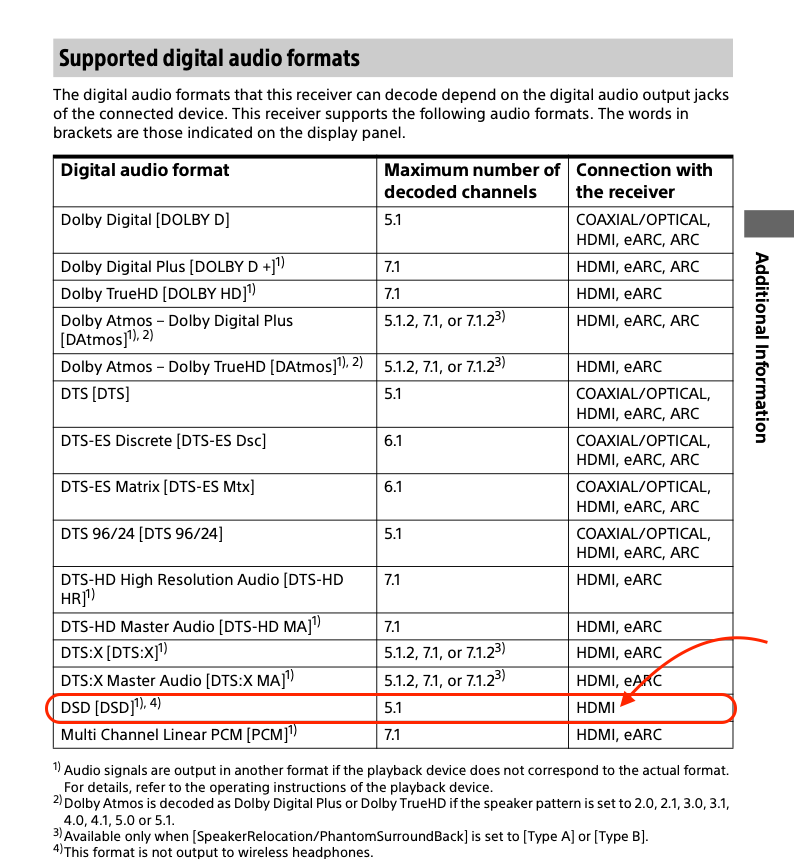
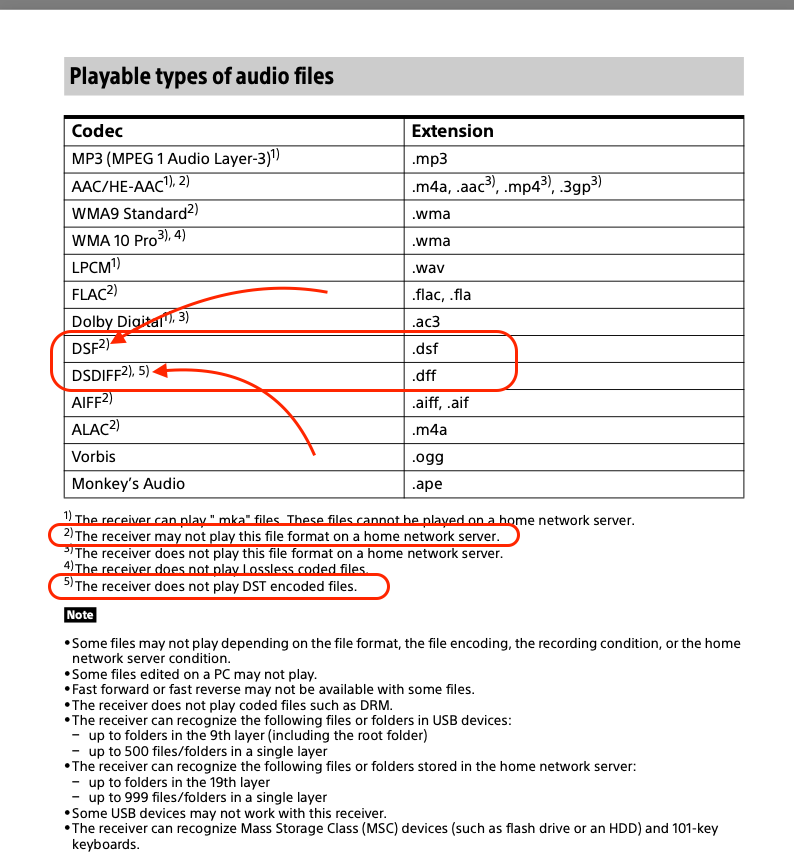
Renderer function
By connecting this product to the home network and operating a controller product (*1),
- You can play on this product music files stored on the controller
- *You can play on this product music files stored on a server product (2) in the same home network.
*1Controller products include home network products of Sony such as Xperia Smartphone, Xperia Tablet, Walkman and Sony VAIO PC with home network function and other DLNA certified controller products. It is recommended that you check the specification of each product on Sony website in your country/region.
http://www.sony.jp/support/dlna/
*2Server products include home network products of Sony such as Xperia smartphone, Xperia tablet and Sony VAIO PC with home network function and other DLNA certified server products. It is recommended that you check the specification of each product on Sony website in your country/region.
http://www.sony.jp/support/dlna/


The manual is not clear. It doesn’t list at all in those tables all the formats that actually work on DLNA. Only over the physical inputs.
DSD works fine over DLNA for instance, and many other formats. The DLNA renderer responds well with all the supported protocols as well as seen in the debug info in Audirvāna.
There is just clearly some fishy handling done by the Sony probably, dropping the remaining channels somehow from I believe what is a higher bitrate 5.1 DSD stream (5.6Mbps I think). I’ll double check what it says on the Sony screen in terms of bitrate. It clearly says 2.8Mbps for DSD64.
I assume there are other DLNA renderer that were confirmed being working with 6 channels DSD and Audirvāna.
@mimizone It is plainly clear… DSD 5.1 format is handled via HDMI, which is typical due to DRM implementation in receivers… It appears stereo formats outlined in the User Manual details are playable via UPnP… no reason to question this otherwise… Try playing a 5.1 PCM file via UPnP.
https://www.exasound.com/Products/s88StreamingDAC.aspx
The Sony is not modulating the 2.8MHz DSD signal to 5.6MHz… if anything it is converting to multi-bit for output (DSD-wide)…


I guess I was expecting more explicit wording in the documentation from Sony with clearly a chart that says it’s only stereo and not some may/may not work footnote.
And actually, it’s even more sneaky than that.
I did a lot of tests now and the conclusion is that 5.1 works fine over DLNA and USB stick. It’s just that DSD 5.1 is not supported over DLNA. PCM is.
and only DSD64 5.1 is supported on USB, but not DSD128 5.1 (which is not a common format I agree).
So it goes like this:
- HDMI input: DSD64 5.1 works when using my SACD player
- USB Stick: WAV, FLAC, AIFF, DSD64 all with 5.1 work fine from a USB stick with files.
- DLNA: WAV, FLAC, AIFF 5.1 work. but not DSD. The Sony receiver accept the DSD 5.1 stream but would only output the 2 front channels.
So the solution for DLNA is to convert SACD ISO/DSD64 5.1 channels to a PCM 5.1 stream.
I was able to make it work with JRiver in realtime without converting the source files.
Audirvana though doesn’t convert all 6 channels and only sends the 2 stereo channels it seems. But Audirvana would play fine if the conversion is done before end and the PCM 5.1 files are in the library.
I don’t see an option in Audirvana to say to convert/send all channels.
Is that a known limitation of the realtime conversion and nothing that can be done to make it work with 6 channels?
Yes. My brain had a weird thought that since 6 channels would need more Mbps over the network, it would show up as a 5.6Mbps. But it was a brain fart and the result of me trying a DSD 128 earlier.
I tried another DLNA server called serviio since I read this one works.
It does indeed stream the DSD 5.1 fine over the network to the Sony STR-DN1080 receiver.
So I am even more confused now.
For context, it’s the same DSD file used in the other tests with JRiver/Audirvana, with only 5.1, no stereo track.
Really? I’ve read that Serviio cannot stream DSD 5.1 files via DNLA…
You are wasting your time trying to get an A/V receiver to play DSD 5.1 files via UPnP as there is no feedback loop from the renderer about the file status, so there is no way the receiver can manage DRM… this being generally why they don’t output 1-bit PDM (DSD) signals from the digital outputs due to DRM implementation. Technically a SACD rip is illegal.
Just put your ripped 5.1 DSD files on a properly formatted SDD attached to the receiver and play them from the receiver GUI. 
It somehow works with serviio. Can’t explain it now. I’ve tried with exported 5.1 DSD from the Depeche Mode SACD and also now with the Bjork Medulla SACD. There is clearly the very distinctive rear channels playing. I am not dreaming it 
My guts tell me it’s a very subtle flag/option in how the stream is sent to the Sony that is required to make it click properly. And serviio may be using that option coming from a very tiny footnote in the DLNA/DSD spec…
I may be crazy and lose more time tcpdump the traffic on my network to see if serviio is using a different HTTP message envelop or something. Not even sure that traffic is in clear. I expect the worse…
The GUI sucks ballz on the Sony. But I do that if I really want to and don’t have the original SACD.
But I bet I would just go to using PCM 5.1 conversion on the fly in JRiver if I can solve other issues I have with Jriver…
I was expecting Audirvana to solve all my issues and needs