Audirvana EQ vs FabFilterPro Q4

First, very nice to see someone into data and specifics (and with your background). I’ve mentioned it elsewhere in the forum before, but back in the days when Audirvana was Mac-only and open source (a long while ago), Damien would send out source code and users would have debates over which compilers produced the best sounding binaries. :slightly_smiling_face:

A thought about another little data gathering experiment: Audirvana goes through an upsampling phase during the first part of the track, then moves the upsampled track to RAM for playback. CPU usage, as one would expect, drops off when the upsampling phase is done.

Though I’m not using EQ at the moment, I’d be curious as to whether there’s any difference in how long the upsampling phase takes, and CPU usage once upsampling is done (beyond that used by EQ without upsampling), if you’re interested in doing the experiment.

Ah, the other thing I’m curious about (and I can do the experiment on this myself) is to check CPU usage when upsampling in PCM vs. when employing the sigma-delta modulators to modulate to DSD. The fellow who created the modulators used in Audirvana used to say he really should get around to optimizing their resource use, but I don’t know whether he (or anyone else) ever did.

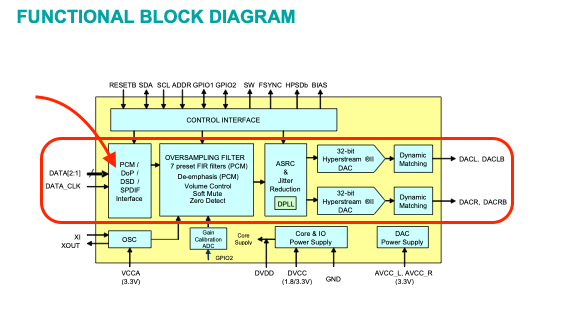
Of course if Audirvana doesn’t modulate to DSD, nearly all DACs will either do that or create a hybrid format (short but not one-bit word length, much higher sample rate) internally anyway, so overall no processing is saved if you don’t convert to DSD with Audirvana.

Jud

Thanks - I like data, although interpreting it isn’t always easy…

Anyhow, I ran your suggested test, and some others I thought of, against the Genesis song: Eleventh Earl of Mar (at 7’44’’ I thought it was a good length track to test against) and the results are interesting:

Resampling took:

With No EQ and No Plugins, 12.6 seconds
With AV’s new EQ but no plugins: 12.8 seconds
With AV’s new EQ and the plugins I use (mentioned above): 24.27 seconds
Without AV’s new EQ but with my plugins: 24.1 seconds
Without AV’s new EQ and only with BlueCat’s Liny Eq: 22 seconds
Without AV’s new EQ and only with BlueCat Gain: 12.96 seconds
Without AV’s new EQ and only with BlueCat Re-Head (which I’m considering): 60+ seconds(!)

This confirms what I saw earlier: AV’s EQ has virtually no impact on performance. That definitely means they’ve done a good job with it, performance wise. It also sounds the same as Blue Cat’s Re-Head with its EQ set for my headphones, so my confidence in its implementation is high. Of course, it’s compiled with the same compiler and optimisations as AV itself, but it’s still impressive.

Plugins take longer to load and may communicate with AV in much the same way as DLLs do with their host apps, or use some kind of inter-process communication. Depending on how they do it, it can be efficient or pretty slow. And then there is the quality of the plugin’s implementation… My money would be on the comms between the plugins and AV that is taking the extra time, but that’s just a guess based on many years’ experience getting tech to talk to each other… (If you think marriage is difficult… !!!)

This test has also convinced me to use AV’s EQ + Redline Monitor as I cannot hear the difference between this combo and Re-Head, and Re-Head clearly is less efficient.

My upsampling currently is Power of Two, r8brian, with the defaults for bandwidth and stop band, Linear phase. I haven’t started experimenting with the settings yet but understand the idea is to get the PC’s CPU to do the hard work and relieve the DAC from upsampling.

One of the previous posts in this thread said my DAC (Topping DX3 pro+) converts DSD to PCM, so I have the DSD Streaming set to Convert To PCM. I’m not sure if that’s right and online research (https://www.perplexity.ai/search/does-the-topping-dx3-pro-suppo-mRRrFnECQcCTKshYqk6MfA) says it is DSD compatible, but that may because it converts it to PCM. In any case, I don’t have any DSD files (yet) and AV’s upsampling isn’t offering upscaling to DSD for this DAC so I can’t test it.

Qobuz offers some albums in DSD, inlcuding my favourite Beethoven’s 5th, so it’s only a question of time before I have a DSD file.

Question: if the goal of upsampling is to match the input to the DAC to its capabilities, is setting the Forced upsampling type to ‘Device Max Frequency’ a good option?

Still much to learn…

1 Like

I believe this is the most important point… I have seen good programming and bad programming… efficient and bloated… I learned this in the very early days of AutoCAD using Auto LISP on 80386 processors and later-on when in the product development team at ReplayTV and as a recording engineer using the early DAW systems and DSP components as they evolved with the CPU platform power.

There was never a doubt in my mind as to the quality of the vertical implementation of EQ Studio in the Audirvāna signal architecture… I up-sample all PCM to DSD128 with Redline Monitor and very minimal tweaks to the region of 4kHz and its harmonics in EQ Studio. Although subjective in nature, my impression is that nothing is degraded… only enhanced in the application of the EQ.

Regarding up-sampling strategy…
‘Power of Two’ will always produce the logically correct results… The DAC will handle the rest.

To offload all other DSP from the computer platform Blue Cat Audio has a neat solution:

:notes: :eye: :headphones: :eye: :notes:

Hi Andy -

There’s a fellow named Jussi Laako who’s the developer of a hi-res player called HQPlayer. He worked for Intel (and was also a sonar instructor in the Finnish navy :slightly_smiling_face:), and the reason I bring up his name is because he does pretty extensive measurements on DACs with various forms of upsampling. For ESS DACs like the one in your Topping, his lowest measured noise and distortion comes with upsampling to DSD256 or DSD512 and use of 5th order modulators (corresponding to Audirvana’s modulator B5 or A5).

Of course whether these noise and distortion levels are such that lowering them a bit is audible is certainly undetermined and perhaps even dubious, but I like to start with the lowest noise and distortion I can get and see whether I subjectively like the sound. If I do, great, if not, play around and see what I like. (So far, fortunately, I’ve really liked the sound and haven’t noticed any improvement by playing around.)

So that’s something you can try if you feel like it, but I doubt it will make anything close to the audible difference of EQ (to return to our topic :slightly_smiling_face:).

Edit: When comparing DSD to PCM, if you want to do that, be very careful to equalize volume levels coming from the speakers/headphones. A difference of as little as 1dB can throw off the comparison.

There is no direct 1-bit signal path to output…

EDIT: This is the ES9038Q2M

1 Like

Thanks @Agoldnear

I found this interesting:

https://www.perplexity.ai/search/f9d6938b-560b-4308-852f-b43fc2822039

I guess, in the end, I need to try various options and pick what I like best. ‘Best’ here being entirely subjective as my tastes and preferences may not equate to the purest sound, etc…

Andy

1 Like

Without juxtaposition the only thing left to make qualitative assessments with, is our own experiences and interpretations. :sunglasses: However, having more information about fundamental operational technologies will assist in making the ‘best’ subjective determination.

1 Like

Yep, ESS DACs convert to the hybrid format (called “DSD-wide” by some, “PCM-narrow” derisively by others) from all inputs. Many other DACs convert to such a hybrid format from PCM inputs, but allow 1-bit DSD inputs to pass through to the final analog filter unmolested.

But again, something like EQ will almost certainly have far more dramatic effect on the final sound.

No DSP can be done on 1-bit PDM signals… EQ must be done in the analog domain… today… I think we will get there someday.
This is why I decimate my DSD files to 24/352.8kHz for HRTF… I don’t decimate native binaural DSD files, however cannot apply EQ in the digital domain.

What’s your favorite (Beethoven’s) 5th? :slightly_smiling_face:

Mono or stereo?

Jud

Beethoven’t 5th Symphony. I have various recordings of it - each conductor/orchestra adds their own personality to it.

Right, I was taking your remark about the availability of a Fifth on Qobuz in DSD as indicating you had a personal favorite version. If you do, which particular recording of the Fifth is it?

It’s like asking somebody what their favorite hue of blue is…

I have now changed the DAC’s settings to DSD over PCM 1.1 and upsampled to DSD256 - more out of curiosity than anything else.

With or without AV’s EQ, the upsampling of the ‘Eleventh Earl of Mar’ by Genesis took 1 minute 20 seconds, 60-70% CPU.

With EQ and plugins, 1 minute 30 Seconds, 60-70% CPU.

As with the PCM upsampling, the plugins add about 10 seconds to the upsampling time. Clearly, upsampling to DSD is more costly, CPU wise.

I haven’t listened to either upsampling version yet - will do that later.

Interestingly, Realtime Control (on my PC) with PCM upsampling cannot ‘keep up’ and the audio signal slows down and sounds terrible. I suspect this is to do with how AV is syncronizing the processing threads with the UI… This is one of the trickiest things (on Windows, at least), especially with real-time updates. However, even after the upsampling has completed, the audio plays at about 1/3 normal speed… Weird, but I think I have my EQ and plugin settings sorted, so I don’t need Realtime Control…

If I turn off upsampling, then playback with Realtime control works OK.

1 Like

You must make sure the system is not pre-loading all of the album tracks in the background…
How much RAM does your system have and how much playback pre-load memory are you allocating?

Ah, understood.

Currently, my favourite is Paavo Jarvi’s Beethoven’s Complete Symphonies, but I also like Daniel Barenboim’s Beethoven: The 9 Symphonies

Jarvi uses a smaller orchestra, has a faster tempo, and the recording really brings out the individual instruments.

Qobuz has many other versions - but I’ve only had it and Audirvana for a few weeks, so haven’t managed to listen to many versions yet.

I don’t have a DSD of it (yet). Qobuz lists a few, but I want to research the quality of the recordings before purchase…

1 Like

I have 16gb memory and Audirvana has allocated 8gb for pre-load. I haven’t adjusted that since installation… It says at 44.1khz this is 202 minutes, but at 768 khz it’s only 11 minutes.

Maybe I should lower it?

1 Like

Try 4GB or less.