Hello,
I have noticed that after an upgrade of Audirvana Remote on my iPhone, it stopped identifying an Audirvana Legacy (3.x.x) on my Mac Mini.
Is that something expected?
I tried to enter IP + Port, but I am not sure on what port Audivana 3.x.x runs.
Any info or advice on this would be appreciated.
Thank you in advance.
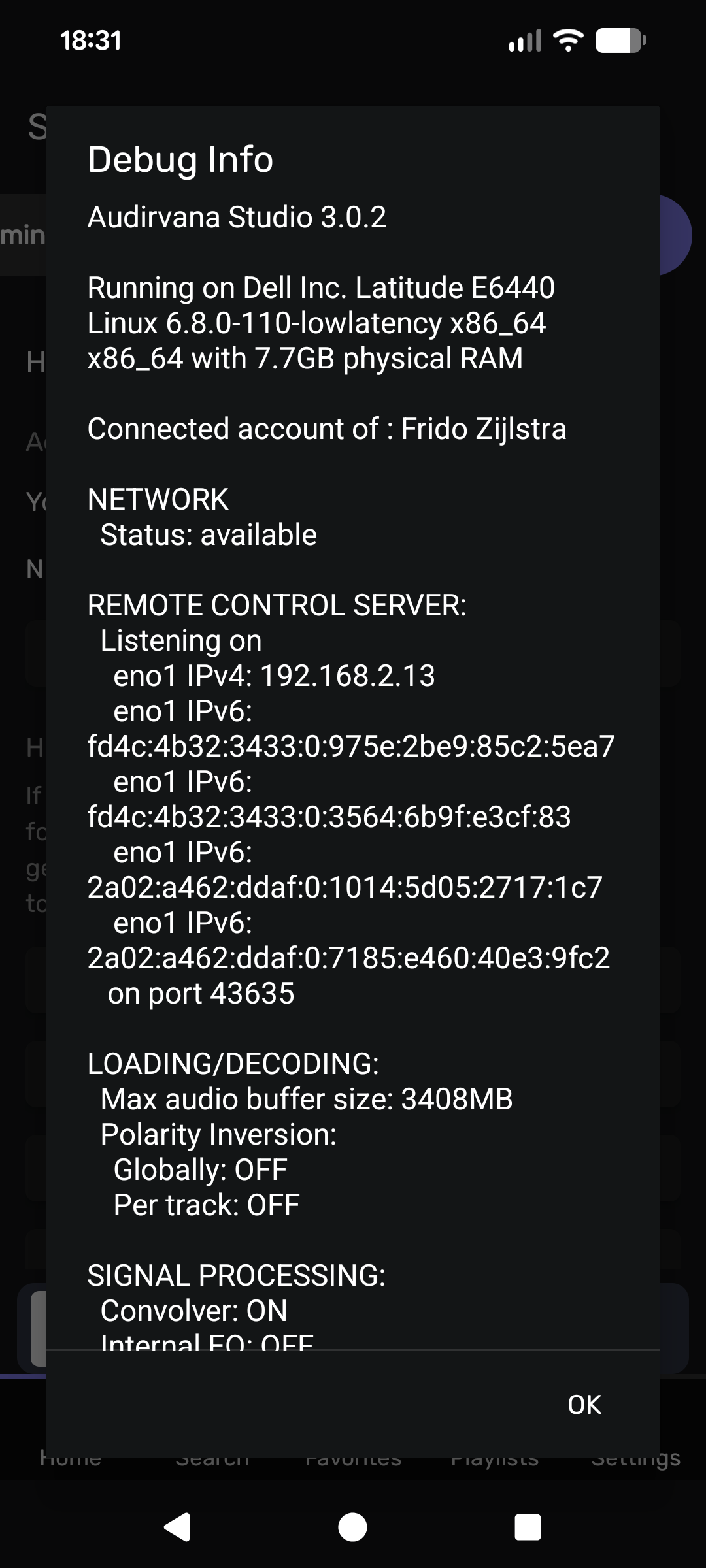
Well, I saw in the debug info of Audirvāna Studio that my port was 39503 yesterday, but today it is 43635 apparently…
No idea why it changes… But I would like to know as well, so I will follow this thread.
Thank you.
I tried to add IP/Port manually, but it didn’t detect the Audirvana.
The problem also is that there is no message and no error.
Exactly. I have that behaviour as well. So I don’t know what to look for or how to check.
Now I don’t have a real problem as Bonjour works quite fine in my case, but I wanted to see if I could make the connection even more stable. So still curious what to make of this.
By the way, you should be able to see the port in the debug info. You can see under REMOTE CONTROL SERVER on which port Audirvāna is listening.
If you cannot get the remote to find Audirvāna I’d first delete all remotes in the settings under appearance. And then delete the remote from your phone and reinstall it.
I am with legacy Audirvana 3.5.50, so I don’t see any “remote” in debug info, and no “appearance” in settings.
Sorry, I don’t know Legacy at all. I was assuming it should have some similar options as Audirvāna Studio. Maybe someone else has a clue?
Little update from my side. After the last time I manually appointed the IP address and port, I could define that the remote indeed used that info.
The name of the computer was changed to Manual Server.
But as Audirvāna doesn’t have the option (at least not in the Core Player) to choose a fixed port, the behaviour is that each time one starts the application it chooses a new port itself.
So when the remote is set to manually it will look for Audirvāna on the port that was provided by the user. That means that the remote will not find Audirvāna most of the time, as Audirvāna chooses its port randomly. Meaning that the user is back at Bonjour working successfully or not.
@Antoine Would you be so kind to look into the issue of the OP first? And if you have the time explain why (at least in the Linux Core Player) one cannot set a fixed port in AS 3.0?
Hi @mickeyvip , have you tried restarting your Audirvāna Studio on your Mac mini while you have your remote opened?
Can you confirm whether the IP port changes each time you restart Audirvāna Studio on Linux?
Yes. It differs every time. At this moment Debug info states that Audirvāna is listening on port 35289.
Update: I stopped and restarted Audirvāna manually and now port 42421 is being used.
It’s possible to set it manually, but it’s not available for everyone. I will ask if it would be possible to make it fixed when you use the IP connection of the Remote.
1 Like