In previous version, the analysing of audio files used to leave audio files unchanged. And now in 3.0 the files are changed. Should this be disabled/configured or ideally fixed ?
I have no issues with 3.0.1 changing my audio files. My settings in Settings\Local are as shown in the following screenshot.
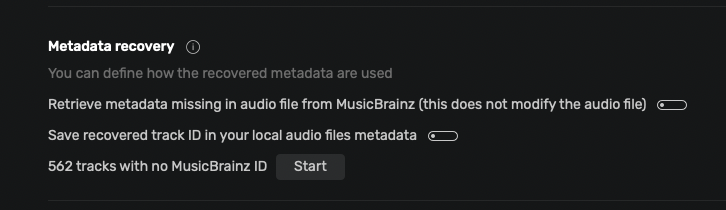
The same settings as mine. I am on 3.0.1 and I can replicate the issue:
- New file added to the folder at 12:58 today
- Audirvana recognized file. - file not changed
- I have clicked on “Albums ReplayGain analyzer button” and selected the new file
- Once completed the file is changed
Home:Tumbuluku $ gfind . -maxdepth 1 -printf '%s %TY-%Tm-%TdT%TH:%TM:%TS %f\n'
40751315 2026-04-14T12:58:38.5407170000 D01-02 - Tofo.flac
Home:Tumbuluku $ md5sum D01-02\ -\ Tofo.flac
69037410f0c88c0b904de95c8891aa50  D01-02 - Tofo.flac
Home:Tumbuluku $ # this is when Audirvana did its analysis
Home:Tumbuluku $ gfind . -maxdepth 1 -printf '%s %TY-%Tm-%TdT%TH:%TM:%TS %f\n'
40751315 2026-04-14T13:01:15.8128830250 D01-02 - Tofo.flac
Home:Tumbuluku $ md5sum D01-02\ -\ Tofo.flac
188f1097ecab35603dee5e02f6d675cb  D01-02 - Tofo.flac
Think it would change the timestamp of the file but the audio itself should be untouched as should the metadata. Only Audirvana can answer that one. I always thought with the settings off only the database data is changed not the file. Hopefully @antoine can provide the answer.
checksum changed, which suggests some change to the file. I have repeated this test and I can confirm that metadata is changed in the file (left is after the audirvana audio analysis):

This is still the case as of today. The analysis is for the MusicBrainz ID, which is not stored anymore in the track metadata, unless you specify it in the settings of Audirvāna.
This is very different, as it’s the Replay Gain information, which is in fact added to the track metadata. It’s common when you do not have the information to add it to the track.
Looks like the Replay Gain is stored in Audirvana database and in the actual audio files. Technically, there is no reason why audirvana database cannot be used exclusivelly for this and leave the original audio files intact. At least, there should be a warning or info tooltip that should state that ReplayGain button will change original files.
My audio files already have the ReplayGain set (using different application on creation); it would also be nice if audirvana can import those instead of recalculating and changing files.
In this case, Audirvāna will use them; don’t you see them in the app when you look at their metadata?
I guess the confusion is that if I click on the ReplayGain button, audirvana will list the files as if they don’t have replaygain (they have, but they are currently not calculated by audirvana). The logical action is now to select those are click on the button, which will recalculate and overwrite the original values.
If audirvana is using them for audio playback, it should use them for replaygain list functionality (at least do not list them if they have replaygain).
My current workflow:
- import CD
- calculate replaygain (dbpoweramp)
- add to and play in audirvana.
In this scenario, my expectation is for audirvana not to list those albums when I click on Settings→local→Album ReplayGain analyser.
Can you send me one for those tracks at [email protected]?