I am also very happy with my very straightforward system setup. Origin - DAC - Amp - Speakers. Simples! as they say.
Yes, that would be one way to do it. Or you could have the choice of device for a zone persist without showing other devices, unless the user selected a new device from a drop-down (rather than cluttering the UI by always showing all devices).
Hi Antoine,
I have removed Audirvāna Studio and reinstalled. Don’t know what the exact problem is, but I just do not have an option to make a zone.
Maybe you can find something in the debug info, but if not then I’ll just leave it at this.
Audirvana Studio 3.3.100
Running on Dell Inc. Latitude E6440
Linux 6.8.0-138-lowlatency x86_64 x86_64 with 7.7GB physical RAM
Connected account of : Frido Zijlstra
NETWORK
Status: available
REMOTE CONTROL SERVER:
Listening on
eno1 IPv4: 192.168.2.13
eno1 IPv6: fd4c:4b32:3433:0:58aa:78a8:36dc:d165
eno1 IPv6: fd4c:4b32:3433:0:3564:6b9f:e3cf:83
eno1 IPv6: 2a02:a462:ddaf:0:8d3a:8720:a67d:c687
eno1 IPv6: 2a02:a462:ddaf:0:7185:e460:40e3:9fc2
on port 38383
LOADING/DECODING:
Max audio buffer size: 3922MB
Polarity Inversion:
Globally: OFF
Per track: ON
SIGNAL PROCESSING:
Convolver: ON
Internal EQ: OFF
Crossfeed: OFF
Balance: OFF
in offline mode
UPSAMPLING:
SoX with 2x upsampling
SoX filter parameters
Bandwidth at 0dB = 97.5%
Filter max length = 30000
Anti-aliasing = 100
Phase = 66%
AUDIO VOLUME:
Replay Gain: None
Volume step size: 1dB
Max allowed volume: 100
LIBRARY SETTINGS:
Sync list: 1 folders
AUTO: /mnt/music/Music
Sync folders at startup: YES
Sort and display order: nl
Library database path: /home/frido/.local/share/audirvana/AudirvanaDatabase.sqlite
Local audio files fingerprinting
Fingerprinting track 3158/3218 : /mnt/music/Music/Qobuz Downloads/Robert Cray/01-04 Nothing But A Woman.flac
ACTIVE STREAMING SERVICES
Qobuz: Connected as Qobuz Hi-Fi Sublime+
APPEARANCE SETTINGS:
UI theme: dark
Font size: regular
Language: System language
Show album covers in tracks list: yes
Source list sorted:
Local
Favorites
Playlists
Streaming
Radios
Podcasts
Startup view: Local Library: Albums
Show local extended in source list: yes
Use media keys: yes
Use media keys for volume control: yes
Number of paired remotes: 2
=================== AUDIO DEVICE ========================
Active method: UPnP
UPnP network interface
Available Network interfaces:
Ethernet Connection I217-LM (eno1)
Preferred device: [UPnP] ND5 XS 2 Woonkamer Model UID:Naim Audio ND5 XS 2 UID:uuid:da0429bf-a8c2-4ae4-aa25-09c4e8747524
Currently playing to UPnP device at 32 bits 96kHz
Selected device: ND5 XS 2 Woonkamer
Manufacturer: Naim Audio
Model name: ND5 XS 2
Model UID: Naim Audio ND5 XS 2
UID: uuid:da0429bf-a8c2-4ae4-aa25-09c4e8747524
Plays with Audirvāna: Yes
Override manufacturer settings: Yes
UPnP device at http://192.168.2.4:45835/da0429bf-a8c2-4ae4-aa25-09c4e8747524.xml
8 available sample rates up to 384000Hz
44100
48000
88200
96000
176400
192000
352800
384000
Volume control: Yes
Max volume alert: Disabled
MQA capability
Auto-detect MQA devices: Yes
Not automatically detected, user set to not MQA
DSD capability
Raw DSD (msb)
Device audio channels
Preferred stereo channels L:0 R:1
Channel bitmap: Ox3, layout:
Channel 0: L
Channel 1: R
UPnP set capabilities
Maximum PCM frequency set: 384000Hz
Maximum PCM bitdepth set: 32
Maximum DSD rate set: DSD128
Number of channels: 2
Avoid RAW PCM streams: No
Universal gapless playback active: Yes
Unwanted playback stop workaround: Yes
UPnP capabilities
DLNA 1.5: Yes
Service versions:
AVTransport: v1
RenderingControl: v1
ConnectionManager: v1
Native gapless playback: Yes
Missing events workaround: Yes
Can play native DSD: Yes
Volume control: scalar
Output configuration
Number of channels: 2
Use as stereo device only: No
Output streams: 1
Active channels: 2, in 1 stream(s)
Channel #0: Stream 0 channel 0
Channel #1: Stream 0 channel 1
2 ch Integer PCM 16bit little endian 44.1kHz finite length
2 ch Integer PCM 24bit little endian 44.1kHz finite length
2 ch Integer PCM 32bit little endian 44.1kHz finite length
2 ch Integer PCM 16bit little endian 88.2kHz finite length
2 ch Integer PCM 24bit little endian 88.2kHz finite length
2 ch Integer PCM 32bit little endian 88.2kHz finite length
2 ch Integer PCM 16bit little endian 176.4kHz finite length
2 ch Integer PCM 24bit little endian 176.4kHz finite length
2 ch Integer PCM 32bit little endian 176.4kHz finite length
2 ch Integer PCM 16bit little endian 352.8kHz finite length
2 ch Integer PCM 24bit little endian 352.8kHz finite length
2 ch Integer PCM 32bit little endian 352.8kHz finite length
2 ch Integer PCM 16bit little endian 48kHz finite length
2 ch Integer PCM 24bit little endian 48kHz finite length
2 ch Integer PCM 32bit little endian 48kHz finite length
2 ch Integer PCM 16bit little endian 96kHz finite length
2 ch Integer PCM 24bit little endian 96kHz finite length
2 ch Integer PCM 32bit little endian 96kHz finite length
2 ch Integer PCM 16bit little endian 192kHz finite length
2 ch Integer PCM 24bit little endian 192kHz finite length
2 ch Integer PCM 32bit little endian 192kHz finite length
2 ch Integer PCM 16bit little endian 384kHz finite length
2 ch Integer PCM 24bit little endian 384kHz finite length
2 ch Integer PCM 32bit little endian 384kHz finite length
2 ch DSD 8bit little endian in 8bit chunk 2822.4kHz finite length
2 ch DSD 8bit little endian in 8bit chunk 5644.8kHz finite length
Current device state
Transport info:
CurrentTransportState: PLAYING
CurrentTransportStatus: OK
CurrentSpeed: 1
Media info:
NrTracks: 1
MediaDuration: 0:46:36
CurrentURI: http://192.168.2.13:49152/audirvana/gaplessAudio_f_1.wav
CurrentURIMetadata:
dc:titleAudirvana gapless playback</dc:title>
upnp:classobject.item.audioItem.musicTrack</upnp:class>
http://192.168.2.13:49152/audirvana/gaplessAudio_f_1.wav
	nextURI:
	nextURIMetadata:
	PlayMedium: NETWORK
	RecordMedium: NOT_IMPLEMENTED
	WriteStatus: NOT_IMPLEMENTED
Transport actions: Pause,Stop,Seek
UPnP / DLNA supported protocols :
http-get::text/xml:DLNA.ORG_PN=DIDL_S
http-get::audio/vnd.dlna.adts:DLNA.ORG_PN=HEAACv2_L2_320
http-get::audio/x-ms-wma:DLNA.ORG_PN=WMAFULL
http-get::audio/x-ms-wma:DLNA.ORG_PN=WMABASE
http-get::audio/3gpp:DLNA.ORG_PN=HEAACv2_L2_320
http-get::audio/mp4:DLNA.ORG_PN=HEAACv2_L2_320
http-get::audio/l16;rate=48000;channels=1:DLNA.ORG_PN=LPCM
http-get::audio/l16;rate=48000;channels=2:DLNA.ORG_PN=LPCM
http-get::audio/l16;rate=44100;channels=1:DLNA.ORG_PN=LPCM
http-get::audio/l16;rate=44100;channels=2:DLNA.ORG_PN=LPCM
http-get::audio/mpeg:DLNA.ORG_PN=MP3
rtsp-rtp-udp::text/xml:DLNA.ORG_PN=DIDL_S
rtsp-rtp-udp::audio/vnd.dlna.adts:DLNA.ORG_PN=HEAACv2_L2_320
rtsp-rtp-udp::audio/x-ms-wma:DLNA.ORG_PN=WMAFULL
rtsp-rtp-udp::audio/x-ms-wma:DLNA.ORG_PN=WMABASE
rtsp-rtp-udp::audio/3gpp:DLNA.ORG_PN=HEAACv2_L2_320
rtsp-rtp-udp::audio/mp4:DLNA.ORG_PN=HEAACv2_L2_320
rtsp-rtp-udp::audio/l16;rate=48000;channels=1:DLNA.ORG_PN=LPCM
rtsp-rtp-udp::audio/l16;rate=48000;channels=2:DLNA.ORG_PN=LPCM
rtsp-rtp-udp::audio/l16;rate=44100;channels=1:DLNA.ORG_PN=LPCM
rtsp-rtp-udp::audio/l16;rate=44100;channels=2:DLNA.ORG_PN=LPCM
rtsp-rtp-udp::audio/mpeg:DLNA.ORG_PN=MP3
http-get::audio/l16;rate=48000;channels=2:
http-get::audio/x-dsd:
http-get::audio/x_pm_flac:
http-get::audio/mpeg:
http-get::audio/x-dsf:
http-get::audio/aiff:
http-get::application/ogg:
http-get::audio/x-dff:
http-get::audio/wave:
http-get::audio/x-flac:
http-get::audio/3gpp:
http-get::audio/flac:
http-get::audio/vnd.dlna.adts:
http-get::audio/ogg:
http-get::audio/l16;rate=44100;channels=1:
http-get::audio/x-ms-wma:
http-get::audio/vorbis:
http-get::audio/l16;rate=44100;channels=2:
http-get::text/xml:
http-get::audio/wav:
http-get::audio/m4a:
http-get::audio/x-aiff:
http-get::audio/mp4:
http-get::audio/aac:
http-get::audio/x-wav:
http-get::audio/x-m4a:
http-get::audio/l16;rate=48000;channels=1:
rtsp-rtp-udp::audio/l16;rate=48000;channels=2:
rtsp-rtp-udp::audio/x-dsd:
rtsp-rtp-udp::audio/x_pm_flac:
rtsp-rtp-udp::audio/mpeg:
rtsp-rtp-udp::audio/x-dsf:
rtsp-rtp-udp::audio/aiff:
rtsp-rtp-udp::application/ogg:
rtsp-rtp-udp::audio/x-dff:
rtsp-rtp-udp::audio/wave:
rtsp-rtp-udp::audio/x-flac:
rtsp-rtp-udp::audio/3gpp:
rtsp-rtp-udp::audio/flac:
rtsp-rtp-udp::audio/vnd.dlna.adts:
rtsp-rtp-udp::audio/ogg:
rtsp-rtp-udp::audio/l16;rate=44100;channels=1:
rtsp-rtp-udp::audio/x-ms-wma:
rtsp-rtp-udp::audio/vorbis:
rtsp-rtp-udp::audio/l16;rate=44100;channels=2:
rtsp-rtp-udp::text/xml:
rtsp-rtp-udp::audio/wav:
rtsp-rtp-udp::audio/m4a:
rtsp-rtp-udp::audio/x-aiff:
rtsp-rtp-udp::audio/mp4:
rtsp-rtp-udp::audio/aac:
rtsp-rtp-udp::audio/x-wav:
rtsp-rtp-udp::audio/x-m4a:
rtsp-rtp-udp::audio/l16;rate=48000;channels=1:
Device description (live, downloaded from device)
<?xml version="1.0"?> 1 0 QPlay:2 urn:schemas-upnp-org:device:MediaRenderer:1 ND5 XS 2 Woonkamer Naim Audio http://www.naimaudio.com/ Naim streaming audio player ND5 XS 2 20-015-0044 https://www.naimaudio.com/product/nd5-xs2 471370 uuid:da0429bf-a8c2-4ae4-aa25-09c4e8747524 image/png 120 120 24 /LibRygelRenderer-120x120x24.png image/png 48 48 24 /LibRygelRenderer-48x48x24.png image/png 32 32 24 /LibRygelRenderer-32x32x24.png image/png 128 128 24 /LibRygelRenderer-128x128x24.png image/png 240 240 24 /LibRygelRenderer-240x240x24.png image/png 480 480 24 /LibRygelRenderer-480x480x24.png image/png 600 600 24 /LibRygelRenderer-600x600x24.png image/jpeg 120 120 24 /LibRygelRenderer-120x120x24.jpg image/jpeg 48 48 24 /LibRygelRenderer-48x48x24.jpg image/jpeg 32 32 24 /LibRygelRenderer-32x32x24.jpg image/jpeg 128 128 24 /LibRygelRenderer-128x128x24.jpg image/jpeg 240 240 24 /LibRygelRenderer-240x240x24.jpg image/jpeg 480 480 24 /LibRygelRenderer-480x480x24.jpg image/jpeg 600 600 24 /LibRygelRenderer-600x600x24.jpg urn:schemas-upnp-org:service:ConnectionManager:1 urn:upnp-org:serviceId:ConnectionManager /xml/ConnectionManager.xml /Control/LibRygelRenderer/RygelSinkConnectionManager /Event/LibRygelRenderer/RygelSinkConnectionManager urn:schemas-upnp-org:service:AVTransport:1 urn:upnp-org:serviceId:AVTransport /xml/AVTransport2.xml /Control/LibRygelRenderer/RygelAVTransport /Event/LibRygelRenderer/RygelAVTransport urn:schemas-upnp-org:service:RenderingControl:1 urn:upnp-org:serviceId:RenderingControl /xml/RenderingControl2.xml /Control/LibRygelRenderer/RygelRenderingControl /Event/LibRygelRenderer/RygelRenderingControl urn:schemas-tencent-com:service:QPlay:1 urn:tencent-com:serviceId:QPlay /xml/QPlayDescription.xml /Control/LibRygelRenderer/QPlay /Event/LibRygelRenderer/QPlay http://192.168.2.4:80/ DMR-1.51Device description (cached from discovery)
<?xml version="1.0"?> 1 0 QPlay:2 urn:schemas-upnp-org:device:MediaRenderer:1 ND5 XS 2 Woonkamer Naim Audio http://www.naimaudio.com/ Naim streaming audio player ND5 XS 2 20-015-0044 https://www.naimaudio.com/product/nd5-xs2 471370 uuid:da0429bf-a8c2-4ae4-aa25-09c4e8747524 image/png 120 120 24 /LibRygelRenderer-120x120x24.png image/png 48 48 24 /LibRygelRenderer-48x48x24.png image/png 32 32 24 /LibRygelRenderer-32x32x24.png image/png 128 128 24 /LibRygelRenderer-128x128x24.png image/png 240 240 24 /LibRygelRenderer-240x240x24.png image/png 480 480 24 /LibRygelRenderer-480x480x24.png image/png 600 600 24 /LibRygelRenderer-600x600x24.png image/jpeg 120 120 24 /LibRygelRenderer-120x120x24.jpg image/jpeg 48 48 24 /LibRygelRenderer-48x48x24.jpg image/jpeg 32 32 24 /LibRygelRenderer-32x32x24.jpg image/jpeg 128 128 24 /LibRygelRenderer-128x128x24.jpg image/jpeg 240 240 24 /LibRygelRenderer-240x240x24.jpg image/jpeg 480 480 24 /LibRygelRenderer-480x480x24.jpg image/jpeg 600 600 24 /LibRygelRenderer-600x600x24.jpg urn:schemas-upnp-org:service:ConnectionManager:1 urn:upnp-org:serviceId:ConnectionManager /xml/ConnectionManager.xml /Control/LibRygelRenderer/RygelSinkConnectionManager /Event/LibRygelRenderer/RygelSinkConnectionManager urn:schemas-upnp-org:service:AVTransport:1 urn:upnp-org:serviceId:AVTransport /xml/AVTransport2.xml /Control/LibRygelRenderer/RygelAVTransport /Event/LibRygelRenderer/RygelAVTransport urn:schemas-upnp-org:service:RenderingControl:1 urn:upnp-org:serviceId:RenderingControl /xml/RenderingControl2.xml /Control/LibRygelRenderer/RygelRenderingControl /Event/LibRygelRenderer/RygelRenderingControl urn:schemas-tencent-com:service:QPlay:1 urn:tencent-com:serviceId:QPlay /xml/QPlayDescription.xml /Control/LibRygelRenderer/QPlay /Event/LibRygelRenderer/QPlay http://192.168.2.4:80/ DMR-1.51UPnP devices found : 2
Device #0: Slaapkamer - SYMFONISK Bookshelf Media Renderer - RINCON_38420B9F702001400
UID: uuid:RINCON_38420B9F702001400_MR
Location: http://192.168.2.26:1400/xml/device_description.xml
Manufacturer: Sonos, Inc.
Model name: SYMFONISK Bookshelf
Device #1: ND5 XS 2 Woonkamer
UID: uuid:da0429bf-a8c2-4ae4-aa25-09c4e8747524
Location: http://192.168.2.4:45835/da0429bf-a8c2-4ae4-aa25-09c4e8747524.xml
Manufacturer: Naim Audio
Model name: ND5 XS 2
Local
Max. memory for audio buffers: 3922MB
Local Audio Engine:
Linux ALSA library 1.2.11
Advanced Linux Sound Architecture Driver Version k6.8.0-138-lowlatency.
Local devices found : 4
Device #0: HDA Intel PCH
Manufacturer:
Model UID: HDA Intel PCH
UID: HDA Intel PCH at 0xf7c30000 irq 43
Model name: HDA Intel PCH
Device #1: HDA Intel HDMI - HDMI 0
Manufacturer:
Model UID: HDA Intel HDMI - HDMI 0
UID: HDA Intel HDMI at 0xf7c34000 irq 45 - HDMI 0
Model name: HDA Intel HDMI
Device #2: HDA Intel HDMI - HDMI 1
Manufacturer:
Model UID: HDA Intel HDMI - HDMI 1
UID: HDA Intel HDMI at 0xf7c34000 irq 45 - HDMI 1
Model name: HDA Intel HDMI
Device #3: HDA Intel HDMI - HDMI 2
Manufacturer:
Model UID: HDA Intel HDMI - HDMI 2
UID: HDA Intel HDMI at 0xf7c34000 irq 45 - HDMI 2
Model name: HDA Intel HDMI
Chromecast
Chromecast devices found : 3
Device #0: KPN DIW7022
ID: KPN-DIW7022-0e3b5385c94b93da7959b3e268e91058
Model name: KPN DIW7022
Device #1: Slaapkamer Stijn
ID: Chromecast-Audio-4c6c203caae902a099894e0dd5059134
Model name: Chromecast Audio
Device #2: ND5 XS 2 Woonkamer
ID: ND5-XS-2-ba6e93360c4f1ea680a52c97b927cf31
Model name: ND5 XS 2
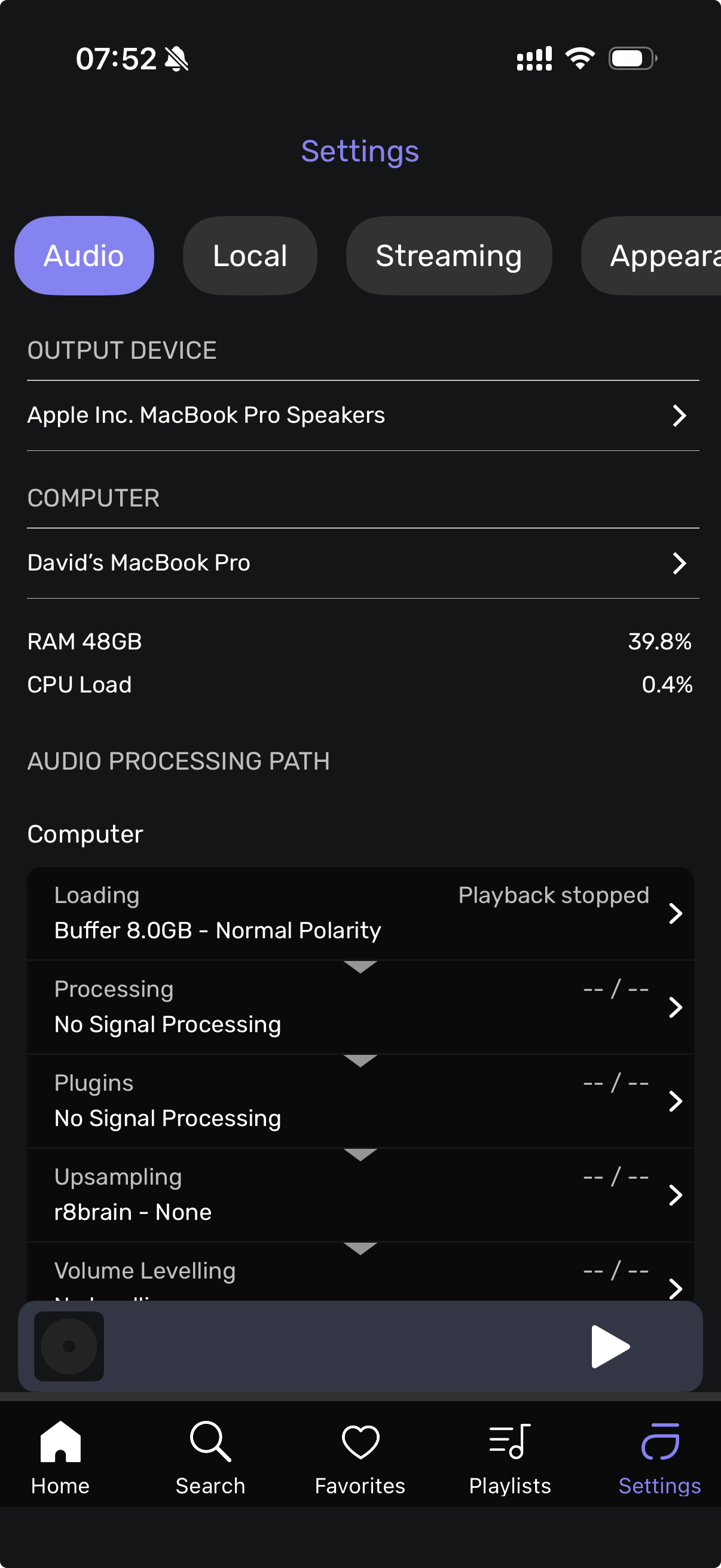
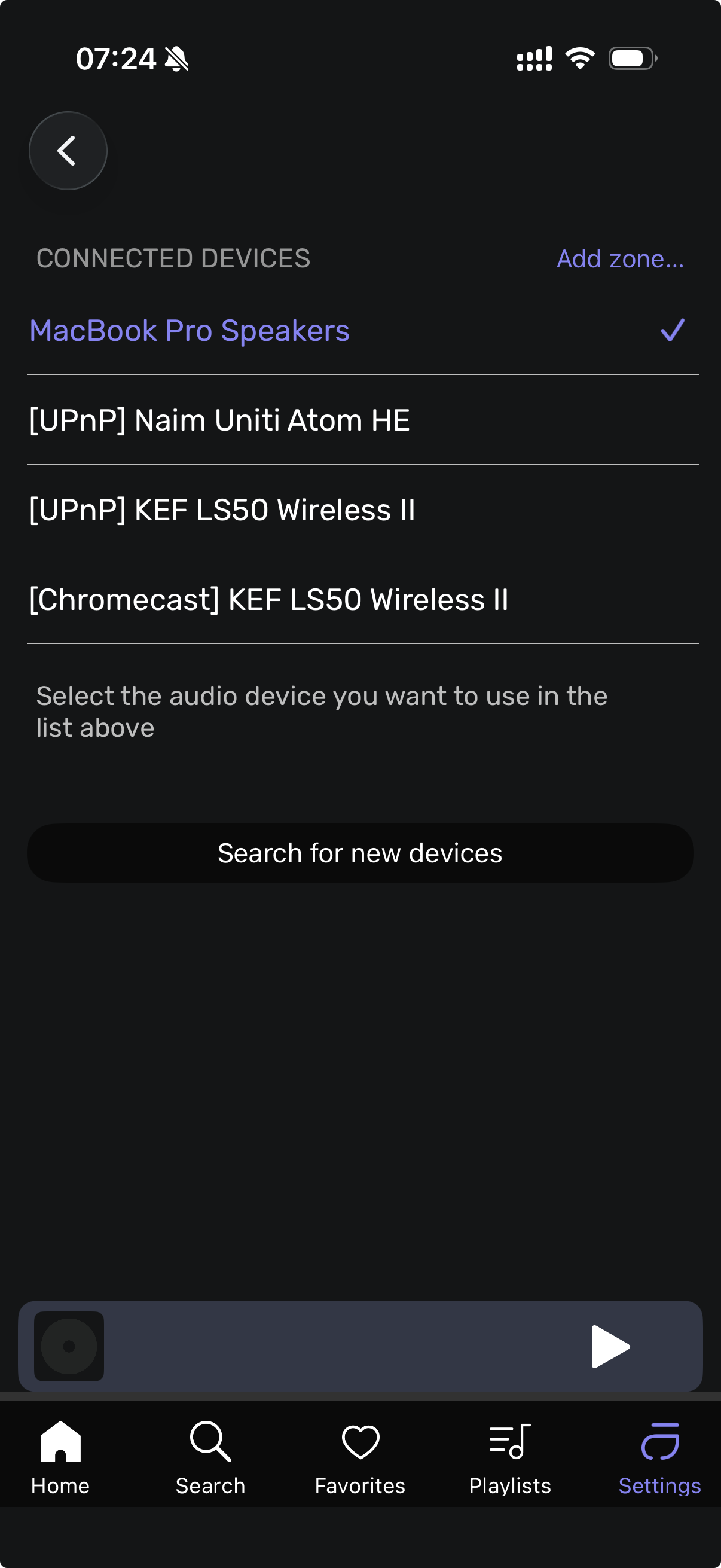
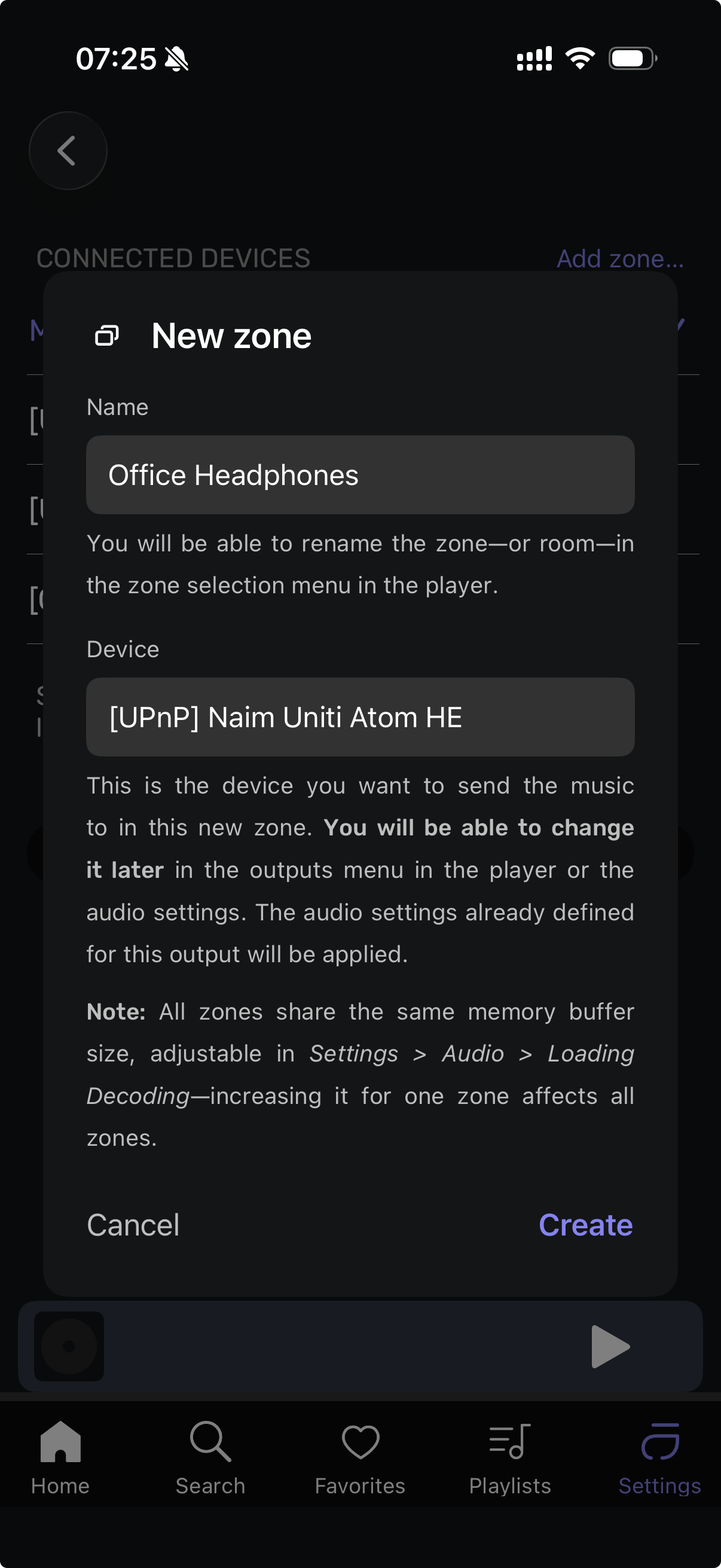
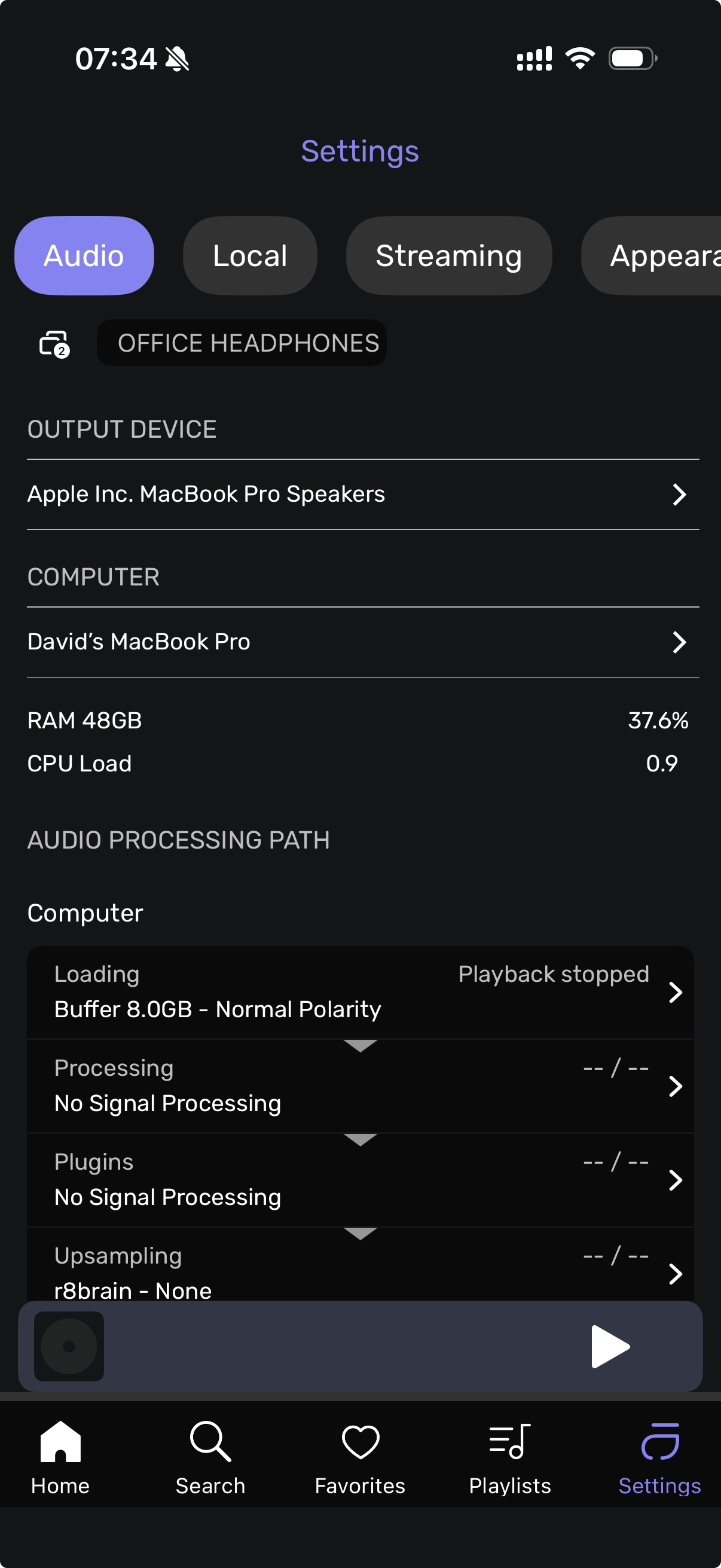
This is how I create a zone using the iOS app, note I am connecting to a macOS laptop, I note yours is on linux but it should work. Hope this helps…
-
Select system output.
-
Got to settings/audio in the iOS app (screenshot 1)
-
Click on the output device and select “Add Zone” (screenshot 2)
-
Create your zone name and add your device (note that current selected device will not show up in the list hence why I select the system output in step 1 first - this seems to be a bug?) See screenshot 3.
-
Click create and you will see in audio settings the zone created (screen shot 4)
Hi @Antoine No problem setting up the Zones. The first I tried and have stopped on is my Sonos Beam as I am unable to get it to play for the following reasons:
I changed upsampling to none. when I opened the zone and changed the maximum rate to 44.1 it just automatically changes it back to 192 and then I get the message that the rate is not supported. Just keeps changing back to 192 every time
Maybe try the others later. Maybe. 
Much appreciated, thx. But unfortunately I don’t get the option to add a zone.
You have the right version installed. I need to test it on my end with the Android emulator. My guess is about the size of the screen. I have a bigger Android screen on the A15 I have at the office. I will come back to you once I have been able to test the Pixel 8a in the simulator.
Hi @Antoine, would you be kind enough to clarify the meaning of “If you have x accounts…”?
-
Does this mean if I pay double for two Studio licenses I can run Audirvana on two computers at the same time and broadcast UPnP from one Audirvana instance to the other?
-
Or does it mean in my current situation where I have one license but have Audirvana installed in 6 operating systems on 2 computers, I can run Audirvana on two computers/OSs at the same time and broadcast UPnP from one instance to the other?
-
If it is the first of these (I would need to buy a second license to broadcast UPnP between Audirvana instances), what other software have you tested with that successfully sees and uses Audirvana as a UPnP renderer?
Doesn’t work with jplay either
Working with another Zone to my WiiM Ultra, but still no joy to Sonos.
@jud I tried it to my MacBook Air with the Audirvāna installed, but it logged me out of the main computer. So I’m thinking I would have to have another paid licence to do that, but if I have another paid licence I don’t need to set up a zone. 

this one has the same issues as origin 3.0.2 still have.
please take a big look to fix those once and for all please
Thank for you input… I am tracking this and the way I read the statement, is that for sure you need another license to run Audirvāna on the target device as a renderer from the primary Audirvana source, and this target device can serve a number of subsequent zones/devices…
In this scenario, it appears the choice to have Audirvāna running as the source or the renderer must be made, given the extent of the zone architecture at any given time and where on the network the source signal is instigated.
I see this as a means to have Ravenna-like control of the zone devices.
Music continually stopping after 2 or 3 songs.
Update on the WiiM zone. As per above the play lasts for about 3-4 max tracks.
Back to one for me. I’ll check again in a few days to see if any fairy dust or ground Unicorn Hair has managed to infiltrate the app. 
A new update of the Beta is available, mainly focused on stability improvements on Linux:
-
Stability: Fixed several Linux crashes — at quit (a background worker outliving core services), on shutdown signals (SIGTERM/SIGHUP), and from a race when logging in to a streaming service while closing the app. Crash logs are now self-describing (build ID, thread names, registers) for faster diagnosis.
-
Linux Network shares (SMB): Much faster and more reliable
.localshare discovery and reconnection — resolving a hostname now takes milliseconds instead of several seconds, and quitting the app no longer waits on stalled network timeouts. -
Multizone / Remote app: Audio settings, actions, lyrics, favorites, and scans in the remote-control app now correctly follow the zone you’re bound to, including DSP and signal processing setup. Fixed a bug where radio track credits could leak into the album label field.
-
Playback: Starting “Play Now” while a radio stream is decoding now properly aborts the radio instead of queuing behind it; requested stream aborts are no longer logged as errors.
On Linux:
-
The indication of which DAC/card is selected in a zone now works correctly, thanks!
-
However, on startup in a zone, even where a DAC/card has been selected on the previous run, Audirvana always says under Output Device, “Error: no device selected,” forcing the user to go to another screen and choose the DAC/card once again. I don’t know whether it is possible, but it would be more convenient if the choice of DAC/card persisted across sessions unless the user changed it.
-
It’s evident that only another Audirvana account/session running at the same time can use Audirvana as a UPnP AV renderer. I tried Audirvana on Linux with mConnect on iOS. mConnect readily saw the UPnP AV renderer running on my microRendu, but could not detect Audirvana as a UPnP AV renderer.