Toggled both those settings, no difference. Bottom line: All works fine as long as VST is disabled, as soon as I enable it I get dropouts even without any gain changes or active eq from a plugin.
Do you get this behavior with every plug-in inserted when you test one at a time?
Also, just inserting a plug-in adds approximately 2dB of gain… what happens when you lower your output volume by 3-6dB?
Wait and let @Antoine get a chance to solve obvious bug then.
It’s entirely possible the gain structure has changed in version 3.0.
1 Like
Thanks once again. I have 4 plugins and did try starting with one at a time and lowering the gain. So far it makes no difference even if I stick to any one and lower the gain by 3 db. Interesting points about the gain structure. I really have no need to use more than one plugin at a time, but so far no joy even with just one. Just for diagnostic purposes I can try connecting my DAC in the main system with usb rather than upnp to eliminate that as a factor, but my regular use is via upnp so I wouldn’t want to give that up permanently. I can also try a different server just for the heck of it, but have already reinstalled Studio 3.0 and it didn’t change anything.
The USB test would give you a baseline reference…
yes. I have a busy couple of days ahead of me so might not get to that for a bit, but I can try it.
1 Like
Also, try a very short and simple Ethernet connection…
ethernet connection from my server to Airlens is 1 meter to switch and less than that to Airlens. Anyway: I was able to pull the overall gain down by 6 db in one plugin and it seems to work. Assuming I am understanding correctly, it looks like the Audirvana EQ auto-corrects the gain structure. That also so far works. TL;DR, it’s looking like it is indeed a gain issue; if so, no disaster assuming I can figure out how to do that with other plugins, but it does appear to me that something changed in that regard with this version. Would lowering Audirvana’s output volume level be helpful here, or would it not make any difference?
It will depend on where the over-load is happening… When I was using the Studio EQ I used the Auto gain management function to get a good reference for the amount of output level being reduced… Once you have that then you can just set the gain control to that factor… from there, you can adjust the I/O gain of the plug-in to make sure you have a clean output and if needed, reduce the output level with the Audirvāna volume control…
1 Like
Just remember that any DSP operation adds bits to the signal, which will increase the dynamic-range of the signal… some devices have more dynamic-range headroom than others. 
1 Like
Understood. What I am seeing, FWIW, is that with the integral EQ it works fine with the auto-compensation, but with eq plugins, even if the settings are flat, I need to pull down the overall gain level.
Since Audirvana has created their own DSP (Convolution, EQ, etc)… They (Devo) don’t seem too interested in solving Legacy Plugins issues… Although I was told a few times that “they” are working on it…  Seems like a conflict of interest to me…
Whilst I have not been running the full latest version of Audirvana that long, I did however enable the Tokyo Dawn labs TDR Nova yesterday. There was an update for it which I installed and everything is fine my end.
I don’t think so… Not being able to reference monitor playback for pre-mastering and any mastering transfers or any other user playback scenario using plug-in DSP, doesn’t seem to follow the trajectory of the primary premise… Not everyone is comfortable with Convolution processing, and in some cases dynamic equalization and other variants of equalization processes that fit certain playback scenario support, makes Audirvāna Studio more valuable in concert with the superb sound-quality as a reference, and as a tool in the production process.
1 Like
Wow, that was quite the word salad… We are just talking about having “standard VST & AU” plugin capabilities… Even you have several plugins that used to work with the previous version of Audirvana and still don’t work in this current release…
There is no magic in my use of one Convolver for Digital Room Correction and one Old Skool Mastering Quality Equalizer… Which, by the way, works on several other small signal chains outside of the Audirvana plugin architecture…
1 Like
This was rectified by rescanning the plug-ins as I described in another related thread… The stereo versions of my most relevant plug-ins work fine…
In the case of using a convolved wrapper… I personally want to reduce the amount of transitional code that signal(s) must pass-through, I find simpler is better in my world…
Lol, “using a convolved wrapper”… Hey if you like the new convolver and EQ that’s great for you… I, on the other hand, think that they don’t compare with the Pro Quality plugins I use… The Hang Loose Convolver is by far and away better than the “black box” convolver built in to Audirvana… Let not compare features as the “black box” seems to have none…
As for the Old Skool Mastering EQs I use, well they just work everywhere else, and not so great here in Audirvana land… As I have said before, not a priority for Devo to fix these Legacy Plugin issues…
I will try you rescanning idea… If all the other small signal chains see and correctly function, why would rescanning change anything in Audirvana?
It made the difference for me…
Your argument regarding Convolution in Audirvāna would be better debated with Chris of Audiophilestyle as he is heavily invested in that game…
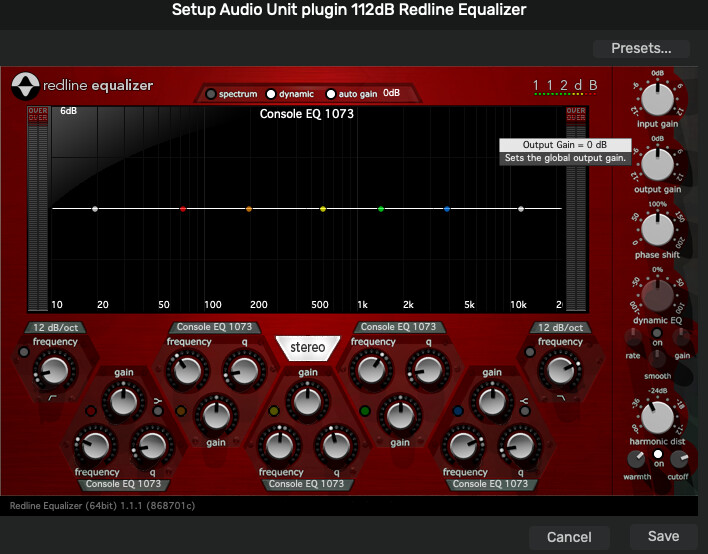
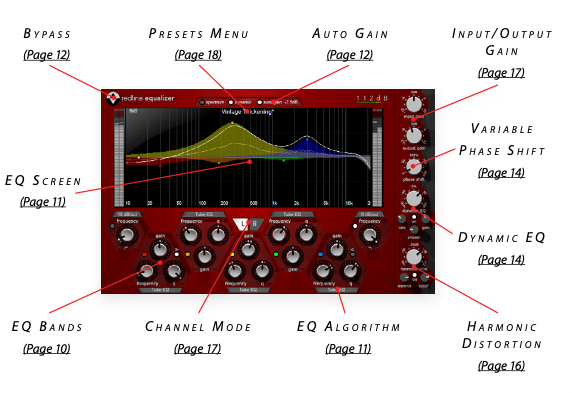
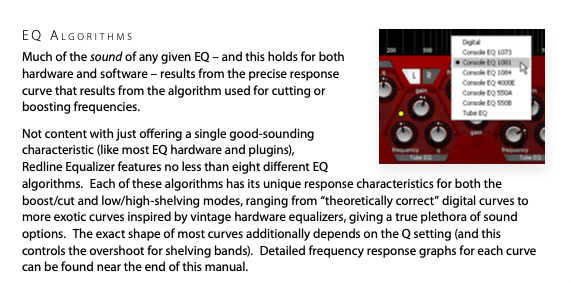
My favorite equalization plug-in is the now unavailable 112dB Redline Equalizer and it works perfectly in Audirvāna Studio 3.0, but I don’t use equalization at all in Audirvāna in my reference playback scenario.. You will note the flexibility of the EQ algorithms, etc. (Good to 384kHz)
1 Like