Linux 6.12.75+rpt-rpi-v8 aarch64 (ARM64, 7.6GB RAM)
DAC: iFi ZEN DAC 3 (USB)
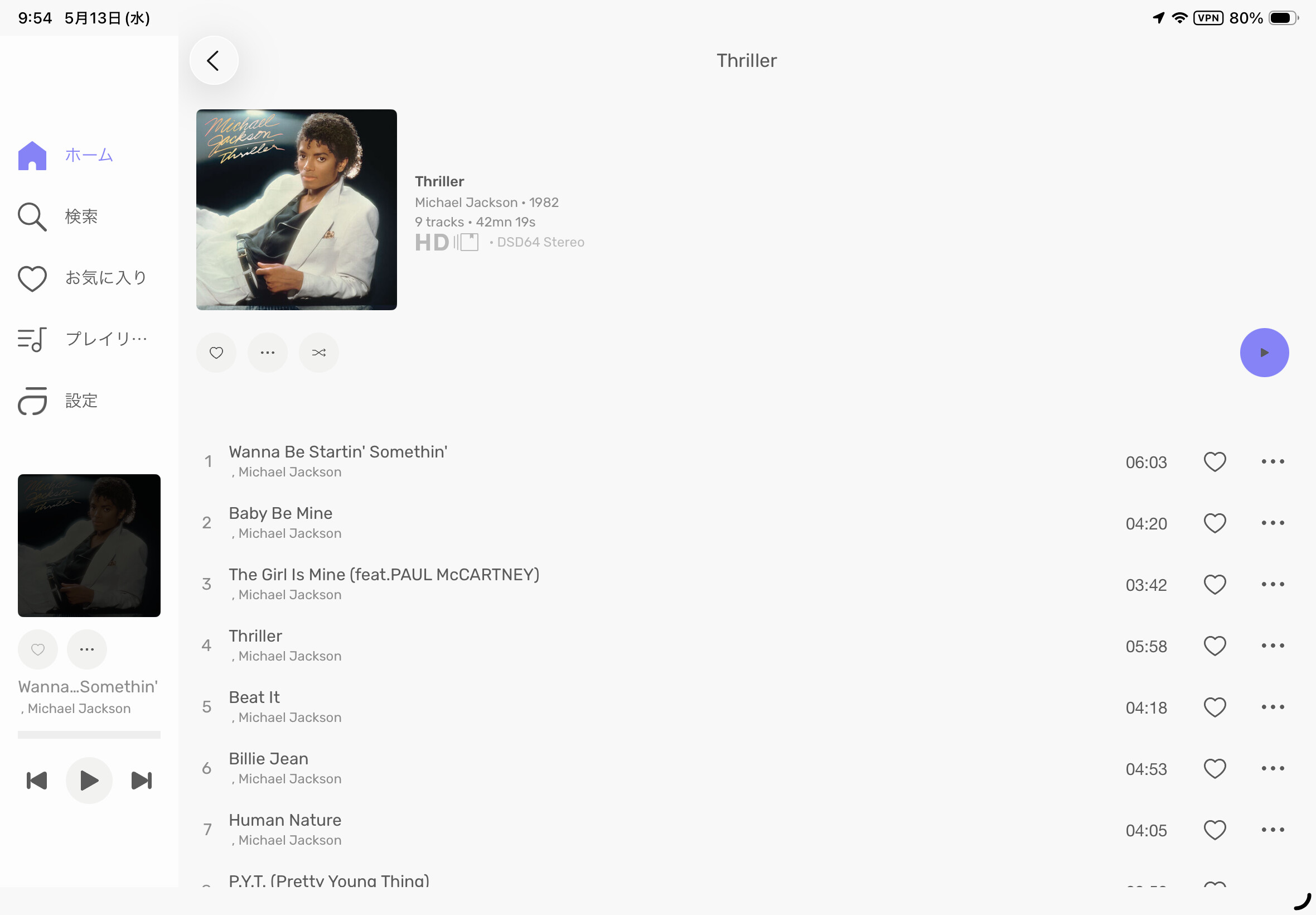
Issue: When playing DSD files, a leading comma is added to the artist name (e.g. ,Michael Jackson instead of Michael Jackson). This affects not only the display within Audirvana Studio, but also Last.fm scrobbling — the track is submitted with the corrupted artist name, polluting the listening history.
Request:
Fix the display so that no leading comma appears during DSD playback.
Even as a temporary workaround, please strip the leading comma before submitting to Last.fm.
Thank you for your great work on Audirvana Studio. The sound quality is excellent and I enjoy it very much, especially for DSD playback.
Hi Antoine,
I cannot take a screenshot as Audirvana Studio is running headless on a Raspberry Pi (SSH only). Instead, here is the full metadata output from exiftool, which should contain the same information:
ExifTool Version Number : 13.50
File Name : 06-Billie Jean_17881502.dsf
Directory : .
File Size : 210 MB
File Modification Date/Time : 2025:12:27 14:45:49+09:00
File Access Date/Time : 2026:03:31 11:10:02+09:00
File Inode Change Date/Time : 2025:12:27 14:45:49+09:00
File Permissions : -rwxr-xr-x
File Type : DSF
File Type Extension : dsf
MIME Type : audio/x-dsf
Format Version : 1
Format ID : DSD Raw
Channel Type : Stereo (Left, Right)
Channel Count : 2
Sample Rate : 2822400
Bits Per Sample : 1
Sample Count : 829763648
Block Size : 4096
ID3 Size : 2449463
Artist : Michael Jackson
Title : Billie Jean
Album : Thriller
Band : Michael Jackson
Genre :
Recording Time :
Composer : Michael J. Jackson
Part Of Set : 01
Track : 6
Publisher : JASRAC / Epic
Comment : JASRAC / Epic
Copyright : (P) 1982 MJJ Productions Inc.
Conductor :
Mood :
Picture MIME Type : image/jpeg
Picture Type : Other
Picture Description :
Picture : (Binary data 2447628 bytes, use -b option to extract)
As you can see, Artist: Michael Jackson is stored correctly without any leading comma. The issue appears to be introduced by Audirvana Studio during DSD playback, not in the file tags themselves.
I have also attached a screenshot from Audirvana Remote, which shows the leading comma displayed on the artist name.
This file was purchased from mora (a Japanese music store), so it is not a rip. Regarding Agoldnear’s comment, the metadata is from the original purchased file.
Would a single track be sufficient instead of the full album? I’m a bit hesitant to share the entire purchased album.
I’m not sure how they acquire DSD files in general, but in Japan we can purchase them from mora (mora.jp), a legitimate Japanese music download store operated by Sony Music Solutions. It is one of the major Hi-Res audio stores in Japan.
Hi Antoine,
I removed the space from the Conductor tag and the leading comma is gone. Thank you for finding the cause!
However, I have many DSD albums and will continue to purchase more in the future. Having to manually edit the metadata of every single file is not something I want to do as an end user — I just want to enjoy the music without worrying about such things.
I also noticed that moOde Audio plays the same DSD files without the leading comma, and scrobbles to Last.fm correctly as well. Because of this issue, I have been using moOde Audio instead of Audirvana Studio whenever I want to listen to DSD.
Could you please consider adding similar handling to Audirvana?