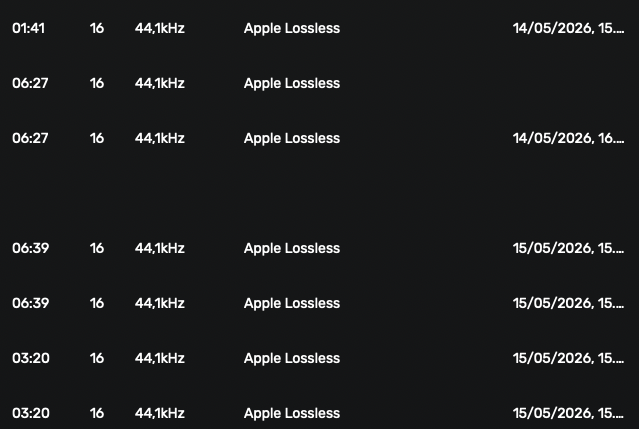
Hi there, can somebody help me get rid of these “ghost” tracks that suddenly appeared yesterday?
As you can see the day before it worked well (no playdate because there was only one instance at that time) but then next day when I continued listening to CD2, I’m was getting every track played twice. Checking the volume with the files, showed only one instance of each track.
Should I just discard the old database and build a fresh? My Audirvana log is also attached. Any thoughts?
Audirvana Studio 3.1.0 (30100)
Running on Macmini8,1
macOS 15.7.5 x86_64 with 16GB physical RAM
Connected account of : Lars Hansen
NETWORK
Status: available
Local network access: allowed
REMOTE CONTROL SERVER:
Listening on
en0 IPv6: 2a13:8a02:a103:ec00:1427:5bc:2e2f:d18
en0 IPv4: 192.168.1.68
en0 IPv6: 2a13:8a02:a103:ec00::b
en1 IPv6: 2a13:8a02:a103:ec00:ce7:7a4b:a0dd:fa8c
en1 IPv4: 192.168.1.83
en1 IPv6: 2a13:8a02:a103:ec00::e
on port 64412
LOADING/DECODING:
Max audio buffer size: 10782MB
Polarity Inversion:
Globally: OFF
Per track: OFF
SIGNAL PROCESSING:
Convolver: OFF
Internal EQ: OFF
Crossfeed: OFF
Balance: OFF
PLUGINS: NOT ACTIVE
UPSAMPLING:
r8brain not in use
r8brain filter parameters
Bandwidth = 99.5%
Stop band attenuation 218dB
Phase linear
AUDIO VOLUME:
Replay Gain: None
Volume step size: 1.5dB
Max allowed volume: 100
SW volume control: OFF
LIBRARY SETTINGS:
Sync list: 3 folders
AUTO: /Users/larshansen/Documents/Musik/Audio Tracks
AUTO: /Volumes/Data/Musik/Audio Tracks
AUTO: /Volumes/Data/Musik/iTunes Max/iTunes 1/iTunes Media/Music
Sync folders at startup: YES
iTunes/Music library synchronization: not synchronized
Sort and display order: en
Library database path: /Users/larshansen/Library/Application Support/Audirvana/AudirvanaDatabase.sqlite
Local audio files fingerprinting
Tracks with no MBID: 4081
ACTIVE STREAMING SERVICES
Qobuz: Connected as Qobuz Studio
APPEARANCE SETTINGS:
UI theme: dark
Font size: regular
Language: System language
Show album covers in tracks list: yes
Source list sorted:
Streaming
Local
Favorites
Playlists
Podcasts
Radios
Startup view: Local Library: Albums
Show local extended in source list: yes
Use media keys: yes
Use media keys for volume control: yes
Use Apple Remote: yes
Number of paired remotes: 2
Remote pairing code required: yes
Screen saver disabled: yes
=================== AUDIO DEVICE ========================
Active method: Local
Max. memory for audio buffers: 10782MB
Local Audio Engine:
CoreAudio
Exclusive access: ON
Integer mode: ON
Use max I/O buffer size: ON
Actual I/O buffer frame size: 512
Preferred device:
Apple, Inc. AirPlay
Model UID:a5fc0a05-208a-4fc2-9e25-37a284833cd5-102218543202-Audio
UID:a5fc0a05-208a-4fc2-9e25-37a284833cd5-102218543202-Audio
Active Sample Rate: 44.1kHz
Hog Mode is off
Bridge settings:
Sample rate limitation: none
Sample rate switching latency: none
Limit bitdepth to 24bit: OFF
Mute during sample rate change: OFF
Selected device: WAVELIGHT DAC
Manufacturer: ROCKNA
Model name: ROCKNA WAVELIGHT DAC
Model UID: WAVELIGHT DAC:16D0:078C
UID: AppleUSBAudioEngine:ROCKNA:WAVELIGHT DAC:413-001:2
Plays with Audirvāna: No
Override manufacturer settings: No
USB Vendor ID: 0x16d0
USB Product ID: 0x078c
ID 0x63
9 available sample rates up to 384000Hz
32000
44100
48000
88200
96000
176400
192000
352800
384000
Audio buffer frame size : 14 to 4096 frames
Current I/O buffer frame size : 512
Volume Control
Physical: Yes
Virtual: Yes
Max volume alert: Disabled
MQA capability
Auto-detect MQA devices: Yes
Not automatically detected, user set to not MQA
DSD capability
DSD via PCM 1.1
Device audio channels
Preferred stereo channels L:1 R:2
Channel bitmap: Ox3, layout:
Channel 0 mapped to 0
Channel 1 mapped to 1
Audio channels in use
Number of channels: 2
Use as stereo device only: No
Simple stereo device: Yes
1 output streams:
Number of active channels: 2, in 1 stream(s)
Channel #0 :Stream 0 channel 0
Channel #1 :Stream 0 channel 1
Stream ID 0x64 2 channels starting at 1
18 virtual formats:
2 ch Mixable linear PCM Interleaved 32 little endian Signed Float 384kHz
2 ch Mixable linear PCM Interleaved 32 little endian Signed Float 352.8kHz
2 ch Mixable linear PCM Interleaved 32 little endian Signed Float 192kHz
2 ch Mixable linear PCM Interleaved 32 little endian Signed Float 176.4kHz
2 ch Mixable linear PCM Interleaved 32 little endian Signed Float 96kHz
2 ch Mixable linear PCM Interleaved 32 little endian Signed Float 88.2kHz
2 ch Mixable linear PCM Interleaved 32 little endian Signed Float 48kHz
2 ch Mixable linear PCM Interleaved 32 little endian Signed Float 44.1kHz
2 ch Mixable linear PCM Interleaved 32 little endian Signed Float 32kHz
2 ch Non-mixable linear PCM Interleaved 32 little endian Signed Integer 384kHz
2 ch Non-mixable linear PCM Interleaved 32 little endian Signed Integer 352.8kHz
2 ch Non-mixable linear PCM Interleaved 32 little endian Signed Integer 192kHz
2 ch Non-mixable linear PCM Interleaved 32 little endian Signed Integer 176.4kHz
2 ch Non-mixable linear PCM Interleaved 32 little endian Signed Integer 96kHz
2 ch Non-mixable linear PCM Interleaved 32 little endian Signed Integer 88.2kHz
2 ch Non-mixable linear PCM Interleaved 32 little endian Signed Integer 48kHz
2 ch Non-mixable linear PCM Interleaved 32 little endian Signed Integer 44.1kHz
2 ch Non-mixable linear PCM Interleaved 32 little endian Signed Integer 32kHz
18 physical formats
2 ch Mixable linear PCM Interleaved 32 little endian Signed Integer 384kHz
2 ch Mixable linear PCM Interleaved 32 little endian Signed Integer 352.8kHz
2 ch Mixable linear PCM Interleaved 32 little endian Signed Integer 192kHz
2 ch Mixable linear PCM Interleaved 32 little endian Signed Integer 176.4kHz
2 ch Mixable linear PCM Interleaved 32 little endian Signed Integer 96kHz
2 ch Mixable linear PCM Interleaved 32 little endian Signed Integer 88.2kHz
2 ch Mixable linear PCM Interleaved 32 little endian Signed Integer 48kHz
2 ch Mixable linear PCM Interleaved 32 little endian Signed Integer 44.1kHz
2 ch Mixable linear PCM Interleaved 32 little endian Signed Integer 32kHz
2 ch Non-mixable linear PCM Interleaved 32 little endian Signed Integer 384kHz
2 ch Non-mixable linear PCM Interleaved 32 little endian Signed Integer 352.8kHz
2 ch Non-mixable linear PCM Interleaved 32 little endian Signed Integer 192kHz
2 ch Non-mixable linear PCM Interleaved 32 little endian Signed Integer 176.4kHz
2 ch Non-mixable linear PCM Interleaved 32 little endian Signed Integer 96kHz
2 ch Non-mixable linear PCM Interleaved 32 little endian Signed Integer 88.2kHz
2 ch Non-mixable linear PCM Interleaved 32 little endian Signed Integer 48kHz
2 ch Non-mixable linear PCM Interleaved 32 little endian Signed Integer 44.1kHz
2 ch Non-mixable linear PCM Interleaved 32 little endian Signed Integer 32kHz
Local devices found : 3
Device #0: ID 0x6d Philips FTV
Manufacturer: Apple Inc.
Model UID: AppleGFXHDA:0
UID: AppleGFXHDAEngineOutputDP:f803:0:{0C41-0000-01010101}
Model name: Apple Inc. Philips FTV
Device #1: ID 0x63 WAVELIGHT DAC
Manufacturer: ROCKNA
Model UID: WAVELIGHT DAC:16D0:078C
UID: AppleUSBAudioEngine:ROCKNA:WAVELIGHT DAC:413-001:2
USB Vendor ID: 0x16d0
USB Product ID: 0x078c
Model name: ROCKNA WAVELIGHT DAC
Device #2: ID 0x5d Højttalere i Mac mini
Manufacturer: Apple Inc.
Model UID: Speaker
UID: BuiltInSpeakerDevice
Model name: Apple Inc. Højttalere i Mac mini
UPnP
UPnP network interface
Selected Network interface: Ethernet
Available Network interfaces:
Ethernet
Wi-Fi
UPnP devices found : 0
Chromecast
Chromecast devices found : 0