Hello again. I’m writing to give feedback about a bug. I use a Matrix TT-1 as a streamer and the album covers on the screen don’t update correctly. The cover of the first track you play is displayed, but when the song changes it doesn’t update and the first one stays on screen. If I stop playback completely and start again, the behavior is the same. This doesn’t happen with JPlay or other apps.
Best regards
Good Afternoon
In my configuration (MacBook Pro 15 inch mid 2010 with Intel I5), Audirvana Studio is running correctly with a low usage of CPU (I am able to upsample to DSD 128 for example without any problem). When appear the pop up saying that there is not internet if I don’t select the OK button it continue to work without problem and again the CPU usage is low even with DSD. So I don’t think that the problem is related to HW configuration because he is working normally.
Thanks
Paolo
I realize that the log-on issue is not a hardware problem… The kluged software can certainly be the culprit…
Just for reference… I run Audirvāna Studio v3 Beta (2.99.19) on my M2 Max Mac Studio (macOS 26.3) and for years prior ran Audirvāna Studio on my 2016 MacBook Pro i7 quad-core without ever having the problem you are experiencing… It is hard to imagine that running a kluge of software isn’t playing into the log-on problem.


The question arises… Is this the best platform configuration to run OpenCore Patcher?
@paolo63 have you update to latest Sequoia 15.7.4 (24G517)
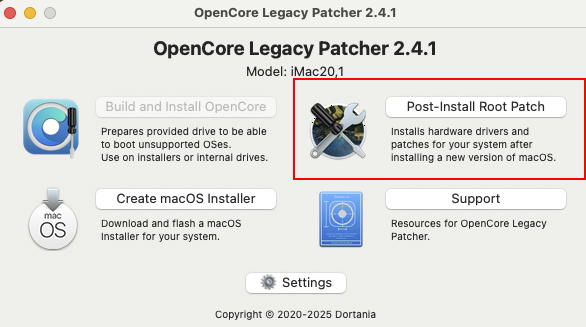
and don’t forget to check if you have some post-install patches to apply in Opencore Legacy, if you didn’t.
Are you on Windows, Linux, or macOS?
Nope, not it either. I got the loud pop after restarting Audirvana today, and after that no sound at all from any app on any OS. All the OSs and apps recognize the locally connected DAC, and Audirvana shows normal playback progress. So at this point I’m thinking the desktop amp is gone, and the pops may have been a precursor. I have a new small desktop amp on order that should be here in a couple of days, and we’ll see what happens.
1 Like
Well, I suppose you would have loved to see it otherwise. Hopefully the new device will perform as wanted.
1 Like
Well, it did, but…
The volume was quite low, even when turned up to maximum. I then substituted my main system DAC, and everything was fine. Put the old amp back in, everything still fine. Put the desktop DAC back with the old amp, again very low volume with the amp turned to max. So the DAC still showed up on OSs and apps, but something’s gone in the preamp section. So back the new amp goes, and I’ve ordered a new DAC.  (Topping E30 II, takes input to DSD512 without imposing its own digital filtering, and nicely priced.)
1 Like
I’d be looking for a ground-loop potential… 
Hopefully this will be a nice addition that will do the trick.
Audirvana Linux beta run perfectly in UPnP with Diretta Renderer (Qobuz PCM) even with DSD upsampling (even if stability depends of jumbo frames), I always have some issue of lost control of Audirvana Remote (after not using a while in particular, or sometimes after changing screen) but new Audirvana Remote is more stable than old one.
Sound Quality with Diretta Renderer is crazy, especially with last version.
I have a strange bug when sometimes display the player screen (with progress bar) it change to the next track…
I use Android Remote. And Install on Fedora.
A ground loop that only manifests as a loud pop at the beginning of the first track and is totally absent before or after that? Don’t think so. (Because I still heard the popping noise with the damaged DAC, just very low volume this time.)
What I want to see is whether this pop, which only started happening around the time of the app and remote betas, was caused by the DAC preamp section starting to go, or a current surge from Audirvāna or the remote creating the pop took out something in the preamp circuitry of the DAC. If the latter, that’s something Antoine and Damien will want to know. So let’s see if it still happens with the new DAC.
My point is, there might be some ground differential that set-up the failure of the preamp circuit, if there is residual voltage that builds-up and is suddenly shunted to ground… Ever touched a door knob and got a zap when the static electricity was dissipated?..
Another issue is when folks leave their components powered all day when not in use, where the component topology is put under stress from unnecessary heat build-up that accelerates component failures and random voltage spikes and droops from other devices on a circuit with a poor ground-path to earth.
The signal amplitude is intrinsically tied to the bit-depth of the output signal…
If you get uncorrelated noise output from the DAC, this is most likely related to a loss of sample-rate synchronization.
Yes, this is along the lines that I’m thinking.
The ground current thing is pretty far down the list next to that. First the DAC’s been connected exactly the same way for years and this only started happening a few weeks ago. If the circuit was such as to cause a buildup of potential that for some very strange reason has never discharged when the electrical connection to the DAC is made (when the computer connected to the DAC is turned on) or when any other audio app is employed, one would think it would have occurred at some point during those prior years. And as the preceding sentence suggests, the DAC only turns on when the desktop computer that powers it via USB is on.
Ground/earth potentials can change for a variety of reasons over time… 
There is a common ground-path for the power-plane of a computer platform… this includes the power-signal presented to the USB bus topology… Just something to consider.
I’m experiencing several issues when adding, playing, and editing favorited radio stations. I recorded a video demonstrating the problems.
The issues shown in the video are:
-
Interface freeze when right-clicking:
When I right-click on an item, the interface freezes for about 5–10 seconds. I paused the video at that moment but it lasts quite a while. -
Unable to edit or open previously added favorites:
After adding another station to favorites (in this case Groove Salad after adding Classic), I can’t edit the newer entry. Interface keeps opening the first item. -
FLAC HLS streams do not play:
I’m unable to play FLAC HLS streams such as:
https://hls.somafm.com/hls/groovesalad/FLAC/program.m3u8
However, AAC streams work, for some reason. Additionally, metadata is not displayed for these streams.
P.S. The built-in SomaFM entries do not include the highest quality streams. From my limited testing, the 256 kbps MP3 streams have noticeably better quality than the 128 kbps AAC versions.
Can you post the URL of the first radio you used and changed it’s metadata?