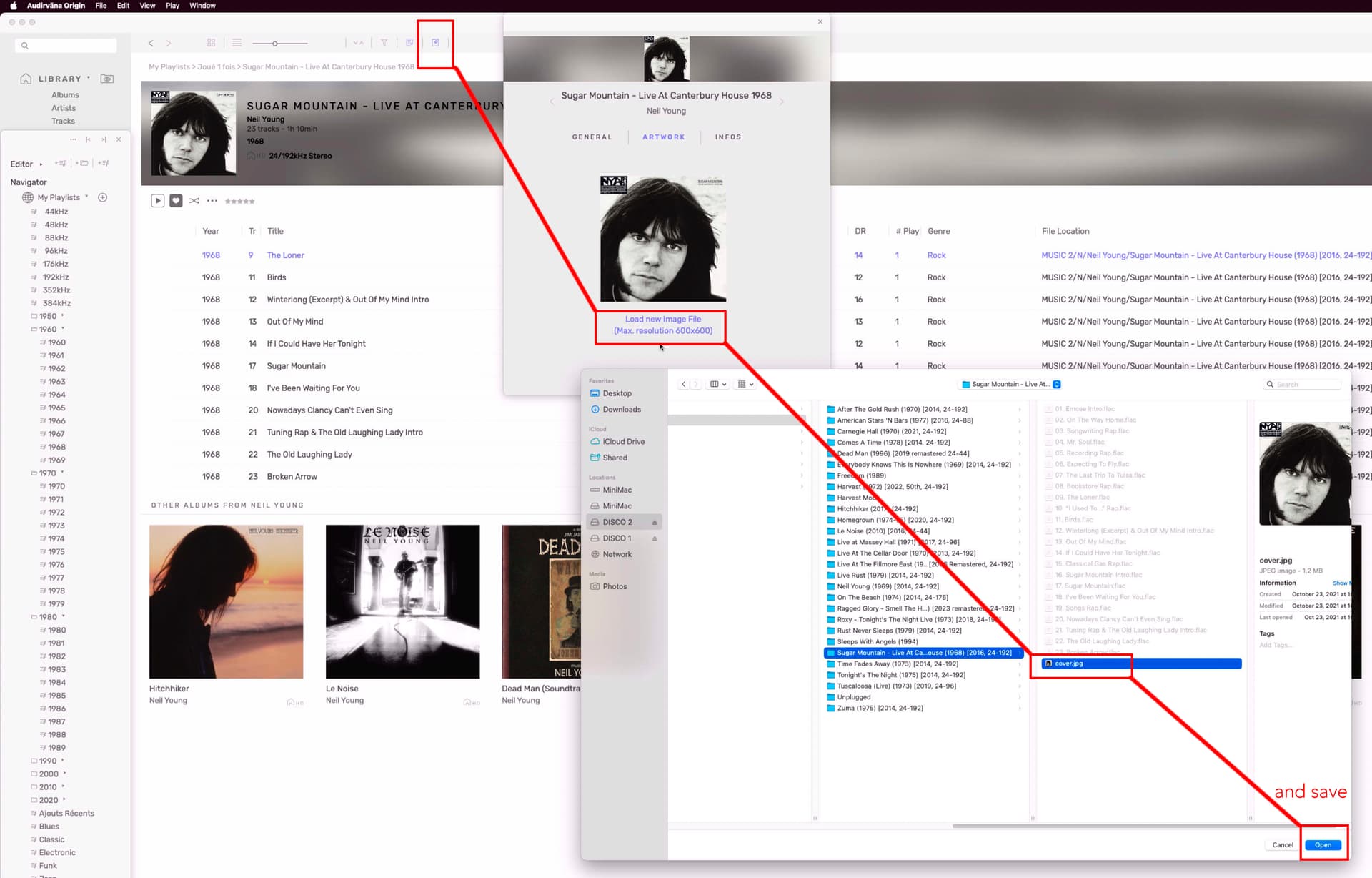
I’m trying to figure out how the album covers are processed by AS. I noticed in some cases that there is no album covers shown in AS when there is in the same album folder a subfolder that contains pictures.
I understand that it’s easy to drag and drop any picture to replace the album cover but this is not what I’m trying to understand.
In other words, I would like to know what are the rules used by AS:
To detect an album cover: shall the filename contain “cover” or something else?
To detect (if that is supported by AS) a folder from its name to look for any cover: apparently, having a subfolder named “Covers” does not work.
AND, by the way, is there any solution to add a booklet (PDF file) that was ignored during the Sync process?
Thanks!
So, cover shall be named cover.jpg and booklet booklet.pdf, and there shall be no subfolders.
I remember having seen in the change logs of one AS version that this has been improved by adding new possibilities and additional flexibilities.
Did I misread something?
According to this FAQ article, it says it reads metadata from the tracks, so embedded cover art.
Since all my cover art JPEGS are called ‘folder.jpg’ and the albums on the harddrive show cover art, I guess Audirvana does indeed read from the tracks.
it can be Folder.jpg or Even cover.png i guess, mine are always save by and arrange by me with Photoshop.
if there is no cover in the Library album View, and you put a cover in the tracks Folder of the album, it Will appear in the Library when sync…
but for me the best way is to embedded the cover, so put info panel, cover Tab, load an image and save, then you Will see in the Finder of the computer that all those tracks have been updated.
Ok, this is what I observed: putting a file named cover.jpg in the track folder triggers the sync process and the cover appears in the library.
But, the last paragraph of your post, I’m a bit lost: what do you mean by “info panel” and “cover tab”? Is it the panel you see after opening an album in the Library view but without selecting any track?
Do you mean that in that case, if you import a cover it will be embedded into all tracks metadata, which is not the case if you add a cover file into the tracks folder?
Sorry, but I’m a bit confused…
if you put just the cover in the Folder it is not embedded (stick) to the tracks.
if you put a Celine Dion in your Pink Floyd Folder it Will show Celine Dion. but if you load yourself the cover and save it with Audirvana it Will stick with the tracks…
if you gave me that album after without the cover inside i Will still see it, if you have just put a cover inside without embedded, and gave me the album without the cover inside the Folder… i Will see no cover when loaded back in Audirvana.
Do you mean that in that case, if you import a cover it will be embedded into all tracks metadata, which is not the case if you add a cover file into the tracks folder?. yes.
That is why you see in the tracks Folder after you save your cover…
the time of the tracks Will all be changed to today, now.
OK! I think I understood this (can’t be 100% sure…)! That explains why when you drag and drop a cover to an album in the Album view, it takes a few time to append the cover to all tracks.
Thanks for this. I learn something today.
I wish audirvana was allow you to display more than one image on the main screen. I scan both front and back album covers and would love to be able to display both when playing an album.
There is surely an application that can make a .pdf file
from multiple pictures.
Save it as Booklet.pdf
and put it in the same Folder as the tracks…
Acrobat pro will do this easily but a paid program…
Pretty sure They are many free…
but you will have to make them all until Audirvana make it available