A Linux user. Use the user you use when logging in and under whose account you made the SMB network mapping to the NAS drive. No need to edit the script, use the appropriate way.
i returned to the original shell script file as you say. But I have no clue what you mean unfortunately by ‘use the user you use when logging in’. I understand that is my Ubuntu username. Easy, as I have only one. But where to ‘use’ it?
Really appreciate your help btw. But I never ever used Linux before so a bit lost unfortunately. Just making this topic so hopefully other users can use for reference.
See: https://www.alpha-audio.net/review/audirvana-core-player-review-audirvanas-future/2/
Use your ubuntu username as the user.
I followed the instructions per the link and enable the service including my Ubuntu username. Also removed the remote app to be sure cache is empty and install again. When i click add folders the NAS folders still aren’t visible on the remote app. I’m browsing a bit through the file structure (e.g. the mnt folder) but still see nothing. On Ubuntu i do see all folders. The directory is called smb://diskstation.local/muziek/. As I only have one username on the Ubuntu it must be the user that connected to the NAS. Strange.
Do you see the folder or any subfolders in it, if there are subfolders? You won’t see files, the Audirvāna remote app only shows folders and not the content of the folder.
No the /mnt is empty when i open it on Audirvana remote. Also i see no other folders which may be representing the NAS.
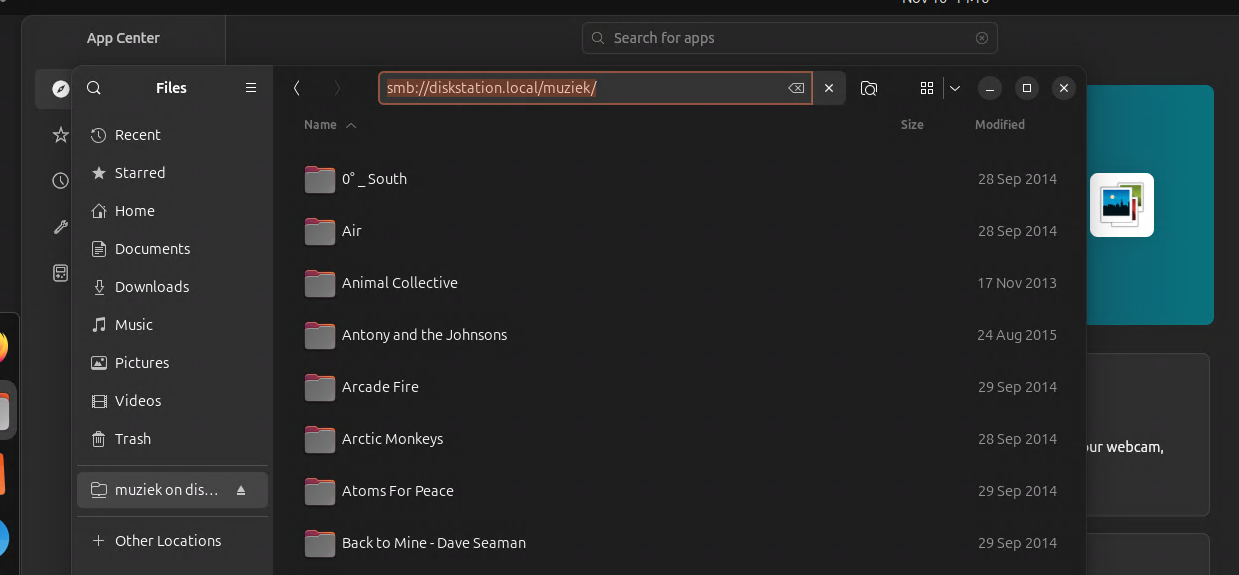
This is how my Ubuntu screen looks. I initially clicked ‘other locations’ on the left menu. It shows me two instances of Diskstation (my NAS). Selecting the first one let me connect via ‘afp’. The other one via smb, which i selected. As you see on the right, the folder loads with subfolders representing the artists. Inside are subfolders representing albums and then inside are the files.
It is not mounted as a drive. You need to explicitly mount the NAS as a drive in Linux: How To Easily Map A Network Drive On Ubuntu (GUI & commands) – RaspberryTips
A bit fed up with the mounting issue so i wanted to listen music. But now the remote app doesnt connect to Qobuz and when i connect to Qobuz it says request error. Rebooted the Ubuntu, removed the app from phone and reinstaller but still same issue. 
Qobuz app itself is working fine.
The remote on an android device which is connected to same audirvana has the same issue.
Edit: i inspected the log of audirvana via app. It says audirvana is in offline modus as there is no internet. But the pc has internet, i can just browse internet perfectly fine on it. Computer is hardwired and is connected around the clock. But obviously this issue keeps audirvana from connecting to qobuz.
Edit2: i saw another postung about audirvana starting before the computer actually established a network connection. As i enabled the autostart of audirvana (i think, still linux noob) i suspect the issue might be similar.
Well, I observed something. If I use that script indeed Audirvana has problems.
So:
- Install Audirvana
- Add in Startup using Startup Apps (Linux Mint)
- Restart
No problems at all.
But I don’t use network shares.
I will try to disable the script and try as you say. At least than i hope to qobuz back.
I solved the issue of failing Qobuz connection on my system. I disabled the autostart of Audirvana which was done via the script Audirvana delivers. According to Audirvana log files, there was no internet on the device but obviously the device had internet, it is hardwired on my LAN and other apps (e.g. webbrowser) were able to access internet. Since then, no issues at all. I must say my MacMini is always on and I even don’t have the ‘screen’ to go idle, although it’s headless. I’ll test it for a while before dipping into letting my system sleep as I suspect problem again.
1 Like
Exactly. I observed the same. But I don’t ned that script to put Audirvana in Startup as I said. Without it everything is good for me.
Ubuntu has a startup app as well. Now I have disabled the script i will put Audirvana in there and see if it works.
My new setup still have some two issues. Nevertheless, subscribed to Studio now so committed myself to fixing them!
Issues:
-
NAS drive still not mounted. I stopped trying after a lot of failures. As I use Qobuz 99% of the time anyhow not such a big deal. Feels as a personal let down though. I’m normally good with computer and even do coding professionally

-
I use Thincast to share screen from the Ubuntu MacMini to my (MAC OS) iMAC. However, it works and after some days it stops working. Thincast give a connection error although IP of Mac Mini didnt change nor did my local network. Restarting router is only thing that solved it.
update;
Thincast works again after a reboot of the router. So all good.
NAS still not mounted as i stopped trying.
Audirvana itself runs well. I have an occasional ‘request error’ on the remote in the middle of a music session. Sometimes it goes away after a minute but sometimes a reinstall of the entire is app on iphone is needed to make it work. Very inconvenient but i have no clue how to avoid it.