Origin 3.0 update question & observations

Hi all,

I hope everyone is well. I updated Origin to 3.0 last night and just have a few questions if I may?

Firstly, can Antonie or Damien confirm whether they have tinkered / improved the sound engine at all with this version? It could all be in my head but it sounded different to me, pulling more detail and much more focused sound stage. The overall presentation seemed more ‘up front’ too.

Secondly, a mild gripe I’m afraid - the layout is obviously different, some good and some not so good. When your flicking through the ‘Artists’ library and you enter a particular artist to view your albums any attempt to return back to the library either through the back button or other means takes you back to the beginning of the library, i.e ‘A’. Surely you should to return to where you previously were in the library whether it be K, M, U, etc? This is very annoying.

Thirdly, if I wanted to revert back to the previous version I’m assuming this is available? Just a case of saving files, deleting software and re-downloading form the Audirvana website?

Cheers, Paul

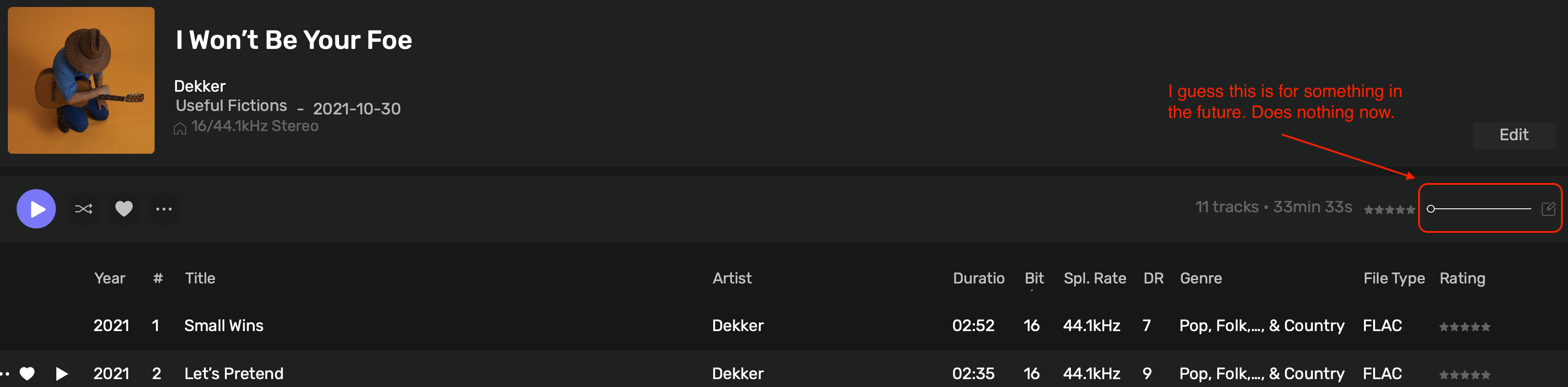
Not sure what this is for. Does nothing presently???

Increases the size of album artwork below the track listing.

so, first run AO 3.0.

As with most updates, would probably get used to new layout etc.

However, major update and still the sa,me annoyances.

!. each time I switch from one device to another I get reminded it “works with Audirvana” I know it does! Don’t need reminding every f*****g time !

  1. Still doesn’t remember my plugin preference on per device basis…… Really, after all this time?

I’ll stick with what I have.

And now, having tried 3.0, I have to log in every time I open my current copy of 2.6 - WTF Audirvana!

But, fortunately, off-line mode still works… Though a standalone app shouldn’t need to call home, at all.

Hi all,

Does anyone compared the SQ with 2.6 ? Not so much enthusiast to upgrade now …

Ok, the log in issue seems to have resolved itself… maybe some residue from trying out vers 3.0?

I have just updated to v3.0. I had no issues with the previous 2.6 release, but v3.0 has unexpectedly quit on me a couple of times, and I now hear a loud popping feedback noise when switching to new tracks (playing local FLAC files). There have also been other bugs when switching to new playlists where I am unable to start certain tracks.

Is there a way to downgrade to the previous stable 2.x release, as I’m not sure v3.0 is ready for general use?

Welcome…

It will be helpful if you were to provide more information regarding your computer platform and resources and its Audirvāna synergy in concert with your DAC capabilities… Please paste your debug information here (remove IP details) so to provide details in which to help with insights regarding your playback behavior…

:musical_notes: :eye: :nose: :eye: :musical_notes:

Thanks for the suggestion. Here is my debug information:

========================================
Audirvana Origin 3.0.0 (30000)

Running on MacBook Pro (14-inch, M5), Apple M5
macOS 26.5.1 ARM64 with 32GB physical RAM

NETWORK
Status: available
Local network access: allowed

REMOTE CONTROL SERVER:
Listening on
en0 IPv4:
on port 49495

LOADING/DECODING:
Max audio buffer size: 29696MB
Polarity Inversion:
Globally: OFF
Per track: ON

SIGNAL PROCESSING:
Internal DSP option not present

PLUGINS: NOT ACTIVE

UPSAMPLING:
r8brain not in use
r8brain filter parameters
Bandwidth = 99.5%
Stop band attenuation 218dB
Phase linear

AUDIO VOLUME:
Replay Gain: None
Volume step size: 1dB
Max allowed volume: 100
SW volume control: OFF

LIBRARY SETTINGS:
Sync list: 1 folders
AUTO: /Users/Music/Music Collection
Sync folders at startup: YES
iTunes/Music library synchronization: not synchronized
Sort and display order: en
Library database path: /Users/Library/Application Support/Audirvana/AudirvanaDatabase.sqlite

APPEARANCE SETTINGS:
UI theme: dark
Font size: regular
Language: System language
Show album covers in tracks list: yes
Source list sorted:
Library
Favorites
Playlists
Startup view: Library: Albums
Show local extended in source list: yes
Use media keys: yes
Use media keys for volume control: yes
Use Apple Remote: yes
Number of paired remotes: 0
Remote pairing code required: yes
Screen saver disabled: no

=================== AUDIO DEVICE ========================

Active method: Local

Max. memory for audio buffers: 29696MB

Local Audio Engine:
CoreAudio
Exclusive access: ON
Integer mode: ON
Use max I/O buffer size: ON
Actual I/O buffer frame size: 512

Preferred device:
Bowers & Wilkins Px8 S2 USB
Model UID:Px8 S2 USB:19B5:0040
UID:AppleUSBAudioEngine:Bowers & Wilkins:Px8 S2 USB:FP45373-2534-0003841:4

Active Sample Rate: 44.1kHz
Hog Mode is off

Bridge settings:
Sample rate limitation: none
Sample rate switching latency: none
Limit bitdepth to 24bit: OFF
Mute during sample rate change: OFF

Selected device: MacBook Pro Speakers
Manufacturer: Apple Inc.
Model name: Apple Inc. MacBook Pro Speakers
Model UID: Speaker
UID: BuiltInSpeakerDevice
Plays with Audirvāna: No
Override manufacturer settings: No
ID 0x47

4 available sample rates up to 96000Hz
44100
48000
88200
96000
Audio buffer frame size : 14 to 4096 frames
Current I/O buffer frame size : 512

Volume Control
Physical: Yes
Virtual: Yes
Max volume alert: Enabled

MQA capability
Auto-detect MQA devices: Yes
Not automatically detected, user set to not MQA

DSD capability
Unhandled (PCM conversion) with boost gain of 6dB

Device audio channels
Preferred stereo channels L:1 R:2
Channel bitmap: Ox3, layout:
Channel 0: L
Channel 1: R

Audio channels in use
Number of channels: 2
Use as stereo device only: No
Simple stereo device: Yes

1 output streams:
Number of active channels: 2, in 1 stream(s)
Channel #0 :Stream 0 channel 0
Channel #1 :Stream 0 channel 1

Stream ID 0x48 2 channels starting at 1
4 virtual formats:
2 ch Mixable linear PCM Interleaved 32 little endian Signed Float 96kHz
2 ch Mixable linear PCM Interleaved 32 little endian Signed Float 88.2kHz
2 ch Mixable linear PCM Interleaved 32 little endian Signed Float 48kHz
2 ch Mixable linear PCM Interleaved 32 little endian Signed Float 44.1kHz

4 physical formats
2 ch Mixable linear PCM Interleaved 32 little endian Signed Float 96kHz
2 ch Mixable linear PCM Interleaved 32 little endian Signed Float 88.2kHz
2 ch Mixable linear PCM Interleaved 32 little endian Signed Float 48kHz
2 ch Mixable linear PCM Interleaved 32 little endian Signed Float 44.1kHz

Local devices found : 1
Device #0: ID 0x47 MacBook Pro Speakers
Manufacturer: Apple Inc.
Model UID: Speaker
UID: BuiltInSpeakerDevice
Model name: Apple Inc. MacBook Pro Speakers

UPnP

UPnP network interface
Available Network interfaces:
Wi-Fi

UPnP devices found : 2
Device #0: ID 0x0 : Lounge Stereo WiFi - Audioengine
UID: uuid:FF98FCDE-AD01-0D21-E10D-67ECFF98FCDE
Location: http://192.168.68.102:49152/description.xml
Manufacturer: Linkplay Technology Inc.
Model name: WiiM Pro Plus-ED8E
Device #1: ID 0x0 : [LG] webOS TV OLED55C1PTB
UID: uuid:e4ace531-d4a6-b84f-6fc8-c67e31f58b76
Location: http://192.168.68.107:1262/
Manufacturer: LG Electronics.
Model name: LG TV

Chromecast

Chromecast devices found : 1
Device #0: Lounge Stereo WiFi - Audioengine
ID: 3f35c4a7f7de90cd1ae4fe0a1c89627e
Model name: WiiM Pro Receiver
… So a couple of things…

  • You have allocated approximately 30GB of your 32GB System RAM for playback audio buffers memory… this is starving the macOS platform operational efficiencies/synergy… Reduce this to 8-10GB.

  • It appears that your music library resides on the System drive… this is not optimum, it is not a good idea to have the OS and the music library on the same drive, as this creates an unnecessary performance bottleneck.

  • In the case of the B&W phones, Limit bit-depth to 24bit.

  • If playing DSD files as part of your playback scenario, add some ‘Sample rate switching latency’ and set ‘Mute during sample rate change’ to “ON”

:musical_notes: :eye: :nose: :eye: :musical_notes:

Thanks,

Didn’t realise there was an option to limit memory allocation, but I have reduced this to 8 GB. I have also reduced the input bit depth to 24 bit for the B&W headphones, which seems to have helped significantly reduce the popping noise when changing tracks (though not 100% eliminate it in all cases).

I’m mainly playing FLACs or other PCM formats, ranging from 16 bit / 44.1 kHz to 24 bit / 192 kHz, not DSD.

I can’t do much about my library location, but it’s on a local SSD with extremely high bandwidth - my disk I/O is a very, very low % of bandwidth, so I don’t think that’s an issue on my system (it certainly wasn’t with the older version of Origin).

Thanks again for the tips.

Origin 3.0 has added a horizontal scroll on my 13” laptop screen when in settings, Annoying.

Being a mere mortal I can hear no difference in audio between 3.0 and 2.6.6.

The one plugin I use works in 2.6.6.

So, that’s where I’ll stay.

When the music library resides on the same drive as the System/OS, it is primarily related to operational transfer interrupts especially with contiguous ‘real-time’ playback of larger music files in concert with memory throughput and available RAM resources… Best practice is to maintain the music library on a separate locally attached drive (not a partition)… There is no dedicated audio playback subsystem support employed in the chipsets, as exists for video processing…
For reference:

  • MBP 14", M5 - (153GB/s memory bandwidth)
  • MBP 14", M1 Pro (2021) - (200GB/s memory bandwidth)
  • MBP 14", M1 Max (2021) - (400GB/s memory bandwidth)

**The residual intermittent “popping” may be related to output signal-level related clipping distortion in the DAC and more randomly, clipping distortion related to Intersample Overs (ISP) created in the master encodings that overload the DAC… Try reducing the output volume by -3dB. (Some DACs have more headroom than others)

** Your 192kHz files will be truncated to 96kHz.. You may find that creating a ‘Custom’ sample-rate conversion strategy will produce the best overall playback experience with the B&W phones…

(‘Custom’ r8Brain sample-rate conversion strategy)

  • 44.1kHz → 88.2kHz
  • 48kHz → 96kHz
  • 88.2kHz → 88.2kHz
  • 96kHz → 96kHz
  • 176.4kHz → 88.2kHz
  • 192kHz → 96kHz
  • 352.8kHz → 88.2kHz
  • 384kHz → 96kHz

DAC Input settings: DSD - convert to PCM

:musical_notes: :eye: :nose: :eye: :musical_notes:

A few days ago I installed version 3.0 for Mac.
So far I haven’t had any bugs.
I found the new interface very good, I enabled the SIGNAL PROCESSING SUITE for the trial period and I intend to buy it in a few days.

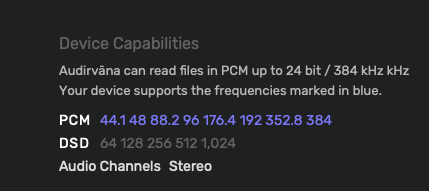
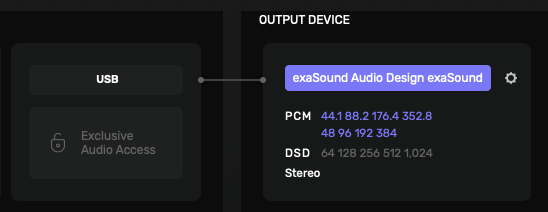
Since updating to 3.0, my exaSound e20 DAC is no longer recognized as a DSD-capable device. Origin worked perfectly through 2.6.5 / 2.6.6, but the upgrade to 3.0 grayed out DSD (DoP 1.1) playback of DSD files and conversion of PCM files to DSD. The exaSound driver is set correctly to Core Audio. Nothing else on the computer side changed, only the upgrade to Origin 3.0.

Update: Thanks for a quick email response from customer support! I reverted to version 2.6.6. I’ll wait for further revisions before upgrading again to 3.0.

The obvious question… Have you shutdown the computer and Audirvāna (and Network architecture to the DAC if used…) and rebooted the computer and Network architecture) and restarted Audirvāna again, then making sure the e20 is selected as the output DAC?

It will be helpful if you were to provide more information regarding your computer platform and resources and its Audirvāna synergy in concert with your DAC capabilities… Please paste your debug information here (remove IP details) so to provide details in which to help with insights regarding your playback behavior…

:musical_notes: :eye: :nose: :eye: :musical_notes:

Yes, I shutdown the computer, rebooted, and checked that the e20 was the selected output device. It’s too late to run the debug because I reverted to Origin 2.6.6. But if this is helpful:

Apple Mac mini, 3.2GHz 6-Core i7 “Late 2018” with 64GB DDR4, 512GB SSD, OS 15.7.7 (Sequoia)
exaSound e20 Mk III DAC, attached to the Mac Mini via USB cable
SSDs with hi res and DSD albums, attached to the Mac via USB cables

To recap: Origin ver. 2.6.6 communicates flawlessly with the exaSound DAC. I set r8brain upsampling to DSD256 for all PCM albums. Ver. 2.6.6 plays all the ripped SACDs, DSD128 and DSD256 albums in my library perfectly.

Ver. 3.0 grayed out the DSD functions of the exaSound DAC. Screenshots, below, were taken when 3.0 was installed, prior to reverting to 2.6.6.

Weird… What does exaSound say about this…? :thinking:

In the mean-time…

:musical_notes: :eye: :nose: :eye: :musical_notes: