When starting a DSD playback after the Exclusive Audio (lock icon) is off and using ASIO, I get a couple little quiet crackles and then a loud painful pop out of the speakers. When I stop the DSD playback with the Exclusive Audio turned on, and then restart the playback there is no pop generated. This happens with any DSD file I have. There is no upsampling. Windows 10 PC connected to a Gustard DAC.


I think the answer dates back 10 years. Perhaps it would be time to update the situation.
Je pense que la réponse remonte à 10 ans. Il serait peut-être temps de faire le point sur la situation.
This statement above speaks to how the condition is addressed in Audirvana…
The question is why one would not want to engage ’ Exclusive Audio’ mode ?
1 Like
Please excuse my ignorance, as I am new to this game. I disengage Exclusive Audio to switch from kernel mode to ASIO to play DSD. Then when playback begins, Exclusive Audio enables & the pop is heard. As was mentioned earlier, once Exclusive Audio is on, no pops when switching tracks or albums.
It has beenn my experience that playback is not possible without Exclusive Audio mode engaged.
Thank you for the reference in your initial post. Am I reading it right that if Audirvana introduced a small delay in DSD starting up the pops would go way?
To get more insights on configuring Audirvana, you can access the online ‘Help/User Guide’ found in the top-right corner of the ‘Computer’ and ‘Output Device’ settings windows and the other pop-up windows in ‘Settings’…
Where is @Antoine ?
The Audirvana team responds during office hours. It is weekend now.

Hi @12317,
Can you send us a copy of the "Debug Info“ when you have this issue? You can get it in Audirvana Settings>My account.
Note: When you click on the Debug Info button, Audirvana automatically copies all its content. Please paste it in response to this message
Thank you Antoine for your response, but I may have a solution. I’ve added some delay when the SPL changes and the problem doesn’t happen.
As well, I wasn’t taking advantage of kernel streaming. Now no need to switch to ASIO when playing DSD.
1 Like
This problem is back. Worst when using Extreme and High kernel streaming, but still present with Standard. With Extreme/High setting, it sounds like a second of a track then it plays the selected track. Occurs all the time. With Standard setting, it occurs sometimes and it’s more of a pop. It occurs no matter how long of a delay is set for SPL changes.
I am trying to use oversampling using DSD64 and SoX. This problem occurs with DSD, but not when using PCM and SoX oversampling.
I will send a copy of the Debug Info to you Antoine.
1 Like
An additional observation. After listening using Standard setting, there was no issue for several hours. Then I switched to Extreme to see what would happen and no issues for about 30 minutes and then the problem appeared. It was like a counter had to get to a certain point to start the problem. Once the problem occurred, it happened before every track was played.
This behavior would tell you that it is not Audirvāna related… If it were, this behavior would be consistent from the start…. Best to look at your memory allocations and if using network distribution, your transmission pathway…. You must ask yourself, why more folks are not having this behavior in playback…


Yes I also experience this same issue, when upsampling to DSD64 in exclusive mode, If I stream any song I can hear the pop, I use the:
-Audrivana Debian package on DietPi
-I stream Tidal
-Output is a USB powered D10s.
Here’s the debug info in case it is helpful:
“Audirvana Studio 3.0
Linux 6.12.75+rpt-rpi-v8 aarch64 ARM64 with 7.7GB physical RAM
Connected account of : x
NETWORK
Status: available
REMOTE CONTROL SERVER:
Listening on on port x
LOADING/DECODING:
Max audio buffer size: 3934MB
Polarity Inversion:
Globally: OFF
Per track: ON
SIGNAL PROCESSING:
Convolver: OFF
Internal EQ: OFF
Crossfeed: OFF
Balance: OFF
UPSAMPLING:
r8brain to DSD128 with filter type B 7th order
r8brain filter parameters
Bandwidth = 99.5%
Stop band attenuation 218dB
Phase linear
AUDIO VOLUME:
Replay Gain: None
Volume step size: 1dB
Max allowed volume: 100
SW volume control: OFF
LIBRARY SETTINGS:
Sync list: 0 folders
Sync folders at startup: NO
Sort and display order: en
Library database path: /home/audirvana/.local/share/audirvana/AudirvanaDatabase.sqlite
Local audio files fingerprinting
Tracks with no MBID: 0
ACTIVE STREAMING SERVICES
TIDAL: Connected as PREMIUM
APPEARANCE SETTINGS:
UI theme: dark
Font size: regular
Language: System language
Show album covers in tracks list: yes
Source list sorted:
Local
Favorites
Playlists
Streaming
Radios
Podcasts
Startup view: Favorites: Artists
Show local extended in source list: yes
Use media keys: yes
Use media keys for volume control: yes
Number of paired remotes: 2
=================== AUDIO DEVICE ========================
Active method: Local
Max. memory for audio buffers: 3934MB
Local Audio Engine:
Linux ALSA library 1.2.14
Advanced Linux Sound Architecture Driver Version k6.12.75+rpt-rpi-v8.
Preferred device:
D10s
Model UID:D10s
UID:Topping D10s at usb-0000:01:00.0-1.1, high speed
Currently playing in Integer Mode:
Device: 2ch 32bits Integer, 8 bytes per frame 5644.8kHz
Active Sample Rate: 5644.8kHz
Bridge settings:
Sample rate limitation: 192kHz
Sample rate switching latency: none
Limit bitdepth to 24bit: OFF
Mute during sample rate change: OFF
Selected device: D10s
Manufacturer:
Model name: D10s
Model UID: D10s
UID: Topping D10s at usb-0000:01:00.0-1.1, high speed
Plays with Audirvāna: No
Override manufacturer settings: No
USB Vendor ID: 0x152a
USB Product ID: 0x8750
11 available sample rates up to 11289600Hz
44100
48000
88200
96000
176400
192000
352800
384000
2822400
5644800
11289600
Volume Control
Physical: Yes
Virtual: No
Max volume alert: Disabled
MQA capability
Auto-detect MQA devices: Yes
Not automatically detected, user set to not MQA
DSD capability
Raw DSD (32bit MSB)
Device audio channels
Preferred stereo channels L:0 R:1
Channel bitmap: Ox3, layout:
Channel 0 mapped to 0
Channel 1 mapped to 1
Audio channels in use
Number of channels: 2
Use as stereo device only: No
Simple stereo device: No
1 output streams:
Number of active channels: 2, in 1 stream(s)
Channel #0 :Stream 0 channel 0
Channel #1 :Stream 0 channel 1
2 ch Integer PCM 32bit little endian 44.1kHz
2 ch Integer PCM 32bit little endian 48kHz
2 ch Integer PCM 32bit little endian 88.2kHz
2 ch Integer PCM 32bit little endian 96kHz
2 ch Integer PCM 32bit little endian 176.4kHz
2 ch Integer PCM 32bit little endian 192kHz
2 ch Integer PCM 32bit little endian 352.8kHz
2 ch Integer PCM 32bit little endian 384kHz
2 ch DSD 32bit big endian in 32bit chunk 2822.4kHz
2 ch DSD 32bit big endian in 32bit chunk 5644.8kHz
2 ch DSD 32bit big endian in 32bit chunk 11289.6kHz
Local devices found : 2
Device #0: bcm2835 Headphones
Manufacturer:
Model UID: bcm2835 Headphones
UID: bcm2835 Headphones
Model name: bcm2835 Headphones
Device #1: D10s
Manufacturer:
Model UID: D10s
UID: Topping D10s at usb-0000:01:00.0-1.1, high speed
USB Vendor ID: 0x152a
USB Product ID: 0x8750
Model name: D10s
UPnP
UPnP network interface
Available Network interfaces:
wlan0
UPnP devices found : 2
Device #0: 65" OLED
UID: uuid:xx
Location: http://192.168.x.x:x/dmr
Manufacturer: Samsung Electronics
Model name: QA65S90DAUXSA
Device #1: Family Room TV
UID: uuid:xx
Location: http://192.168.x.x:x
Manufacturer: Microsoft Corporation
Model name: Windows Media Player
Chromecast
Chromecast not started”
I can tell you that the E30 II Topping model has this pop or tick sound when starting playback, and a prior DAC I had with an ESS chip had a louder one. So it seems to be a problem with certain DACs, though it might be nice if it was possible for Audirvana to introduce a setting that would help with these particular DACs.
1 Like
@Jud @htalloush
I think it is more related to playing DSD files on certain platforms with systems running small levels of System RAM and then allocating a large playback preload memory allocation… In this case above, 4GB of the 7GB System RAM… This may not be the case, but with such low levels of available RAM, the latency appears to be a problem with DSD file playback on certain platform/systems… I don’t have this problem with my M2 Max Mac Studio (64GB) and 13GB playback memory allocated.
There is a function available in Audirvāna to add latency when switching sample-rates and to mute the signal when switching sample-rates…
This can be DAC platform related, especially if it does not support ‘soft mute’ of the 1-bit PDM signal transition to zero.
I don’t understand why one would not want to engage exclusive control in this scenario, where it gives Audirvāna the best possible functional control of the data-flow.
- In the case of the E30 II DAC that @Jud is pointing-to, we can see the digital-domain ‘Soft Mute’ module in the block diagram below and this can be bypassed in the case of DSD playback:
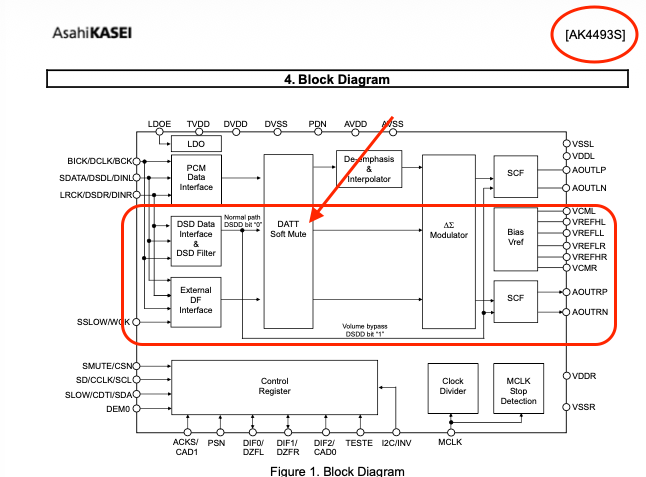
- In the case of the D10s DAC that @htalloush is using, we can see the digital-domain ‘Soft Mute’ in the DSP module in the block diagram below and there is no bypass for DSD signals.

Note:
In the case of ESS DAC chipsets as being employed in the D10s DAC topology, we can see from the block diagram above, that there is no direct pathway to output for 1-bit PDM (DSD) signals… DSD is decimated to PCM for Hyperstream processing.


1 Like
Thank you both for the replies and the suggestions to fix, I did indeed not experience this pop with other DACs, The Fiio K17 worked perfectly fine, so yes this could be specific to the Topping D10s, interesting to see that you experienced the same issue with an earlier Topping model as well,
Unfortunately, these settings did not fix the pop:
Set “Additonal latency when changing sample rate” to >= 0.5 seconds, and,
Toggle ”Mute during sample rate changes” to Enable,
Reducing tracks pre-load memory allocation to < 512MB,
This issue doesn’t occur when running Audirvana through the Mac Mini which works normally with the Topping D10s, I only experience it when running Audirvana on DietPi(Linux).
Also this happens regardless of exclusive mode, I think Audirvana has exclusive access by default on Linux?
The pop only occurs when initially locking the audio device to play a song. Once the first song is running, It won’t pop again even after pausing and resuming playback or if I skip forward to the next song.
Thank you for your insights and taking the time to respond, Yes I agree It would be nice if we saw a fix for this older DACs on this platform.
Since the behavior is related to platform architecture and OS, the condition is most likely in the court of the DAC platform system architecture and implementation in regard to DSD playback, and related to computational platform/OS synergistic latency …
In the case of the D10s, For best playback results, I suggest converting all DSD files to PCM in Audirvāna as this will offload the decimation DSP from the ESS chipset… Audirvāna will decimate the DSD signal to the logically highest PCM sample-rate supported by the DAC and the Hyperstream processing will take it from there.. 
I have 32GB of RAM in my system and less than half devoted to Audirvana preload, so I don’t think that’s it. Someone who develops audio software who also has an E30 II reported the same thing to me.