If this is the kind you support your paid customers than I musy say this is one of the worst platforms I have ever used or subscribed to so far….
I have been requesting to advise as how can I stream Native DSD files through UPnP using Audirvana and even shared all the details but the reponse time is so pathetic which is now making me think as why am I even paying for such services.
This is my last attempt and if your team is really interested to close this permanently, respond back or I am happy to go for a refund of my money.
As mentioned I was to use Audirvana over my network devices like Eversolo DMP A6 or Wiim Pro or Marantz Sacd 30N or CXN V2 to play native DSD files which I can see on Audirvana.
Where do you see that the Eversolo DMP A6 receives DSD files for playback via the Ethernet interface?
Where do you see that the WiiM Pro can play DSD files?
Both the Marantz SACD 30N and the CXN V2 streamer only play DSD files via a server connection or NAS
The CXN V2 plays DSD64 and DSD128 via DoP (DSD over PCM) transmission on the USB bus.
Audirvāna is a player…
What is pathetic, is that it took me less than 10 minutes to get the insights about your components and their DSD playback capabilities and it appears you have not done much research to help yourself… Did you ever contact your component manufacturers for support insights?
Audirvāna is not responsible for the capabilities of your platform architectures or network architecture.
I guess you are one of the patent members or someone who loves the platform. It’s very easy to judge people and give comments that it took you less than 10 minutes to get the insights about my components and their DSD playback capabilities and you thought that I had not done my research.
First of all Mr. Oversmart, you should not comment until you know the whole story and don’t try to teach others as if you know everything.
All my components mentioned here supports Native DSD Playback and my intent to subscribe to Audirvana Studio where I am paying a subscription cost from my pocket was to use my NAS full of DSD files or albums play on these devices using Audirvana which is not happening.
Though I officially sent them an email and it’s almost a week and there was no response from them which made me think if this is the kind of support whcih should be expected from a platform like Audirvana.
Hope you understood the concern and now better speak when needed and keep you mouth shut if you don’t know anything.
I didn’t state that native DSD was not supported by a couple of your components… I am pointing-out to you that these devices don’t support DSD playback via UPnP unless attached to a PC based server, or NAS via UPnP protocol… You must use the proprietary protocol(s) supported by Eversolo and Marantz and Cambridge to access those files from your NAS… To be able to play those files from Audirvāna via UPnP protocol, you must have a DAC that supports UPnP protocol playback… The Eversolo, Marantz and Cambridge devices use proprietary UPnP protocol to access those DSD files on a server or NAS, via their user-interface software control… Any DSD files residing on the NAS are accessible via the proprietary media access control interface of the platform(s) via UPnP.
This is typical… (From the CXN V2 user manual…)
The CXN (V2) can play content from many different physical sources and this section will explain what you need to do to access and play your locally stored digital music collection. ‘Locally Stored’ means the digital music files you have on your PC, Mac or Network Attached Storage devices (NAS).*
To stream local content, you will need the following hardware and software running in your network:
1. Your Cambridge Audio CXN (V2) Network Player.
2. A mobile device such as a smartphone or tablet on which you can run the StreamMagic app, or by accessing your collection via the front panel controls.
3. A hard drive, computer or NAS containing your compatible digital music files.
Both, actually. Audirvana operates as what’s called an ad hoc UPNP server and control point. The other necessary component for UPnP playback is a renderer, in this case provided by the software on the streamer.
@rajiv.kumar1984 Hi. When you say the Wiim supports native DSD: The most recent information I was able to find (July 2025) on the Wiim user forums says the Wiim converts DSD files to PCM for playback. Has this changed since July 2025? So there should be sound, but the files are converted internally by the Wiim to PCM as far as I can tell. Please let me know if I have the wrong impression.
I’m having a hard time finding good information on the Eversolo’s specifications for UPnP input resolution. Can you (or someone else) point me to them? Thanks.
As you well know… The reality is that Audirvāna is the DSD file player in the context of UPnP playback protocol functionality … It is not a slave to the Eversolo, Marantz, Cambridge and WiiM devices…
This is what I am pointing out… The scenario is not what you believe it to be… Audirvāna is a player… not a server…
Audirvāna looks for a library folder or folders, on the path that it has been pointed-to on your network or locally attached storage device in the ‘LOCAL’ settings configuration… When the path has been established, Audirvāna will retrieve the file , run it through the audio-engine and subsequently send the signal to the chosen output bus, (in your scenario, the Ethernet bus) and transmitted via UPnP protocol to a DAC or Streamer/DDC that is capable of receiving the UPnP digital-audio signal being sent to it by the Audirvāna audio-engine/player.
You are conflating UPnP playback from your devices using their proprietary operational functionality when connected to a NAS or PC server, with the Audirvāna player, sending signals to a DAC or Streamer/DDC capable of receiving UPnP digital-audio data from a player… If the devices supported UPnP playback from another player or playback source, you wouldn’t be griping about the inability to play native DSD files… If you don’t believe this to be true, contact your device manufacturer(s) for technical insight(s) on the playback of files via a network connection using UPnP protocol for the reception of those files transmitted from a source player… in this case, Audirvāna.
Audirvāna is not corollary to the expected type of synergistic file server in the context of these device operating systems and not corollary to a NAS…
Media Server
A UPnP AV media server is the UPnP-server (“master” device) that provides media library information and streams media-data (like audio/video/picture/files) to UPnP clients on the network. It is a computer system or a similar digital appliance that stores digital media, such as photographs, movies, or music and shares these with other devices.
UPnP AV media servers provide a service to UPnP AV client devices, so-called control points, for browsing the media content of the server and requesting the media server to deliver a file to the control point for playback. Universal Plug and Play - Wikipedia
All WiiM devices, except for the WiiM Mini, support DSD audio file playback. These devices convert DSD content into PCM data for playback, with a sample rate of up to 192kHz.
Here are the ways you can play DSD audio files on WiiM devices:
1. Using USB Disks with WiiM Amp or WiiM Ultra
Store the DSD audio files on a USB disk.
Insert the USB disk into the WiiM Amp or WiiM Ultra.
Open the WiiM Home app:
Go to the Browse tab.
Select USB to browse and play the DSD files.
2. Using a DLNA Media Server
WiiM devices fully support DLNA Media Servers. To play DSD audio files:
Use a DLNA Media Server that supports DSD audio files.
Yep, what I was still seeing in the Wiim forums as of July of this year.
Please note there was a potentially confusing summary by Wiim of a firmware update that resolved a problem with DSD playback, but the conclusion of forum members was that the update did not confer native DSD playback capability; the Wiim was still converting internally to PCM.
If conversion to PCM is what Rajiv is complaining of, then the exclusive potential solution lies with Wiim. If he doesn’t get any playback at all, that is a different matter.
Regarding input resolution for the Eversolo streamer: I see an owner’s thread on Audio Science Review where one commenter says input resolution over Wi-Fi is limited to 24/192 and suggesting output to an external DAC for higher resolutions. Can anyone confirm this, and whether Ethernet input has the same limitation?
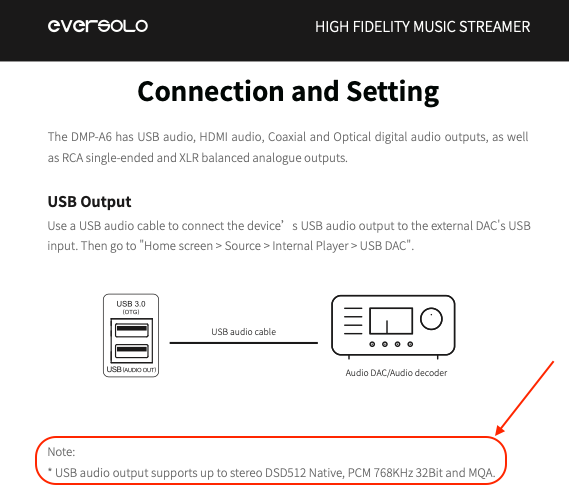
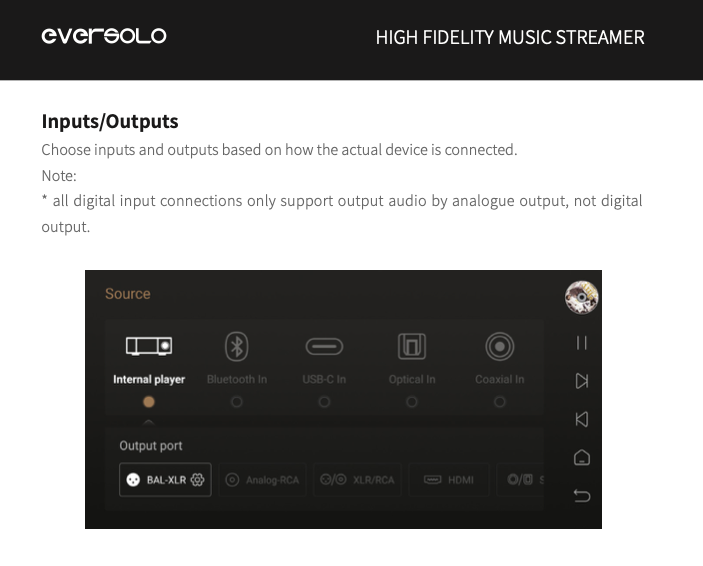
There are no specifications for the Ethernet interface sample-rate support... This is probably due to the how files are accessed via a PC server or NAS or as the streaming content interface or from its onboard SSD storage or attached storage… it is primarily a stand-alone-file player/storage/ internet streaming device… Pages 25 through 29 of the User Manual describe the ‘Connection and Setting’… The USB input supports up to DSD512 and 768kHz PCM, so we can extrapolate that DSD file playback via USB is capable to DSD512 (native) and DoP playback up to DSD256 (However, all DSD signals are decimated by the ESS chipsets to PCM for processing before output)
Hi @rajiv.kumar1984 , I‘m sorry that you feel that way about the help I provided over email. I sent you an email today regarding your issue, as I would like to check your setup directly to see what is going on.


 What you call a “file player” is commonly called a “server” in the UPnP context. See for example