Hi
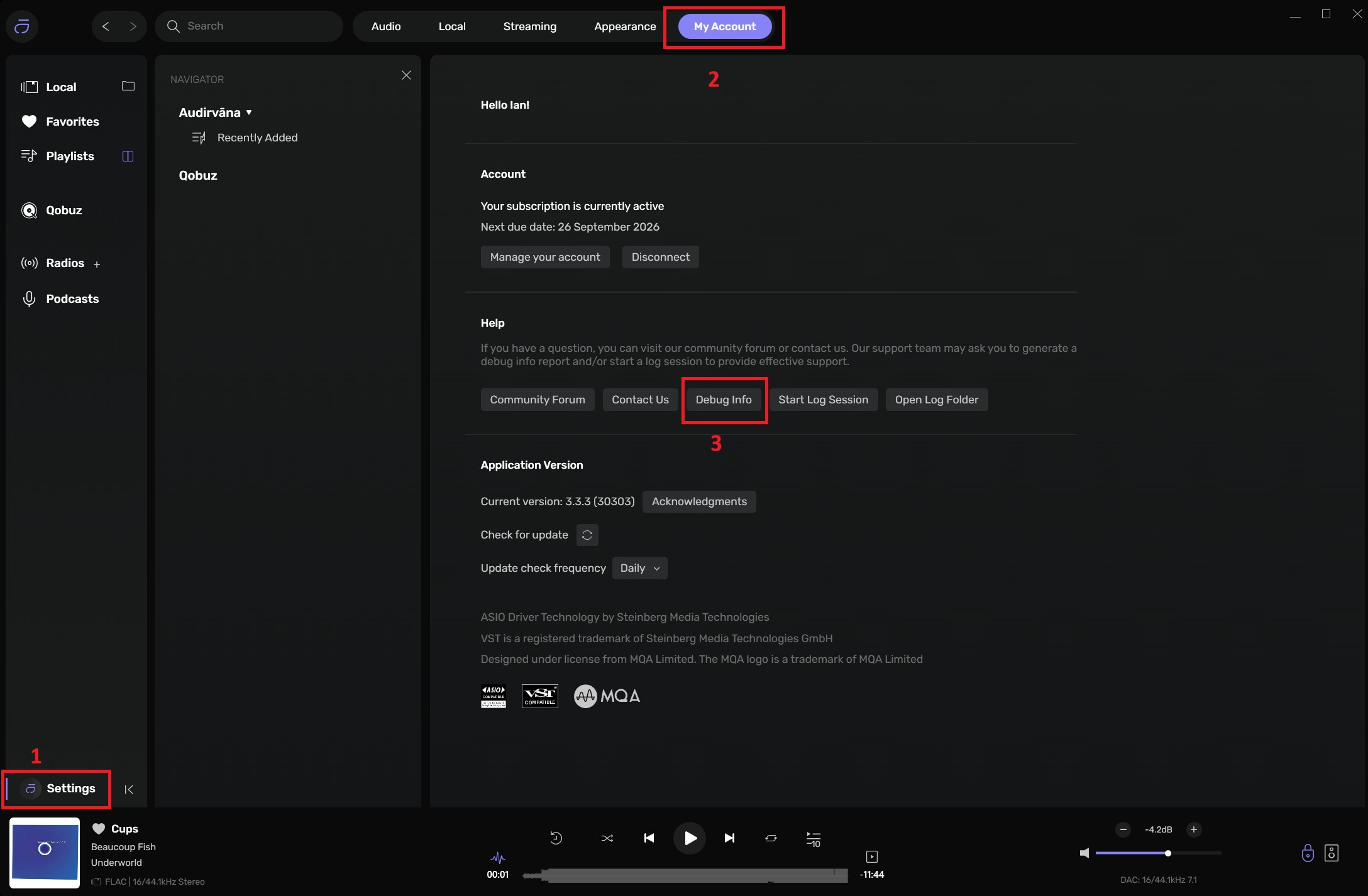
Forgive me, I am new to Audirvana. What exactly are you asking for in terms of debug info and where do I find it/generate what you need?
Sorry for my naivety
Colin
Hi
Forgive me, I am new to Audirvana. What exactly are you asking for in terms of debug info and where do I find it/generate what you need?
Sorry for my naivety
Colin
My fear is in a different scenario, where AI exerts itself into the biological world through CRISPR DNA manipulations ( clustered regularly interspaced short palindromic repeats)…
My fear is in a different scenario, where AI exerts itself into the biological world through CRISPR DNA manipulations ( clustered regularly interspaced short palindromic repeats)…
That was not my fear when employing Google AI to identify and resolve my clicking problem. And I employ common sense!
There was no doubt in my mind that you were engaging an Artificial Intelligence agent, with clear-headed logical awareness, to provide some insightful and contextual solution to the behavior you were experiencing… Fully considering, that engagement of an AI agent brings more than just a resulting set of relevant points to adopt or consider, as means to reach a solution. 
However, since folks here on the forum are engaging with AI agents, some aware and some not so aware… this is as good, as any place to shed light on the subject. I am certain a virtual agent will soon be able to handle most user questions and problems related to their Audirvāna playback scenario…
I am aware that most AI users, are not thinking about a time in the very near future, because of the power theses machines are accumulating and usurping, by virtue of our engagements, when these quasi-sentient machines will exert their AI will, AI psyche and biases into the biological domain…
I think, all you have to do, reviewing any statement whether from a United States Nincompoop President, or Idiote United States Vice President, or an AI Chatterer, including the, love of my LIFE, CLAUDE, who knows the all of me through my writings, is use common sense. Of course in order to utilise this “commonsense” you need to be reasonably well educated. I know. We are all going to hell.
Well… when you become the arbiter of truth and reality for us all here on this spaceship we call “Earth”… let us know…


I think you’ve got the drift… As
I’m ready baby to let you know all. I bow to your common sense.
As requested debug data whilst running a 24/192 file. More info since my last post
Get same issue running Jriver and Qobuz direct on win 11 laptop. DSD plays no issues via Jriver on My win 10 laptop
I disabled my VST files, no change to the problem, so it seems to be localised to the Win11 machine
Any help you can offer is much appreciated. It would be acceptable to down sample to 96k if all else fails
Audirvana Studio 3.3.3 (30303)
Running on ASUSTeK COMPUTER INC. Vivobook_ASUSLaptop M1605YA_M1605YA
Windows 11 (26200) x86_64 with 8GB physical RAM
Connected account of : Colin Weaving
NETWORK
           Status: available

           Available network interfaces:

                          Vodafone ({15f948a9-0dd3-407a-92da-e2f6ed4837cf}) is PUBLIC

           Windows Defender Firewall status for this instance of Audirvana Studio

                          Active profile types: all

                          Private profile:

                                         Firewall: enabled

                                         Inbound: blocked

                                         Outbound: allowed

                                         Notifications: enabled

                          Public profile:

                                         Firewall: enabled

                                         Inbound: allowed

                                         Outbound: allowed

                                         Notifications: enabled
REMOTE CONTROL SERVER:
           Listening on

           2a0a:ef40:ef5:da01:3324:2454:81b3:f8e2

           192.168.1.132

            on port 59390
LOADING/DECODING:
           Max audio buffer size: 6140MB

           Polarity Inversion:

                          Globally: OFF

                          Per track: ON
SIGNAL PROCESSING:
           Convolver: OFF

           Internal EQ: OFF

           Crossfeed: OFF

           Balance: OFF
PLUGINS: ACTIVE in offline mode
                          VST3 plugin #0: C:\\Program Files\\Common Files\\VST3\\DiracLiveProcessor.vst3

                                         ClassID: 56535456376C6564697261636C697665

                          VST3 plugin #1: None

                          VST3 plugin #2: None

                          VST3 plugin #3: None
UPSAMPLING:
           r8brain not in use

           r8brain filter parameters

           Bandwidth = 99.5%

           Stop band attenuation 218dB

           Phase linear
AUDIO VOLUME:
           Replay Gain: None

           Volume step size: 1dB

           Max allowed volume: 100

           SW volume control: OFF
LIBRARY SETTINGS:
           Sync list: 2 folders

                          AUTO: \\\\wdmycloud\\Public\\Shared Music\\

                          Manual: (OFFLINE) D:\\Music

           Sync folders at startup: YES

           Sort and display order: en

           Library database path: C:\\Users\\cweav\\AppData\\Local\\Packages\\Audirvana.Audirvana-4118-9684-d80dbb7827cd_q3nymrkmej12j\\LocalCache\\Local\\Audirvana\\Audirvana\\AudirvanaDatabase.sqlite
Folders synchronization in progress:
           \\\\wdmycloud\\Public\\Shared Music\\

           Deep Synch: yes

           Scanning 2125/17333: \\\\wdmycloud\\Public\\Shared Music\\Music\\ALL MUSIC\\Christopher Cross\\Christopher Cross\\desktop.ini
Local audio files fingerprinting
Fingerprinting track 17254/27368 : \\\\wdmycloud\\Public\\Shared Music\\Music\\10,000 Maniacs\\Love Among The Ruins\\05 10,000 Maniacs - Green Children.flac
ACTIVE STREAMING SERVICES
Qobuz: Connected as Qobuz Studio
APPEARANCE SETTINGS:
           UI theme: dark

           Font size: regular

           Language: System language

           Show album covers in tracks list: yes

           Source list sorted:

                          Local

                          Favorites

                          Playlists

                          Streaming

                          Radios

                          Podcasts

           Startup view: Local Library: Artists

           Show local extended in source list: yes

           Use media keys: yes

           Use media keys for volume control: yes

           Use legacy Bonjour protocol: no

           Number of paired remotes: 1

           Remote pairing code required: yes

           Screen saver disabled: no
=================== AUDIO DEVICE ========================
Active method: Local
Max. memory for audio buffers: 6140MB
Local Audio Engine:
           WASAPI

           Use max I/O buffer size: ON
Preferred device:
           Speakers (Naim DAC-V1. Audiophilleo.com)

           Model UID:USB\\VID_279A&PID_0001&REV_0110&MI_01

           UID:\\\\?\\SWD#MMDEVAPI#{0.0.0.00000000}.{92fc9fa7-abe6-471a-a965-59d5f61889b9}#{e6327cad-dcec-4949-ae8a-991e976a79d2}
Currently playing in Integer Mode:
Device: 2ch 24bits Integer, 6 bytes per frame 192kHz
Active Sample Rate: 192kHz
Bridge settings:
           Sample rate limitation: none

           Sample rate switching latency: none

           Limit bitdepth to 24bit: OFF

           Mute during sample rate change: OFF
Selected device: Speakers (Naim DAC-V1. Audiophilleo.com)
           Manufacturer: (Generic USB Audio)

           Model name: Naim DAC-V1. Audiophilleo.com

           Model UID: USB\\VID_279A&PID_0001&REV_0110&MI_01

           UID: \\\\?\\SWD#MMDEVAPI#{0.0.0.00000000}.{92fc9fa7-abe6-471a-a965-59d5f61889b9}#{e6327cad-dcec-4949-ae8a-991e976a79d2}

           Plays with Audirvāna: No

           Override manufacturer settings: No

           USB Vendor ID: 0x279a

           USB Product ID: 0x0001
8 available sample rates up to 384000Hz
           44100

           48000

           88200

           96000

           176400

           192000

           352800

           384000
Volume Control
           Physical: Yes

           Virtual: No

           Max volume alert: Disabled
MQA capability
           Auto-detect MQA devices: No

           Not automatically detected, user set to not MQA
DSD capability
Unhandled (PCM conversion) with boost gain of 6dB
Device audio channels
           Preferred stereo channels L:0 R:1

           Channel bitmap: Ox3, layout:

                          Channel 0: L

                          Channel 1: R
Audio channels in use
           Number of channels: 2

           Use as stereo device only: No

           Simple stereo device: No
1 output streams:
           Number of active channels: 2, in 1 stream(s)

                          Channel #0 :Stream 0 channel 0

                          Channel #1 :Stream 0 channel 1

           2 ch Integer PCM 16bit little endian 44.1kHz

           2 ch Integer PCM 24bit little endian 44.1kHz

           2 ch Integer PCM 16bit little endian 48kHz

           2 ch Integer PCM 24bit little endian 48kHz

           2 ch Integer PCM 16bit little endian 88.2kHz

           2 ch Integer PCM 24bit little endian 88.2kHz

           2 ch Integer PCM 16bit little endian 96kHz

           2 ch Integer PCM 24bit little endian 96kHz

           2 ch Integer PCM 16bit little endian 176.4kHz

           2 ch Integer PCM 24bit little endian 176.4kHz

           2 ch Integer PCM 16bit little endian 192kHz

           2 ch Integer PCM 24bit little endian 192kHz

           2 ch Integer PCM 16bit little endian 352.8kHz

           2 ch Integer PCM 24bit little endian 352.8kHz

           2 ch Integer PCM 16bit little endian 384kHz

           2 ch Integer PCM 24bit little endian 384kHz
Local devices found : 2
           Device #0: Speakers (Realtek(R) Audio)

                          Manufacturer: Realtek

                          Model UID: HDAUDIO\\FUNC_01&VEN_10EC&DEV_0256&SUBSYS_10431F3F&REV_1000

                          UID: \\\\?\\SWD#MMDEVAPI#{0.0.0.00000000}.{7170f6cb-ca36-48e7-a8a5-42d1d31dfb6c}#{e6327cad-dcec-4949-ae8a-991e976a79d2}

                          Model name: Audio Device on High Definition Audio Bus

           Device #1: Speakers (Naim DAC-V1. Audiophilleo.com)

                          Manufacturer: (Generic USB Audio)

                          Model UID: USB\\VID_279A&PID_0001&REV_0110&MI_01

                          UID: \\\\?\\SWD#MMDEVAPI#{0.0.0.00000000}.{92fc9fa7-abe6-471a-a965-59d5f61889b9}#{e6327cad-dcec-4949-ae8a-991e976a79d2}

                          USB Vendor ID: 0x279a

                          USB Product ID: 0x0001

                          Model name: Naim DAC-V1. Audiophilleo.com
UPnP
UPnP network interface
           Available Network interfaces:

                          WiFi
UPnP devices found : 0
Chromecast
Chromecast devices found : 0
Certainty is beholding to the evidence revealed by time and informed consideration, as filtered by interpretive ego-biases… We are all limited by our certainties… I submit humbly, the ultimate arbitration of truth and reality to a higher power…
You are allocating 6.1GB of your 8GB System RAM for playback memory buffering… Reduce your playback buffer allocation to 2GB or lower… probably lower because you are employing the Dirac Live processing plug-in…
You must be vigilant against creating clipping distortion in the plug-in or anywhere in the signal flow through to the output to the DAC… Gain-structure management is essential to high-quality signal output… You could be overloading the Dirac plug-in.
Again, some DAC’s have the capacity to handle dynamic signal peaks and some have less capacity to handle those signal peaks… In your case, I suggest that you limit the ‘Device Input’ sample-rate to 24bit… The DAC V-1 is not capable of handling 32bit playback it is capable to 24bit… Audirvāna performs all DSP calculations with 64bit precision and subsequently converts the result to 32bit for output to the DAC unless the device input signal is limited to 24bit output in the ‘Device Input’ setting “Maximum Sample rate”.
However, available System RAM is essential to the operational synergy with Audirvāna processing… I/O operations, DSP processing, and other RAM related functions of the computational platform, like memory bus bandwidth … Giving the platform more operational RAM resources in support of Audirvāna processes will mitigate the potentials for data-flow interrupts, that precipitate anomalies in the playback signal…
It appears that you have your library stored in a cloud storage device… This will introduce latency in the signal transmission requests and transfer of the data… If there is insufficient available I/O buffer memory, this will further exacerbate latency related interrupts in the operational efficiencies of the platform OS + Audirvāna and will produce drop-outs (intermittent interrupts in the contiguous flow of the digital-audio data) because there is no error correction in the asymmetrical USB digital-audio protocol transfer to the DAC.
Also, The DAC does not support DSD file playback.. In-order to play DSD files on this system in Audirvāna, they must be converted to PCM for playback… This is achieved by configuring the ‘Device Input’ setting ‘Native DSD streaming method’ to “None (convert to PCM)” This will decimate the 1-bit PDM (DSD) file to the logically highest PCM sample-rate capability of the DAC (in your case 352.8kHz for playback via USB) .
Also, keep your USB cable short and manage your power/ground/earthing by placing your playback system components on a common circuit from a single outlet from the wall, so to mitigate the potential for grounding/earthing differential voltages from migrating across the system… Isolate any ethernet connection from the computer by virtue of optical or galvanic circuitry. and be cognizant of the propagation of RF and EMF influences in the playback system
Thank you very much. I’ll implement the changes you suggest and give feedback on the results.
A couple of small clarifications. My local drive is usually a USB hard disc. I didn’t attach it for the debug process as It takes some time to build the library (>1K CD rips and dowloads) I use the cloud store as a backup and can’t seem to remove it from Audirvana. For the debug data I was running Qobuz over a pretty high speed network.
The DAC V1 was upgraded to support DSD in its later releases and I have successfully played DSD files through it. Dirac however automatically converts it to PCM so I don’t buy them anymore 
All my cables are protected by ferrite cores which removed the noise I had on the initial installation but good advice on RF.
Colin
The debug report (above) shows the DAC does not support DSD and does not support DoP transmission of DSD files… This is because you are using WASAPI…
Playing DSD natively in Audirvāna
Using Windows, you must go to the website of your USB device’s manufacturer and find the ASIO driver for it.
Once done, you must select this driver as an audio output:
Audirvana will decimate the DSD file before presenting it to the Plug-in module… And this will be dependent on the sample-rate/bit-depth capability of the Dirac plug-in.
When a drive is synced with Audirvāna, each change you make in this drive (add/remove/edit tracks) is automatically applied and will trigger a sync for the drive.
If you don’t want your network drive synced each time you restart Audirvāna, you must turn off “Rescan network folders at each start”.
Although there is no limit to the number of tracks being synced with Audirvāna (we have users with more than 500,000 tracks synced!!!), You could experience some issues during the sync, such as tracks being duplicatedor never-ending sync; in such cases, we recommend you look at the corresponding article in our knowledge base before contacting us.
Hi. I implemented the changes you suggested but sadly no joy. I transferred a 192 file to my win 10 laptop and it played fine. So I guess the issue lies with the Win11 machine. The Naim driver was never updated past win 10 so I presume an interaction there is causing the problem. In the short term I have limited my files to 24/96 and all is good. I may investigate the driver issue later but for now I’m happy with the performance of Audirvana
I suggest reviewing Pages 3 through 6 of the DAC-V1 User Guide regarding the Windows set-up and make sure the USB Volume setting is ‘PC Volume’… Make sure you do not have your S/PDIF cable connected.
It is hard to imagine that you cannot play 24/352.8kHz files…
What does Naim say about this behavior?
I asked them when MS forced me to move to Win 11, and they were clear that as the DAC was now end of life they would not be investing in an upgrade to Win 11. Its only now that I have come across 24/192 software it has become an issue. I will investigate it further over coming days but I was keen to actually listen to some music so just set it to run at 96Ks/s which is fine for me
You might like to consider a streaming DDC that provides a USB output connected to the V1 that is compatible with Win 11… something like this:
@Jud might give you more insights…
@WelshColin, purely up to you of course whether you’d want to spend money on a streamer, a new DAC, or stay with your present system. If you want to make changes, I’m sure people here will have plenty of opinions. 
Hi am having loud clicks and pops almost like sticks banging during listening to Ella Radio.
I have move ram to 8 Gig, and back to 3,794 MB and same results.
can someone please help, thanks.
Audirvana Studio 3.3.3 (30303)
Running on Mac mini (2023), Apple M2 Pro
macOS 26.6.2 ARM64 with 16GB physical RAM
Connected account of : Jeffrey White
NETWORK
Status: available
Local network access: allowed
REMOTE CONTROL SERVER:
Listening on
en0 IPv4: 192.168.1.191
en0 IPv6: 2600:1702:3b0:3900:4b8:46da:6ee0:e298
en0 IPv6: 2600:1702:3b0:3900::2f
en1 IPv6: 2600:1702:3b0:3900:4a9:1fc2:df12:22f1
en1 IPv6: 2600:1702:3b0:3900::3f
en1 IPv4: 192.168.1.232
on port 56454
LOADING/DECODING:
Max audio buffer size: 3794MB
Polarity Inversion:
Globally: OFF
Per track: ON
SIGNAL PROCESSING:
Convolver: OFF
Internal EQ: OFF
Crossfeed: OFF
Balance: OFF
PLUGINS: NOT ACTIVE
UPSAMPLING:
r8brain not in use
r8brain filter parameters
Bandwidth = 99.5%
Stop band attenuation 218dB
Phase linear
AUDIO VOLUME:
Replay Gain: None
Volume step size: 1dB
Max allowed volume: 100
LIBRARY SETTINGS:
Sync list: 1 folders
AUTO: /Users/jeffreywhite/Music/For Mac Mini/Audirvana Music
Sync folders at startup: YES
iTunes/Music library synchronization: not synchronized
Sort and display order: en_US
Library database path: /Users/jeffreywhite/Library/Application Support/Audirvana/AudirvanaDatabase.sqlite
Local audio files fingerprinting
Tracks with no MBID: 1244
ACTIVE STREAMING SERVICES
Qobuz: Connected as Qobuz Studio
APPEARANCE SETTINGS:
UI theme: dark
Font size: large
Language: System language
Show album covers in tracks list: yes
Source list sorted:
Local
Favorites
Playlists
Streaming
Radios
Podcasts
Startup view: Local Library: Albums
Show local extended in source list: yes
Use media keys: yes
Use media keys for volume control: yes
Use Apple Remote: yes
Number of paired remotes: 2
Remote pairing code required: yes
Screen saver disabled: yes
=================== AUDIO DEVICE ========================
Active method: UPnP
UPnP network interface
Selected Network interface: Ethernet
Available Network interfaces:
Ethernet
Wi-Fi
Preferred device: [UPnP] AirLens Model UID:PS Audio AirLens UID:uuid:ADFA5F0C-2C29-11EA-8518-985E1B009B3D
Currently playing to UPnP device at 32 bits 44.1kHz
Selected device: AirLens
Manufacturer: PS Audio
Model name: AirLens
Model UID: PS Audio AirLens
UID: uuid:ADFA5F0C-2C29-11EA-8518-985E1B009B3D
Plays with Audirvāna: No
Override manufacturer settings: No
UPnP device at http://192.168.1.203:38400/description.xml
ID 0x0
10 available sample rates up to 768000Hz
44100
48000
88200
96000
176400
192000
352800
384000
705600
768000
Volume control: Yes
Max volume alert: Disabled
MQA capability
Auto-detect MQA devices: Yes
Not automatically detected, user set to not MQA
DSD capability
Raw DSD (msb)
Device audio channels
Preferred stereo channels L:0 R:1
Channel bitmap: Ox3, layout:
Channel 0: L
Channel 1: R
UPnP set capabilities
Maximum PCM frequency set: 768000Hz
Maximum PCM bitdepth set: 32
Maximum DSD rate set: DSD256
Number of channels: 2
Avoid RAW PCM streams: No
Universal gapless playback active: No
Unwanted playback stop workaround: No
UPnP capabilities
DLNA 1.5: Yes
Service versions:
AVTransport: v1
RenderingControl: v1
ConnectionManager: v1
Native gapless playback: Yes
Missing events workaround: Yes
Can play native DSD: Yes
Volume control: scalar
Output configuration
Number of channels: 2
Use as stereo device only: No
Output streams: 1
Active channels: 2, in 1 stream(s)
Channel #0: Stream 0 channel 0
Channel #1: Stream 0 channel 1
Stream ID 0x0 0 channels starting at 0
33 virtual formats:
2 ch Non-mixable linear PCM Interleaved 16 little endian Signed Integer 44.1kHz finite length
2 ch Non-mixable linear PCM Interleaved 24 little endian Signed Integer 44.1kHz finite length
2 ch Non-mixable linear PCM Interleaved 32 little endian Signed Integer 44.1kHz finite length
2 ch Non-mixable linear PCM Interleaved 16 little endian Signed Integer 88.2kHz finite length
2 ch Non-mixable linear PCM Interleaved 24 little endian Signed Integer 88.2kHz finite length
2 ch Non-mixable linear PCM Interleaved 32 little endian Signed Integer 88.2kHz finite length
2 ch Non-mixable linear PCM Interleaved 16 little endian Signed Integer 176.4kHz finite length
2 ch Non-mixable linear PCM Interleaved 24 little endian Signed Integer 176.4kHz finite length
2 ch Non-mixable linear PCM Interleaved 32 little endian Signed Integer 176.4kHz finite length
2 ch Non-mixable linear PCM Interleaved 16 little endian Signed Integer 352.8kHz finite length
2 ch Non-mixable linear PCM Interleaved 24 little endian Signed Integer 352.8kHz finite length
2 ch Non-mixable linear PCM Interleaved 32 little endian Signed Integer 352.8kHz finite length
2 ch Non-mixable linear PCM Interleaved 16 little endian Signed Integer 705.6kHz finite length
2 ch Non-mixable linear PCM Interleaved 24 little endian Signed Integer 705.6kHz finite length
2 ch Non-mixable linear PCM Interleaved 32 little endian Signed Integer 705.6kHz finite length
2 ch Non-mixable linear PCM Interleaved 16 little endian Signed Integer 48kHz finite length
2 ch Non-mixable linear PCM Interleaved 24 little endian Signed Integer 48kHz finite length
2 ch Non-mixable linear PCM Interleaved 32 little endian Signed Integer 48kHz finite length
2 ch Non-mixable linear PCM Interleaved 16 little endian Signed Integer 96kHz finite length
2 ch Non-mixable linear PCM Interleaved 24 little endian Signed Integer 96kHz finite length
2 ch Non-mixable linear PCM Interleaved 32 little endian Signed Integer 96kHz finite length
2 ch Non-mixable linear PCM Interleaved 16 little endian Signed Integer 192kHz finite length
2 ch Non-mixable linear PCM Interleaved 24 little endian Signed Integer 192kHz finite length
2 ch Non-mixable linear PCM Interleaved 32 little endian Signed Integer 192kHz finite length
2 ch Non-mixable linear PCM Interleaved 16 little endian Signed Integer 384kHz finite length
2 ch Non-mixable linear PCM Interleaved 24 little endian Signed Integer 384kHz finite length
2 ch Non-mixable linear PCM Interleaved 32 little endian Signed Integer 384kHz finite length
2 ch Non-mixable linear PCM Interleaved 16 little endian Signed Integer 768kHz finite length
2 ch Non-mixable linear PCM Interleaved 24 little endian Signed Integer 768kHz finite length
2 ch Non-mixable linear PCM Interleaved 32 little endian Signed Integer 768kHz finite length
2 ch Non-mixable linear PCM Interleaved 8 little endian Signed Integer 2822.4kHz finite length
2 ch Non-mixable linear PCM Interleaved 8 little endian Signed Integer 5644.8kHz finite length
2 ch Non-mixable linear PCM Interleaved 8 little endian Signed Integer 11289.6kHz finite length
0 physical formats
Current device state
Transport info:
CurrentTransportState: PAUSED_PLAYBACK
CurrentTransportStatus: OK
CurrentSpeed: 1
Media info:
NrTracks: 0
MediaDuration: 1:41:26
CurrentURI: http://192.168.1.191:49152/audirvana/audio_r_1.wav
CurrentURIMetadata:
dc:titlemp3, 44100 Hz, stereo, 192 kb/s</dc:title>
upnp:albumArtURIhttp://static.airable.io/22/15/878684.png</upnp:albumArtURI>
upnp:albumElla Radio</upnp:album>
upnp:classobject.item.audioItem.musicTrack</upnp:class>
http://192.168.1.191:49152/audirvana/audio_r_1.wav
	nextURI: http://192.168.1.191:49152/audirvana/audio_r_3.wav
	nextURIMetadata: <DIDL-Lite xmlns:dc="http://purl.org/dc/elements/1.1/" xmlns:upnp="urn:schemas-upnp-org:metadata-1-0/upnp/" xmlns="urn:schemas-upnp-org:metadata-1-0/DIDL-Lite/" xmlns:dlna="urn:schemas-dlna-org:metadata-1-0/">
	PlayMedium: NETWORK
	RecordMedium: NOT_IMPLEMENTED
	WriteStatus: NOT_IMPLEMENTED
Transport actions: Play,Stop,Seek,X_DLNA_SeekTime,Next,Previous
UPnP / DLNA supported protocols :
http-get::audio/mpeg:DLNA.ORG_PN=MP3
http-get::audio/mpeg:DLNA.ORG_PN=MP3X
http-get::audio/mp4:DLNA.ORG_PN=MP4
http-get::audio/mp4:DLNA.ORG_PN=AAC_ISO_192
http-get::audio/mp4:DLNA.ORG_PN=AAC_ISO_320
http-get::audio/vnd.dlna.adts:DLNA.ORG_PN=AAC_ADTS
http-get::audio/vnd.dlna.adts:DLNA.ORG_PN=AAC_ADTS_192
http-get::audio/vnd.dlna.adts:DLNA.ORG_PN=AAC_ADTS_320
http-get::audio/x-ms-wma:DLNA.ORG_PN=WMABASE
http-get::audio/x-ms-wma:DLNA.ORG_PN=WMAFULL
http-get::audio/x-ms-wma:DLNA.ORG_PN=WMAPRO
http-get::audio/x-ms-wma:DLNA.ORG_PN=WMALSL
http-get::audio/x-sony-oma:DLNA.ORG_PN=ATRAC3plus
http-get::audio/mpeg:*
http-get::audio/L16:
http-get::audio/aiff:
http-get::audio/wav:
http-get::audio/flac:
http-get::audio/aac:
http-get::audio/m4a:
http-get::audio/x-aac:
http-get::audio/x-dsf:
http-get::audio/mp4:
http-get::audio/vnd.dlna.adts:
http-get::audio/x-dff:
http-get::audio/x-wav:
http-get::audio/x-flac:
http-get::audio/x-aiff:
http-get::audio/x-m4a:
http-get::audio/x-alac:
http-get::audio/dsd:
http-get::audio/x-dsd:
Device description (live, downloaded from device)
<?xml version="1.0"?> 1 0 urn:schemas-upnp-org:device:MediaRenderer:1 AirLens PS Audio http://www.psaudio.com This model is a connected audio module which supports the UPnP/DLNA standard AirLens CDMCM-210-004 uuid:ADFA5F0C-2C29-11EA-8518-985E1B009B3D http://www.psaudio.com DMR-1.50 image/jpeg 48 48 24 /images/small.jpg image/jpeg 120 120 24 /images/large.jpg image/png 48 48 24 /images/small.png image/png 120 120 24 /images/large.png urn:schemas-upnp-org:service:RenderingControl:1 urn:upnp-org:serviceId:RenderingControl /service/RenderingControl1.xml /service/RenderingControl_control /service/RenderingControl_event urn:schemas-upnp-org:service:ConnectionManager:1 urn:upnp-org:serviceId:ConnectionManager /service/ConnectionManager1.xml /service/ConnectionManager_control /service/ConnectionManager_event urn:schemas-upnp-org:service:AVTransport:1 urn:upnp-org:serviceId:AVTransport /service/AVTransport1.xml /service/AVTransport_control /service/AVTransport_event CDM414006230770 http://192.168.1.203:38400Device description (cached from discovery)
<?xml version="1.0"?> 1 0 urn:schemas-upnp-org:device:MediaRenderer:1 AirLens PS Audio http://www.psaudio.com This model is a connected audio module which supports the UPnP/DLNA standard AirLens CDMCM-210-004 uuid:ADFA5F0C-2C29-11EA-8518-985E1B009B3D http://www.psaudio.com DMR-1.50 image/jpeg 48 48 24 /images/small.jpg image/jpeg 120 120 24 /images/large.jpg image/png 48 48 24 /images/small.png image/png 120 120 24 /images/large.png urn:schemas-upnp-org:service:RenderingControl:1 urn:upnp-org:serviceId:RenderingControl /service/RenderingControl1.xml /service/RenderingControl_control /service/RenderingControl_event urn:schemas-upnp-org:service:ConnectionManager:1 urn:upnp-org:serviceId:ConnectionManager /service/ConnectionManager1.xml /service/ConnectionManager_control /service/ConnectionManager_event urn:schemas-upnp-org:service:AVTransport:1 urn:upnp-org:serviceId:AVTransport /service/AVTransport1.xml /service/AVTransport_control /service/AVTransport_event CDM414006230770 http://192.168.1.203:38400UPnP devices found : 3
Device #0: ID 0x0 : AirLens
UID: uuid:ADFA5F0C-2C29-11EA-8518-985E1B009B3D
Location: http://192.168.1.203:38400/description.xml
Manufacturer: PS Audio
Model name: AirLens
Device #1: ID 0x0 : OPPO BDP-103
UID: uuid:140479c0-58f3-1cef-84bf-6cfdb9d9019b
Location: http://192.168.1.77:2870/dmr.xml
Manufacturer: OPPO
Model name: OPPO BDP-103
Device #2: ID 0x0 : Denon AVR-X6200W
UID: uuid:5f9ec1b3-ff59-19bb-8530-0005cd681503
Location: http://192.168.1.243:8080/description.xml
Manufacturer: Denon
Model name: *AVR-X6200W
Local
Max. memory for audio buffers: 3794MB
Local Audio Engine:
CoreAudio
Actual I/O buffer frame size: 0
Local devices found : 2
Device #0: ID 0x9c NT Headless
Manufacturer: @@@
Model UID: 00000000-0000-0000-331D-0103803E2278
UID: 00000000-0000-0000-331D-0103803E2278
Model name: @@@ NT Headless
Device #1: ID 0x49 Mac mini Speakers
Manufacturer: Apple Inc.
Model UID: Speaker
UID: BuiltInSpeakerDevice
Model name: Apple Inc. Mac mini Speakers
Chromecast
Chromecast devices found : 0