Popping sound and and a narrow-frequency single-tone parasitic signal when changing tracks
Have this problem using Kernel Streaming only. All other options of AS are switched off. So: No Processing, No Upsampling, No Volume Levelling, No Volume Control. The sources are WAV 16/44.1 or FLAC 16/44.1 or FLAC 24/96. NO switching PCM->DSD->PCM between the songs. It happens sometimes at the beginning of the next song which is in the same format and resolution like the previous.
But it doesn’t happen at all when I switch from Kernel Streaming to ASIO playing exactly the same songs in the same order.
Tried out with an delta-sigma DAC Marantz HD-DAC1 and with R2R DAC HoloAudio Cyan. The problem is occurring only with Kernel Streaming.
The option “Mute during sample rate change” is always switched ON. But, as I wrote above, it happen also without changing sample rate.
@ SUPPORT:
I suppose it is a problem with implementation of the “Kernel Streaming” in AS running, in my particular case, under Win11 on HP notebook.
More information is needed… Please paste your debug information report here so we can see your computer platform configuration and Audirvāna set-up in relationship to your playback system architecture… It is found here:


Audirvana Studio 2.11.1 (21101)
Windows 11 (22631) x86_64 with 16GB physical RAM
Connected account of : Peter Grabka
NETWORK
Status: unavailable
Available network interfaces:
foj-24985 ({bcd7c850-4f96-4383-910e-67e9481dd86f}) is private
Windows Defender Firewall status for this instance of Audirvana Studio
Active profile types: all
Private profile:
Firewall: enabled
Inbound: allowed
Outbound: allowed
Notifications: enabled
Public profile:
Firewall: enabled
Inbound: blocked
Outbound: allowed
Notifications: enabled
LOADING/DECODING:
Max audio buffer size: 7936MB
Polarity Inversion:
Globally: OFF
Per track: ON
SIGNAL PROCESSING:
Internal EQ: OFF
Effect Plugins: NOT ACTIVE
UPSAMPLING:
r8brain not in use
r8brain filter parameters
Bandwidth = 99.5%
Stop band attenuation 218dB
Phase linear
AUDIO VOLUME:
Replay Gain: None
Max allowed volume: 100
SW volume control: OFF
LIBRARY SETTINGS:
Sync list: 1 folders
AUTO: C:\myMusic
Sync folders at startup: YES
Sort and display order: en
Library database path: C:\Users\pgrab\AppData\Local\Packages\Audirvana.Audirvana-4118-9684-d80dbb7827cd_q3nymrkmej12j\LocalCache\Local\Audirvana\Audirvana\AudirvanaDatabase.sqlite
Local audio files fingerprinting
Tracks with no MBID: 175
Remote Control server:
Listening on 2a02:1210:1829:6d00:2bcc:bbd8:894b:711f on port 50433
ACTIVE STREAMING SERVICES
TIDAL: Connected as PREMIUM
APPEARANCE SETTINGS:
UI theme: dark
Font size: regular
Language: System language
Show album covers in tracks list: yes
Source list sorted:
Streaming
Local
My Music
Radios
Podcasts
Startup view: My Music: Albums
Show local extended in source list: yes
Use media keys: yes
Use media keys for volume control: yes
Use legacy Bonjour protocol: no
Number of paired remotes: 0
Remote pairing code required: yes
Screen saver disabled: yes
=================== AUDIO DEVICE ========================
Active method: Local
Max. memory for audio buffers: 7936MB
Local Audio Engine: KernelStreaming
Preferred device:
Digital Audio Interface (Marantz USB Audio)
Model UID:USB\VID_154E&PID_3005&REV_0100&MI_00
UID:\?\SWD#MMDEVAPI#{0.0.0.00000000}.{1742b99a-0470-413a-b082-2c5e16737f47}#{e6327cad-dcec-4949-ae8a-991e976a79d2}
Active Sample Rate: 44.1kHz
Bridge settings:
Sample rate limitation: none
Sample rate switching latency: none
Limit bitdepth to 24bit: OFF
Mute during sample rate change: ON
Selected device:Digital Audio Interface (Marantz USB Audio)
Manufacturer: Marantz
Model name: HD-DAC1
Model UID: USB\VID_154E&PID_3005&REV_0100&MI_00
UID: \?\SWD#MMDEVAPI#{0.0.0.00000000}.{1742b99a-0470-413a-b082-2c5e16737f47}#{e6327cad-dcec-4949-ae8a-991e976a79d2}
USB Vendor ID: 0x154e
USB Product ID: 0x3005
Kernel Streaming capable
7 available sample rates up to 352800Hz
44100
48000
88200
96000
176400
192000
352800
Volume Control
Physical: Yes
Virtual: No
Max volume alert: Disabled
MQA capability
Auto-detect MQA devices: Yes
Not automatically detected, user set to not MQA
DSD capability
DSD via PCM 1.1
Device audio channels
Preferred stereo channels L:0 R:1
Channel bitmap: Ox3, layout:
Channel 0 mapped to 0
Channel 1 mapped to 1
Audio channels in use
Number of channels: 2
Use as stereo device only: No
Simple stereo device: No
1 output streams:
Number of active channels: 2, in 1 stream(s)
Channel #0 :Stream 0 channel 0
Channel #1 :Stream 0 channel 1
2 ch Integer PCM 24bit little endian 44.1kHz
2 ch Integer PCM 24bit little endian 48kHz
2 ch Integer PCM 24bit little endian 88.2kHz
2 ch Integer PCM 24bit little endian 96kHz
2 ch Integer PCM 24bit little endian 176.4kHz
2 ch Integer PCM 24bit little endian 192kHz
2 ch Integer PCM 24bit little endian 352.8kHz
2 ch Integer PCM 32bit little endian 44.1kHz
2 ch Integer PCM 32bit little endian 48kHz
2 ch Integer PCM 32bit little endian 88.2kHz
2 ch Integer PCM 32bit little endian 96kHz
2 ch Integer PCM 32bit little endian 176.4kHz
2 ch Integer PCM 32bit little endian 192kHz
2 ch Integer PCM 32bit little endian 352.8kHz
Local devices found : 2
Device #0: Digital Audio Interface (Marantz USB Audio)
Manufacturer: Marantz
Model UID: USB\VID_154E&PID_3005&REV_0100&MI_00
UID: \?\SWD#MMDEVAPI#{0.0.0.00000000}.{1742b99a-0470-413a-b082-2c5e16737f47}#{e6327cad-dcec-4949-ae8a-991e976a79d2}
USB Vendor ID: 0x154e
USB Product ID: 0x3005
Model name: HD-DAC1
Device #1: Speakers (Conexant ISST Audio)
Manufacturer: Conexant
Model UID: INTELAUDIO\FUNC_01&VEN_14F1&DEV_2008&SUBSYS_103C83B6&REV_1001
UID: \?\SWD#MMDEVAPI#{0.0.0.00000000}.{dee906c4-06df-4891-8dd7-47e9ae58ca3a}#{e6327cad-dcec-4949-ae8a-991e976a79d2}
Model name: Intel High Definition Audio
UPnP
UPnP network interface
Available Network interfaces:
WiFi
UPnP devices found : 1
Device #0: Swisscom tv box 2
UID: uuid:8f08b748-45ff-11ef-8ea4-d463fea6c1e1
Location: http://192.168.1.105:61621/aw
Manufacturer: Swisscom
Model name: Swisscom TV 2.0 Box
Chromecast
Chromecast devices found : 1
Device #0: Nokia Streaming Box 8000
ID: DnsSd#Nokia-Streaming-Box–fc57bbd98a63aaa9949710370e625649._googlecast._tcp.local#0
Model name: Nokia Streaming Box 8000
Tried out to run AS on my other Notebook running under win10.
Played the same songs in the same order using Kernel Streaming like under win11.
The problem of “Popping sound and single-tone parasitic signal” doesn’t occur under win10 at all. So it seems to be a win11 problem with Kernel Streaming and/or of implementation Kernel Streaming is AS when running on win11 PC.
It can also be caused by different hardware between the 2 laptops. It doesn’t have to be a Windows 10 vs 11 problem per se. The combinations of hardware (and the number of variables introduced as a consequence) for pc’s is almost endless. Kernel streaming is known for not always playing nice with every type of hardware (depending on drivers, type of DAC etc.).
But I have a question: Why do you insist on using Kernel streaming if WASAPI or ASIO perform without problems?
WASAPI, Kernel Streaming and ASIO all bypass the Windows mixer/sound-engine completely (if set correctly). The choice between them is mostly for convenience (depending on the system/DAC etc.) but in theory there should be no difference in sound quality between them.
I don’t know why but at least for me it is.
Best sound for me is with ASIO - more presence for instruments, more details.
KS is good also, the sound has more air.
WASAPI is good too, but less detailed or spectacular.
These differences are clear and absolutely audible with my system.
So the theory is just theory. I decide with my own ears and brain what I like.
1 Like
Your ears are your ears and your brain is your brain. Of course you decide.
In the case of the OP Kernel Streaming is clearly not working so I tried to provide an alternative viewpoint.
In my case on my (revealing) system I sometimes think I hear differences. Funny enough when using Foobar I hear no difference between WASAPI and ASIO. With Audirvana I think I do. That says probably more about how Foobar and Audirvana are implemented than about the protocols used (or my own biases?).
That is why I said ‘in theory’ because other variables play a role too.
What the OP does with my suggestion is entirely up to the OP and what the OP hears is what the OP hears.
At least I hope my suggestion is a pragmatic way to get rid of the pops and the ‘parasitic noise’ 
1 Like
“In theory there is no difference between theory and practice. In practice there is,” - Yogi Berra…
Use what works for you and sounds best to you… Like fingerprints your ears and brain are individual wonders… Vive la différence…
1 Like
The answer is simply: Because it sounds better then ASIO for me. Not to mention WASAPI.
Hi @pegra, I just found out after some more (Google) research that Kernel Streaming is a legacy audio interface (from the Windows XP era) and not supported by Microsoft anymore. Microsoft now encourages developers to use WASAPI instead. So it is not guaranteed that it will be still working in future versions of Windows.
Also, as I mentioned before, because Kernel Streaming is very low level and does not play nice with all hardware I doubt if Audirvana can do anything about your specific issue on your specific hardware/Windows version. I have seen posts in the past on this forum about similar problems with Kernel Streaming. Some people are lucky and don’t have any problems at all, others do.
Excuse me if you already mentioned this and probably you already looked at the settings, but did you try to play with these tweaks? My settings below are maybe not the best for you, but maybe other combinations might help.
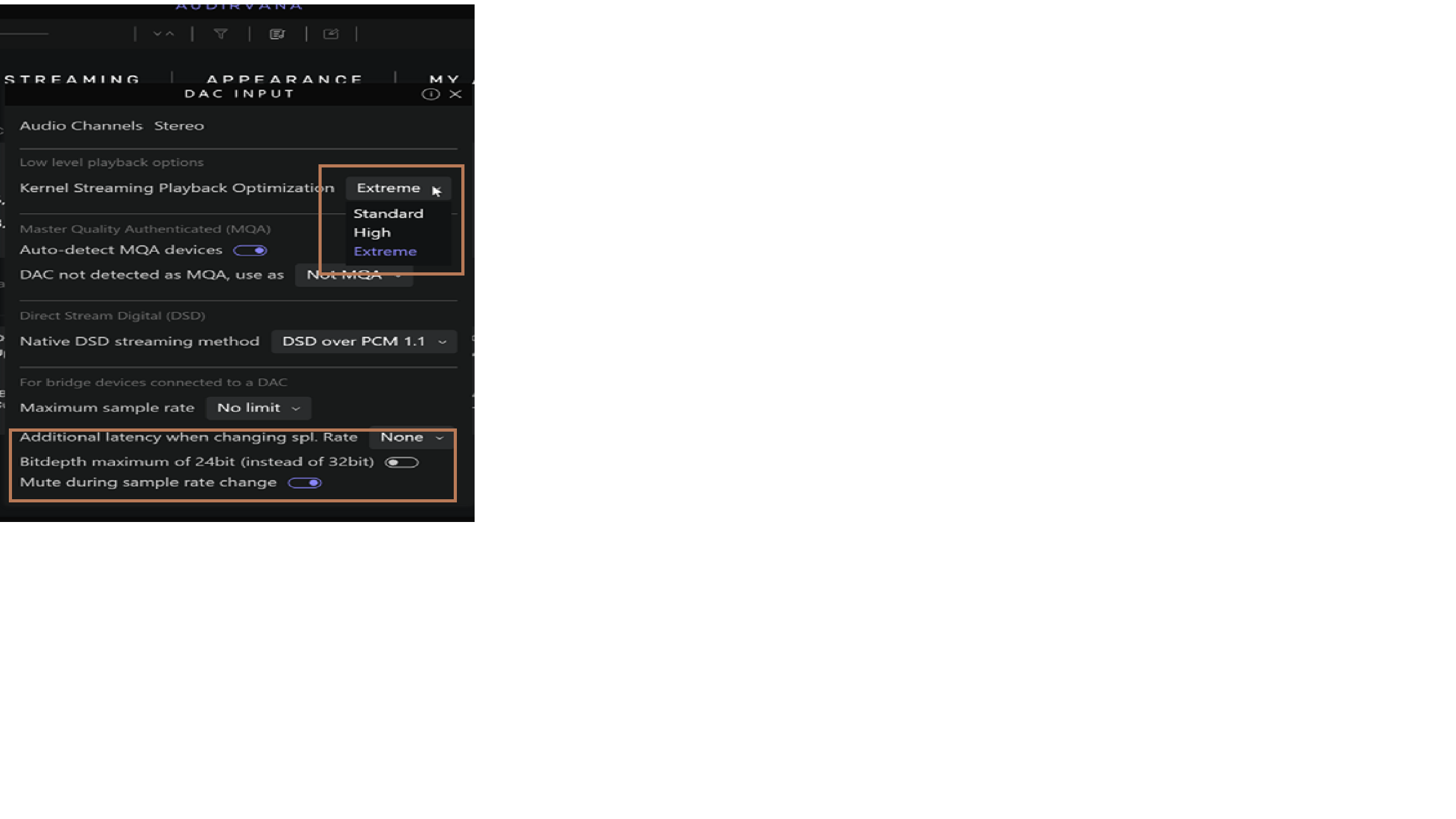
Hi Andy, in the meantime I’ve seen it too, unfortunately. That’s typical Microsoft. They make things worse instead of make it better, unfortunately.
My workaround is to use AS and play music enjoying it so much on my win10 notebook.
The win11 “wrack” I will use for my daily business. I also take into consideration to “upgrade…!!!” it to win10… and to stay with win10 as long as possible (like I did with win7 for the last 15 years being very happy).
2 Likes
This topic was automatically closed 90 days after the last reply. New replies are no longer allowed.