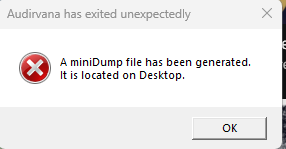
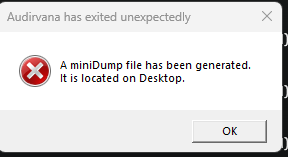
Tried to open the app this morning and now getting this message and the app closes. Tried a few reboots and no luck. It did create a dmp file on my desktop if you need it. Any help would be great.
I tried once more and if I don’t click OK to the error pop up it will stay running but as soon as I click OK on the error it closes the Studio app.
Yeah did so last week. Waiting to hear back. I figured maybe someone else had this issue and could provide a solution? Or I could be the first that this has happened to?
It has been a long time ago that I encountered that behaviour. I started deleting and reinstalling Audirvāna as rebooting the router didn’t work. Usually then I had a reasonably troublesome period of listening again. But eventually it would reappear. And then I’d do the same exercise again.
It disappeared once I switched to the Linux Core Player and started using an ethernet cable between the PC and the router.
Hmm well I’m a well built Win 11 pro machine with Roon Core/Audirvana core with cat8 cables feeding the Lumin T2 and routers. I’m thinking hard about moving to a Mac Mini M2 Pro for these duties as well.
I’ll try your fix as a re-install and see what happens.
Yeah, I did get the app re-installed and the error is now gone. However I still get radio dropouts, especially on hi def radio stations. Oh well, I’ll keep trying!
These drop outs on radio occur from time to time indeed. It is not how it should be. But for me personally that’s ok. I do not listen to radio very often.
Well I use the radio all day while I work from home and love Linn Jazz and Radio Paradise Mellow Mix while I work. But for evening time it’s HD listening for sure!
You’ve got to figure out from the dumb file what’s causing the crash, since it isn’t a generic issue, but seems to be tied to your device in this instance. It can be a hardware failure / problem or an interfering piece of software, but analysing the dump file is the only way to figure this out. You won’t get any answers here.