I use Audirvana on the most recent version of macOS. My output is to a Wiim Pro over UPnP. I use an external Topping DAC rather than the Wiim’s internal DAC, before the signal is then sent to my amplifier.
There is a delay of a few seconds when I play the first track of an album, while the DAC figures out the sample rate. This causes me to miss the first few seconds of that first track.
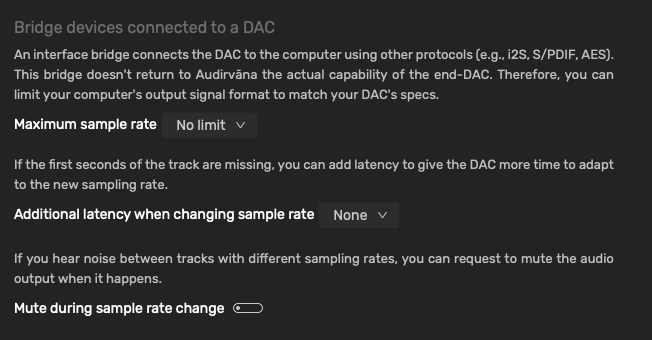
I’ve seen mention of an “Additional latency when changing sample rate” setting in Audirvana, including the screenshot here:
This setting is not appearing for me in Settings > Device Input. Does this have to do with the fact that I’m using UPnP, or an external DAC?
What do you see when the audio-engine is stopped and unlocked…?
This is what I see when the audio-engine is stopped and unlocked and choose ‘Settings’ → ‘Device Input’ with my USB connection:
Update: I just confirmed my suspicion that UPnP was the reason I can’t see these particular settings.
When Audirvana is stopped and unlocked, and my Wiim Pro is chosen as the output via UPnP, the entire “Bridge devices connected to a DAC” section of the Device Input settings page is missing.
If I switch to a USB device connected directly to my Mac Mini, however, that section appears.
I’m wondering if, given the UPnP protocol, Audirvana doesn’t know whether the sample rate is changing on the DAC, and thus can’t do anything to delay the first track from starting. But it would be nice if UPnP mode still offered a setting for “Additional latency when changing sample rate” which would come into effect whenever the sample rate of the track being played is different than the one before it. I’d simply set it to 5 seconds and call it good.
There is no playback status feedback from the DAC with UPnP protocol… No realtime control is available during playback because of the data buffering involved in the transmission..
The WiiM is connected via Ethernet. Tried switching to WiFi and there is no change in Audirvana’s behavior.
If I go into the WiiM app settings and change the Audio Output from “Optical Out” to “Line Out,” there is no change in the settings page within Audirvana.
Tried connecting the WiiM Pro directly to the computer via USB, but then confirmed via the WiiM’s manual that no audio passes in or out via the USB connection, only power.
For the solution I proposed at the end of my last message, no playback status info from the external device would be needed for Audirvana to implement this. Audirvana would internally note when two tracks in sequence have different sample rates, and would put a silent pause of the designated number of seconds in between them. This would give the DAC, independent of any control by Audirvana, to complete its sample rate switching before the new track began.
I suppose when you’re sending the signal via a UPnP renderer, that is the bridge device connected to a DAC. But there’s still the fact you don’t have that latency/delay setting. A delay can be set in a configuration file in Linux, but that doesn’t help you with MacOS.
For now at least, until perhaps @Antoine might have a suggestion, the somewhat kludgy workaround would be to use the remote app on a phone or tablet to pause play immediately after starting (move the playback cursor back to the start if necessary), wait your 5 seconds then tap the Play arrow.
Audirvāna loads the file completely into the playback buffer…
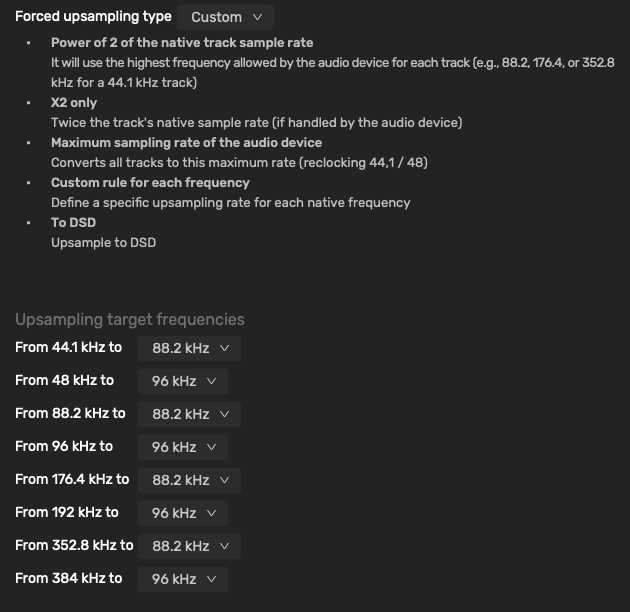
Try using a custom up-sampling strategy in r8Brain like this… This is my strategy for my general background music using the DAC in my Mac Studio and a pair of cheap powered speakers…
Thank you @Agoldnear , @Amarok1969 and @Jud for your suggestions! I stumbled upon the solution finally, and it is within the WiiM app.
For anyone with a WiiM device who may have the same problem and find this thread in the future:
Within the WiiM app, go to the settings page for the particular audio device, then choose “Audio Output.” At the bottom of the page is a slider with the label “Sample Rate Switching Latency.” It can be adjusted from 0 ms to 3000 ms. I’ve set it all the way to 3000 ms, and in my testing I’m successfully able to jump back and forth between songs with different sample rates, and not getting the beginnings cut off of any of them.