Still playing with the settings

It`s been just over a week now, and on and off I have been slowly working my way through the settings to try and improve things as much as I can. The info button in each category is a real big help for me as I am just learning at my own pace how each and every adjustment effects what comes out.

I have a new Audiolab D9 DAC/Pre-amp along with a new power-amp and new pair of Wharfedale Evo5.3 speakers. Whilst I appreciate the speakers could probably do with a few more hours running in time, they are slowly loosening and warming up. Still though things were still not quite right to my ears, and then this morning I came across the signal polarity invert Globally option which is nestled inside the bottom of the loading/decoding panel, so I enabled it.

Now I know absolutely zilch about the technical side of things, but all I can say is it put a smile on my face, and has totally transformed the stereo effect as well as overall sound. I`m always happy to listen to advise from those who know better than me so any comments on this will be taken onboard.

1 Like

Hi u8myufo,

Great choice you made. This duo will have great potential in years to come. I also indulged myself with a new system and chose a Quad 3 and Quad Revela 1 as exclusive stereo set-up. I connected them with a Wiim Ultra for streaming Audirvana and listening to radio.

You are absolutely right. The speakers need sufficient breaking in time (at least 200 hours) and afterwards you will be surprised how much better they will sound. Especially bass will loosen up and be ‘feel’ more coherent. During this time you can place your speakers to suite your listening preferences.

You have experienced a worthwhile improvement already. Replicating a proper soundstage is quite a thing and realistic sounding music ‘eyes closed’ is the holy grail for any audio enthusiast.

I assume you have already invested in quality cabling for coax and USB (for direct computer playback). I first set-up my Wimm streamer through a coaxial cable which is equal to connecting a CD transport/player. I recommend you to only listen from a music lover perspective as this gives you the most enjoyment long term. Good quality playback will improve your appreciation for a proper set-up (speaker placement and room acoustics play a pivotal role in this satisfying journey) and your musical discoveries. In my experience the D9 default settings will be good enough while your ears and brain need to learn to process the new musical experience. In my opinion a solo grand piano in hi-res (at least 24/96) will be an excellent reference for realistic payback. If that is completely to your taste you can expand the list of favorite instruments and artists. In this order you build a solid foundation of what to hear and to enjoy!

Start with no adjustments (flat) on all components and sample the acoustic quality just out of the box. Find the best suitable and comfortable spot within your interior for ‘critical’ and foremost musical listening. Fully replicating your favorite concert hall of venue can be achieved to a large extend given your equipment. It will require well spent time and lots of joyful hours of listening.

Connecting your computer will require a one-piece audio grade USB B cable. I ordered one AudioQuest Cinnamon USB cable which is on its way right now. Audirvana will give you lots of opportunities to screw things up. It is mainly due to your valued personal intention to either listen technically or musically. Only focusing on the technical side will grow a form of audio paranoia and will therefore kill the anticipated enjoyment. Ultimate perfection is the worst enemy of good quality musical sound.

I am extremely satisfied with the system I bought two weeks ago. It sounds ultra-realistic and is still hugely improving. Instrument placement and soundstage are now spot-on. Orchestral pieces are a joy to listen to. Guitar and lutes are heared and felt in my room. Singers, male and female? I can grab their noses virtually.

I am reassessing my CD and hi-res collection using Audirvana Origin. And I am loving it every second for at least 200%.

I wish you an equally straightforward journey into audio nirvana. Any questions on my pursuits into computer USB, please keep in touch and post so everyone can enjoy their own personal listening experience to the fullest.

1 Like

Thank you my friend and wise words indeed. Glad you commented as I now have reason to pose another question. But first, yes I have a semi decent USB cable from the PC to the D9, however I know that`s not the end of things.I will be ordering the Ifi Zen stream next week along with the ipower Elite power supply for it.

As it is at the moment the SW icon is enabled in Audirvana because it`s obviously going through the PC. So when I am using the Zen stream as a network bridge and outputting from the Zen to the D9, will Audirvana then recognise the DAC do you know?

Thank you for this quick reply and great musical taste by the way.

I have investigated many options before buying the Quad 3 and the Revela 1. As I have ripped all my CD’s in Flac/DSD I found in Audirvana Origin a trustworthy musical companion, after years of using its legacy 3.5 player.

I have been a Quad lover since I bought my first proper system to actively listen quality music on LP and later CD. I still have my 1980 set of Quad 44/405, that will be serviced in the next couple of months. Although they are seem old, they still have a –to me anyway– likable warmer sound that goes well with my predominately classical music collection.Over several years, I have curated my collection based on both musical performance and recording excellence. Tip: There are plenty magnificent musical recordings to elevate your soul albeit not the best recording. Musical performance is and has always been my primary focus. Being involved in this process is a very joyful occupation in itself as well.

Returning to your question: it all depends! If your PC is very near to your D9 (< 1,5 m of one-length audio grade cable) than using a direct USB connection will provide you maxed out possibilities of using the top-tier DAC in your D9. The Audirvana Remote app will be the everyday controller of selecting music in Audirvana on your PC. My initial direct USB test on my Quad was very favorable (32/384 PCM and DSD 512) compared to the relatively ‘limited’ 24/192 using coaxial cables. To be fair, this second best option sounds already out of this world, given a suitable hi-res recording. If your PC is near your D9 and you have the right cable available (or are able to lend it through your friendly dealer?), I would opt for direct connection right away. This will make the best use of your initial investments.

The reason I chose the WiiM Ultra was threefold. Firstly, I wanted a stable streaming platform with a future proof update system, Secondly, I wanted to incorporate a subtlety controlled subwoofer to supplement my Revela 1 (which is actually not in use right now because the Revela 1 have for now excellent bass response in my living/listening room. Maybe applicable for my ultimate fine tuning in the future!?!). Thirdly, Wiim has an option to improve the frequency response in your room and to synchronize the subwoofer output.

It all is going te be an interesting project. When my USB cable arrives, I will initially connect my Quad 3 with my MacBook Air. Then I can experiment with the expansive options Audirvana provides in streaming direct to the integrated DAC inside my Quad 3. Eventually, I will install a Mac mini as control unit running Audirvana and hub for my wired NAS.

I would postpone the purchase of the Zen in preference of the direct USB connection with your PC running Audirvana. On the basis of these results you can –if necessary– evaluate further actions. Mind you, you have a top-tier DAC in your D9 that will be underutilized by adding a streamer for no advantageous musical reasons.

Answering your last question: it will max-out at 24/192 using a coaxial cable and at 24/96 using an optical cable. USB is the best option into the future to obtain maximal use of Audirvana and the DAC in your D9.

If you have any questions, please let me know. I like to learn from your experiences in improving your musical enjoyment and beyond… as well.
Have a nice weekend and hear you….

PS: Could you tell me what you have connected to your D9 and the reasoning behind the current setting and what your ultimate goals are?
1 Like

Thanks again for the reply, as far as Im aware using the Zen as an audio bridge, its going to pass a far cleaner signal to the Dac than via the pc. I have always gone with, I use the best I can for what I can comfortably afford. Having just sold off some camera gear the Zen will not be too much of a strain on my pocket. That`ll be it then for me, if I happen to feel it needs a tad more improvement then that will be back to tweaking the software here and there again.

I can also output to a subwoofer from the D9 asfaik, I am using alanced XLR to the main speakers at the moment, and if what I read is correct I can use an rca unbalanced to the sub, as the D9 supports both at the same time.

Hi Rich,

As I have researched, the Zen Stream and the Ifi Elite will cost you €600,00 in The Netherlands, where I live. For approximately the same money you can buy a dedicated M4 Mac mini with 16GB of memory. This will be a stable hub for future sonic expansion.

I will read the D9 user manual in more detail to give you a more precise answer of what to expect in either scenario. The Zen Stream is respectfully a basic streamer. Audirvana on a PC/Mac is much more powerful and customizable. With the upcoming 3.0 version in sight, you can utilize the best of both worlds choosing either Studio or Origin based on your goals.

To be fair, if I had not had those extra requirements, I would have sadly skipped the Wiim Ultra and connected my Mac through USB for ultimate results choosing the PC/Mac route.

Please consider what your end goals are, as I have thrown a massive ….. into the spanners. I am curios of your current stance in this.

Cheers.

Ok thank you..I`ll stab a guess and say Eric? :thinking: I can get the Zen and power supply for about £480 new here in the uk.

Hi Rich,

My name is Erwin, by the way

You have no immediate need for the Zen Stream and power supply if you connect the PC into the D9 using the USB port on the D9. The D9 then becomes visible within Audirvana as a USB output device with which Audirvana can communicate directly. Changes in the settings in Audirvana (resolution, upsampling, etc) have immediate effect on Audirvana’s output to the D9 and any sonic differences in the musical performance coming out of your speakers.

If you choose to follow this route, it is recommended that you have some utterly familiar music pieces in different genres as the changes can be (very) subtle and requires keen and ideally trained ears. Experiences with playing musical instruments and/or attending live concerts is a huge bonus.

All depends on the unique sound signature you want to built utilizing the strict interdependance with your favorite music and the chain of DAC, amplifier, speakers and actual room acoustics. It’s a kind of magic going into a sonic rabbit hole.

I happen to have created an ideal interior design that acoustically enhances my current set-up as my listening position for instance follows the idea of a perfectly aligned equal sided triangle. I was fortunate to be able to build this design from scratch. It’s usually a process of trail and error and a true labor of love.

I am curios what your next steps will be. All the best for now….

Top tip: https://www.youtube.com/watch?v=Ftkeuwl6q5U

You would be better served by using USB Purifier Pro or iSilencer Max…

  • Also, Using USB 3 as the transmission protocol via a good quality short as possible USB 3.0 cable to the DAC and from the PC will provide the cleanest USB transmission, due to the USB 3.0 cable protocol that removes the power feed from the signaling-data lines where the digital-audio signal and signaling request/receive interrupts are transmitted on separate shielded conductors…
    :musical_notes: :eye: :nose: :eye: :musical_notes:
1 Like

Thanks, as far as I`m aware, whilst the iSilencer max and suchlike can reduce noise and jitter, it cannot fundamentally eliminate any electrical noise generated by a computer’s motherboard, power supply, and other components, although happy to be pointed to any info to the contrary. On another note, the Audiolab D9 is USB-2, so using a USB-3 will make no odds with regards to speed or any other benefits, and the QED one I have is 1mtr which is more than short enough.

… Intrinsic jitter ‘noise’ is removed from the digital-audio signal via re-clocking… In the case of iSilencer “REBalance” and jitter attenuation through buffering… The combination of iSilencer Max and USB Purifier Pro (piggy backing) Galvanic Isolation isolates the DAC from the computer platform where in the case the power/ground/earthing has not been managed properly… If you use a very short USB-C → USB-B 2.0 adapter cable you get the benefit of the isolated power line and the benefit of the speed and noise reduction of the USB 3.0 transmission protocol… You will be complicating your system by relying on UPnP and Ethernet…

I have watched that video Erwin, probs a bit of a rabbit hole for me in all honesty for my needs but still interesting. I follow Paul McGowan of PS audio on Youtube who has a lot of very short videos answering peoples questions, not sure if you have come across him or not?

Hi Rich,

I follow Paul of PSAudio for many years. Although he is an excellent teacher on audio related topics, you need a lot of his very varied shorts to paint a whole picture of what you specifically want/need.

Following the issues you asked on this forum I would like to ask you the following questions:

  1. Have you installed the Asio drivers on your computer? If not, they can de be downloaded on the Audiolab website.
  2. Have you connected the Qed Usb B cable in both the computer and the D9?
  3. When you open Audirvana, can you see the D9 as an USB output device at the top of the devices list next to the lock icon?
  4. Do you have at least one PCM and one DSD music file available to use as proof of concept resolution?
  5. Can you now play those two music files flawlessly through Audirvana using the standard/basic settings (see your screenshot earlier?)
  6. Are you willing to experiment in a step by step manner to make you familiar with the DAC related settings?

Hear you soon….

Hi Erwin, as you say I guess it all depends on what you are looking to achieve at the end of the day. I do like the fact he explains things in laymens terms and keeps it short and sweet. That`s a bonus for me since having a couple of heart attacks in 2013, part of the brain get damaged. My brain does not function like it used to, so if things are drawn out I tend to find it over complicates things, and either have to listen or read things several times before anything sinks in.

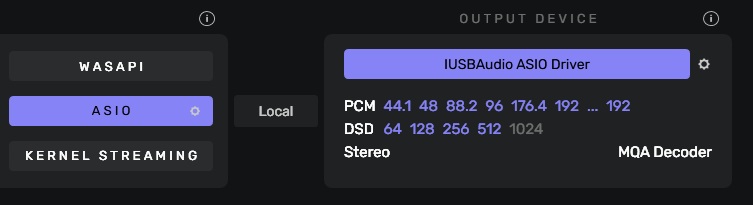
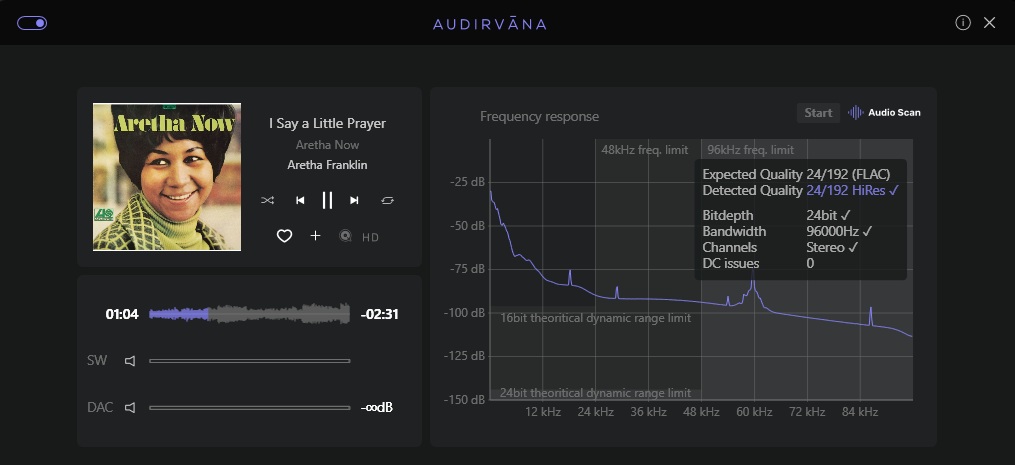
Yes the Asio drivers are installed, see the first two images either using Asio or Wasapi.

Yes USB is connected from PC to Dac.

Yes I have PCM files and they play just fine, no I do not have any DSD files Erwin, I have only just got into all this and just using a trial of Qobuz and even Audirvana at the moment.

Happy to go through things one step at a time.

Rich

1 Like

Hi Rich,

I am very impressed what you have accomplished during our conversation so far. The next step will be tomorrow if that’s fine with you.
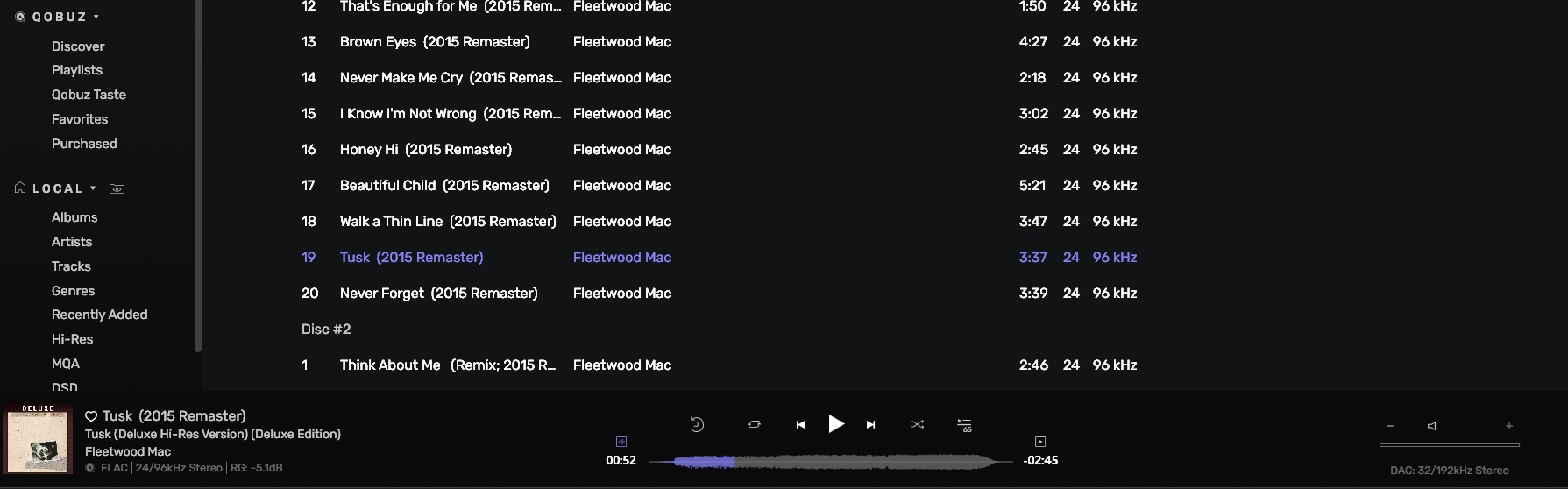
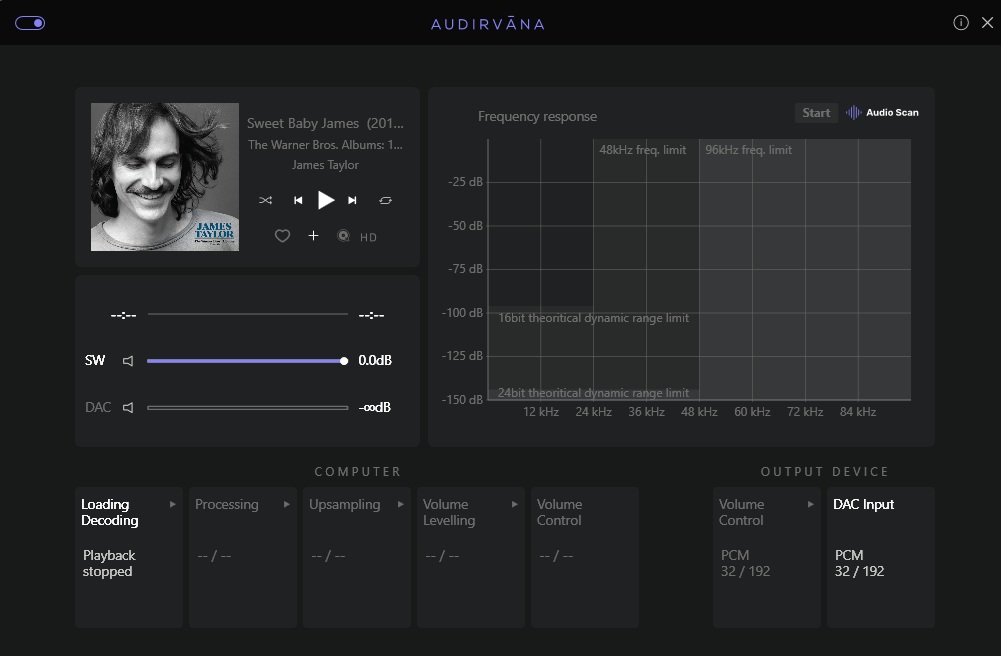
Could you please make a screenshot of a music file playing beforehand so we can see and check the current settings within Audirvana Studio. It is the very bottomn row of your screen with the file’s bitrate and resolution and the output setting in the right corner.

Is your Quobuz account still active, so you can stream DSD files from them?.

If you play the music, can you simultaneously hear the music through your Evo 5.3 speakers? We will walk you through Audirvana’s subsequent settings and their implications in your marvelously capable audio system.

When are you available to walk you through the DAC settings process?

Good night. Hear you later…..

1 Like

No can do.. Only purchase…

New Feature: The DSD and DXD formats are now also available for purchase; these formats are not available for streaming.
What are DSD and DXD? | Qobuz Help Center

There are better resellers of DSD music files like ProStudioMasters, NativeDSD and PS Audio’s own Octave Records, among others…

:musical_notes: :eye: :nose: :eye: :musical_notes:

1 Like

Hi Erwin, unfortunately I have a lot on today and going out with friends for lunch. Here`s a screen grab of a HiRes file playing. I do not think you can stream DSD files through Qobuz but they are available for purchase if I felt the need to.

Thank you for the screenshot. I did not know that because I play or stream DSD files. I am not into streaming through Tidal or Qobuz yet. I have my own curated collection on my NAS. New CD releases I will find in audiophile magazines around the world. I like to hear the for myself first.

Sundays are terrific for going out with family and friends, to chat, laugh and indulge. Have a vey nice and lovely Sunday. Hear you in due course…

1 Like

@u8myufo
This is the type of adapter cable I am describing;
https://www.l-com.com/usb-usb-20-type-c-to-b-straight-connection-03-meter

An excellent reference from which to triangulate, regarding length vs performance and quality/design architecture.

:musical_notes: :eye: :nose: :eye: :musical_notes:

An honest question, but what makes you favour this cable?
Looks like an after-market Chinese special to me.
The type of cable you could buy for a fiver in Aldi’s.

If you’re going to promote a particular brand of cable, why not something like this:

1 Like