Studio program close his self after a while playing on windows 11.
Check if your sound and graphical drivers in Windows are up to date (asio drivers for your DAC, drivers for your internal soundcard, drivers for your video card).
Also check for driver errors in Windows.
If that does not help you need to provide more info: what brand/type of computer you use, how much ram, what cpu etc?
Also copy and paste Audirvana’s debug info here (Audirvana/settings/account/ debug info). That helps for the community to know what system you are using.
Hi,
Everthing is OK.
Audirvana Studio 2.2.7 (20208)
Windows 11 (22621) with 16GB physical RAM
Connected account of : John De Smet
SIGNAL PROCESSING:
Polarity Inversion:
	Globally: OFF
	Per track: ON
Effects plugins NOT ACTIVE
UPSAMPLING:
r8brain not in use
r8brain filter parameters
Bandwidth = 99.5%
Stop band attenuation 218dB
Phase linear
AUDIO VOLUME:
Max allowed volume: 100
Replay Gain: None
SW volume control: OFF
LIBRARY SETTINGS:
Sync list: 1 folders
AUTO: C:\Users\johnd\Music
Library database path: C:\Users\johnd\AppData\Local\Audirvana\Audirvana\AudirvanaDatabase.sqlite
Remote Control server:
Listening on fdb2:28e0:bb8a:46de:6faa:b854:ef86:6fdf on port 60445
ACTIVE STREAMING SERVICES
Qobuz: Connected as Qobuz Lid
TIDAL: Connected as HIFI
=================== AUDIO DEVICE ========================
Active method: Local
Max. memory for audio buffers: 4016MB
Local Audio Engine: KernelStreaming
Preferred device:
Digitale audio-interface (ND8006)
Model UID:MZ_USBAUDIO_ENUM\VID_154E&PID_300A&KS
UID:\?\SWD#MMDEVAPI#{0.0.0.00000000}.{736b7f2c-ab18-4587-9a75-d87d8b11ae91}#{e6327cad-dcec-4949-ae8a-991e976a79d2}
Active Sample Rate: 44.1kHz
Bridge settings:
Sample rate limitation: none
Sample rate switching latency: none
Limit bitdepth to 24bit: OFF
Mute during sample rate change: OFF
Selected device:Speakers (Realtek(R) Audio)
Manufacturer: Realtek
Model name: Intel High Definition Audio
Model UID: INTELAUDIO\FUNC_01&VEN_10EC&DEV_0257&SUBSYS_17AA38CB&REV_1000
UID: \?\SWD#MMDEVAPI#{0.0.0.00000000}.{e199fa8b-d044-4835-865d-5ddd3b62d063}#{e6327cad-dcec-4949-ae8a-991e976a79d2}
Kernel Streaming capable
6 available sample rates up to 192000Hz
44100
48000
88200
96000
176400
192000
Volume Control
Physical: Yes
Virtual: No
Max volume alert: Enabled
MQA capability
Auto-detect MQA devices: Yes
Not a MQA device, user set to not MQA
DSD capability: Unhandled
Device audio channels
Preferred stereo channels L:0 R:1
Channel bitmap: Ox3, layout:
Channel 0 mapped to 0
Channel 1 mapped to 1
Audio channels in use
Number of channels: 2
Use as stereo device only: No
Simple stereo device: No
1 output streams:
Number of active channels: 2, in 1 stream(s)
Channel #0 :Stream 0 channel 0
Channel #1 :Stream 0 channel 1
2 ch Integer PCM 16bit little endian 44.1kHz
2 ch Integer PCM 24bit little endian aligned high in 32bit chunk 44.1kHz
2 ch Integer PCM 16bit little endian 48kHz
2 ch Integer PCM 24bit little endian aligned high in 32bit chunk 48kHz
2 ch Integer PCM 16bit little endian 88.2kHz
2 ch Integer PCM 24bit little endian aligned high in 32bit chunk 88.2kHz
2 ch Integer PCM 16bit little endian 96kHz
2 ch Integer PCM 24bit little endian aligned high in 32bit chunk 96kHz
2 ch Integer PCM 16bit little endian 176.4kHz
2 ch Integer PCM 24bit little endian aligned high in 32bit chunk 176.4kHz
2 ch Integer PCM 16bit little endian 192kHz
2 ch Integer PCM 16bit little endian 192kHz
Local devices found : 1
Device #0: Speakers (Realtek(R) Audio)
Manufacturer: Realtek
Model UID: INTELAUDIO\FUNC_01&VEN_10EC&DEV_0257&SUBSYS_17AA38CB&REV_1000
UID: \?\SWD#MMDEVAPI#{0.0.0.00000000}.{e199fa8b-d044-4835-865d-5ddd3b62d063}#{e6327cad-dcec-4949-ae8a-991e976a79d2}
Model name: Intel High Definition Audio
UPnP
UPnP devices found : 1
Device #0: Marantz ND8006
UID: uuid:380d4ea1-2e56-1a4e-0080-0005cdc1384a
Location: http://192.168.0.4:60006/upnp/desc/aios_device/aios_device.xml
Manufacturer: Marantz
Model name: Marantz ND8006
Chromecast
Chromecast devices found : 3
Device #0: Google Chromecast
ID: DnsSd#Chromecast-6c822f34b4fa745c3d26c2f9938e07b5._googlecast._tcp.local#0
Model name: Chromecast
Device #1: Google Nest Hub
ID: DnsSd#Google-Nest-Hub-148fa9be4977fdfc92b9b02e45f71f83._googlecast._tcp.local#0
Model name: Google Nest Hub
Device #2: Google Nest Mini
ID: DnsSd#Google-Nest-Mini-1dd4c71c2436fd92ae177166f98c884c._googlecast._tcp.local#0
Model name: Google Nest Mini
extra info as requested
| Naam van besturingssysteem | Microsoft Windows 11 Home |
|---|---|
| Versie | 10.0.22621 Build 22621 |
| Andere beschrijving van besturingssysteem | Niet beschikbaar |
| Leverancier van besturingssysteem | Microsoft Corporation |
| Systeemnaam | LENOVO-IDEAPAD- |
| Systeemfabrikant | LENOVO |
| Systeemmodel | 82L9 |
| Systeemtype | x64-based PC |
| Systeem-SKU | LENOVO_MT_82L9_BU_idea_FM_IdeaPad 5 Pro 16IHU6 |
| Processor | 11th Gen Intel(R) Core™ i7-11370H @ 3.30GHz, 3302 MHz, 4 core('s), 8 logische processor(s) |
| BIOS-versie/datum | LENOVO GRCN22WW, 8/10/2022 |
| SMBIOS-versie | 3.3 |
| Versie van ingesloten controller | 1.22 |
| BIOS-modus | UEFI |
| Basisbordfabrikant | LENOVO |
| Basisbordproduct | LNVNB161216 |
| Basisbordversie | SDK0J40709 WIN |
| Platformfunctie | Mobiel |
| Status beveiligd opstarten | Ingeschakeld |
| PCR7-configuratie | Uitbreiding van bevoegdheden vereist om te kunnen weergeven |
| Map met Windows | C:\WINDOWS |
| Systeemmap | C:\WINDOWS\system32 |
| Opstartapparaat | \Device\HarddiskVolume1 |
| Landinstelling | Nederland |
| HAL (Hardware Abstraction Layer) | Versie = 10.0.22621.1413 |
| Gebruikersnaam | LENOVO-IDEAPAD-\johnd |
| Tijdzone | Romance (zomertijd) |
| Geïnstalleerd fysiek geheugen (RAM) | 16,0 GB |
| Totaal fysiek geheugen | 15,8 GB |
| Beschikbaar fysiek geheugen | 8,13 GB |
| Totaal virtueel geheugen | 16,8 GB |
| Beschikbaar virtueel geheugen | 8,01 GB |
| Ruimte voor wisselbestand | 1,00 GB |
| Wisselbestand | C:\pagefile.sys |
| DMA-beveiliging van kernel | Ingeschakeld |
| Beveiliging op basis van virtualisatie | Wordt uitgevoerd |
| Vereiste beveiligingseigenschappen voor beveiliging op basis van virtualisatie | |
| Beschikbare beveiligingseigenschappen voor beveiliging op basis van virtualisatie | Ondersteuning voor basisvirtualisatie, Beveiligd opstarten, DMA-beveiliging, UEFI-code alleen-lezen, SMM Security Mitigations 1.0, Uitvoeringsbeheer op basis van modus, APIC-virtualisatie |
| Geconfigureerde services voor beveiliging op basis van virtualisatie | |
| Actieve services voor beveiliging op basis van virtualisatie | |
| Beleid van Windows Defender-toepassingsbeheer | Afgedwongen |
| Beleid van Windows Defender-toepassingsbeheer voor gebruikersmodus | Uitgeschakeld |
| Ondersteuning voor apparaatversleuteling | Uitbreiding van bevoegdheden vereist om te kunnen weergeven |
| Er is een hypervisor gedetecteerd. De vereiste functies voor Hyper-V worden niet weergegeven. |
I hope that U can help me solve the problem.
I looked at the info you posted, but I can’t see anything strange. Everything seems to be in order.
- Does Audirvana crash everytime after the same time (like always after 20 minutes or so)? In that case look at task manager in Windows while Audirvana is running. Look for other processes/services that take up a lot of memory or cpu resources.
- Or does Audirvana crash when you are playing certain tracks? In that case investigate if those files are not corrupt. Also look in your music library if you have *.cue files there. If a *.cue file is corrupt Audirvana can behave strangely sometimes.
- If Audirvana crashes it makes a crashdump file which can be helpfull.
@Antoine, maybe do you have a suggestion?
Or try disconnecting Audirvana that connects to your device at the settings page of the website. to uninstall and install again.
Optional : Update App Installer to the latest version before installing .
hope this is helpful 
thanks! But it’s doesn’t solved the problem.
After about 20 minutes.
@Antoine, maybe you could explain where to find the crash dump and have a look at it?
1 Like
CPU and memory usage looks normal in task manager when using apps and playing music ? or not
Indeed everything normal.
Thanks, I will try. 
I use a usb dac cable. My network player is a Marantz ND8006. Why do you have to install an asio driver separately? And does it have to be from the Marantz brand? My apologies I’m not a techie. I have a subscription and just want it to work. Isn’t that the point? Plug and play.
You should try following the instructions of your device to connect the USB DAC to the computer.
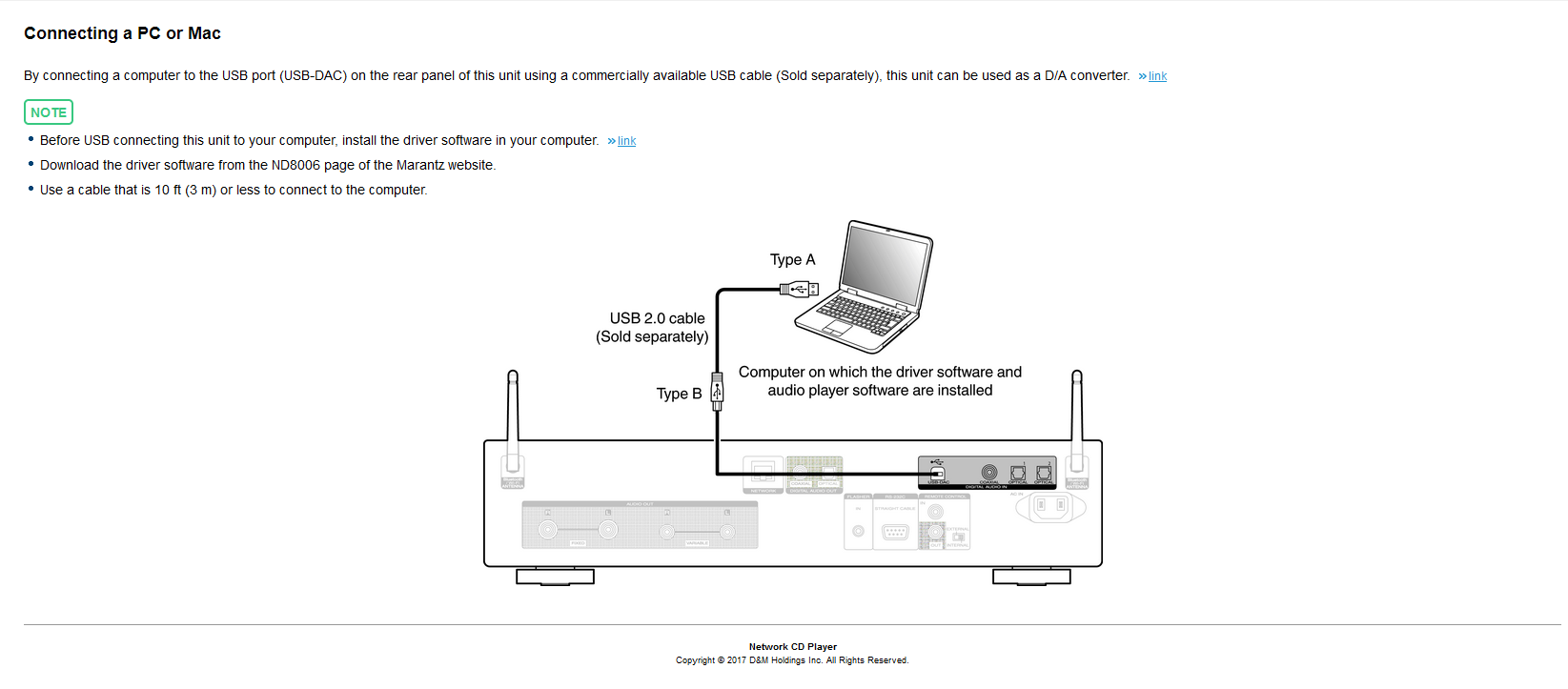
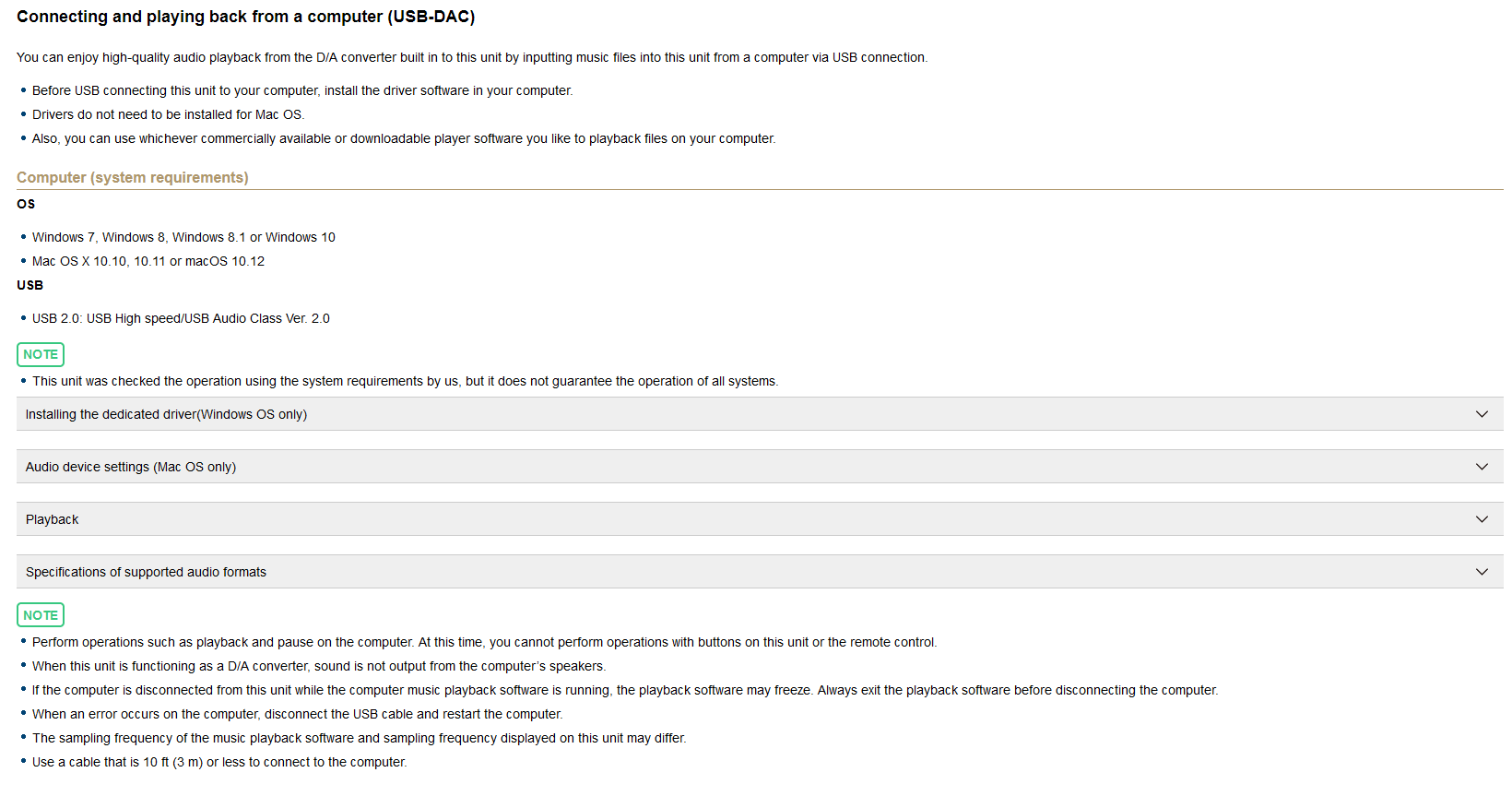
https://manuals.marantz.com/ND8006/NA/EN/OBAOSYfiehhjyi.php#OBAOMLgbskfzuz
2 Likes
If your Marantz is USB audio 2.0 compatible you do not need to install an ASIO driver and you can play in Audirvana through WASAPI or Kernel streaming. From the post from @SiwakornK with the Marantz manual it seems that Marantz wants you to install their driver (which is ASIO).
Install the driver from the Marantz site for your Marantz NB8006. Reboot your computer (probably not needed, but with drivers you never know). After that start Audirvana and choose the ASIO output in Audirvana and then your Marantz.
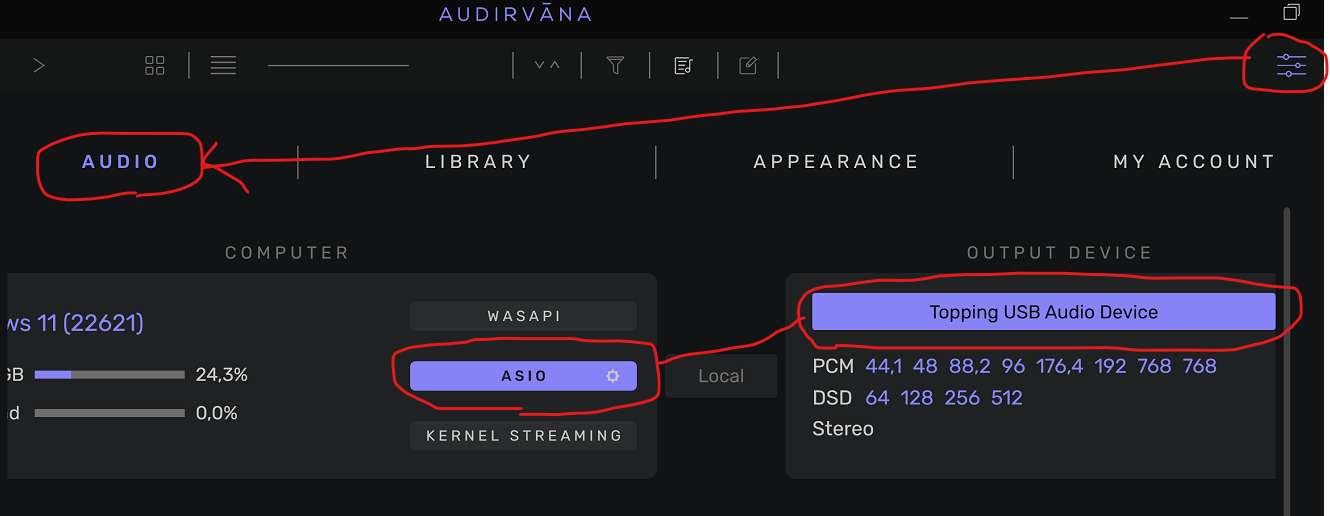
In my example you see a Topping DAC, but in your case, if you click there, a list should open and you should see your Marantz there. Choose that.
1 Like
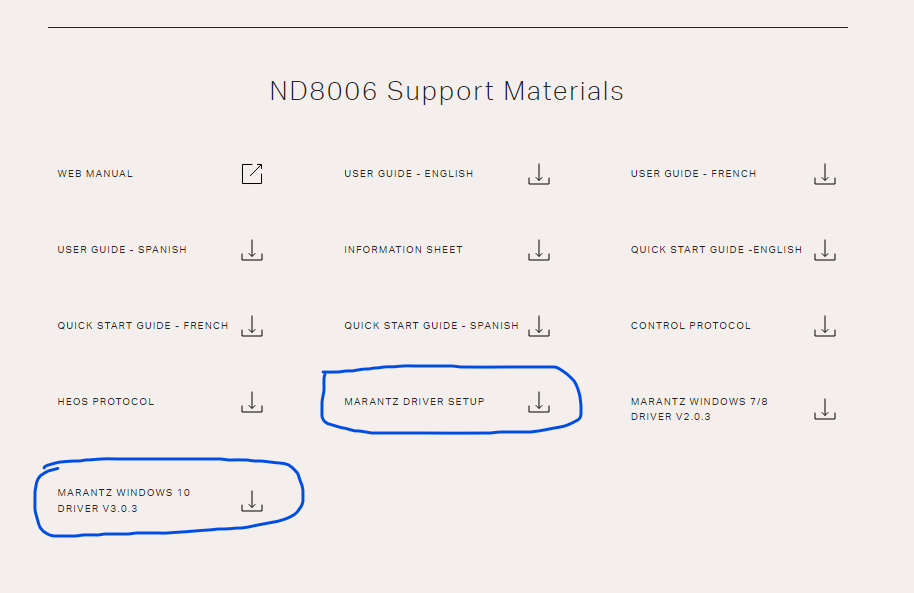
1 Like
Hi @John1,
Can you send us your audirvana.dmp and audirvana.log file at [email protected]?
It can be in two different locations :
C:\Users[your login]\AppData\Local\Packages\Audirvana.Audirvana-[… id number that can vary]\LocalCache\Local\Audirvana\Audirvana
C:\Users[your login]\AppData\Local\Audirvana\Audirvana
to show AppData folder:
hi Antoine, a new problem has arisen. after a while music falters like an LP.
Here is some basic advice that might help.
1 Like