Studio=settings? ADVICE REQ'D using PS Audio Mk1 DAC/Win 11 Workstation/USB/Qobuz for dedicated DIGITAL RIG & ROOM

Dear Damien, and your firms staff, thank you for Studio. As a long term Audiophile with over 60 years experience listening I require from those who know different settings that will work as good as it gets to get the best out of my rig. I am in Canada. Bell contracts with Sagemcom (France) for the GigaHub2 which has 1x10gig port and 2x2.5gig ports, the rest are 1 gig ports. I use Cat 6A direct to my workstation. Xeon, 64 ECC RAM. USB SSD and USB 6 TB HD hooked up to workstation and a NAS farm in home which I do not lately use. This is for safekeeping as the attached to workstation USB SSD and HD drives are used to draw local digital music files off of. Otherwise Qobuz and Audirvana (was PLUS now Studio). From workstation USB to PS Audio Mk1 DAC Have bridge2 installed but not using it because I have not been using the NAS Farm. From DAC to rest of Rig using Nordost loom, etc. My electrical distribution box is 6 ft away from 3X20amp 12 guage 4 gang, 3 double outlet boxes using 6 good clamping receptacles=12 potential plug-ins.

My family worked with Tom Hidley out of Switzerland helping to build Masterphonics in Nashville. I use a somewhat treated dedicated one chair listening room, and due to my age am dropping the higher frequencies ability to hear but still ok to 8-9-10 kilohertz. perhaps up to 12KHZ subconsciously.

I understand everyone at one stage or another likes sound one way or another. Loud, soft, bombastic or soft. Orchestra or Baroque. Rocknroll or rythymnblues, etc.

In my experience currently there is only one way which is nearfield at LOW sound pressure level using high quality equipment feeding each playback chain with the best product I can.

This is why I require help in providing the best Source possible which Audirvana is working on providing to the World. I gave up Vinyl, reel to reel, three times. Purely digital now and streaming is very good for me even though I have a collection of CD, SACD and BluRay Audio only.

AS A STARTING POINT-IS THERE ANY ADVANTAGE TO INCREASING RAM UP TO 100?

HAS AUDIRVANA AN AUTOMATIC CHECK TO USE MAXIMUM RAM UP TO?? WHEN IN EXCLUSIVE MODE? iDIGRESS..SO MANY OTHER SETTINGS W BUT FUTURE UPDATE ADVICE IS ALSO WELCOME.

Can…will anyone offer advice here?

Damien are your ears perking up?

Thank You all in advance.

Welcome…

I suggest keeping your playback pre-load memory allocation at or below 12GB…

Also, please paste your debug information report here for best possible help:

:musical_notes: :eye: :nose: :eye: :musical_notes:

Excellent resources:
https://thewelltemperedcomputer.com/index.html

See the tutorials regarding all digital-audio formats and playback:

More technical system considerations:

Power and Grounding for Audio and Video Systems
A White Paper for the Real World – International Version
Jim Brown
Audio Systems Group, Inc.
https://thehistoryofrecording.com/Papers/Audio_Systems_Group/SurgeXPowerGround.pdf

Thank You

Is playback pre-load memory allocation

the same as in LOADING / DECODING

Max memory allocated for tracks pre-load? which maximizes to a limit of 64512 Mega Bytes

or 63 Gigabytes normal polarity, I can however LOWER this setting down to 11999 megabytes

using the ends of the slider scale which is very tricky touchy to change perhaps add a dot on either end of that horizontal line to make it more sensitive to 1 increments. IE-12000 12001, 12002, etc.

However the box shows 11.7 GB and the adjustment line shows 11999 GB.

I wonder why these two numbers are different and not the same?

suggest keeping your playback pre-load memory allocation at or below 12GB…

Thanks, Have been using this Studio now for 2 or 3 hours and it is better clearer

higher highs lower lows sound is between speakers floating nicely, ans so on but I must warn those new to Studio. It definitely takes experimenting and changing things around because out of the box so to speak …I wanted my money back. Not now though I deactivated the equalizer, set up Wasapi

to remove Windows undercurrent operations and under upsampling Sox device maximum frequency

under processing Audirvana EQ in real time, NO volume levelling, inactive volume control and volume control 0.0 db limit 100%, DAC input SPL rate limit no limit.

BUT-I cannot get upsampling to go over 24/192 khz stereo and in the OLD 3.5.51-PLUS

the upsampling is 32/352.8 khz stereo and up until today it sounded terrific.

Now my rig sounds better the piano notes on Angela Hewitts Domenico Scarlatti’s

Sonata series are very good. You can hear the foot pedals decay and so on just marvellous.

ONWARD!

MORE PLEASE….

Yes, Masterphonics was a room within a room hung from the roof by way of cables.

There was a main substation directly out side with transformer being adjustable

allowing a fine tuning.

In homes everyone here should disconnect unused grounds hooked up or clamped onto water lines

like for telephone or coaxial and just have a look at the jumper cable which joins the water meter from one side to the other side.

Remember since there are rubber washers between water pipe main shut off valve and meter

the bypass ground cable is required. How green is the corrossion? Yes copper corrodes and that corrossion creates resistance. Therefore not a very good ground. Everywhere there s a shutoff typically but not always rubber washers exist stopping any ground flow into the earth and back up into the distribution towers. This is why often a flare tool is used to create the join at the ends of the soft copper tube.

In my sound room I explained to the electrician the correct number of turns of the 12 guage solid core wires required per foot within the metal conduit and I thought they were going to walk away from the job. So I let them be. Hard to get electricians in Canada-they are busy.

I maximized my RAM memory useage toggling between the recommended 12 and the max on my workstation and at 64 GIG ECC RAM the stage was wider the sound was louder and everything was better using windows 26200 with 15.6% of the 64 gigabytes of ECC RAM used and around 15% of CPU used. 15.6% of 64 GB RAM is 9.6 for what that is worth so I wonder why the sound is better to my ears it is different but in my room at my listening distance using my gear I prefer it listening low SPL around 70-74 decibels on average. Hence the louder perception….

This setting seems to work for me. NO veil. CLOSER sound Closer to the piano listening to Angela Hewitt. WIDER much much more decay almost like a needle drop using an all tube Allnic rig ALMOST with compression tweeter 18 inch coax-but not quite=which my rig is not.

But my rig sounds better with the slider set to maximum.

WHY is that?

It is all a matter of tradeoffs but in this case it was like adding mono blocks

that double down to 3 ohms from a stereo amp with same wattage that doesnt quite

double down to around 4 ohms when using MAX RAM (64) and when using 12 RAM setting.

I wonder if there is a timing issue (usually or typically) in fetching from different ram slots?

Remember I use all ECC Ram so theres no back and forth trying to find some memory

and my motherboard supports multichannel RAM as well.

Will then Audirvana sound quality using Studio

benefit from me spending huge money to upgrade

my ECC RAM from 64 RAM to say 100 or more RAM?

Not everyone will be using a good tower workstation but I am.

I will alter the memory settings and decide if there is a sweet spot or just MAX OUT THE RAM usage.

DAMIEN..

will I get progressively different sound if I put 100 GB RAM in?

Will the latest version (todays( allow up to a maximum of what size RAM or

is there a limit to the amount of RAM a computer//streamer can use?

Please do not throttle this.

Yes, I asked my wife to listen for one song.

She chose the last track off the Beatles Anthology 4=”Now And Then.”

She said I was getting “a pretty good stereo” meaning HiFi rig.

That it was clear and sounded good. She is no audiophile.

I noticed she was tapping her feet to Angela Hewitt!!!

Now Playing Pat Methany “whats it all about” very good.

I dont think I will change the highest RAM setting. I may be wrong but it sounds so right.

It is like I changed a major component in a balanced equal chain system that made a very large difference. Hard to imagine. So ten stars for the cheapest upgrade money I ever spent in my 60+

years of Audiophillia.

Now I would like to know why in opposition to a 12 GB RAM memory (throttle)

adjustment that was recommended…does a 65GB RAM memory adjustment which maxes out my motherboard RAM sound soooo much better not different but clearly much better.

The motherboard-multi channel for RAM fetch?

The ECC RAM bigger buffer?

The Qobuz/Studio/Workstation combination is now sending out what

the PS Audio Direct Stream Mk1 DAC wants to be fed

over a reasonable USB cable-that is for sure.

Please advise if adding “more than” 64 GB RAM Memory will allow for better sound

when using Studio. Ask Ted Smith he will tell you what he thinks regarding my

question. But get your most knowledgable person to contact him. The conversation

just might be enlightening for all concerned.

Try it in your Lab first and write some software to allow it.

Try non ECC memory and regular memory.

I use a Lenovo Thinkstation P520 Win 11 Pro 64 Xeon W.

I also use a Dell Precision 5820 Windows 11 for Workstations under four core.

Ted Smith designer of PS Audio Direct Stream

Ted Smith - PS Audio | LinkedIn

From the PS Audio PerfectWave DirectStream DAC overview…

…“DirectStream is entirely DSD based, even for PCM inputs. DSD was chosen as the core engine for this instrument for a number of compelling reasons…”

The DirectStream DAC Mk1 converts all PCM to DSD128 for output…

“The heart of DirectStream is the DSD engine itself. Regardless of input format, whether PCM or DSD, all data are upsampled to 30 bits running at 10 times the standard DSD rate and then back down again to double rate DSD for noise shaping. The internal volume control keeps complete precision: every bit in the input affects the output of the DAC for any volume level. Except for the sigma-delta modulation process itself there is no rounding, dither or other trimming, not to 24 bits, not to 32 bits, not to 48 bits, but rather a full 50. The incoming PCM signal is 30 bits from the upsampling filter and the volume control is 20 bits wide so all 50 bits of the output are used throughout the sigma-delta conversion, requiring more than 50 bits of precision. DSD only requires a nominal 20 bit signal to noise ratio, this design utilizes a minimum width of 24 bits with wide filter coefficients and 144dB S/N. Use of full precision
everywhere and many guard bits in the IIR filters and the sigma-delta modulator help maintain our goal of perfecting the audio output.”

This is not throttling anything… This is buffering used for playback pre-load and DSP operations… The throttle will be in the CPU memory bus throughput and synergetic operational interrupts associated to transfer requests and file transfer latencies that precipitate noise related jitter.
The computer platform and OS need RAM for operational support… Audirvāna needs RAM for operational buffering so to minimize the computer platform operational noise related jitter to output…

You are starving the CPU/OS of operational RAM when you max the Audirvāna playback buffering RAM… Which forces the computer platform to use ‘Virtual Memory’ on the System drive… Audirvāna will consume CPU cycles while loading files in the background while playing… What you are describing is contrapuntal to a strategy for creating a high performance digital-audio computer playback scenario.

In your case the common denominator is the PS Audio DAC platform design which handles all digital-audio signals in the DAC architecture and modulates these signals to DSD…

You can try modulating all PCM files to DSD128 in Audirvāna and deliver this to the MK1 for playback, which will offload DSP in the DAC architecture…

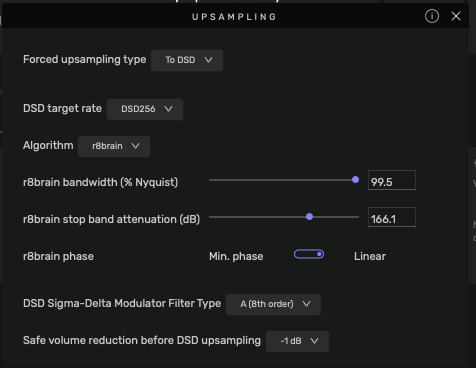
I modulate all PCM to DSD256 via r8Brain in Audirvāna… My platform is an Apple M2 Max Mac Studio with 64GB RAM (12GB allocated for playback pre-load memory),.. I am headphone-centric and process all PCM through Studio EQ and apply 112dB’s ‘Redline Monitor’ HRTF DSP plug-in before modulating to DSD256 for output…

I am 72 years old and have been involved with digital-audio production and recording/playback since its inception… I will not bore you with my full background.

The PS Audio MK1 will always be the common denominator in regard to sound-quality… So, your strategy should be focused on providing a noise related jitter-free transmission scheme… the results will follow… The parametric settings of the SoX or r8Brain modulators play an important part in the quality of output sound… The more you understand what they influence the better you can fine-tune the output quality presented to the PS Audio platform.
Here is a screenshot of my r8Brain settings… a good place to start… very small incremental changes to the stop-band level make very audible differences in output character:

Obviously, you will be modulating to DSD128… so some tweaking of the stop-band level will be involved…
You may find that up-sampling PCM to DXD (352.8kHz) works for you.

For your information look at the pre-load buffer ‘time’… in my case 12.99GB of RAM is approximately 18-minutes of playback buffer. I find no rational reason to increase this RAM allocation.
:musical_notes: :eye: :nose: :eye: :musical_notes:

Customer service is off the charts.

Thank You Agoldnear.

I will alter everything to suit as per your advice.

I will try the 12 GB RAM a bit more a bit less and will use every headphone I have

and will switch a few tubes in the HP amp.

I will do the same with my SS amp driving my near field loudspeakers

and will try from out of circuit flat to tone control adjustments on the

amp and in the Studio equalizer software.

I am not used to plug ins that work with Studio.

I may not even need or require a plug in except for the one or two headphones

I use on occasion. Thank You for the tip

I must say Studio is very impressive for such a small outlay of cash in the world

of ever shrinking value for the money.

I very much appreciate your replies, your knowledge and experience and desire to share.

Hopefully others will learn as I am how to adjust Audirvana so it sounds spectacular.

Thank You Agoldnear.

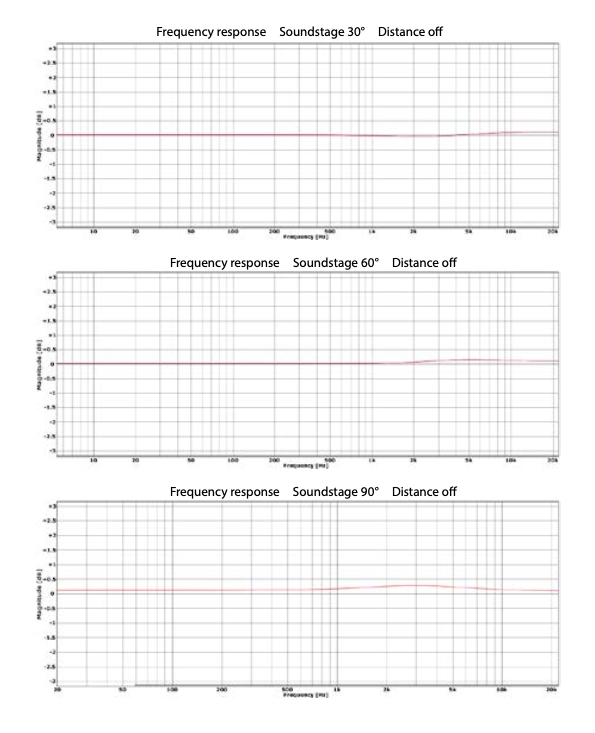
I use the 90° soundstage speaker orientation (45° L / 45° R) zero-distance (Distance off) setting in Red Line Monitor… Here are the frequency response graphs of the most relavant orientations, unless your strategy is to emulate your near-field speaker array. :wink:

:musical_notes: :eye: :nose: :eye: :musical_notes: