So tried pc straight to dac usb.Using DSD two loud pops when stopping and starting song.Find it sounds better then when playing by upnp.Trird upnp had issues there to.Hasnt been a great experience so far
I think you can use a mute option in settings to be set when there are sampling changes.
Please paste your debug information here so to provide more insight into your Audirvāna settings and computer platform resources relationship with your DAC…
Start here… In ‘Device Input’ settings, add latency when changing sample-rates and enable ‘Mute during sample-rate change’
The “pop” or “tick” may never be completely attenuated unless the DAC supports suppression… It is due to the nature of 1-bit PDM (DSD) encoding and the mastering of the file(s)… However, when the DAC is using suppression, it is converting the 1-bit DSD file to PCM to apply the attenuation DSP and subsequent of this processing modulating the signal back to the 1-bit DSD sample-rate… The computer platform System RAM resources also play into this behavior with DSD files.


This is because the silence prior to starting and after stopping is a train of zeroes, rather than “DSD silence” (alternating zeroes and ones). Some DACs play DSD silence themselves, some (the ones with pops) don’t.
There are 3 things you can do to help with this:
-
In Audirvana, under Device Input settings, toggle on “Mute during sample rate change” and try adjusting the “Additional latency when changing sample rate” setting.
-
If your DAC has an onboard preamp, and you’ve set it to DAC mode, try setting it to preamp+DAC mode (while adjusting the volume all the way up if you have another volume control).
-
A bit of a PITA, but if you have an amp with a remote control or can reach it by hand, have the amp off when starting playback; pause playback; then rewind back to the start of the track, turn the amp on, and restart playback. This in conjunction with Audirvana’s settings above will hopefully eliminate pops.
This only serves to convert the 1-bit DSD file to PCM for volume/level processing before modulating the processed PCM signal back to the source 1-bit PDM sample-rate… You are not keeping the 1-bit PDM signal unfettered… so of course the “pop” or “tick” is mitigate by creating a compatible format for Volume processing (PDM) which avoids the transition noise to a zero-value when the format is changed from or to PCM… Some DSD files have mastering errors which also contribute to the transition to zero level noise.
If you go to this extreme, there is something wrong with your DAC where format transitions do not have enough latency or memory to mitigate the transition noise. If the master encoding was not truncated to zero before distribution, if not mitigate by DSP processing, the “pop” or “tick” will be always be present at some level and never completely suppressed.
Upsampling everything to dsd 256.Never had this issue with upsmpling in roon or when using hqplayer.Never had this issue with any other player
Please paste your debug information here so to provide more insight into the synergy of the computer platform and available resources, in concert with your Audirvāna configuration settings in concert with your DAC capabilities…
I upsample all PCM files to DSD256 with Audirvāna Studio 3.3.2 via r8Brain subsequent of Virtual LR+C cross-feed HRTF processing and I play native Binaural DSD files… I might get a very, very, low-level “tick” occasionally, when jumping around from album track to album track…
-
macOS 26.5.1
-
M2 Max Mac Studio w/64GB RAM
-
13GB RAM allocated for ‘Loading and Decoding’ buffer
-
Locally attached USB 3.0 SSD music library on the USB 3.2 bus
-
DAC receives signal via USB 2.0 bus served by iGalvanic 3.0 receiving signal via USB 3.0 protocol interconnect, via USB 3.0 controller card housed in a Thunderbolt 3 PCIe chassis with extensive PCIe data and power noise filtering, being fed from the Mac Studio via Thunderbolt 3 bus.
-
The DAC supports a pure 1-bit PDM (DSD) signal-path to the low-pass filter output D/A circuitry.
I hadn’t had this myself until Audirvāna 3, and I don’t believe it happens with HQPlayer, though I’d have to check to make sure. In any case, the steps I outlined are what I’ve done with my directly connected DAC (it doesn’t happen with UPnP, which I use for my main system).
It appears this is associated to a specific DAC… Isn’t your UPnP playback scenario serving a different DAC platform topology than the one you experience the transition noise in at your desk?
As noted previously in the thread, this only began with Audirvana 3, on a DAC that didn’t have the problem with Audirvana 2. So it’s not exclusively the DAC. And if I’m able to confirm it doesn’t happen with HQPlayer, that’s an additional data point.
How do you explain that I do not have this behavior with modulation to DSD256 in Audirvāna Studio 3.3.2 via r8Brain with my playback system architecture?
I have tried upnp and straight to dac.Dont get the pops with upnp but prefer sound with dac to pc.Dac is a moon 280d with built in mind 2 streamer
Please provide your debug information… This will better describe your computer platform capabilities and DAC synergies with Audirvāna.
I am presuming you have an updated MOON USB HD DSD Driver installed?
MOON USB HD DSD Driver
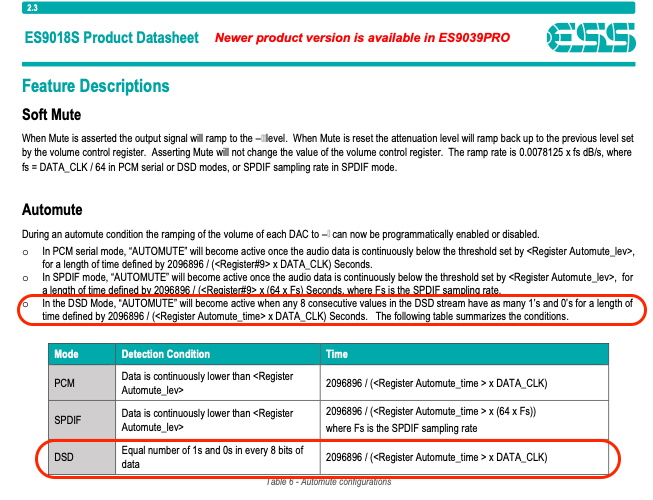
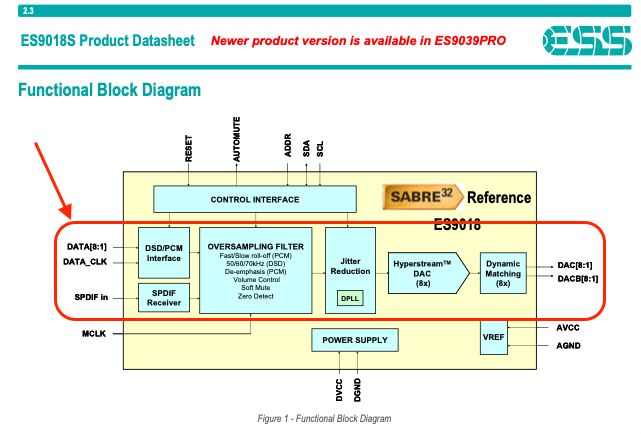
The 280d utilizes the ESS ES9018K2M chipset which has no pure direct 1-bit DSD signal-path to output… These chipsets decimate the 1-bit DSD signal to PCM for Hyperstream processing before output conversion…
I suggest that you up-sample all PCM using “Power of Two” strategy… this will logically up-sample to 352.8kHz (44.1khz family) and 384kHz (48kHz family) and have Audirvāna convert your DSD files to PCM, where they will be delivered as 24/352.8kHz files to the DAC, which will off-load decimation from the chipset DSP, reducing operational noise… Letting the Hyperstream processing do its thing… 
Note the block diagram signal-path:
[quote=“Agoldnear, post:11, topic:47190, full:true”]
How do you explain that I do not have this behavior with modulation to DSD256 in Audirvāna Studio 3.3.2 via r8Brain with my playback system architecture? [/quote]
Of course the very same way I explain that the problem did not exist with Audirvāna 2, but did with Audirvāna 3 on the same DAC: Some DAC and player combinations have the problem, some don’t. Your DAC doesn’t have the problem with Audirvāna 3, my past and present DAC and the OP’s do. Simple.
So… you cannot explain why my system is not experiencing this behavior… that’s the context of my statement… 
Ho-hum. So anyway, @Jason_Pasosky, let’s hope the developer is able to revert whatever changed between Audirvāna 2 and Audirvāna 3 that results in this issue for some USB connected DACs.
Let’s hope that folks playback system architectures are not playing into the behavior in concert with DAC platform architectures that seem to precipitate the transition “pop” by virtue of inadequate platform resources and/or design implementations.
Confirmed, no pops with directly connected DAC with HQPlayer.
For reference…
DAC must keep its output mute relays muted for first 50 ms of DSD playback and also for the last 50 ms of playback. So unmute is allowed to happen only after 50 ms of DSD has been played and must be muted 50 ms before DSD playback ends. Some DACs fail to do this and that’s why you get popping at start/end.
jussi_laakoJussi Laako (Signalyst)Developer of HQ Player
That is common problem with DoP and DACs that don’t follow DSD
specification closely enough. The specification requires DAC to mute
output for 50 ms when DSD stream is starting and when it is ending to
avoid such noises.HQPlayer does play silence at beginning and end of playback. But not
between tracks. Make sure you have either PCM or SDM output mode
selected (instead of Auto) in main window so that DAC stays at either
mode and doesn’t keep switching between the modes…Best regards,
- Jussi
@Jason_Pasosky
In the context of the 280d DAC utilizing the ESS chipset and the implementation of the Automute function… @Jud This can be common implementation problem across a series of DAC platform chipset architectures: