Moreover, i do not have this issue on Windows 10
and Jriver 32 can see all the audio UPNP devices on Windows 11.
I tried different solutions : nothing works !
Are we only 2 suffering from this crippling problem ?
Since 3 days, nobody of the support team did answer me
I’ve sent a support request but have had no response so far.
You will get a response during office hours (monday). It is weekend now.
with the update 2.8.3, I’ve the same issue with Windows 11. On another I’ve a old version and everything is ok. There is an Upnp feature that is added with the new version, and it breaks different configuration
Same issue here.
I got the same issue. 
Me too. Happened immediately after the 2.8.3 update. Both sets of wireless speakers disappeared from AS but both set of speakers still connected to wireless network. Also, since 2.8.3 update AS reccomends I change from Public (default) to Private wireless network, which i did, but still getting the 203 UPNP error. Sent requests to support on the 14th and 17th but not heard back yet.
Hi, everyone. I saw your emails with comments about this issue. We made a test version to learn more about what is happening. Can you install it and check what is displayed?
https://audirvana-my.sharepoint.com/:f:/p/antoine/EkHaCab0Ki9Ohgeor8lLahcB_cwtq2z6gHDREJJylY-2jQ
Hello Antoine, do we need to unistall existing AS installation first?
I installed it, having to uninstall the existing version. I get exactly the same error with this test version.
Can you send a screenshot of it?
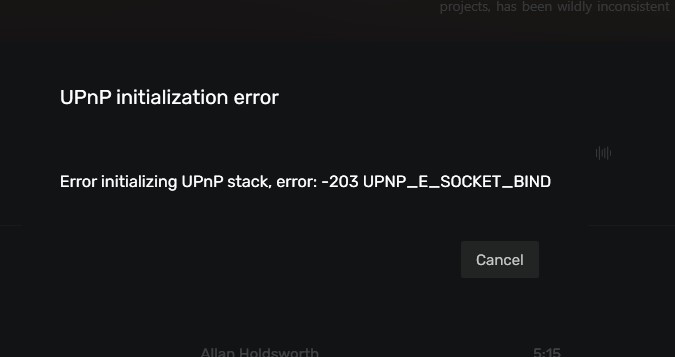
Uninstalled and reinstalled test file still getting same error. i note that MS released a major update on same day as the AS 2.8.3 update? Coincidence?
In my case, the error occurred even before I installed that major Windows 11 update. I hoped the update would fix the issue, but it didn’t.
When I use 2.8.3 version from this blog I gets this error
UPnp services discovery (SSDP UDP 1900 port) is already in use by another application.
But if use the 2,8,2 version I don’t get any error.
Hi everyone,
After a long period of email testing with some of you, we have found the root cause of this issue on Windows.
The issue is linked to iPv6 UPNP discovery, which generated an issue with Audirvāna. We made a version that does not use iPv6 at all for UPNP discovery and fixes the issue.
We made a 2.8.4 version just for Windows that fix the issue 
1 Like
2.8.4 doesn’t work for me same issue of not starting up after update and reboot
Hi @geekee,
Can you contact me at [email protected] and send me your OS information?