Upsampling with Audirvana yes/no?
If yes - Sox or R8Brain - witch settings?
What should I do with MQA? No MQA or alternative MQA render, MQA decoder?
The other story about - if I use EQ - Apples AU EQ; Audirvana EQ; Sonarwork SoundID EQ (not plugin version) - sometimes I use one of this three, here other settings?
My currrent settings:
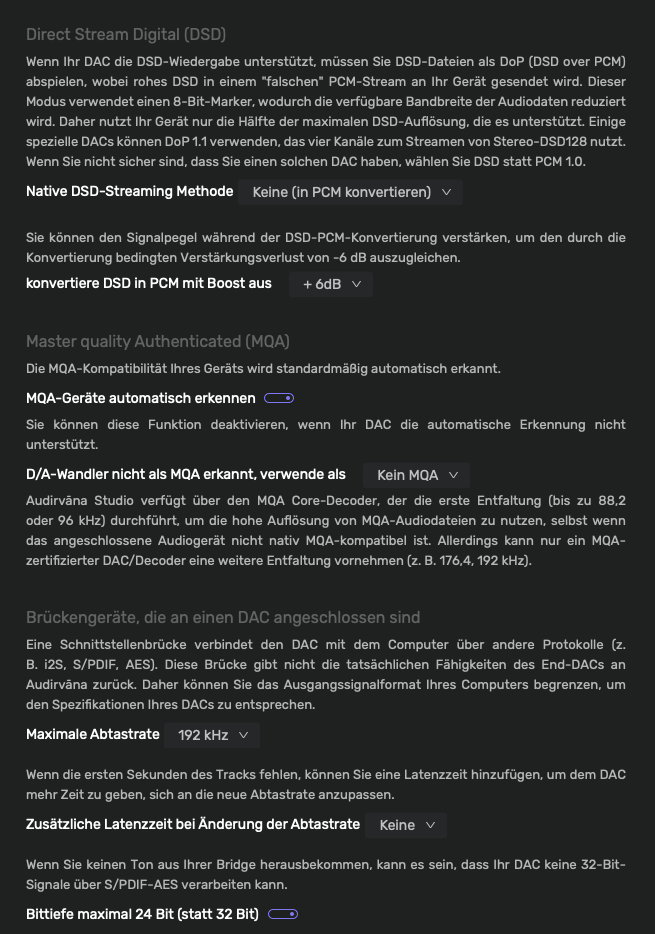
Audirvana default to DAC
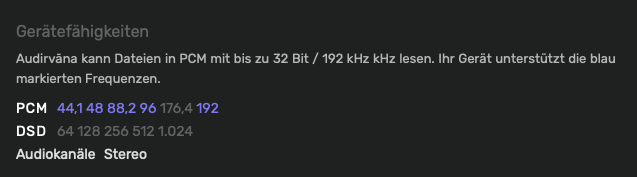
PCM 44.1 48 88.2 192 (no 176.4)
DSD (no)
Exclusive access (on)
Integer mode (on)
Large CoreAudio I/O buffer (on)
Native DSD streaming method (none - convert to PCM)
Convert DSD to PCM with boost off (+ 6dB)
MQA devices automatically recognize (on)
D/A converter not recognized as MQA, use as (no MQA) alternative MQA render, MQA decoder
Maximum sample rate (192 kHz)
Bit depth maximum 24 bit (instead of 32 bit) (on)
…
This will depend on the MQA capability of the DAC, as to whether or not to up-sample to a higher PCM sample-rate… You will be the arbiter of the sound-quality.
From the Knowledge base article linked above regarding MQA playback…
Thanks to the MQA decoder integrated into Audirvana, non-MQA-capable audio devices can benefit from the high resolution (doubled sample rate compared to the encoded file).
In this case, Audirvana brings, in addition to the general Sound Quality improvement, the decoding of the MQA file that would be played only at a little above CD quality otherwise, losing all its high-resolution benefits.
By up-sampling in Audirvāna, you are removing processing overhead from the DAC chipset DSP topology that is not as powerful or customizable… I suggest r8Brain using ‘Power of Two’ strategy… It appears that you have Audirvāna set to convert DSD files to PCM which will decimate the DSD file to the highest logical PCM sample-rate supported by the DAC (24/88.2kHz).
Make very fine adjustments with the parameters… I suggest leaving the ‘Bandwidth’ (Nyquist Fc) % as is… Heed the information provided in the Knowledge base article, as incremental changes on the ‘Cutoff Band Attenuation’ have large effect on the output sound-quality… I also suggest setting the filter type to ‘Linear’… and you will need to experiment… The more you understand how SDM filters perform, the better you can fine-tune the output sound-quality to suit your aesthetic… If you have FIR filter options you will be working in concert with the filter(s) in the Wolfson DAC… Start with the filter cut-off in the Wolfson DAC that applies the least attenuation of signal energy beyond the Nyquist cut-off… A lot of patience and experimenting will be worth the time invested…
The process of fine-tuning the output of the SDM will not be quick and will evolve over time… step away for a couple of days and come back to evaluate your adjustments across a wide spectrum of relevant music… As you appear to appreciate, the small-things matter… Manage your audition times so not to make adjustments on tired ears… You are the arbiter of your preferred aesthetic.
Also, you are allocating 8GB for playback pre-load memory… 50% of your System RAM for playback pre-load memory… I suggest lowering this to around 4GB… More System RAM is better…
Your DAC chip allows two different possibilities: Either upsampling the signal it receives, or, if it receives a DSD signal, it’s possible to implement the chip so that it passes the DSD signal without alteration. I don’t know whether your DAC’s implementation of the chip allows this second possibility or not.
If your DAC allows DSD input, you might want to try upsampling to DSD in Audirvāna (DSD256 or DSD512 if possible) and sending that to the DAC. You should also try upsampling PCM in Audirvāna and sending that to the DAC, because the initial upsampling is important to the sound quality. And finally, try without upsampling in Audirvāna. Then choose whichever you prefer.
The DSD specification requires a volume cut when upsampling to DSD, so be sure you equalize volume levels when comparing.
Edit: Regarding MQA, my suggestion would be not to use it, unless you listen to a great deal of MQA content from Tidal. (Tidal doesn’t have new MQA content, but there is still a substantial amount.)
The advantage of up-sampling is in the ability to reveal the low-level information that is masked by the quantization noise in the source master encoding, and move the Nyquist Fc further beyond the real-world human hearing, where the filter aliases are attenuated using less intrusive filter coefficients, while increasing sample-resolution… Nothing is added-to or subtracted-from the source encoding in the up-sampling process… The source file sample-density is maintained, as-well-as the encoded dynamic-range that has been codified in the originating master encoding… The up-sampling process injects zero-values in-order to increase the sample-rate and bit-depth is increased… The increased bit-depth reveals the entirety of the source master encoding dynamic-range… Ultimately the increased sample-rate presents a more refined signal waveform to the D/A circuitry…
In LPCM theoretical ‘Dynamic Range’ is calculated as:
(Where 1-bit = 6db)
[ 6(db) x (Number of Bits) + 1.75mv = Dynamic Range ]
For example:
16bit encoding has a theortical dynamic-range of approximately 96dB
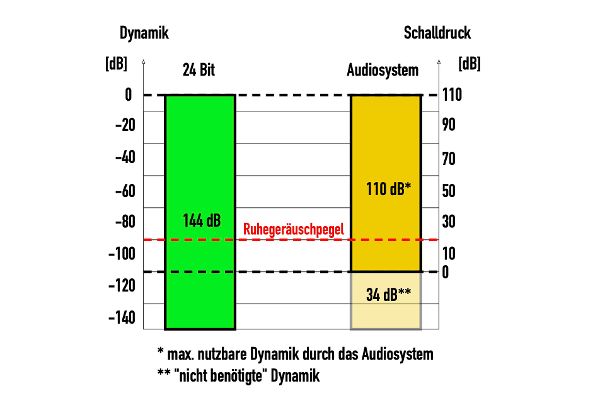
24bit encoding has a theoretical dynamic-range of approximately 144dB
A native 16/44.14kHz encoding of a source master is not equal to a native 24/88.2kHz encoding of the same source master, unless the source master is a lower resolution digitized iteration… The 88.2kHz sample-density is 2X of the 44.14khz encoding sample-density… The dynamic range of the 24 bit encoding is 48dB greater than the 16 bit encoding.
The real-world is the reference for value of frequency density and dynamic-range.
We end up back at around 96 dB, which can actually be utilised in a normal environment. Anyone who lives near a busy road will achieve even less. Unless you use closed headphones.
This only has to do with music for the end user, none of which has anything to do with processing = calculation in the studio.
Stagetec (manufactures digital mixing consoles) digitises at the inputs in 40 bits (cascaded AD converters) – the reason being that the level setting is purely digital. A distinction must be made between processing and the end product.
Part 1 to part 5 –>
DAC-Chips im High-End-Audio: Welcher Wandler macht den besten Sound?
24/192 Music Downloads …and why they make no sense
Sample-density and bit-depth matter in a master PCM encoding…
If a master encoding is done at 16/44.14khz, then the advantage of up-sampling is in the refined signal waveform presented to digital-to-analog (D/A) circuitry of the DAC platform, as compared to the raw 16/44.14kHz waveform presented to the D/A circuitry, which is far from looking like a pure-analog waveform in comparison… In the case of a 44.1khz encoding being up-sampled/encapsulated in a 88.2kHz file, the waveform presented to the D/A circuit of the DAC platform is refined by 2x the number of samples…
Of course, most master encodings do not take advantage of the available dynamic-range and it is rarer still to have a home speaker playback system with greater than 96dB of dynamic range… However the idea is to not lose low-level detail hidden in the quantization noise of a lower sample-rate and bit-depth encoding.
If you send 44.1 or 48kHz signals to your DAC, or even 96 or 192KHz, it first upsamples them to a higher PCM resolution (perhaps to 352.8 or 384kHz), then modulates them to either DSD or a hybrid DSD/PCM format (perhaps 5 bit word length at mHz rates). Why?
Modulation to DSD or a hybrid format is done because the final analog reconstruction filter in the DAC can be effective with less expensive parts.
That leaves upsampling to higher rate PCM, which is done for two reasons: (1) It enables conversion to the desired DSD or hybrid DSD/PCM bit rate; and (2) It makes good digital filtering easier. Let’s talk about the second one.
Digital filtering (removing the artifacts created by digital sampling) is essential in digital audio. All digital filtering must balance between two contradictory effects: (a) The filter should remove as much ultrasonic distortion (aliasing and imaging) as possible; but (b) The more sharply the filter cuts to remove this distortion, the more it “rings” (the Gibbs phenomenon - Gibbs phenomenon - Wikipedia ).
If you have a 44.1kHz signal, then you must remove everything above 22.05kHz, but leave everything in the audible range below 20kHz intact. That doesn’t give much leeway for the filter to operate. But if you upsample to 352.8KHz, now you have much more space to strike a good balance between cutting out distortion and having the filter ring too much.
The same applies to the ADC conversion in recording as it does to the DAC conversion in playback. The lower the resolution, the harder it is to make a filter for the ADC that effectively removes aliasing and imaging while not creating ringing. So if all else is equal, it’s easier to make a high resolution recording with low noise and distortion than to make a lower resolution recording with these characteristics. Of course all else is often not equal, and we all know examples of excellent sounding 44.1kHz recordings, and bad sounding 96kHz or 192kHz recordings.
Increasing Dynamic Range: A higher bit depth means that the audio signal can represent a greater range of amplitudes, capturing more subtle differences between the quietest and loudest parts of the audio.
Reducing Quantization Noise: With more possible amplitude values, the difference between the actual analog signal and the quantized digital signal is minimized, resulting in lower quantization noise and a clearer, more accurate reproduction of the original sound.
Quantization
Definition: Quantization is the process of converting the continuous range of amplitude values in an analog signal into a finite set of discrete digital values during analog-to-digital conversion. This is necessary because digital systems can only store data in discrete steps. The quantization precision is determined by the bit depth, which specifies the number of possible discrete values each sample can take.
How It Works:
Sample Amplitude: After sampling the continuous analog signal, each sample has an amplitude within a specific range. These amplitudes are typically continuous values.
Discrete Levels: Quantization maps these continuous amplitude values to the nearest value within a finite set of levels. The bit depth determines the number of these levels. For example, a 16-bit depth allows for 65,536 possible discrete levels (2^16).
Quantization Noise: This process introduces a small error known as quantization noise, which arises because the exact value of the original analog signal is approximated to the nearest available digital value. The larger the bit depth, the smaller the quantization noise, as the signal is represented more accurately.
Purpose: Quantization captures the amplitude variations in the audio signal, translating the continuous analog signal into a digital format that can be stored and processed by digital systems. The greater the bit depth, the more accurately the analog signal is represented in the digital domain, which results in better sound quality.
Key Differences Between Sampling and Quantization
Purpose:
Sampling: Captures the time-based characteristics of the audio signal by taking periodic measurements of the signal’s amplitude at specific intervals. This process transforms a continuous analog signal into a series of discrete time points.
Quantization: Converts the continuous amplitude values obtained during sampling into a finite set of discrete digital values. This step is essential for storing and processing the sampled data in a digital system.
Process:
Sampling: Determines how frequently the signal is measured, which is controlled by the sample rate (e.g., 44.1 kHz, 48 kHz). The sample rate defines the temporal resolution of the digital representation, with higher rates capturing more detail in the time domain.
Quantization: Determines the precision with which each amplitude measurement is represented, dictated by the bit depth (e.g., 16-bit, 24-bit). The bit depth defines the number of possible discrete amplitude levels, affecting the dynamic range and the accuracy of the digital representation.
Outcome:
Sampling: Produces a series of discrete time points, each representing the amplitude of the audio signal at a specific moment in time. This sequence of samples forms a digital approximation of the original analog waveform.
Quantization: Produces a series of discrete amplitude values corresponding to each sampled time point. These quantized values are then stored as digital data, ready for further processing, storage, or playback. Quantization inherently introduces some level of error, known as quantization noise, due to the approximation of the continuous signal.
Nyquist Theorem:
The Nyquist theorem states that to accurately reproduce a signal, the sample rate must be at least twice the highest frequency present in that signal. For human hearing, which typically ranges up to 20 kHz, this means a minimum sample rate of 40 kHz is necessary to capture all audible frequencies. This principle underpins the standard 44.1 kHz sample rate used in CDs, which was chosen to avoid aliasing—a form of distortion that occurs when a signal is undersampled, leading to incorrect frequency representation. Aliasing results in high-frequency components of the signal being misrepresented as lower frequencies, creating an audible distortion.
To prevent aliasing, the Nyquist theorem suggests using a sample rate just above double the highest frequency, but in practice, engineers often employ a slight buffer, leading to the choice of 44.1 kHz rather than exactly 40 kHz for CD audio. Oversampling—using a sample rate significantly higher than the Nyquist rate—can help further reduce the effects of quantization noise and make filtering easier, resulting in cleaner and more accurate audio reproduction. While oversampling doesn’t increase the actual frequency content beyond the original signal’s range, it can help improve the fidelity of the digital representation by minimizing potential artifacts.
Understanding these fundamental concepts—sampling, sample rate, bit depth, and the Nyquist theorem—is essential for anyone working with digital audio. These parameters determine the quality and fidelity of the digital audio recording, influencing both the capture and playback of sound.
Theoretically the input should be reproduced identically by the D/A circuitry, but non-linearities will have influence on the signal as it flows through the platform topology and DSP… This is where offloading SDM processing from the DAC chipset is beneficial, as it reduces the potentials for phase and amplitude distortions that may be introduced, due to noise (jitter) in the clocking architecture due to latencies precipitated by gate wait-times and component slew-rate latency, among other influences…
Measurements indicate some improvement in noise and distortion when using software that has the capability to do higher quality upsampling than what occurs in the DAC. This improvement is at low levels and audibility has been the subject of debate.
I use it because I like the idea of getting accustomed to the lowest levels of noise and distortion in my listening, whether I can actually hear a difference or not. But in the end it comes down to personal preference, so listen with software upsampling, listen without, and choose whichever you like best. Or if you don’t have a preference, don’t worry about it.
I am presuming @fredmusiconmac is fairly savvy in regard to digital-audio fundamentals and playback performance… The perceived sound-quality of any audition is subjective, and these perceptions are intrinsic to the entire signal-flow through hardware and software topologies… The only true digital-audio “bits” (1 and 0, On and Off) are those signal encodings stored in or on a given storage media, before being lifted from the media for transmission as electrical impulses through the playback architecture, and once lifted from the storage media, these signals are influenced by a myriad of potentials in the transmission-path to the D/A output signals.
This codified information is what it is… The idea is to reveal the entirety of harmonic and dynamic-range energy imbued in that signal… If we can remove noise that masks those elements, we are getting closer to the reality of those signals codified on or in the storage media.
It is a balance depending on your playback strategy… available System RAM is important to the synergy of computer operations and Audirvāna operations… You never want to starve the computer of resources for data flow I/O and operational memory is support of the platform OS and the operational memory in support of Audirvāna functions…


 You are the arbiter of your preferred aesthetic.