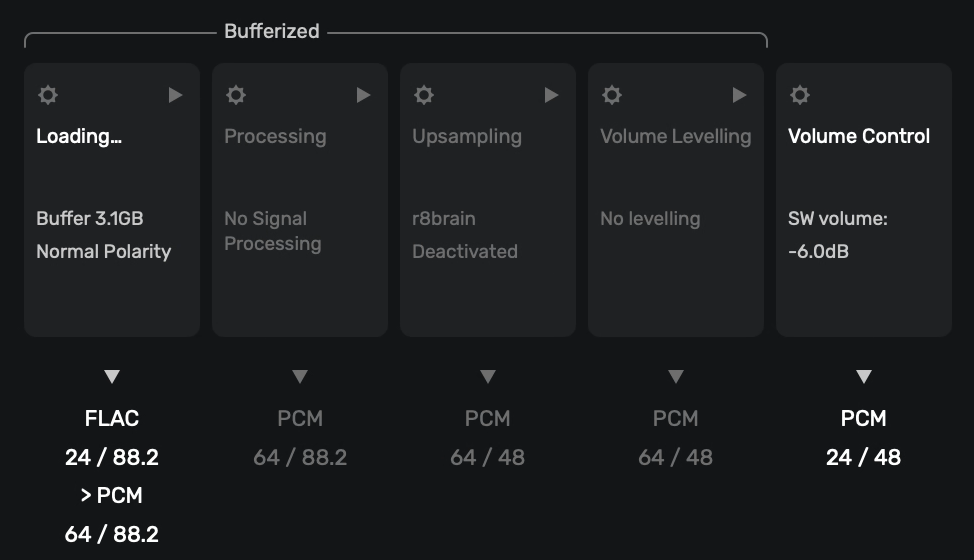
It appears that a sample rate conversion occurs in the processing chain before the volume control stage is reached, even when no sample rate conversion is configured:
Would it be possible to have a volume reduction stage before this conversion, so inter-sample overs during sample rate changes can be definitively avoided?
From the Online Help information, accessed by clicking on the (i) in the top-right of the Upsampling pop-up window…
"To avoid problems caused by oversampling of DSD, which can cause interruptions during audio playback, it is advisable to reduce the sound volume. For tracks that use ReplayGain and for tracks with sampled peak values, the volume reduction is calculated automatically. For other tracks, a precautionary volume reduction can be specified here at the bottom of this settings window."
If ISP’s are detected this will be mitigated subsequent of the up-sampling/modulation processing in the Volume management modules feeding the output level. Proper gain management prior to up-sampling/modulation if using the Plug-in module is also essential… It is difficult to assess the difference between ISP’s and simple spurious digital signal overload clipping distortion in the DAC.
It is not logical to assume that the Up-sampling module is always engaged when it can be enabled or disabled (bypassed).
Thanks for the reply. I’m not using or converting DSD, in fact, the entire upsampling stage is deactivated. Yet, as evidenced by the screenshot above, a sample rate conversion from PCM 88.2 (or anything the source file happens to be) to PCM 48 is taking place. Now, this needs to take place somewhere, since the output device requires 48, but I would like it to happen after I had the chance to lower the digital volume. Like you said, gain management is essential prior to sample rate changes.
If you notice… The FLAC file is being converted to PCM with 64 bit math and the sample-rate is decimated to 48kHz (which is an illogical target for 88.2kHz… the target should be 44.1kHz to avoid round-off errors…) Sample-rate decimation does not add gain, the increase in bit-depth adds dynamic-range…. in the case of 64 bit math the theoretical dynamic-range is approximately 384dB! (where, in PCM digital-audio, 6dB = 1 bit) … The 64 bit/48kHz signal (The correct target should be 44.1kHz) is presented to the 64 bit Volume processes where the signal bit-depth is decimated to 24 bits (theoretical dynamic-range of 144dB) for output to the DAC.
The signal presented to the sample-rate converter decimation process is not altered by virtue of the 64 bit math, just the sample-rate…
However, (in the scenario you are showing) you are presenting the potential for truncation-distortion/round-off-error by setting an illogical target sample-rate of 48kHz for output instead of 44.1kHz.
Note: 1-bit = 6dB in LPCM…. Therefore: [6(dB) x (number of bits) + 1.75mv = Theoretical Dynamic-Range in volts]
My concern isn’t dynamic range. It is that the signal is subjected to sample rate conversion without the chance of reducing the level first. There is a risk of clipping inter-sample overs during this conversion, because sadly a lot of source material contains samples at or close to 0dBFS. I would like to reduce the signal level by at least 3dB before any sample rate (or D-A) conversion.
From the Online Help Guide info in the Volume Leveling Module…
“The Replay Gain function allows you to automatically adjust the volume of tracks to maintain a consistent playback level within a playlist. This adjustment is made according to a sound level reference specific to each song according to EBU R128 and DR standards.
If this reference is not available in the metadata of a piece in your local library, Audirvāna can calculate it.
You can start the analysis of the albums in your library by pressing the ‘start’ button. You will then open a view that displays all the albums that do not have this information. You can select all or some of them, and launch the analysis in background.
The Replay Gain can also be applied to songs streamed from a partner service, provided that this service makes this information available (e.g. TIDAL).
It is advisable to start with the “Preserve album dynamics” option which preserves the dynamic variations desired by the artist within an album.”
Yes, but replay gain (like SW volume adjustment) is applied after sample rate conversion, i.e. after any potential clipping of inter-sample overs had already occurred.
Are you sure of this? Any software Leveling and/or Volume adjustment will be made in the digital domain… At what dynamic-rangeg (bit-depth) do you want this to be calculated? 24 bit? …
What makes you think the 64 bit DSP is going to inject ISP’s?
It sounds like your DAC does not have the headroom to fully reproduce a 24 bit file without clipping.
ISP’s are spurious, not contiguous… If you are getting hard clipping distortion it is not because of the DSP algorithm in Audirvāna.
More information is needed… Please paste your debug information report here so we can see your system configuration… You can find it here:
Creating a debug info
Before you click on the "Debug Info“, please select the correct output.
Once you have done this, go to Audirvana Settings>My account, and you will see the button:
Note: Once you clicked on Debug info,YOU CAN DIRECTLY PASTE IT IN A EMAIL OR TEXT file.
Yes. If you look at the screenshot in my original post, you can clearly see that the conversion from 88.2kHz to 48kHz occurs before both the volume levelling (replay gain) and SW volume adjustment stages. If that presentation in the Audirvana UI reflects what is actually happening.
Inter-sample overs are spurious, yes, but can occur en masse, in particular with “loudness war” recordings. And no, I’m not suggesting that Audirvana is doing anything to cause them. But to be sure that they don’t lead to clipping one must reduce the level of the digital signal before any sample rate conversion (or D-A conversion) happens.
If I am not mistaken, the DSP algorithm can change dynamically based on the playback scenario, so, the static GUI does not tell the whole story… The Audirvāna team can shed more light on this…
Again, “sample-rate” is just that… the frequency of samples-per-second or otherwise put, Frequency of sampling (Fs) in nomenclature, and has nothing to do with amplitude or dynamic-range… It is the number of digital ‘bits’ in the PCM frame that define the amplitude/dynamic-range. (lowest level to highest level).
Your example file is a 24 bit file… that does not mean it is always playing at maximum level… If you are playing files with zero dynamic-range where the files have been normalized to OdB, then these files are junk… they are just loud and distorted. You will not be able to “un-normalize” the file…
I’ll give you a reference…
I modulate all PCM files from 16/44.1kHz up-to 24/352.8kHz to DSD128 (5.6MHz) in r8Brain after processing the files through EQ Studio w/auto gain control and a HRTF plug-in because I am headphone-centric. This is in concert with the FIR filtering in my DSD-centric DAC…
Because the HRTF plug-in automatically increases the number of bits in the signal path just by inserting it, I reduce the gain before modulation in r8Brain by -2dB which is close to the insertion gain of any plug-in before any processing… I don’t worry about ISP’s and believe me, I don’t tolerate any digital-audio artifacts in playback.
For reference… my DAC has approximately 115dB of dynamic range.
I understand that and I’m not worried about dynamic range. All I want to do is avoid inter-sample overs, which can only occur during sample rate conversion if the signal contains samples very close to 0dbFS. Dropping the overall level of the signal by a few dB will prevent them.
No, I cannot un-DRC them, but I can prevent them from clipping.
ISP’s are generally less than 1dB, typically, less than .5dB… It appears you believe the 64bit DSP cannot handle the 24bit signal level dynamic-range in the decimation process (which is lowering the sample-rate and discarding samples, reducing resolution…) from 88.2kHz to 48kHz (logically should be 44.1kHz), while keeping the integral 24bit-depth of the source file throughout.
For reference:
I suggest that you use an offline Sample-Rate Coverter (SRC) like the one linked below to remaster your files…
I’m not sure why you keep circling back to bit depth and dynamic range. Inter-sample overs have nothing to do with that. When you have two adjacent samples at 0dBFS then the waveform amplitude in between those samples (alternatively: on both sides of the samples) must be above 0dBFS. Similarly, the closer two adjacent samples are to 0dBFS, the higher the chance that this occurs. When resampling a signal like that, there is a high chance that sample values exceeding 0dBFS will be required, which of course isn’t possible, so the signal will be clipped.
That is certainly possible, but seems like a lot of effort. It would seem much much easier to reduce the level of the signal before any resampling occurs. Roon and JRiver can do it, I was just hoping something similar would be possible in Audirvana.
Signal amplitude in LPCM is directly related to bit-depth… An Inter-sample peak is a voltage that is interpolated from the digital-audio signals which are nothing but analog voltage pulses of varying amplitude… This ISP voltage is representative of the percentage of 'bit-energy" beyond the expected sample bit-depth maximum of 0dBFS, where 0dBFS represents the expected maximum dynamic-range of the encoded digital-audio signal, In the case of LPCM, this typically being 16, 20, 24bits (96dB, 120dB, 144dB theoretical) where DSP like Volume, sample-rate conversion, etc are done at 32, 64 bits (192dB, 384dB) because of the precision of the headroom (dynamic-range) in the calculations that is transparent to the source LPCM signal.
The 64bit sample-rate downconversion that you suspect is not adding amplitude and if your DAC cannot handle the 24bit signal, you can lower the amplitude of the 24bit signal before output with the software Volume control… In the example provided, this is lowering the bit-depth by 1bit (-6dB) and in the context of the 24bit file, Audirvāna is effectively sending a 23bit file a signal to your DAC with a dynamic-range amplitude of approximately 138dBmv [6(dB) x 23(bits) + 1.75(mv) = 138dBmv]… (Otherwise, in the case of up-sampling/modulation in Audirvāna you have the ability to reduce the input gain to the SDM (r8Brain or SoX).
If you read the Benchmark reference article regarding SRC. In that article, they specifically address the issue of dynamic-range and provide insight into the value of headroom in the interpolator algorithm calculations. Because, dynamic-range in LPCM encoding is intrinsically tied to the analog voltages those samples represent in amplitude/energy presented to your DAC,
If the ISP’s are encoded in your source files, they cannot be removed as it is truncation distortion that is precipitated product of the encoding process. Most likely this distortion is not audible in the context of any given file playback, unless your DAC is incapable of handling the signal-level (dynamic-range) of the spurious ISP events. Most modern DACs are capable if handling 32bit files. However, you are doing what is possible by lowering the output volume in Audirvāna or if so inclined, Volume Leveling.
What DAC are you using for playback and why are you not logically converting 88.2kHz files to 44.1kHz?
Again, bit depth (dynamic range) is not related to the phenomenon of inter-sample overs. They occur only when there are samples present at the highest possible bit values (representing 0dBFS or very close). Some DACs (e.g. RME, Benchmark) can handle this situation gracefully, they usually do it by lowering the signal level by -3dB before D-A conversion.
However, inter-sample overs do not only occur during D-A conversion, they can also bite when resampling a digital signal, namely when the resampler would be required to produce bit values in excess of 0dBFS. Since this isn’t possible, those samples will be replaced by 0dBFS, resulting in clipping. At least in integer PCM formats. With floating point formats, bit values in excess of 0dBFS can be represented, I believe.
I disagree. Inter-sample overs are a phenomenon that only manifests itself during resampling or D-A conversion. Having 0dBFS samples in a digital file is not “illegal” in and of itself. By reducing the signal level prior to resampling or D-A conversion, inter-sample overs can be avoided.
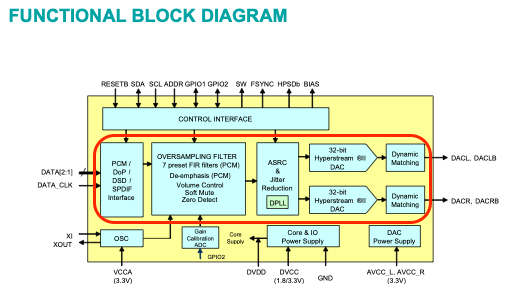
The -3dB reduction in amplitude (dynamic range) is done to the signal introduced to the Sigma-Delta Modulator (Sample-Rate Converter) in the ESS chipsets so not to overload the SDM because they convert all digital-audio signals to high sample-rate PCM in the HyperStream processing for multi-bit DSD-Wide output… There is limited dynamic range in the chipset… They (Benchmark) are applying dynamic range (amplitude) reduction prior to sending the signal to the chipset.
What is an Intersample Peak?
Again we reference the Benchmark article:
“PCM digital systems sample audio waveforms at discrete instances in time. Samples may occur at a waveform peak, but in most cases, the samples will miss the peaks. The diagram below shows an analog waveform being sampled by a digital system. “1” and “-1” represent the maximum and minimum digital codes. In a 16-bit system, these codes would be +32,767 and - 32,768. In the diagram below, note that the peaks exceed the maximum and minimum codes by a factor of 1.414 (3.01 dB). This worst-case example occurs when the audio tone is 1/4 of the sample rate. In a 44.1 kHz system, this worst-case scenario occurs near 11 kHz”.
Inter-Sample Peaks (or as the term is used in the article “Inter-Sample Overs”) are codified in the digital master if present and are only problematic when the DAC topology cannot handle the interpolated dynamic-range of the signal being being presented to the Digital to Analog (D/A) output circuitry where subsequently, the pure analog output signal will be distorted.
If the signal presented to the SDM in Audirvāna (r8Brain, SoX) for conversion to a higher sample-rate is overloading the SDM, the result will have distortion in the form of clipping… However in the case of up-sampling LPCM we see the sample-rate conversion DSP is done with 64bit accumulator which has more than enough headroom to handle signals with the dynamic-range/bit-depth of 32bit LPCM. (384dB vs 192dB theoretical).
As described in the Benchmark article, if the master containing ‘overs’ is interpolated to a higher sample-rate, the amplitude/dynamic-range of the ‘overs’ is not changed… The interpolation process injects zero values ( 0 ) to increase the sample-rate and calculates the result at a higher bit-depth to increase the dynamic-range to that of the target file format.
In the case of the decimation of LPCM files to a lower sample-rate than the source, the sample-rate is reduced by keeping every 10th sample, so, theoretically, this can reduce the number of ‘overs’, but at the sacrifice of resolution.
How do you define amplitude in a LPCM encoded signal?
How do you define a digital-audio signal?
No, the additional dynamic range doesn’t help, since the maximum bit values in 16bit, 32bit and 64bit integer formats are used to represent 0dBFS and map to each other. Only floating point formats can express values in excess of 0dBFS.
Now, if someone could confirm that the “64bit” format shown by Audirvana is actually a floating point format, rather than signed integer PCM, this would go a long way to allay my concerns.
They’re replacing them with “1”, where “1” means maximum digital code (corresponding to 0dBFS). But replacing those sample values with 1, where they should have been larger than 1, is exactly the problem. Since the larger than one values cannot be expressed in any integer PCM format, these samples are clipped.
Yes, but unless the sample rate reduction is done by an integer factor, the new samples will sit at very different places along the time axis, so new inter-sample over situations can be introduced. But overall, a reduction in sample rate is much less likely to cause inter-sample over issues than oversampling.
The only way do guarantee that inter-sample overs do not cause clipping is level reduction prior to resampling (like JRiver does it) or level reduction prior to D-A conversion (like Benchmark does it).
The amplitude/dynamic-range of the source signal is codified in the master encoding… The bit-depth defines the amplitude of the signal… In the case of up-sampling a 24bit signal to a 64bit signal, the headroom differential is +240dB Theoretical… The fundamental 24bit signal dynamic-range does not change, it is imbued in context to the new bit-depth… This is why low-level details are revealed in the lower bit-depth files that would be normally buried in the quantization noise of the lower bit-depth encoding. The Nyquist Fs cut-off of the source file is not changed… only the Nyquist Fs cut-off of the new higher sample-rate file is moved… there are no new contextual frequencies added in the up-sampling DSP outside of aliasing and residual stop-band harmonics and proper filter settings will mitigate these artifacts.
The limiting factor is the dynamic-range capability of the DAC… It appears you are worried that your DAC is incapable of handling 24bit dynamic-range well.


 …
…