If I could ask one more thing, as we all know its good to experiment right? And as its kinda linked to how things sound Id thought it best not to start another post as its easier for me to follow advice in this one.
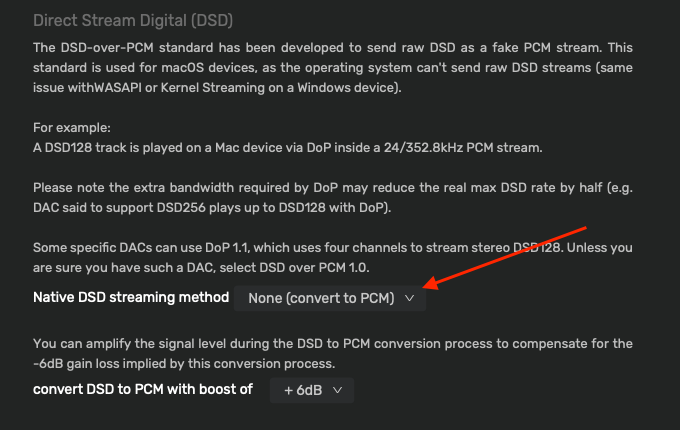
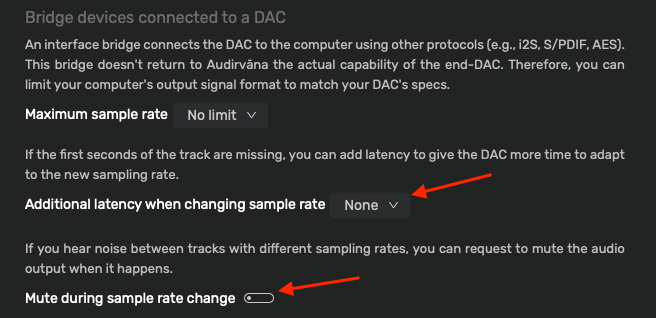
I have tried upsampling to DSD, and to me things sound good, and the Adiolab D9 can handle DSD up to 512. The issue is, if I load a playlist and play a track I get a pop at the beginning. If I switch to other tracks within the playlist it does not happen again, but will do if I change the playlist.
If what I read to eliminate this is correct, I have the Asio USB buffer mode set to safe, and set at 2048 samples which I beleive was the default when I opened it up.
I started with the DSD setting in Audirvana at 512 and have gone down to DSD64 but it still happens. The DSD Sigma-Delta Modulator filter is at B(7th order) and the safe volume option is set at -3 by default, those last two settings are ones I have not changed to date.
Questions, is there anything else I could look at to find the cause, should I not even be concerned of upsampling to DSD even?
Thanks.
This (the pop) began for me with Audirvana 3.0, and yes, it only occurs with DSD. It happens sometimes with other players with DSD also, due to DSD’s 1-bit characteristic (that is, either 1s or 0s are sent to the DAC).
To prevent any possible damage to speakers (if the pop is loud, otherwise don’t worry) I turn my amp off when the track first begins to play, then pause and go back to the beginning with the amp on.
This only happens for me when directly connected by USB, not when playing back using UPnP.
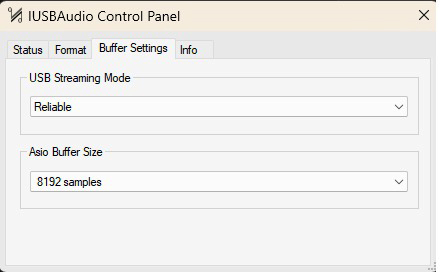
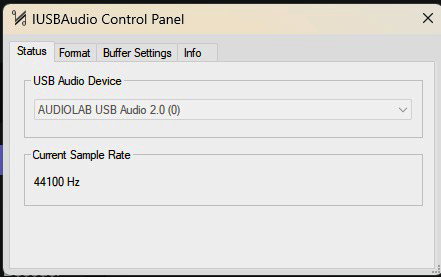
Cheers @Jud, I did wonder if it was due something pc related, a Cambridge Audio MXN10 is on the cards for me a month or so down the road so maybe that will sort it out. On another note, I noticed earlier that in my Asio buffer settings there was a warning that it was set too low. So I increased it to 8192 (1st image) and no warning. I checked the status (image 2) and the current sample rate was 44100Hz.
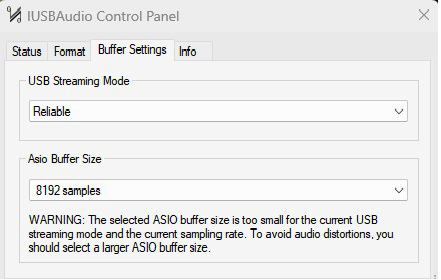
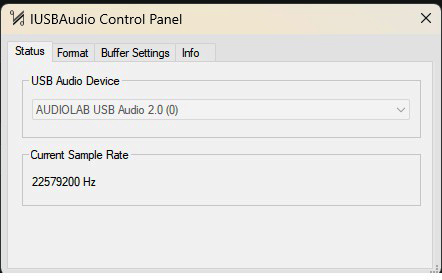
However, after starting a track, pausing it and checking the Asio settings again, the warning has popped up again, (Image 3) and the sample rate has now gone sky high to 2297200Hz (image 4)
I have no idea why that is, if I quit out of Audirvana and restart it, the Asio settings are back to what I would assume normal with no warning.
I’ve never had the control panel for my ASIO USB driver say that. She’s gonna blow, dive, dive! (Kidding.) My guess would be this is something specific to Audiolab’s driver.
Warp factor five Scotty yes thats what I am thinking @Jud, something is amiss somewhere for it to do that, I may not have that much experience but it does not seem right. I will send an email to them and see if they can shed any light on it, unless someone else can come up with a suggestion. I also read elsewhere that it can be inherent of some DACs not to be able to lock on to the sample quick enough which can cause the popping sound.
I am off out for the evening shortly @Jud, a well deserved drink or three. What I have not checked yet though, if this is only happening when I have upsampling set to DSD, i`ll try power of 2x and the device maximum frequency setting and see what it throws up tomorrow.
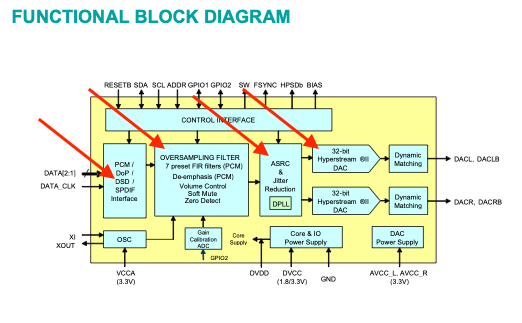
Yes… and I have already described the nature of the ESS chipset in the Audio Lab box… The ESS chipset decimates all DSD signals to PCM for Hyperstream processing… Again, I suggest having Audirvāna Studio convert DSD to PCM so to offload DSP processing demand in the ESS chipset architecture… You will be the arbiter of which sounds better… the ESS doing all the work or Audirvāna doing the decimation and letting the Hyperstream DSP take it from there…
In that scenario, you will be best served to up-sample your PCM files using ‘Power of Two’ strategy, which will produce the logically correct maximum sample-rate capability of the DAC (705.6kHz and 768kHz).
It is the nature of 1-bit PDM (DSD) files when transitioning from a PCM file… the sound can be muted to an inconsequential level, however, will never be totally eliminated… you will still hear a very low-level ‘tick’ at the start of a track and/or the end of a track… This also is related to the mastering of the 1-bit DSD encoding.
Another note… If you study the wavelength chart, the listening distance from the speaker will affect the perceived level of low-frequency energy… too close and the bass will sound thin…
Here’s Jussi Laako, developer of HQPlayer, regarding DSD and ESS DACs:
“AFAIK, Oppo uses ESS Sabre. With Sabre chips, the DSD path through the DAC is much simpler and more straightforward than the PCM path. So you can happily send it any DSD. Regardless of the DSD rate it behaves the same way, but higher rates just improve performance.”
He recommends sending DSD at the highest rate the DAC will accept and the computer is able to provide. He offers various different sigma-delta modulators, and was recommending a 5th order modulator for ESS DACs, though I don’t know if he still does.
So not decimation, but modulation to the highest DSD rate and any necessary oversampling to accomplish that.
It gets decimated in the ESS chipset DSP for ‘Soft Mute’ and ‘Volume Control’ and ‘Zero Detect’.. Zero Detect is their means of muting the transition noise and presented to the ASRC where the sample-rate is optimized for the Hyperstream processing… note the Hyperstream DAC is 32 bit.
Note:
Modulation of PCM to DSD only reveals the full dynamic-range of the PCM file, it does nothing to the spectral bandwidth, which is codified in the PCM master encoding… There is no benefit to sending a modulated (up-sampled) PCM to DSD file to DAC platforms employing ESS chipsets… You do not get the benefit of a simple 1-bit low-pass filtered D/A circuit that a DAC with a direct 1-bit signal-path to output provides.
The subjective qualitative assessment is left to individual.
You’ll need to inform the manufacturers of Jussi’s measurement equipment. He measured a characteristic intermodulation distortion “hump” if something other than a DSD signal using a 5th order modulator was sent to an ESS DAC. (He’s since developed other modulators so I don’t know if the 5th order modulator recommendation still stands.)
Whether this is audible is another matter, but there is indeed a measurable benefit.
The inherent “ESS hump” is a measured characteristic of the ESS chipset output quality and has nothing to do with DSD playback… check out every ASR (Audio Science Review) review of DACs employing ESS chipset in the design topology…
You could turn convolution off when you use your headphones or try getting the auto eq for your actual headphones from https://autoeq.app enter your manufacture and model choice output option as convolution and use that IR.wav when you listen with your headphones…
I also prefer the HLC as it allows up to 6 FIR files to be loaded and a no latency switch between FIR filters… Great for A/Bing filters as well as working with multiple output device like speakers in a room and headphones…
Yes, still issues with .cfg files via upnp… CPU to ~100% Or switching from on board speakers to upnp device which is how I do most of my listening… CPU to 100&…
 yes that


 He measured a characteristic intermodulation distortion “hump” if something other than a DSD signal using a 5th order modulator was sent to an ESS DAC. (He’s since developed other modulators so I don’t know if the 5th order modulator recommendation still stands.)
