Which volume control to use

I’m curious as to whether I should use Audirvana’s software volume control or my Wyred 4 Sound DACs digital volume control. The W4S DAC has very high output, around 8 volts or more, and my W4S mAmps only require 1.4 volts for full output. So I have to really turn down the DACs digital volume control which throws away a lot of bits to get it low enough to listen to. I was wondering if I turned up the DACs volume all the way up and used Audirvanas volume control if it would be less lossy. Would that be the case or is it the same lossy result?

On a side note I installed some -20db inline attenuators to help w/ this high DAC output.

Thanks.

The proper place for volume control is at the amplifier…

If you are experiencing clipping distortion in the DAC you may want to limit Audirvāna output bit-depth to 24-bit…

Dynamic-range in LPCM is calculated as: [6 (dB) x (number of bits) + 1.75mv = Dynamic Range] where one-bit (1-bit) = 6dB in gain (+/-)

For reference, -12dB of gain reduces the dynamic-range by two-bits (2-bits)… In the case of the theoretical dynamic range of a 24-bit file (144dB) and the theoretical dynamic-range of a 32-bit file (192dB)…

You will notice any Volume adjustment in Audirvāna is done with 64-bit math (384dB) before being decimated to the highest bit-depth capability of your DAC…

If you have both volumes available (the one of your device and the internal software volume control) and want to avoid unnecessary layers of processing, it may be best to leave your device’s volume at its nominal volume, i.e., at the volume where it does not attenuate or increase (= 0 dB).

Note: remember to turn it down when you leave Audirvāna
Which volume setting can I change in Audirvāna?

:musical_notes: :eye: :nose: :eye: :musical_notes:

It sounds like we are talking about gain staging… The proper place to set the gain to the amplifier would be at the PreAmplifier and/or at the DAC (if it has a PreAmp) or even before in some software, if it is done correctly…

If the W4S mAmps only require 1.4 volts then you should feed it 1.4 volts for the best performance from that AMP…

You might look at the DACs User Manual to see if it is possible to select an output voltage…

I sometimes wonder if @Agoldnear is an hallucinating AI…

Cordially,

-DD-

:roll_eyes:
FYI…

DAC-2V2 AND 2V2SE SPECS:

  • Balanced Output Level (Vol. 100%): 10.5V (20.1 db)
  • Unbalanced Output Level (Vol. 100%): 5.2V (14.5 db)
  • Output Impedance: DAC-2v2: 100Ω, DAC-2v2SE: 50Ω

Of course, some form of pre-amplification or attenuation is required if none is available, especially if the amp cannot be driven with enough gain… the OP has installed -20dB of attenuation, so obviously, has been using the DAC volume control as a pre-amp. :roll_eyes:

mAMP

  • Balanced Input Impedance: 100kΩ
  • Unbalanced Input Impedance: 100kΩ
  • Dynamic Range: 111db
  • Gain: 30db
  • Sensitivity: 1.31V
  • Output Impedance: 0.018Ω
  • Min Load: 3Ω

Input Level (DAC-2v2) or Volume Level (DAC-2v2SE)

Choose Fixed or Variable for input/volume level. Fixed mode bypasses the internal DAC volume control, while Variable mode engages it. Fixed mode should be used if you are connecting the DAC to a preamplifier, receiver, etc. to use that component’s volume control. Choose Variable to use the DAC’s internal volume control for connecting 13directly to an amplifier. On the DAC-2v2, you can adjust this for each input type. On the DAC-2v2SE, the Volume setting is global, affecting all inputs.

Minimum/Maximum Volume Level Settings

The Min/Max volume level settings can be set differently for each input type and allow you to tailor and optimize the DAC’s output to your preamplifier (or amplifier if connecting directly). For many users, the default settings will work best. However, with so many gain variables inherent in different systems, being able to raise the minimum output level or lower the maximum one can be an invaluable feature.

The volume table for the DAC is 70 steps in size and offers different size steps depending on the location of the step.

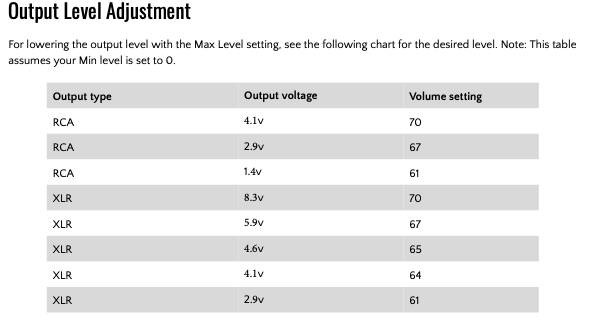
When the minimum level for the corresponding input is set to 5, the maximum level will be 65. Essentially, the Min > level is the amount of steps skipped in the first position. When used, the Min amount is subtracted from the 70 possible steps total. If a system doesn’t have enough gain to utilize the bottom several steps, you can remove them from the table by raising the Min setting to within the playback range of the system. Similarly, if you find the DAC output level too high, you can adjust the Max level down to within your personal preferences. See the Output Level Adjustment table on page 17 for volume level settings and the corresponding output voltages.

Example: With a less efficient system requiring a DAC volume level of 12 to hear anything, setting the Min level of 10 removes steps 1-10 which likely will be desirable. In this instance, the Max volume would then equal 60. The volume table offers from 3db to 1dB steps as follows (refer to the end of this manual for a chart correlating volume level to output voltage):

● 0 = mute

● Steps 1-9 = 3dB

● Steps 10-24 = 2dB

● Steps 25-70 = 1dB


https://cdn.shopify.com/s/files/1/0226/6264/3786/files/DAC-2v2_manual_v2.1.pdf?1523

:musical_notes: :eye: :nose: :eye: :musical_notes:

1 Like

Nice finds @Agoldnear I was wondering why there would be such a mismatch between a W4S DAC and a W4S amp… Turns out the are a perfect match when Gain Staging is done correctly… And the OP can probably toss those attenuators…

It will depend on the resolution of the Volume DSP, whether or not to use the Audirvāna software Volume Control or the device volume control… Audirvāna can control the Device Volume if available from the DAC architecture… Which one sounds the best, is up to the user to determine… My personal recommendation in this particular scenario would be to disable the Volume control of the DAC (lose the -20dB attenuation) and use Audirvāna to control the output signal level if remote control is required.

1 Like

Yes I am aware of all this but none of this changes the fact that the greater degree of digital attenuation the more bits are thrown away to achieve this attenuation. That’s what I’m trying to minimize. Plus reducing the upper volume limit down from 70 negatively affects headroom as told to me by W4S.

You’re right that there is a mismatch which leads me to believe that this DAC (DAC-2v2SE) was intended to be used w/ the SX-1000R amps. They need like 2.9 volts to reach full output…a much better match than the mAmps provide.

1 Like

So, When you are working with 64 bits of resolution, decimated to 32bits as in the case of Audirvāna Volume Control, this is as good as it gets… if you want better, then use an analog pre-amp or passive analog stereo volume control… its a trade-off, more interconnects, and potential noise generation…

1 Like

As you suggested I’m using the inline attenuators, DAC at full output (70) and controlling volume w/ Audirvana. I’m liking the sound this way better than using the DACs digital volume control.

1 Like

I doubt that you can discern an audible difference when Audirvāna is handling the Volume Control with the DAC set to ‘Fixed’ output on the RCA output and no inline attenuation… It may sound even better, because of elimination of interconnects and phase anomalies.

I will try it w/ the attenuators removed but I will then have to set the Audirvana volume control much further down which seems like that would still throw away too many bits. Plus I’m using the XLR connections between DAC and amps.

1 Like

Here are two posts on the topic by the fellow who coded the DSD modulators for Audirvana. I think the upshot is that the answer to your original question is “both.”

It is all about the input sensitivity and the output voltage relative to the input dynamic-range of the file…

If you are sending a 16-bit file through the 64-bit Audirvāna software volume control, where the output of the file is 32 bit, and the DAC is configured as ‘Fixed’ output, where the DAC is capable of handling 32bit signals, you will not be losing the dynamic-range codified in the 16bit encoding which is approximately 96dB theoretical… Even with 24bit files (144dB Theoretical) you will have plenty of headroom to work with as these will be output at 32bit files to the DAC.

The DAC has a measured dynamic-range of 110dB… This is your real-world limit.

*Bit-depth defines dynamic-range/volume… sample-rate defines the frequency bandwidth and resolution of the encoding…

Even though it may seem that you are giving something away by lowering the Volume in Audirvāna, you really are not, because of the 64bit processing… The preferred scenario would be no digital attenuation and use a very well designed analog volume control.

For example:
32bit output (approx. 192dB) delivering a encoded 16bit dynamic-range maximum (96dB Theoretical) to the DAC, gives you approximately 96 dB of headroom [approximately 16 bits (96 ÷ 6) ] … the entire dynamic-range of the 16bit file is retained… A 24bit encoding (144dB Theoretical) will have approximately 48dB of headroom (8 bits) the entire dynamic-range of the 24bit file is retained.

This is from The Absolute Sound 2011 review:

“… the Wyred 4 Sound DAC-2 includes a very well thought-out analog preamplifier…”
https://www.theabsolutesound.com/articles/wyred-4-sound-dac-2-digital-to-analog-converter-tas-210/

Is this really an analog pre-amp under digital control, integrated in the architecture, given they provide so much output level information in the context of the Volume Setting control…?

There is conflicting information about the DAC’s volume control… I’ve also read that it is 32bit volume control (Digital Control resolution?)… After all, the DAC is built around the ESS chipset which includes volume control functionality.

It may not be a great sounding analog preamp…

:musical_notes: :eye: :nose: :eye: :musical_notes:

1 Like

Thanks for all your input it is appreciated and gives rest to my soul that Audirvans’s volume control is not lossy.

As far as the DAC having a analog volume control, that’s the first I’ve heard of that. I think that is a mistake. When I communicatd w/ Wyred they talked only of a digital control.

Maybe they are speaking to the ‘step’ resolution becoming less resolved as the control mechanism is lowered…? This could be a digitally-controlled gain circuit in the analog domain as opposed to gain management in the digital domain. Both can be 32bit algorithms.