Had to choose a Category and tag…
Maybe more people on Studio than Origin… i’m on Origin and Mac, pretty sure the same on PC…
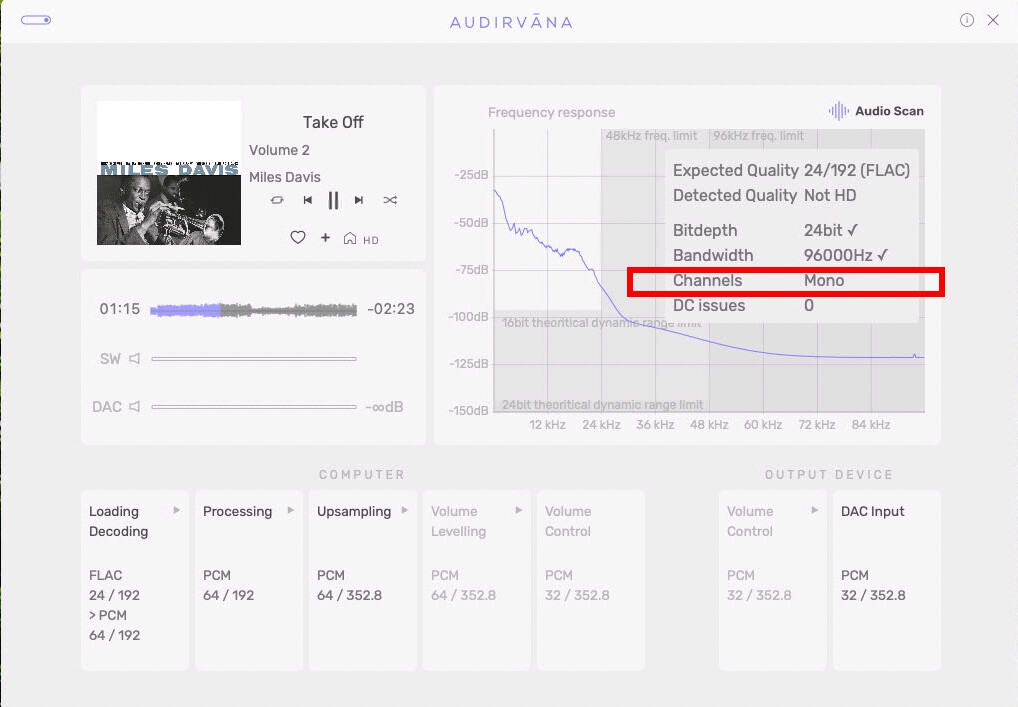
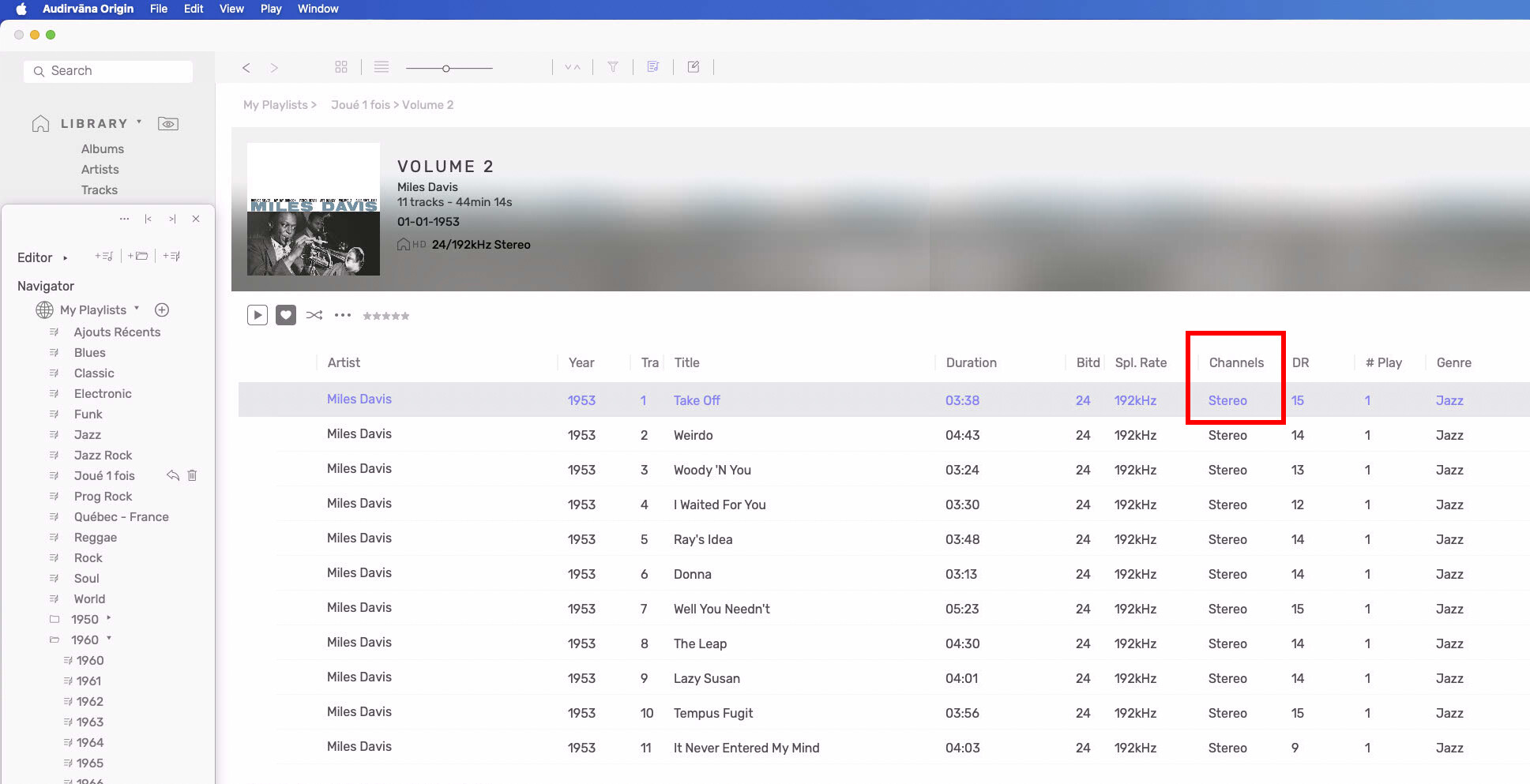
And we already know for a couple of years now, that 24/192 files in Audio Scan are not HD if mono 
Had to choose a Category and tag…
Maybe more people on Studio than Origin… i’m on Origin and Mac, pretty sure the same on PC…
And we already know for a couple of years now, that 24/192 files in Audio Scan are not HD if mono
From the ProStudioMasters ‘Technical Notes’ about this album…
192 kHz / 24-bit, 96 kHz / 24-bit PCM – Blue Note (BLU) Studio Masters
“This album is a high-resolution digital transfer of material originating from an analogue recording. It may be limited in bandwidth and dynamic range by the technology available at the time of its original creation, and is offered as a documentation of a historical release.”
For sure, this recording is mono. … In regard to quality? Most likely this digital iteration is sourced from an existing analog-tape master and processed for 2-channel playback when mastered/digitized for archival purposes and for digital distribution in today’s world, and this digital master serves as the ‘mother’ for down-sampled iterations, (And up-sampled 24/192kHz iterations.)
This album was recorded before the AMPEX 350 and 600 2-track ‘Stereo’ recorders were introduced in 1955 (I was a one-year old living down the road from AMPEX).
Acoustic Sounds sells a relatively recent 180g mono vinyl LP mastered from the original masters by Kevin Gray… So these digital iterations may be produced from that master.


Could it be that the original mono track is transferred as 2 identical L/R tracks and is seen by the system as a stereo recording? Metadata maybe the only way to change that.
I too well remember seeing in the ‘70s the back of the Ampex facility adjacent to the southbound 101 lane in Redwood City. 
I was born in Redwood City… 
It’s possible, however, more likely than not it has been processed for 2-channel playback to avoid frequency smearing and not as simple as two identical tracks, panned Left and Right,
… I bet there is a digitized true mono archival of this recording.
I see that the recording is available as a 24/96kHz file, which is most likely the original digitization sample-rate based on the Audio Scan readout … So, it would be safe to presume the 24/192kHz file is an up-sampled iteration… I see that you are up-sampling to 352.8kHz, which would allude that the up-sampling target is set to 352.8kHz… The logically correct up-sampling target would be 384kHz. I suggest that you use ‘Power of Two’ up-sampling strategy so to produce the logically correct sample-rate results for all files in playback, so to avoid round-off error distortion.  … It’s too bad that some vendors do not provide provenance information about the original source digitization sample-rate…
My question was simple, who is right…
I don’t care about the file. I know it is mono by default, stereo was not there yet (1953).
You are not sure it is an upsampled file from 24/96… don’t make suspicion about it…
24/192 is there, all seems good in Audirvana ‘Audio scan’ window… except saying mono hires are not hires!! i don’t care either about Audirvana says in that window, many flaws there not been updated since put on in the Audirvana soft… Yes, not an Audirvana thing that audio scan, like a plugin….
That software (Audirvana) is good, and the one i use everyday for being the most versatile in sound and look and editable database for ME, i use Origin… there is MANY things to be better In every window you look at it in that software!! (remote most). Not for you, i don’t care either, my listening and tagging experience, playing also with JRiver and HQPlayer (who as the MOST BEST remote, that remember what you put on it, yes you can go in vacation in an other continent and still be able to see your database covers!!! That is the way to go!!).
My DAC on usb seems to accept max 192 for sure on a sticker on the back of the DAC, but it is 352/384 DAC… didn’t find yet how to make it stable with 352/384 upsampling without not struggling switching to 352/384 (not locking for secondSS before it plays without jumping).
Upsampling everything to 352 without having to switch between 352/384 makes everything playing smooth without jumping and not locking for seconds. I don’t experience ANY tics or not sounding well with upsampling everything at max 352 (computers can take easily care of that in 2025 and before!! rounding 384 to 352 mathematical)… mine is an old Mac Mini 2018)… 75% of my 55000 files are playing on the x2 ratio 44 to 352…
Even to make you go WOW, my buffer is at 17gb (17430 to make it appear as 17gb in the window of setting) out of 20gb of memory on my 2018 Mac Mini buffer memory (default as the developper make it to 13312 i think to anybody who download Audirvana for the first time, and it NEVER changed to this day! allowing 2.5 to 3gb for the macOS or WIN system (i guess) to since it is available like 20 years ago)… 
So, i guess Idiot Scan was right… mono is that Album
If you study the frequency response contour versus the dynamic range of this file, you will see that in the audible region up to the Nyquist Frequency cut-off of 96kHz, which is 48kHz, that there is no musical energy beyond 48kHz and the dynamic-range of the recording is approximately 60dB, which is about the dynamic-range of the analog-tape master recording that the digital file was mastered from, and you will notice that beyond 12kHz this is mostly tape noise up to the Nyquist Frequency (48kHz) and if the recording was done at 7 1/2 IPS we will see a bump in the high-frequency response primarily due to saturation and biasing.
It’s probably not considered a high-resolution recording because of the limited dynamic-range and the limited harmonic energy in the audible band… So to simply answer your question, they are both right.
The 24/192kHz file does not reveal more musical energy than the 24/96kHz master. But it will have a smoother playback sound-quality, and most likely, this is an up-sampled iteration of the 96kHz file.
Where did you get this file…?
Your DAC cannot play 384kHz files?
Yet you have playback problems with high sample-rate file playback…  What happens when you lower the playback pre-load playback memory allocation to 2GB? The system needs RAM beyond just the OS in support of Audirvāna DSP calculations (up-sampling) accumulator/registers, especially in regard to memory bus speed and file handling of large 32 bit 352.8/384kHz files, in order to reduce latencies that will affect playback performance… If you cannot get reliable playback with a 2GB playback memory buffer allocation, this would give you more information to work with in order to sort-out what is going on with your DAC… If by lowering the pre-load memory, you get normal playback behavior, at least you will have more information to work with, because many users like myself are getting flawless playback when upsampling 16/44.1kHz files well beyond 352.8/384kHz to much larger file sizes and sample-rates… You are describing a very troubling DAC behavior.