This is related to the increase in the dynamic range of the file (minimum to maximum amplitude) from 16bit to 24 or 32bit, which is unmasking harmonic energy that exists in the source file.
1 Like
Apologies, didn’t know it was iOS only. This is for Android and has a graphing function:
1 Like
That prompts a mal ware alert for me 
Damn.  More searching to do…
Side effect with this increased dynamic: I can turn the volume knob of my stereo amplifier now by a ridiculous small angle only because otherwise it simply gets too loud. That kind of forced me to activate Audirvana’s »Volume Control«, as a result, to specify a SW volume of -20dB. It works, but I’m not too happy with this method as such.
Audirvāna employs 32bit digital Volume control…
-20dB of attenuation = -3.3 bits reduction of dynamic range. ( 1 bit = 6dB )
You are not losing anything in this case. 
Theoretical Dynamic Range is calculated as:
[ 6 (db) x (number of bits) + 1.75mv = dynamic range in mv ]
However are you using plug-in DSP? Because you may be adding gain through EQ and this must be managed in the plug-in.


1 Like
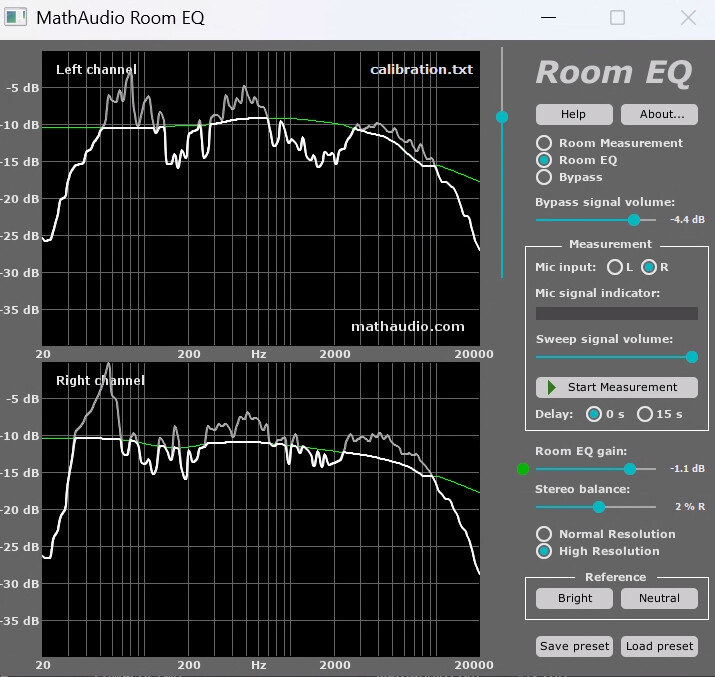
I’m using MathAudio’s Room-EQ. And as far as I understand its UI, I am rather reducing the volume there, with my current settings.
It is important to monitor the output level of the plug-in…
From the Room EQ Help Guide…
15. Adjust the position of the “Room EQ gain” slider
Room EQ doesn’t clip the sound. However, the amplitude of its output signal can exceed 0 dB. If you use the volume control and the clip indicator of your host program, set the “Room EQ gain” slider to 0 dB and don’t use it any more. Otherwise, play an audio file and look at the indicator which is shown in Fig.8. The red color of this indicator means that the amplitude of the Room EQ output signal exceeds 0 dB. Click the indicator to move the “Room EQ gain” slider to the position corresponding to 0 dB output. Repeat this process with a few other audio files.
Fig.8. Indicator.

Other than the vertical slider in the top right half of the UI, there’s no way of directly adressing the output level that I knew of.
The Room EQ gain slider is meant to prevent clipping. I set that with the »loudest« tune I have in my sound library 
What is the impedance of your DAC output and what is the impedance of your amplifier input…? are you using balanced XLR or single-ended RCA inputs…?
What happens when you lower the Room EQ gain by -20db and set the Audirvāna output volume to 0dB? The plug-in is not expecting the increase in dynamic range because the up-sampling is done after the plug-in module.
All these are unchanged for years. Only change: I replaced the DAC’s original USB-A-to-USB-C cable with a USB-C-to-USB-C cable recently.
Minimum here is -6dB. Again: This slider is to prevent clipping only.
Did you make the room correction with up-sampling enabled?

Well… the test is to disable the Room EQ plug-in to understand if there is gain being applied in the plug-in, when the Audirvāna Volume is set to 0dB…
A quick check showed no noteworthy difference regarding output volume.
Mathematically that’s correct, but in reality “maximum upsampling” can still sound better — it does in my system. Probably depends on DAC. When I tested my receiver I tried both maximum and “power of two”, but the differences between receiver and Benchmark DAC (and the differences between DSD and PCM) were way bigger to my ears than the differences in PCM upsampling rates.
I now use DSD conversion, but my Benchmark DAC sounded ever-so-slightly more natural to my ears with 384kHz than with power-of-two. Possibly because the DAC’s internal processing works differently. It’s one thing if Audirvana’s math is optimal… but the DAC’s further math (or conversion to intermediary bit rates) can apparently outweigh this theoretical advantage.
I started with power of two also because of the theoretical rounding errors and the “general advise” found on forums and SoX specifications. But 64 bit real number processing in today’s Macs and PCs possibly makes these errors minute. Mostly by chance, a few years ago I tried 384kHz for everything and, while it took a long time to hear (mostly feel) the difference, I found I enjoyed that more in my setup. I found the difference in what I heard very, very subtle though. I can rotate the acoustic treatment in my room by a few degrees or replace cables for a way bigger effect…
I would suspect that power-of-two is more relevant for 2x upsampling. To my ears the difference between any upsampling rates above 96kHz become extremely subtle. More subtle than tuning SoX parameters, or the conversion to DSD.
I’m still curious about what you and others hear though. It’s possible that other limitations in my system (or my ears) still mask the effect, even though I’m already super happy with the huge progress I’ve made over the past years, the latest Audirvana SoX tweaks and (since two weeks) Auva isolation feet having surprisingly big additional positive effects.
1 Like
Yep.
I will put it this way from my experience with my playback system…
I will always choose the logical result… This is why I decimate DSD files to DXD 24/352.8kHz not 384kHz… I have tuned my system for DSD playback… I never listen to PCM…
I don’t know that 64 bit math has anything to do with truncation/round-off error in a file, the issue there is primarily related to data accumulator/register overruns and under-runs… The influence of round-off error energy is a function of the Fc.
Like @Jud says about modulating to 1-bit 22.4MHz, the potential for reducing noise is a good thing… I don’t believe we need to go beyond 1-bit 5.6MHz in modulating PCM to DSD but now we are getting into some very subjective air… The difference being in a juxtaposition to a native 1-bit 22.4MHz (DSD256) recording and a PCM recording being modulated to DSD256
My feeling that modulating to DSD256 or DSD512 and the appreciation of the resulting output sound-quality is DAC architecture dependent… Interpolation slew-rate becomes more significant as the sample-frequency rises…
I presume that you mean that you still need to attenuate the output signal to your DAC? Are you adding gain in your DAC?
I up-sample all PCM to DSD128 with my Audirvāna Volume disabled… no overload and nominal output level to my HPA…