I think that’s a flaw. I have stumbled upon this as well.
My experience:
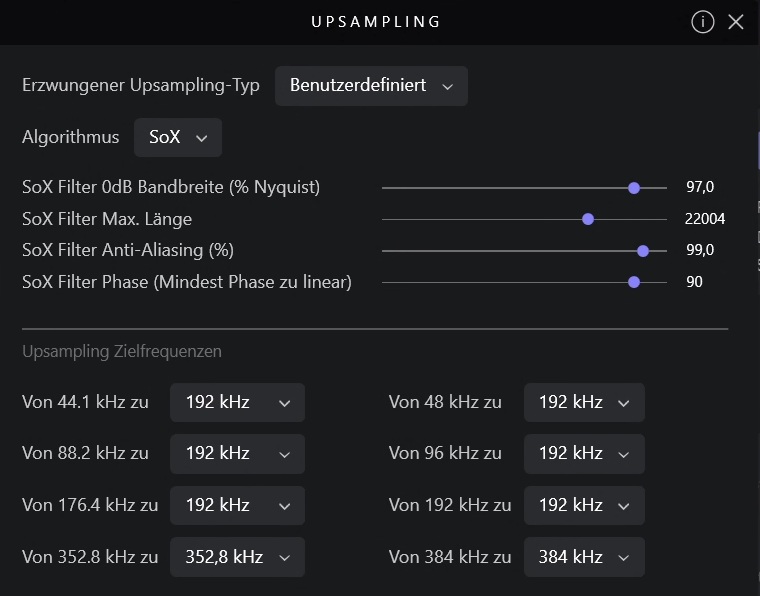
First the device needs to be unlocked before you go into the settings and adjust the upsampling. When you start playing music from that position in the app, the adjustments have taken place and are being used. Although you can slide at that moment, nothing is being adjusted. For that you need to unlock the device again.
I checked by creating debug info.
Feel free to check if you experience this behaviour as well. If you experience it differently this thing would even get more curious.
Another thing that is somewhat annoying:
In the app (which is the only UI for Audirvāna when running the Linux Core Player) the adjustments cannot be made very precise. That’s a real pity, I feel.
I’m pretty sure that, once Audirvana starts playing a track, it has finished upsampling, converting and buffering that part. During playback, Audirvana strives to just serve the converted (possibly still growing) “file” from RAM memory, relieving the computer of as much processor load as possible.
I do almost all auditions from the remote app. I think I need to unlock playback and only then modifications take effect.
By now, I am sure there’s no upsampling setting that works equally fantastic for all types of music I use to listen to. Especially the fact how old a given recording is seems to be a very crucial factor.
This may not be much of a surprise, but it is kind of disappointing all the same.
The recording processes that produced the digital files were done in different ways for different recordings, depending on the technology available and popular at the time, the practices of engineers and producers working in different genres, etc. Some recordings (probably most) are done on an assembly line process with A/D conversion that is felt to be adequate and importantly is not terribly expensive, while others might be done with a lot of individual attention to fidelity. Still others are done to obtain a characteristic sound. (Mark Knopfler notably runs his recordings through older analog equipment before digitizing them to get the particular sound he likes.) So it makes sense that reversing the process as effectively as possible might be different for different recordings.
For me that’s a tweaker’s bridge too far. I listen to music for enjoyment, not to obsess over details for every last individual track. (Or sometimes even more than once per track - Brian Wilson famously used four different studios to record individual sections of “Good Vibrations” to get the specific studio sound he wanted for each part of the song.)
The object of a correctly applied up-sampling filter setting is to bring all recordings to a common denominator that is relative to the Nyquist cut-off frequency of the sample-rate and the bit-depth of the resultant file of the processing… All other information that has been captured in the original source recording/production and mastering processes is not changed… So, a bad recording will still have all of its artistic and technical flaws and attributes revealed and a great recording will have all of its artistic and technical attributes and flaws revealed…
Up-sampling should not be viewed as an equalizer (EQ)… Applying equalization is a means to compensate for harmonic imbalances or to fine tune the tone of the recording to fit one’s aesthetic and/or to compensate for acoustical influences in the listening environment.
Do you favor reproducing faithfully intermodulation and harmonic distortion caused by aliasing and imaging from the A/D filter, that wasn’t present in the original analog performances? What about time-based distortion (excessive ringing)? Or if your D/A filter settings could do a good job of getting rid of much of this distortion and thus get you closer to the original analog sound, would you prefer that?
The answer isn’t necessarily cut and dried, because the identical filter settings won’t work perfectly for every track, so you have to decide whether you really want to go to the trouble of getting rid of the different distortions on various tracks imparted by the various A/D processes involved.
But no, we’re not talking about anything like EQ settings.
The Nyquist Fc of my 16/44.1kHz files is codified at @22kHz… If I upsample to DSD128 (5.6MHz) the Nyquist Fc is 2.8MHz… Even if we look at the Nyquist Fc of 2.8MHz it is 1.4MHz… The Nyquist Fc of the 44.1kHz file is not altered.
In the case of a 16/44.1kHz file up-sampled to 176.4kHz the Nyquist Fc is 88.2kHz… What concerns me is the filter steepness in concert with the residual stop band energy… You cannot do anything about the pre-ringing codified in the source A/D encoding… this is what MQA mastering addresses… The pre-ringing of the filter at the Fc must be audible into contextual harmonic body of the source signal. You can certainly try to chase that ghost… What you are generally perceiving is the leakage relative to the filter steepness and the stop band energy.
The first of these statements is technically incorrect. A suitable apodizing filter will remove the pre-ringing. (I’ve done this with HQPlayer apodizing filters, but Audirvana’s filtering can be configured to do so as well.)
MQA mastering is unlikely to cause ringing if it’s an original master, but at the cost of severe aliasing and imaging. If it’s not an original master, then MQA’s filtering doesn’t cut enough to remove any ringing that may exist in the original.
And that will be the last I have to say on the subject at this point, so you’re free to have the last word(s) if you like.
If we are talking about the initial encoding of a digital-recording, pre-ringing must be addressed at this point… otherwise it is codified… tell me, how does one identify the filter pre-ringing in a codified encoding such as a musical recording?
The answer is that you must have reference information from which to extrapolate from.
I think they are, but the slider shows the default when you go back to the settings again. You can check the real settings in the debug info. In my case then the real settings are shown.
You are creating truncation distortion with the illogical math used in these conversions:
44.1khz → 192kHz
88.2kHz → 192kHz
176.4kHz → 192kHz
If your DAC is capable to 384kHz, ‘Power of Two’ up-sampling strategy will always provide the proper logical results of the up-sampling calculations… Obviously you will need to tweak the SoX parameters to suit your sensibilities in this case, and realign your room correction to compensate for the changes.
What is termed asynchronous sample rate conversion (ASRC) has been used by manufacturers like Benchmark as a means of minimizing distortion. Given that Audirvana will be using at least 24-bit math, perhaps 32 or even 64-bit, it seems to me any “truncation distortion” would be below the heat noise of the electronics (which with really good electronics would be at about the 21-bit level).
But as always, whatever sounds best to you is obviously what you should be using for your own listening.
In the typical case, the original signal is much larger than one least significant bit (LSB). When this is the case, the quantization error is not significantly correlated with the signal and has an approximately uniform distribution. When rounding is used to quantize, the quantization error has a mean of zero and the root mean square (RMS) value is the standard deviation of this distribution, given by . When truncation is used, the error has a non-zero mean of and the RMS value is . Although rounding yields less RMS error than truncation, the difference is only due to the static (DC) term of . The RMS values of the AC error are exactly the same in both cases, so there is no special advantage of rounding over truncation in situations where the DC term of the error can be ignored (such as in AC-coupled systems). In either case, the standard deviation, as a percentage of the full signal range, changes by a factor of 2 for each 1-bit change in the number of quantization bits. The potential signal-to-quantization-noise power ratio therefore changes by 4, or , approximately 6 dB per bit.
At lower amplitudes the quantization error becomes dependent on the input signal, resulting in distortion. This distortion is created after the anti-aliasing filter, and if these distortions are above 1/2 the sample rate they will alias back into the band of interest. In order to make the quantization error independent of the input signal, the signal is dithered by adding noise to the signal. This slightly reduces signal-to-noise ratio, but can completely eliminate the distortion. Quantization (signal processing) - Wikipedia
Some curious(?) observation: It seems to me that the deviation between low volume parts and high volume parts within each single music tune has increased. Listening to Billy Joel’s »River of Dreams« for instance – that one has increasing volume during the first 30 seconds anyway, all right, but I never felt the urge to reduce and reduce and reduce the listening volume that strong ever before.
A simple test is to use the SPL Graph tool in Studio Six Digital’s Audio Tools app for your phone. This will tell you whether dynamic range (the difference between loud and soft) has in fact increased when you turn on upsampling versus when you have it off. (If you want to know. )
Good question…
I have less than a handful of 96k, and 192kHz files… It bugs me a bit that I don’t know if they are played at the logical sample-rate or not… I try to put that out of my head when I listen to those files. I am guessing that if they are truncated (rounded) the Fc is so high that aliasing influence from the round-off is inaudible probably related to the noise-shaping.
Sorry that I don’t have a better answer.
What I can say, is that contextual micro-dynamics and elements of contextual timbre are revealed in juxtaposition to the source recording.



 . When truncation is used, the error has a non-zero mean of
  and the RMS value is
  . Although rounding yields less RMS error than truncation, the difference is only due to the static (DC) term of
  , approximately 6 dB per bit.
 )
)