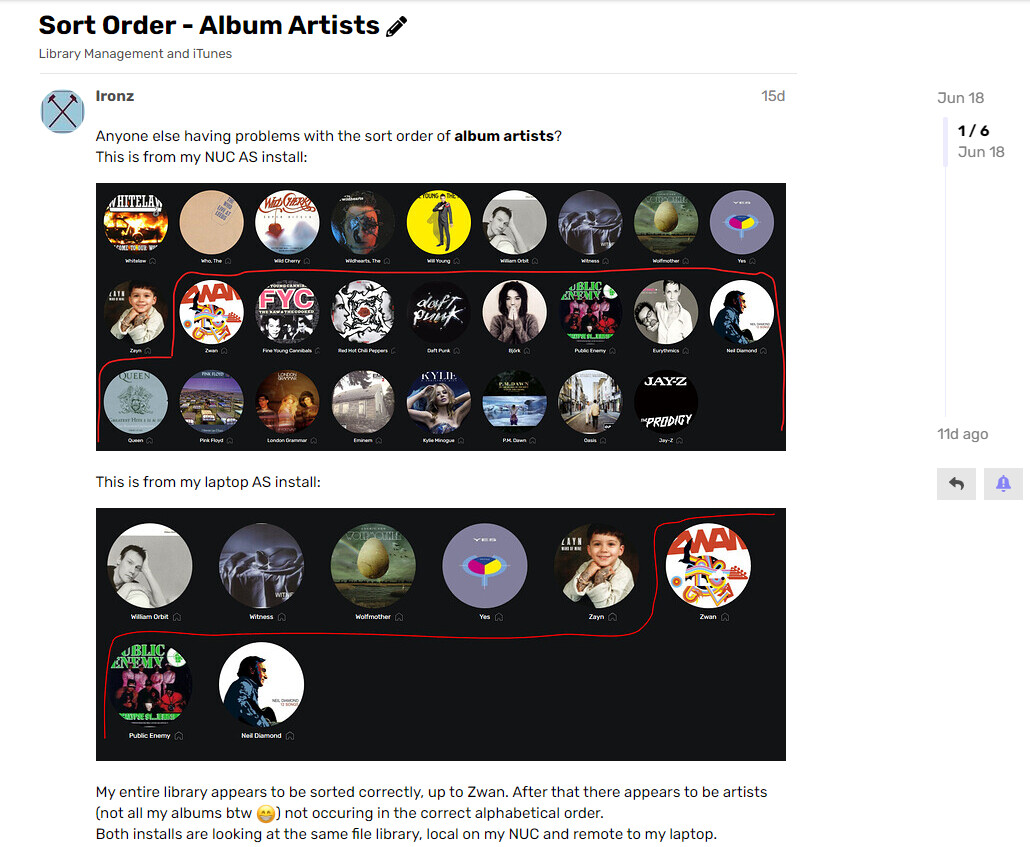
You are in a list view, and I’m in an artist’s view.
In artist’s view, the metadata tool is disabled.
You are in a list view, and I’m in an artist’s view.
In artist’s view, the metadata tool is disabled.
Yes, I clicked on the individual artist within artist view and changed the Audirvana metadata globally (per artist) there:
EDIT:
Sorry Doudou, for clarity and as an example, Bjork is shown out of alphabetical order in the top image.
I clicked on Bjork within artists view, and changed the metadata in the ‘sort as’ field for Bjork within Audirvana to read Bjork and not Artist The.
Bjork then appereared in the correct place, alphabetically 
What should I change?
For instance, the first artist to appear in Artist’s view is “Kempff, William”. His name is correct, and it is set to be sorted as “Kempff, William”. Still, he is sorted first in artist’s view.
I don’t see what I can change in the metadata.
Apologies Doudou, I think our posts crossed.
As you appear to have the sort criteria set correctly, I’m inclined to agree that this software is indeed still full of bugs.
I’ve actually given-up attempting to describe the crashes that I’ve experienced since using AS as there’s far too many of them, and to be honest Roon is beginning to look like a far better solution to me.
And it happens, though I let AS access only to a single folder with a few dozens albums. Imagine what would have happened if I had allowed it to access my full library, which counts thousands of albums. I wouldn’t be able to find anything in the mess that AS would have created.
Agreed. Especially when metadata for classical music (as an example) is likely to be so much more involved, with FAR more metadata possibly stored within the file.
Possibly years of hard work correctly tagging files up in smoke. Is it worth it?
Exactly. Each time I add a new album of classical music to my library, I tag it first very carefully. All the players that I know interpret correctly the metadata, except AS that does very strange things.
I think this issue may have been fixed.
All the Artists I’ve checked have the same values as those in my metadata.
= no updates will take place to the files if the artist image is changed.
@Antoine why does AS do this…? Its definitely a bug. Every new composer that gets pulled from MusicBrainz gets a Sort Artist tag of: ARTIST THE
This causes a bunch of Artist/Composers to appear at the very top because AS sorts them all under A for ARTIST THE