I use Audirvana 2.11.4. It has the new Audirvana Parametric EQ.
I would like to convert two L-R stereo channels to one mono signal that goes to both L+R sides. Can I set up the EQ process to do this stereo to mono conversion?
If Yes and you know how, please explain it to me.
Thank you.
Welcome…
No can do…
That processing would be found in a mastering plug-in like this:
https://www.waves.com/plugins/abbey-road-tg-mastering-chain


You can add a VST plugin to Audirvana to do the conversion… You can get free stereo to mono VST plugins like iZotope’s Ozone Imager, MeldaProduction’s MUtility, Hitshaper Mono, A1StereoControl, or Voxengo’s Stereo Touch to sum stereo signals to mono for mix compatibility checks or to create a centered mono image…
1 Like
Thank you. I appreciate your help.
1 Like
This is a status report on my search for relief from horns blaring into my ears from my headphones.
-
Voxengo’s Stereo Touch – Four or five years ago I tried a Voxengo program. It caused serious distortion. I had to do a manual uninstall of the plugin. I definitely remember that experience, so I am skipping Voxengo.
-
Hitshaper Mono – This seemed like to logical choice, because it is only a mono button. But the website did not produce a download. I sent an email to support but have heard nothing. I think that Hitshaper is dead.
-
iZotope Ozone Imager – I thought that this would be a good choice. iZotope is a high-end developer. The download of the program was easy, but it was a hassle to register. I had to download a second program: a product manager program. This second program registered the first program. When I ran the Ozone Imager, I could not figure out what it was supposed to do. It definitely did not have a mono button. Nothing of use to me. But it was really easy to uninstall both programs.
-
A1StereoControl – This website has an easy download process. They ask for a donation, which I made. After the donation, I had to use the Free Download process to complete things. Not a big problem. The GUI is simple. There are lots of useful tools, including a mono button. They also have a tool to adjust the stereo image width. Since I am trying to get the horns out of my ears, I am going to test this tool first. I have adjusted the stereo image from 100% to 90% and will start testing later today. My major concern is again the sound quality. Note that the mono button would reduce the stereo image from 100% to 0%. Perhaps Audirvana would consider adding this functionality. Thank you
1 Like
Dynamic frequency based EQ and compression would be more useful… The problem you will run into is support for digital-audio files beyond 192kHz.
Use this to create Studio EQ presets in the context of brass related frequency energy…

1 Like
I don’t know if you are already using some EQ to correct for the specific type of headphones you have…
You might take a look at this https://autoeq.app as a starting point and see if it helps…
I will check it all out, but so far so good with A1StereoControl. 
I will probably try to keep it simple, but satisfying.
1 Like
How can this be, when you are skewing the artistic sound qualities imbued in the master encoding by extremely altering the L + R phase/timbral/spatial relationships that are intrinsic to the decisions made in the mix/mastering processes in the application of this sort of processing…?
If you were serious about managing dynamics in the equalization process while relatively maintaining the integrity of the master encoding, the application of dynamic equalization is the correct approach, as is found in these plug-ins:
*A much simpler solution to getting a more natural sound-stage presentation in your headphones is to use a Head Related Transfer Function (HRTF) cross-feed application/plug-in… This is the one that I use for high-resolution playback because I am headphone-centric… It can be set without using the speaker simulation for the highest integrity of playback…
Here are a few of the The 25 Best EQ Plugins of All-Time (2025 Guide) - WaveInformer A few of these are Dynamic EQs, some are even free…
It seems that the OP wants a more speaker-like presentation in headphones, and HRTF DSP is probably all that is needed in this case… The L+R source angle can be set to taste and at the same time improve the contextual presentation of the master mix, etc, in the headphone listening experience.
It seems to me that the OP wants choices and that is what I am giving them…
@agoldenear, I do not understand why you are so against options that might be pleasing to others…
It might be time to reconsider your position, if you can reflect on yourself…
I presented options/choices that you expanded upon afterward…
Yours is a matter of interpretation… I am presenting an alternative perspective on choices… You are not the arbiter of what is pleasing or not… nor am I… it’s not a matter of ego for me… it’s about education. It’s up to others to define their level of DSP acumen in this context.
1 Like
But I am not interested in dynamics.
Last night I listened to Dexter Gordon for the first time in years. At 60% stereo image, I got his horn out of my left ear and in front of me. It was great.
We seem to have different ideas of what is important in sound quality. I want to be able to listen and enjoy.
1 Like
Thanks for the list of 25 Best All-Time, but all I want is what is provided by A1 StereoControl.
I am currently playing with the Audirvana Parametric EQ. Maybe it can compensate for emphasis in the headphone sound field. At this point, I do not know if I will be able to hear a difference. But I will try it.
1 Like
This is where HRTF like Redline Monitor solves your problem without monkeying with the contextual elements of the master encoding, by orienting the source signal relative to a natural human listening experience…
The theory behind Redline Monitor
Listening to music on headphones is essentially different than listening to speakers. When you listen to speakers, both ears receive the output of both speakers but in different proportions. Your right ear will hear more of the right speaker, and the left ear more of the left. And because the left ear is slightly farther away from the right speaker, it hears the right signal a fraction of a second later than the right ear. This time difference between the ears is one of the main cues that your brain uses to figure out the left-to-right position of sounds.
When you listen to headphones each ear will only receive one channel. The sound isn’t mixed, and there are no time differences. In short: the listening experience lacks any similarity to natural hearing. Any regular headphones user will be familiar with the problems this causes: the stereo image is lost due to extreme separation of the left and right channels and has no discernible phantom center (the non-existent ‘center speaker’ that vocals often appear to come from when listening to speakers). Sound sources are impossible to locate and, because of the unnatural stereo image, ear fatigue sets in even after short listening sessions.
Redline Monitor uses sophisticated acoustic and psycho-acoustic processing to trick the ear into perceiving the stereo and depth information that is missing when you listen to audio with headphones. It makes mixes sound identical on speakers and headphones, at least within the tolerance of the different frequency responses of headphones and monitor speakers. (That’s the best anyone can hope to achieve - no two pairs of monitor speakers sound identical either, and they definitely sound different from the speakers in headphones.)
This gives you a portable uniform listening environment even in home studios and untreated rooms that is rivaled only by a set of good monitor speakers. Whether in the studio or on the road, whether on a full-blown studio rig or your notebook, the stereo image, tonal balance, and sound are identical where ever you go.
Redline Monitor gives you direct access to the best from both worlds. Headphones provide detail in a way that no speakers can, allowing you to zoom in on even the tiniest details. Clicks, room ambience, and soft details that are nearly impossible to distinguish on speakers are easily revealed on headphones.
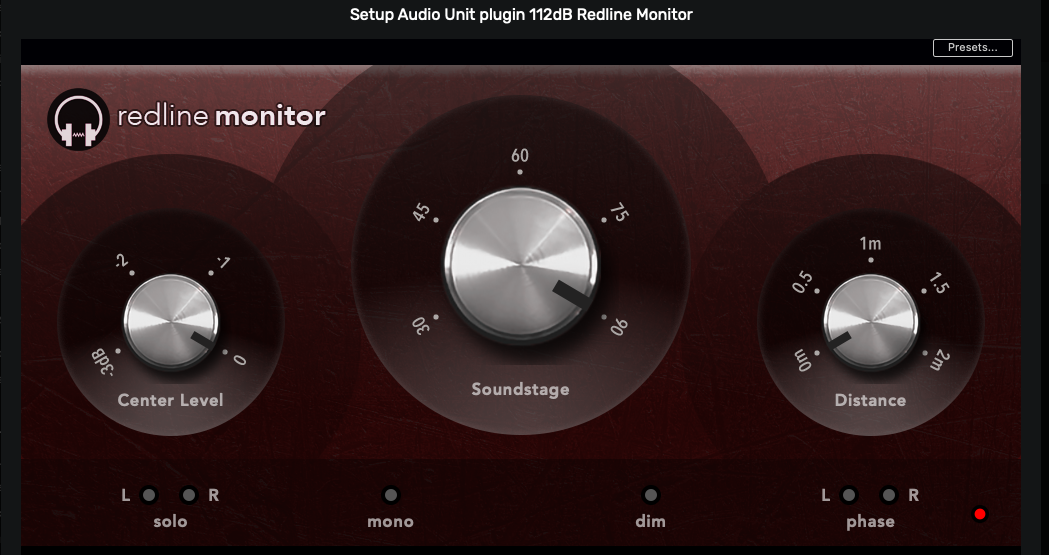
- This is a screenshot of my Redline Monitor settings:
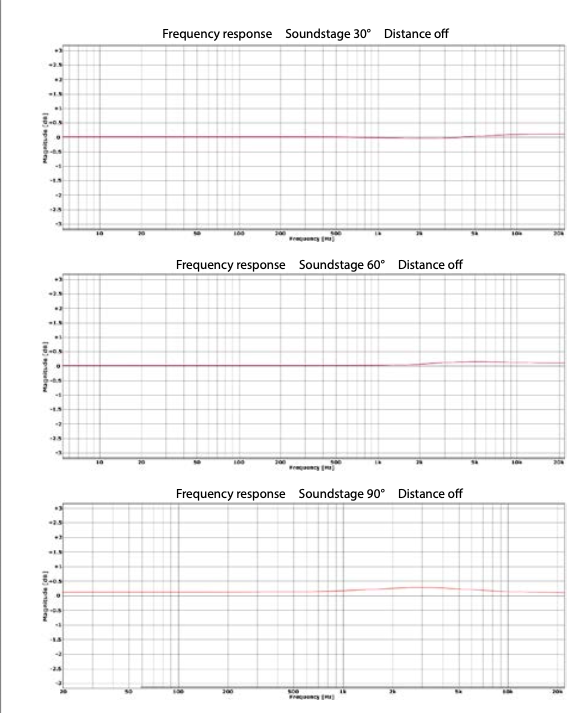
- More relevant Redline Monitor technical data:
Note:
I use Studio EQ in concert with Redline Monitor to fine-tune the sound for my aesthetic relative to my playback system amalgamation of components, headphones and my hearing acuity.
Got it. Redline Monitor is on my list of new things to try with my headphones. Thanks.
I am slow, but I eventually catch on.
I am also loading CoreTemp because I have a really old CPU and I want to be sure that nothing is too CPU heavy.
2 Likes
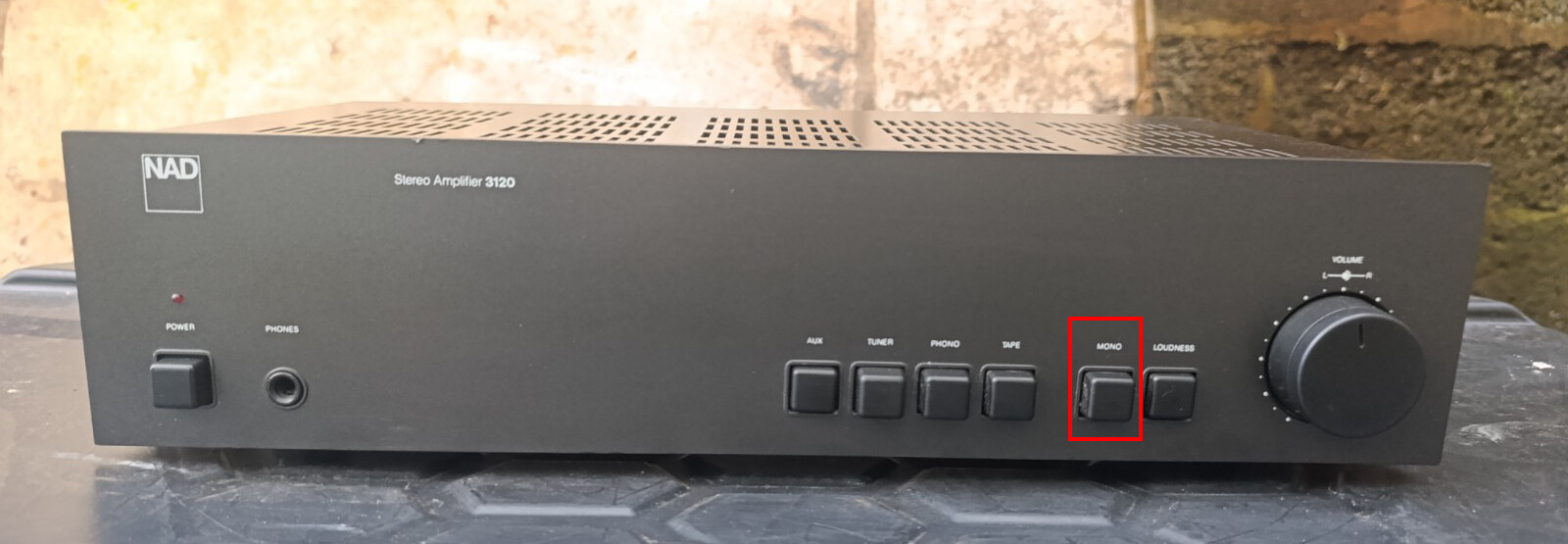
Yeah… But my amplifier does not have that button.
However, I just did a successful install of Redline Monitor.
Listening is over for today. But tomorrow….
I just finished two hours of listening. I started with the Studio EQ turned on plus Redline Monitor. The critical point came when I listened to Bela Fleck on the album My Bluegrass Heart. There were occasional loud pops in each ear that had not been there.
First I turned off the EQ. Still had pops. Then I turned off the Redline. The pops stopped. With A1StereoControl, there were no pops. So I am now going to use only A1, with no EQ.
I have planar magnetic headphones. I am guessing that the correction function in Redline Monitor has some strong peaks that are making the membrane in the headphones slap against the frame. Redline is probably designed to work with dynamic cone drivers.
Anyway, it has been interesting and educational going through this exercise. I am happy with the results I get with A1. I would not have known about A1 if I had not asked the question here.