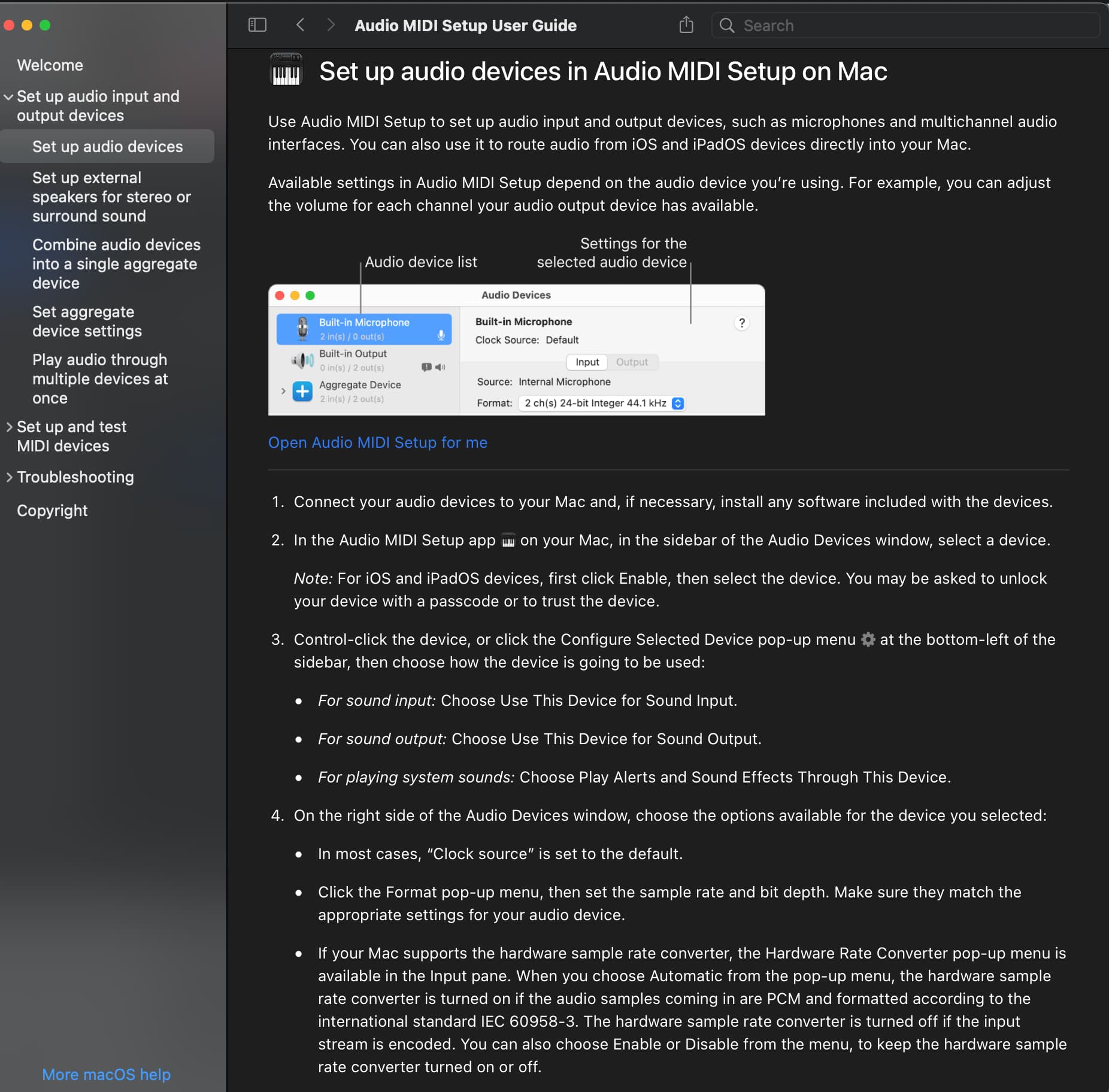
You will find Audio MIDI Setup in the Applications folder in the Utilities sub-folder… You can use the Finder search function to locate this as well…
This is where any outboard audio device is managed and enabled for output…
You will see Upsampler there… Set Upsampler as the Output Device, configure your bit-depth and sample-rate for the Upsampler, close Audio MIDI Setup and then open Audirvana or close Audirvana and restart it… you should see the Upsampler in Audirvana as your DAC…
Use the Audirvana Remote App for remote control… (found in the Apple App Store)
I could be mistaken, but Audio Midi is only when using a USB connection from my Mac with Audirvana to upsampler. My config is using a NAS drive via ethernet to wireless router to upsampler, and Audirvana via UPnP (Minumserver - that is running in linux on the Synology NAS) on the same wireless router network.
Am I missing something regarding Audio Midi settings? Thanks
Audio MIDI Setup is where macOS determines and recognizes the Output Device… It is part of Core Audio and A/V framework…
Your computer should be connected via Ethernet to your router to start… I don’t do wireless digital-audio transmission, so maybe somebody else can give you better insight into the playback format and sample-rate capabilities of Audirvana via wireless UPnP…
You will point Audirvana to your music library folder in Settings → Local
Perhaps you should engage in the Linux and NAS beta, here on the Community forum: Categories → Linux and NAS
I’m happily using UPnP over Ethernet or WiFi with Audirvana to upsample to DSD512, so it must be some specific interaction with dCS.
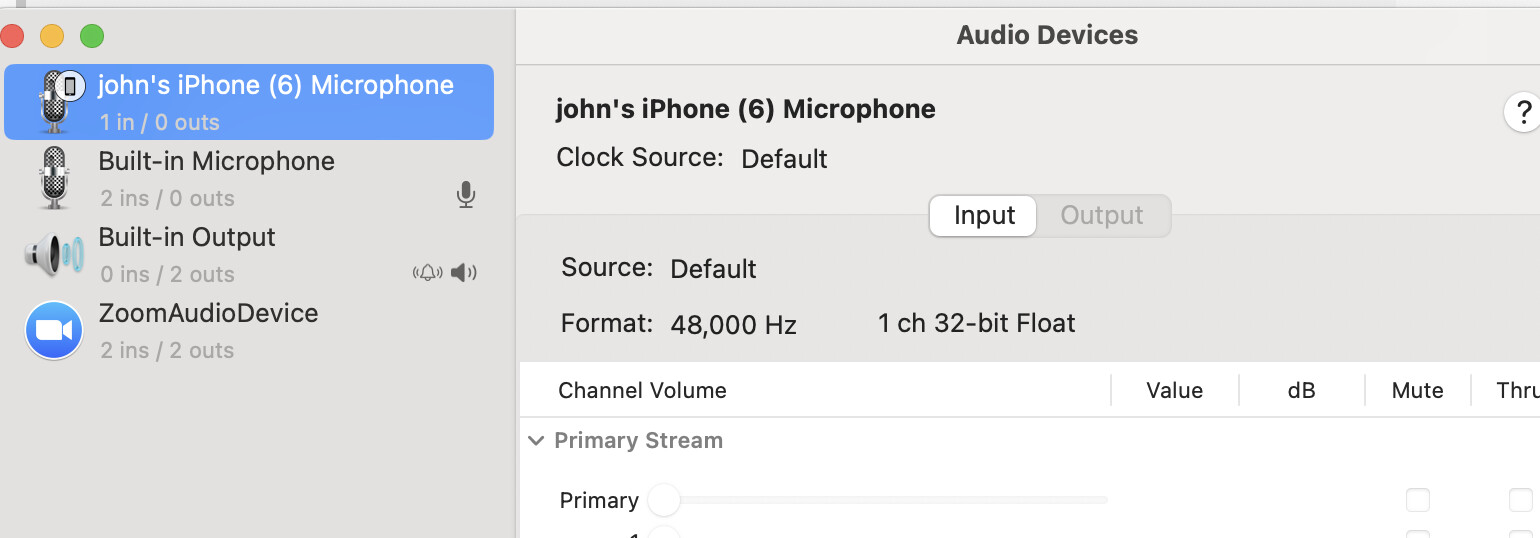
Audio Midi (called simply “Sound” under System Settings in the latest versions of MacOS) deals with USB and AirPlay connections, but not UPnP, so those settings aren’t involved here.
Seeing as this issue only occurs when playing DSD64 or DSD128 files and PCM files play fine up to 24/96 seems to me like it is a UPnP transmission glitch with DSD files (larger bit rate file transmission). Seems odd that as the device appears to be “Plays with Audirvana” certified that dCS did not encounter this issue during testing, surely they played DSD files as part of the testing process? If they did then there appears to be another issue at play (network?)
I would capture a log (settings/my account/help/start log session) and check the log for the time immediately preceding and at the time of a disconnection event to try and see what is happening. Maybe a build up of errors leading to the reset. I would then send the log to Audirvana and dCS support detailing the issue and the log section during the time the issue occurs.
This tells us everything… This is not the Upsampler… The Selected Device is the built-in playback system of the Mac… The Upsampler is capable of reproducing PCM sample-rates to 384kHz…
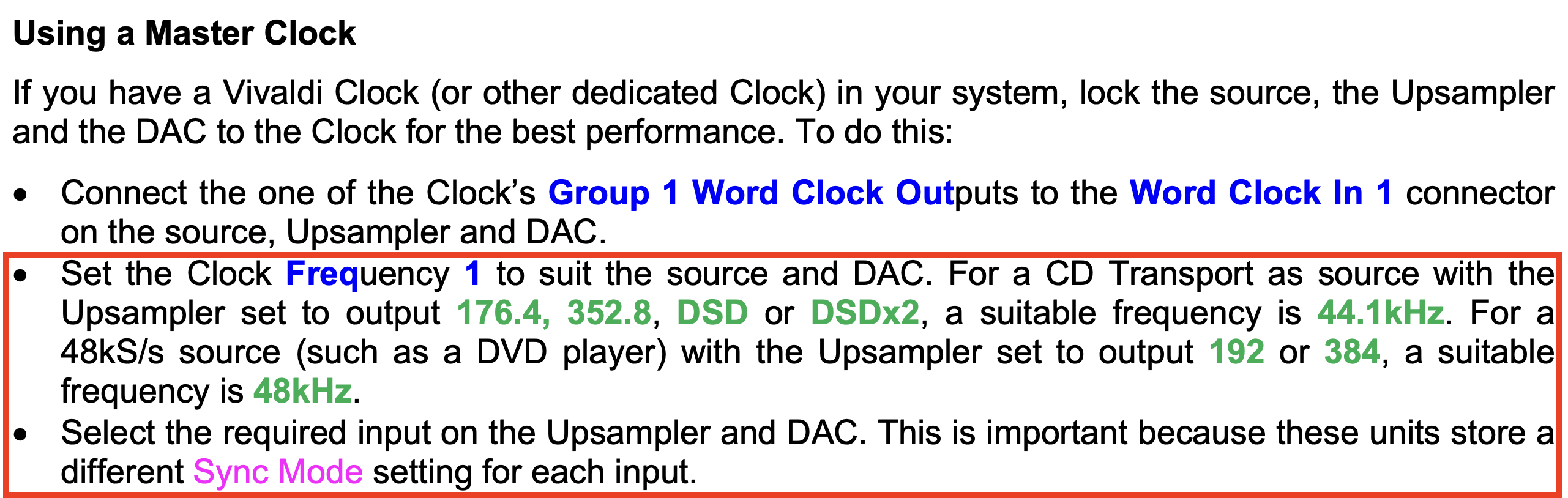
When you set the Upsampler as the Output Device and configure the format to match the Upsampler sample-rate… (This User Manual section below, regarding Master Clock settings.seems to be important to understand when playing PCM multiples of 44.14kHz and DSD and PCM multiples of 48kHz)
That selected device is after the system resets. So that’s when the error has happened and the dCS upsampler is rebooting/recycling the network card. All the clock frequencies are set as you have above, again everything is working fine with Roon, dCS Mosaic/UPnP/Minumserver, other sources such as a USB stick and using the DCS menus. Problem only happening with Audirnava/UPnP/Minumserver.
Preferred device: [UPnP] dCS Vivaldi Upsampler (51210) Model UID:Data Conversion Systems Ltd Vivaldi Upsampler UID:uuid:e941441d-73a4-43ca-a5c5-1a5f1c6219aa
Selected device:dCS Vivaldi Upsampler (51210)
Manufacturer: Data Conversion Systems Ltd
Model name: Vivaldi Upsampler
Model UID: Data Conversion Systems Ltd Vivaldi Upsampler
UID: uuid:e941441d-73a4-43ca-a5c5-1a5f1c6219aa
UPnP device at http://192.168.1.37:16500/e941441d-73a4-43ca-a5c5-1a5f1c6219aa.xml
ID 0x0
10 available sample rates up to 5644800Hz
44100
48000
88200
96000
176400
192000
352800
384000
2822400
5644800
The Audio Devices never shows the upsampler unless I am using the Mac as the USB output source, which I am not. I am using the UPnP server, a Synology NAS as the output source…
It’s playing normally now on 24/96 and nothing in the Audio Devices…
Ok good idea. I will capture and compare a log before and after. If I see differences I will post…I know one difference will be the selected device, but hoping something else will alert us to what’s happening…
If you start a log leave it running whilst playing DSD files, note the time that the dropout of the dCS occurs then stop the log, open it and check before the time of the drop out and at the time of the drop out. Should be some error messages that may give a clue. No point taking before and after logs. Needs to be a continuous log ending after the drop out occurs.
The start log session will record a continuous list of the UPnP interactions between AS and your dCS, any errors in transmission will be recorded. It may end up being a very large log file depending on how long it takes before the dropout, but you can always copy and paste the log entries only for the period of interest to a text file to make it a more manageable size for sending to dCS and Audirvana support.
Have you tried DSD via DoP 1.1 playback with DSD Pass-Through enabled?
I am using the UPnP server, a Synology NAS as the output source…
Why would this be? It makes more sense to directly connect Audirvana to Upsampler so that it’s output signal is unfettered… Audirvana is not a UPnP renderer/endpoint…
To avoid using the USB interface. Better sound performance via ethernet. Mostly using Audirvana to control the UPnP and NAS drive vs Roon. It clearly sounds better than Roon, by a lot, just this issue in higher bit rate files…
I understand that you are using Ethernet to Upsampler… However, why are you not sending digital-audio signals directly to Upsampler from the Mac instead of a proxy? … This does not make sense to me in the context of Audirvana being the audio-engine…
In a dCS arrangement, the ethernet input sounds better than the USB input in certain arrangements. Such as Minimserver (UPnP) and dCS Mosaic (and now Audirvana if I get it working for hi Rez).
Preferable over Roon in any arrangement and Audirvana connect via USB.
Let me clarify…
I am not suggesting to connect Audirvana to Upsampler using USB… I have been suggesting to connect the Mac via your router, directly to the IP address of Upsampler and not using the proxy server, or directly implement an Ethernet connection from the Mac to Upsampler without a router and switches, in the context of Audirvana as the audio-engine/player.
I have the Mac hard wired to the router, where the NAS and Upsampler are also hard wire attached. Curiously, same issue. But before it took about 2:04 minutes to repeatedly happen, now takes 3:41 minutes. It starts drop out for a second or two then Upsampler network card resets. I’ll capture logs before and after and post soon.