Audirvana cannot work with Minimserver … I cannot understand why are you mentioning it.
Audirvana is not able to deal with a UPNP mediaserver, eventually you’re using the network share from your nas that is running Minimserver too, this should be clear
This is because Audirvana itself acts as a UPnP server (and control point) when using UPnP. But I personally have experienced no harm in having MinimServer running at the same time as Audirvana.
Audirvana when acting as a UPnP server needs a UPnP renderer/endpoint to receive the signal, which would be the software (Rygel) running on @jfrech 's Vivaldi Upsampler.
dCS support has recreated the issue. It’s not about networking. The upsampler is expecting a .DSF file and is getting a .DFF file. It’s unclear if the upsampler is requesting this format or Audirvana is sending it. And the upsampler should be able to process the .DFF file. They are investigating and more to come…hoping this sorts out soon and a config or firmware/software issue on one side or the other…
It’s easy to see what DSD format is being played as it is stored as that type of file in your library files… you will see the file extension when you view it in the folder and Audirvana will show the file type being played in the playback window and album/track playback views… Audirvana only plays the DSD file as stored, unless set to convert DSD to PCM…
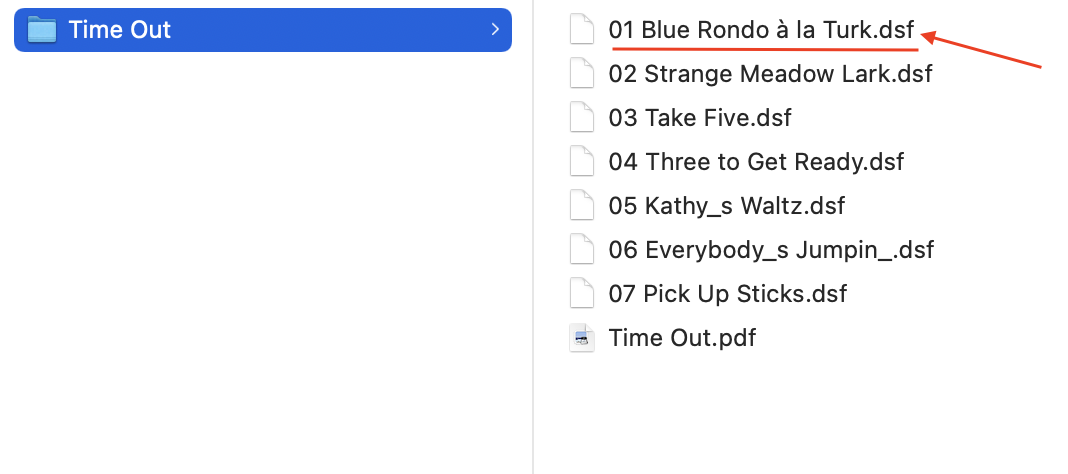


Here’s your problem,… You are playing a .dff file
Current device MediaInfo:
NrTracks: 1
MediaDuration: 0:05:00
CurrentURI: http://192.168.1.36:49152/audirvana/audio_f_8.dff
CurrentURIMetadata:dc:titleYou Go to My Head</dc:title>
dc:creatorBill Evans</dc:creator>
upnp:artistBill Evans</upnp:artist>
<upnp:author role=“Composer”>J. Fred Coots & Haven Gillespie</upnp:author>
upnp:genreJazz</upnp:genre>
upnp:albumArtURIhttp://192.168.1.36:49152/audirvana/artwork_1_8.jpg</upnp:albumArtURI>
upnp:albumSome Other Time (The Lost Session from the Black Forest)</upnp:album>
upnp:originalTrackNumber1</upnp:originalTrackNumber>
upnp:classobject.item.audioItem.musicTrack</upnp:class>
http://192.168.1.36:49152/audirvana/audio_f_8.dffnextURI: http://192.168.1.36:49152/audirvana/audio_f_11.dff nextURIMetadata: <DIDL-Lite xmlns:dc="http://purl.org/dc/elements/1.1/" xmlns:upnp="urn:schemas-upnp-org:metadata-1-0/upnp/" xmlns="urn:schemas-upnp-org:metadata-1-0/DIDL-Lite/" xmlns:dlna="urn:schemas-dlna-org:metadata-1-0/">Very Early Bill Evans Bill Evans Bill Evans Jazz http://192.168.1.36:49152/audirvana/artwork_0_11.jpg Some Other Time (The Lost Session from the Black Forest) 2 object.item.audioItem.musicTrack http://192.168.1.36:49152/audirvana/audio_f_11.dff

Did you rip these files from your personal library of SACD?
For sure Audirvana transcodes flac and alac to wav when using upnp, maybe it transcodes dsf to dff and this highlighted the defect of the DCS Upsampler.
@Antoine could help to better understand what Audirvana does with dsf files streamed to upnp renderer
This issue would have popped-up well before @jfrech 's experience…
Is the file a .dsf file or a .dff file…?? The question can be answered very easily, by looking at the stored file format…
That is quite interesting. I hope dCS and Audirvana will be able to resolve the problem quickly.
From logs it seems the OP is playing dsf files, what you mentioned are the Audirvana output files, not the input … the path you highlighted is very explanatory
I see no reference to .dsf files in the Debug information report…
If you are referring to the screen-shot of my personal DSD library path that I posted above… You are mistaken…
The Debug info report clearly shows a .dff file is being played back from the OP library path.
dc:titleYou Go to My Head</dc:title>
dc:creatorBill Evans</dc:creator>
upnp:artistBill Evans</upnp:artist>
<upnp:author role=“Composer”>J. Fred Coots & Haven Gillespie</upnp:author>
upnp:genreJazz</upnp:genre>
upnp:albumArtURIhttp://192.168.1.36:49152/audirvana/artwork_1_8.jpg</upnp:albumArtURI>
upnp:albumSome Other Time (The Lost Session from the Black Forest)</upnp:album>
upnp:originalTrackNumber1</upnp:originalTrackNumber>
upnp:classobject.item.audioItem.musicTrack</upnp:class>
http://192.168.1.36:49152/audirvana/audio_f_8.dff
*The answer is in the DSD file format stored on the Library storage device…
The Debug report is showing the supported UPnP / DLNA protocols…
(See the lines outlined as bold text…) We are being showed the protocols that Audirvana is recognizing and here it shows both .dsf and .dff…
I cannot see how Audirvana can transmogrify metadata that is inherently imbued in a specific .dsf file, into that of the metadata inherent in a specific .dff file
Until you create a simple Ethernet transmission path from the iMac (with a local library attached via USB) to the Upsampler (eliminating the server and Mosaic from the playback scenario) you will not know if the issue is network related or not network related, because you have not eliminated all of the potential variables from the transmission path…  … If you make a simple transmission path and able to play .dsf files as expected, you have resolved your problem and you can move on from this baseline scenario…
Hi everyone, I’ve been out since Munich, so I’m hopping on the subject. I rode the thread, and as far as I can relate to it, dCS is on the topic and is looking at the issue, right @jfrech?
@Antoine correct. Stay tuned and thanks everyone
files stored as a .dsf. Audirvana changing to .dff (which the dCS should be able to process), it’s unclear why it’s getting changed and unclear why it’s not getting played. Anyway, waiting for dCS support to get back to me. Thanks
Apparently, it is too difficult to bring the iMac to your system and make a simple connection?
Then it’s what I was assuming …
Ok Ok, I made the simple connection. Audirvana sees the network but not the upsampler (even though it says it has a IP address and is network connected). So this config doesn’t appear to yield any results or answers…
Well it’s good you did that, as I’m sure the engineers at dCS would never have thought of covering that possibility.
Audirvana sees the network ???
This is not a simple, direct Ethernet connection to Upsampler… 
You would simply connect an Ethernet cable from the iMac directly to the RJ45 input of Upsampler… Shut down the computer and shut-down UpSampler and the DAC. etc… Restart the computer and when it is booted, power the Upsampler, etc, when these components have booted, launch Audrivana and make sure Upsampler is not looking for a server and make sure Audirvana has the IP address of Upsampler as the DAC/DDC.
The question is, when will they (the engineers) get there… 