i have the same issue, balance feature is completely broken. When you get clipping if you move the db knob for the channel clipping and bring it back to your previous setting the clipping stops. When you change album and or file resolution the settings go back to default though they still display the adjustment you made, if you again move them a little the settings chosen by you reactivate. Sometimes clipping starts when this last problem happens.
Dear all,
First time this happens to me.
I tested the new AS Beta version, just to see the new IF, and then tried to add new files in one of my audio folders under watch by AS. Usually, as soon as the copy process starts, the sync immediately begins.
And this time: nothing happened! I moved back to the previous version and same behaviour!
Rebooted the MAC: same situation.
Deleted and copied the files again: same thing!
I manually initiated the sync on the entire folder, and it’s now in progress and I can see that the newly added files has been found by AS.
Just an additional info: I installed ROON in parralel with a Sync on the very same folders. I hope there is no interaction between the two apps. By the way, it does not seem that ROON reacted to the addition of the new files…
Weird!
Tried with another set of audio files: same result. It seems that the auto sync feature is somewhat disabled.
But this is not what is shown on the AS MMI (Still in Auto mode).
Since reboot of the Mac and application restart did not bring any result, I don’t know what to do next.
Just to be sure, I updated AS to the last known version (outside the Beta dev): 2.11.5 but to no avail.
Still the same issue: Sync does not start.
I don’t have this behavior you are experiencing with the Studio EQ or Balance processing that @TheGuy is describing… I do not use real-time control as this is unavailable when playing DSD files. however, I have tested this function with PCM playback.
- M2 Max, Mac Studio, 64GB RAM
- macOS 26.2
- Audirvāna 2.99.15
- 13GB RAM playback pre-load memory allocation
- Locally attached library SSD via very short and isolated USB 3.0 connection
- DAC locally attached via USB 3.0 (USB 3.0 controller interface housed in a Thunderbolt 3/4 PCIe expansion chassis with extensive power/noise filtering) the USB 3.0 signal to the DAC is reclocked and filtered and galvanically isolated by iFi Audio iGalvanic 3.0 that delivers the signal to the DAC via a 4-inch USB 2.0 interconnect.
- All PCM files are modulated (upsampled) to DSD256 by r8Brain (-1dB gain reduction before up-sampling) after Studio EQ w/Auto gain make-up and Cross-feed Virtual LR processing (I am headphone-centric).
- DoP 1.1 transmission protocol
- No Volume/Replay Gain control is being applied
- I play native 1-bit binaural DSD files
All I can tell you is that you need to look elsewhere for the source of this behavior… You have not provided your debug information report, so that we can see your System resources and Audirvāna configuration(s) and DAC as well, providing your transmission scheme will be of value in helping you. Please paste your debug information here so to get the best possible help from the community.
Gain management is essential… all the way to the output to the DAC… some DACs have more headroom than others…


I think I saw something about embedded “video files” in folders causing syncing issues with Audirvana syncing. My question: are there any known file types in particular that complicate/confuse/fluster Audirvana? Was thinking I could do a pass through my drives and try to remove “offending” file types…..if I knew what they were.
3 Likes
Good question! I having crashes caused by this but don’t know which files that are causing it yet.
Hi
Some suggestions on features I'm missing.

I would love to have the "playing from" link/function that is available in Tidal to easily get back to the current playlist after browsing other lists.

And if possible, sort tracks directly by clicking the column headers (like 'Title' or 'Artist'), even when using streaming services, just like we can with local files."

More on the v3 Beta sound-quality performance…
I have been evaluating the sound-quality of v3 Beta with this binaural native DSD256 recording (among other DSD64 and DSD128 binaural recordings) on my reference playback system (headphone-centric)…
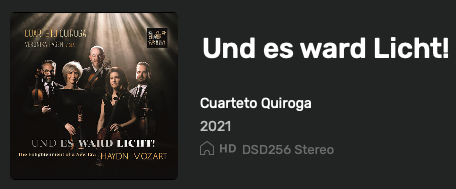
The visceral-ness, the textural color and spatiality is immaculate and intimately compelling… Nothing has been diminished in the sound-quality of Audirvāna v3 Beta.. in-fact my initial impression was one of improved quality… I am afraid to attach more refined descriptive terms to what I perceive, as these may bias others interpretations and may also be misconstrued without a common descriptive lexicon… Again Bravo! 
For reference…
My headphone playback is more complex than most… I employ a custom made stereo tactile, seat-back sub-woofer system, that gets its signal from a volume controlled parallel output from my headphone amplifier, where the signal passes through a stereo variable cross-over to a stereo 30w power-amp. This allows for the ability to balance the headphone output signal with the tactile sub-woofer output signal.
1 Like
At home in the UK for Christmas and put together my retirement system from the Chord Electronics Choral range. Once complete spent a cold winters evening with the wife conducting my demi-decade blind test. Loaded Roon and JRiver (surprisingly more appealing to my eyes than Roon or Audirvana Beta 3’s “grande” sized font designs). Played 20 of my favourite recordings, 30 seconds with each track in random order chosen by the wife. Picked Beta 3 a total of 13 times, Roon once and J River twice and no preference 4 times.
Probably just the “sacred geometry of chance” as Mr Sting referred to it but enough to cement my confirmation bias that Audirvana is superior for another 5 years.
Removed Roon & J River with a clean install of my Mac and then tested Beta 3 versus 2.11.5 installed on my Wife’s M4 Macbook Air. Unsurprisingly 16 no preferences but surprisingly (although probably not statistically significant) 4 for Beta 3. So despite my original plan to stick with AS version 2 due to a preference for the UI compared to beta 3, I may well have to upgrade  …All tests done with Chord Dave fed by 2Go/2Yu over ethernet and Focal Utopia headphones. Obviously results only applicable to my brain no doubt…
4 Likes
I use Audirvana Studio 2.99.15 (299015)
Running on Mac mini (M1, 2020), Apple M1
macOS 26.2 ARM64 with 16GB physical RAM
Gives a newer beta?
I have two directories locked in Auto mode, while the others are in Manual mode. How can I switch them to Manual mode like the others? Thank you.
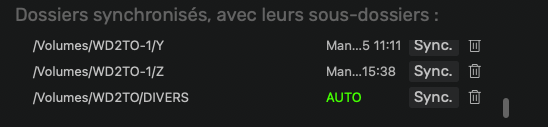
Note: The directory management area is ridiculously small; it would be nice if it could be enlarged.
1 Like
Good - Audirvana use separate profiles for each DAC!
Bad - sometime if I turned off EQ filter Audirvana crash and restarting.
In MacOS console I see some Adrivana crash reports. I could zip all an send you over a private eMail!
Done now!
More on the cross-feed Virtual LR processing…
The ‘Low Cut Filter’ parameter is very effective in fine-tuning the perceived sound-stage cohesiveness… By restricting the amount of low-frequency energy delivered to the L-channel and R-channel of the binaural presentation, the sound-stage is cleaned-up and imaging appears more precise and may feel wider… However, the quality of any subjective assessment in this regard, will greatly depend on the channel separation and cross-talk of your DAC and headphone amp output. Not enough low-frequency will tend to break the coherency of the imbued imaging codified in the recording… Getting the right balance of low-frequency energy in the presentation is essential to realizing the full coherency of the sound-stage. Too much low-frequency energy, will smear the sound-stage.
My headphone amp has a cross-talk figure of -127 dB at around 1kHz on the balanced output…
My current Virtual LR cross-feed settings:
- Distance = 2.0m
- Angle = 90°
- Low Cut Frequency = 4311Hz
You will notice that in my playback scenario I am finding more coherency in the sound-stage by letting more low-frequency energy pass to the Left and Right channel signals than the default setting… It would make sense that a playback system with more cross-talk energy will not benefit from the increased low-frequency energy that I am allowing in my system.
I cannot fully express how functionally important and useful the addition of the Low Cut Filter in the Virtual LR cross-feed processing is in customizing the perceived sound-stage of any headphone playback scenario, but I can say without a doubt, as I further work to fine-tune the playback using the Low Cut Filter parameter, I am getting very close (if not already) to an aesthetic quality of binaural presentation that is in a rarified class for stereo listening. Bravo!
It’s not freezing - the app is writing the newly selected image into each file one by one - progress shown by the circle.
I did indeed reboot my network and it’s working a bit better, but I find it quite slow compared to Roon…
Testing from Windows 11, screen 1440p. I can tell the font size is too small for my eyes and large size option is too large, can you add a medium size setting?
1 Like
Tried something new. Was not really convinced.
But it worked!
I rebooted the NAS and now Sync is automatically started as soon as I modify the content of a synced folder (Works as expected and as it always worked before).
Now, question: what created the mess? Use of the Beta version of AS? Use of ROON in parallel? Need more investigation to conclude.
I didn’t have the time/patience to remove one file type at a time, but I have removed pretty much every audio file type I could think of, and a bunch more to boot. I haven’t had any crashes/hangs, but nothing I have done has speed up loading of the library folders.
1 Like
Macbook Air M2 with 16 GB RAM -
I love the Convolution EQ extension. I’ve integrated 3 WAV files from AutoEQ for my headphones. I’ve also set up Virtual L+R.
However, I keep encountering the same bug: after every second or third track, the next track doesn’t start, but instead a short sequence of the new track is played on a continuous loop. The sequence lasts about 1-2 seconds. I’ve tried it with different buffer sizes. The only way to stop this is to stop the audio interface. After that, you can play the track immediately.
1 Like