I tried changing my Contrast setting of my display to little effect… I appears to me that the hue of the tick-box blends too closely to the background color, making it difficult to discern.
Hello, still don’t have any information about dark search bar in iphone app.
We have been able to fix it on our end, and it will be in the next update of Audirvāna Studio.
4 Likes
great! Thank you Antoine 
It is pretty sad that you could commit to fixing a simple GUI issue and not commit to fixing any legacy plugin issues…
If you are talking about the CPU issue when using an Audio Unit plugin, I ran multiple tests on my end, and I couldn’t reproduce this at all when I have the settings “Use new Audio units macOS hosting API”.
Hello, still don’t have any information about dark search bar in the iphone app. There are black letters on the dark background.
Which iPhone are you using and with which version of iOS?
IOS 16.7.12. Iphone 8+
I could reproduce the issue on my end. I will look at this with our developer
1 Like
Yes I am… And I can still recreate the problem with Audirvana 3.x today… So you are testing the HLC plugin and you are loading multiple FIR files via a .cfg file??? You had said that You and Mitch were working on this BUT never responded with this answer until today?
OK
Hello! I am an audiophile and I’m evaluating the Audirvana Studio for 4 days, and I’m very happy with the sound quality! My requirements are very special - I require both the upsampler and Equalizer (could be convolution or parametric from REW file), playing on Win 11 → USB 384 kHz. I am very little interested in features, user interface, convenience, the sound quality is my only requirement.
I specifically registered to this forum to beg just for one thing (besides saying thank you) - please keep the sound quality the top priority, do not sacrifice it to features. Hopefully, bring in some superior upsampler / convolution options. The reason is, the competition for my requirements above is very poor:
- PGGB-RT upsampler is amazing, but EQ / convolution is degrading the sound
- PGGB-RT → Windows mixer → Equalizer APO is working very well but the mixer and non-exclusive mode are degrading the sound
- PGGB offline is awkward and doesn’t solve the EQ problem anyway
- HQplayer upsampler is perfect, but the EQ / convolution is totally buggy, it clips and cannot play properly, bad sound and may damage my speakers
Please, Studio is working very well, don’t break it trying to bring in more features. By observing all other players - the more features they have, the worse they sound.
androxylo: I totally agree with the ‘keep it simple; keep it sounding good’ mantra. I don’t have any experience with other players sacrificing sound quality for features, though…don’t have to worry about that in any case all the while I can play music through Audirvana/Qobuz. I basically stick to this set up, gleaned from this forum, (although my Adams do have EQ handily accessed on my PC via ethernet connection, so I can occasionally cut some bass or whatever). So no other EQ’ing used:
R8Brain: DSD 256 Bandwidth: 99.5 Stop band attenuation 218 Linear phase B 8th order modulator Volume reduction -3dB
My set-up:
With Speakers: Windows 10>iFi nano iGalvanic3.0>Eversolo-Z8 DAC>Schiit Saga pre-amp>Adam Audio A7V monitors + JL Audio D108 sub
With Headphones: Windows 10>iFi nano iGalvanic3.0>Eversolo-Z8 DAC>Topping A70 headphone amp>Audeze LCD-2 headphones
Welcome…
Audirvāna is working in the 64-bit realm for DSP… 32-bit output dynamic-range.


Have you tried upsampling using ‘Power of Two’ since the Eversolo-Z8 DAC is based on the ESS chipset that converts all 1-bit PDM (DSD) signals to multi-bit PCM for Hyperstream processing? This will off-load decimation DSP overhead from the DAC platform reducing intrinsic noise (jitter) potential…
There is no direct 1-bit DSD signal path to output in the ESS chipset architecture… Using ‘Power of Two’ strategy will produce the highest supported logical PCM sample-rate of the DAC platform (705.6kHz and 768kHz)… You are not gaining anything by up-sampling PCM to DSD256 and presenting it to the ESS DAC architecture that decimates 1-bit DSD to multi-bit PCM for processing and output.
Thanks for that pertinent piece of advice…it makes sense. Also very helpful. I’m trying ‘Power of Two’ right now: sounds great to me!
1 Like
Is the audio scan now accurate? If so, is anyone seeing this? The disclaimer says that it could be due to “recording equipment”, this file was from Presto but I’m seeing the same with Quboz.

The statement “Limited bandwidth can be due to the recording equipment and not lossy compression” is describing that the file presents a bit-rate of an .mp3 encoding, but is not lossy because it is delivered as a 16-bit/44.1kHz .wav file … The bit-depth and sample-rate are determined in the mastering process, so this probably .wav re-master of an .mp3 encoding.
You can clearly see that the useable bandwidth is 20.76kHz, where the Nyquist filter frequency cut-off of a 44.14kHz file is 22kHz (1/2 the sample-rate) and where the theoretical dynamic-range of a 16-bit file is approximately 96dB… This is not a very dynamic recording where the peak appears to be around -25dB.
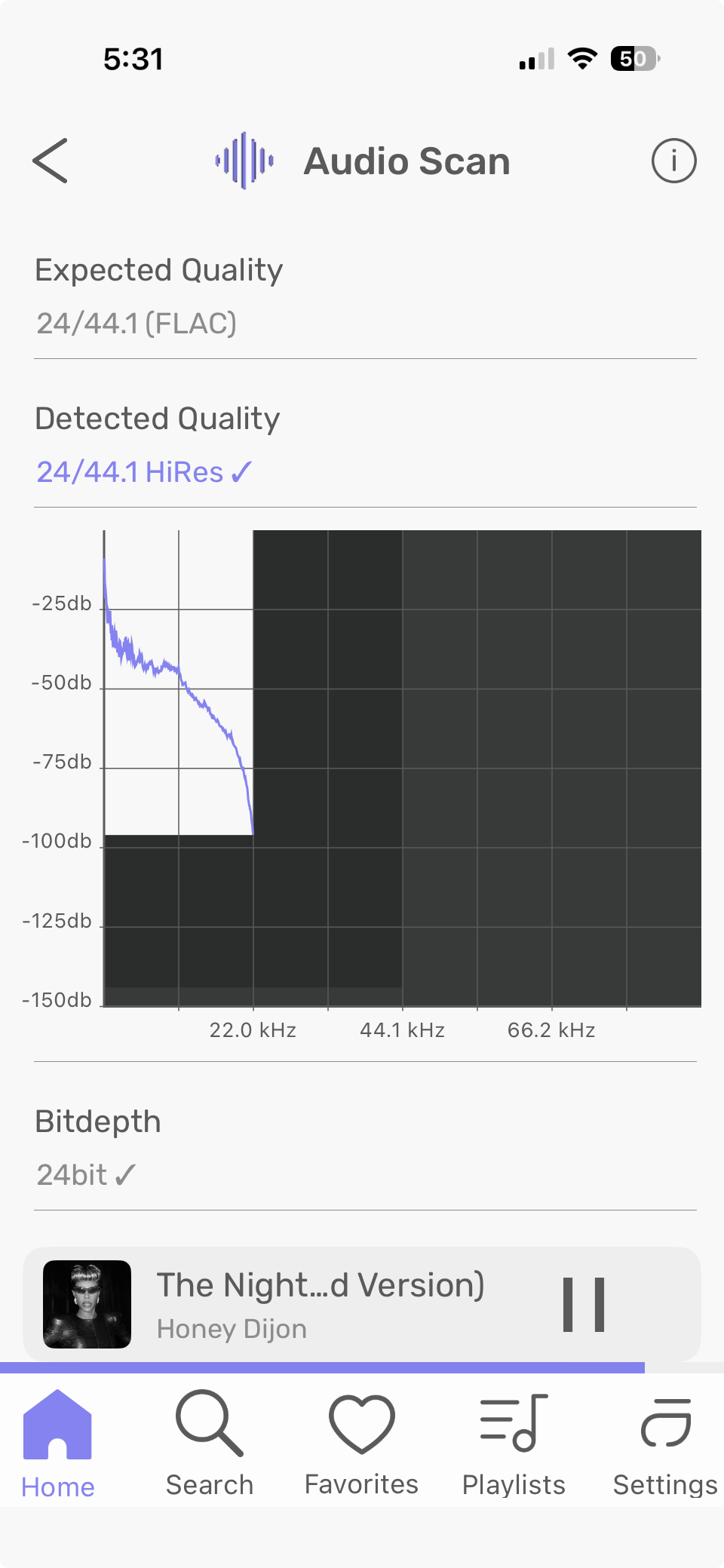
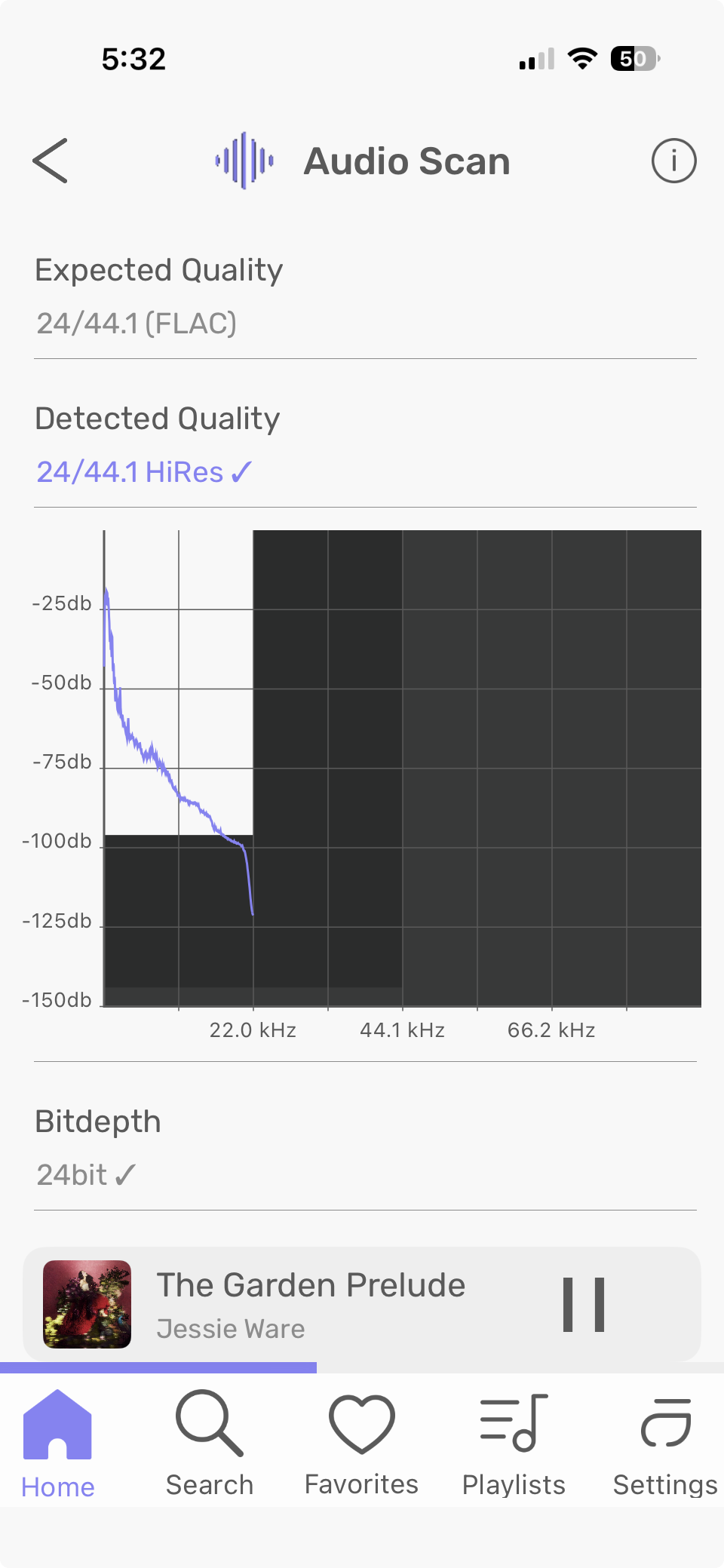
The audio scan is kind of interesting. Both of these tracks, as you can see, are said to be genuine 24/44.1 resolution, yet one cuts off at -96dB (characteristic of 16 bit - 6dB per bit), while the other drops well below that, to -120dB or so. (That’s 6dB x 20, or 20-bit, but even with 24-bit recording you start to get into the heat noise of the electronics below 20-22 bits, so this is still genuine.)