I’m still trialing Origin (one week left) and have three problems, all related to library management.
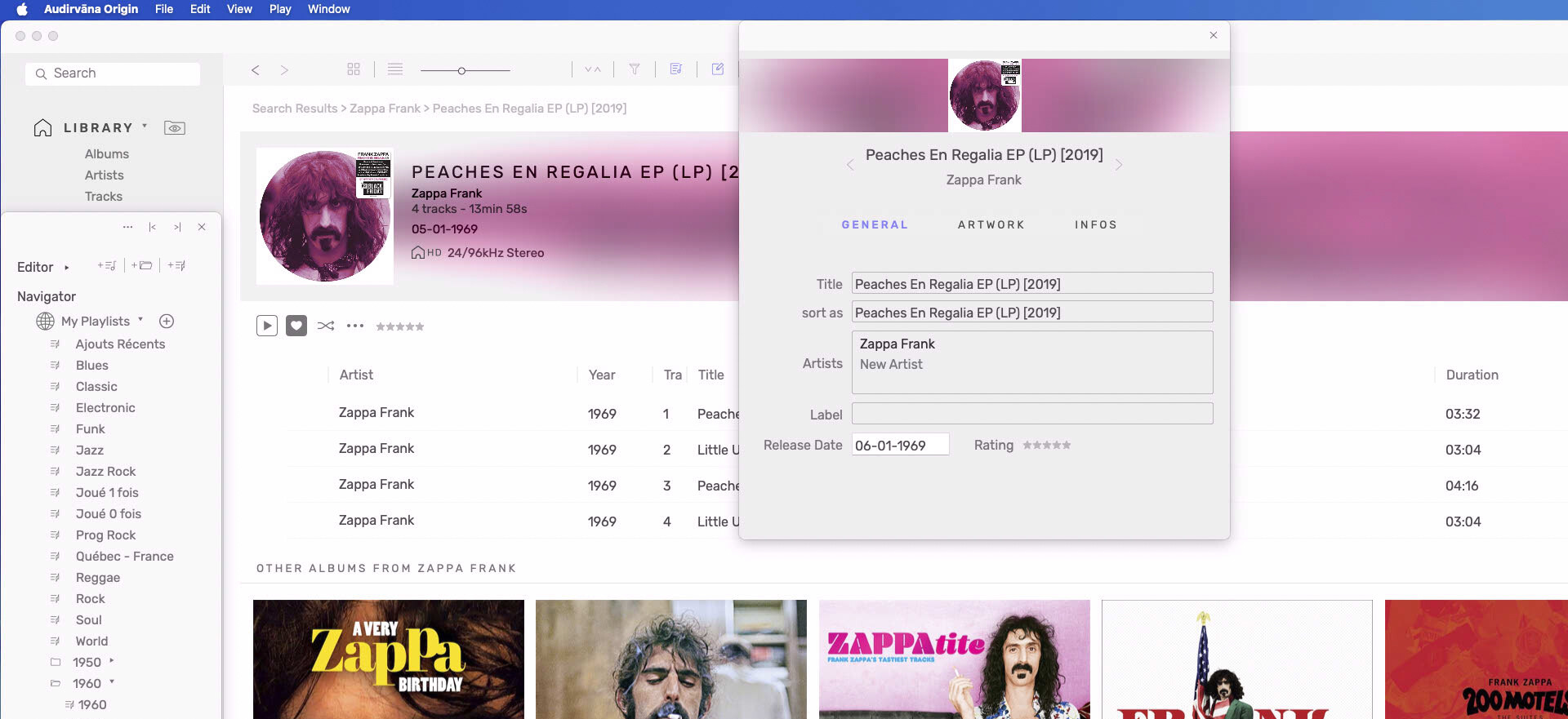
Origin for some strange reason disregards all “year” tags with a value of 1970 or earlier, This leads to no release date being showed for albums released before 1971 and it messes up the sorting of albums. I’ve tried both migrating a “functioning” library from 3.5 and scanning from scratch. Origin for some reason also refuses to write the correct year in the metadata field for “release date”.
Origin can play DSD in WavPack containers, which is good. But it doesn’t seem to be able to read the metadata in the files, which also leads to sorting issues. Basically making the addition of DSD/WavPack support useless. This added support was one of the main selling points for me.
Origin (still) doesn’t have an option to choose between ascending and descending order of release when sorting albums under local library/artist. This also leads to problems with the sort order of albums, for example when files have “albumsort” tags to sort albums in cases where an artist has two or more albums the same year or you have rips of early and late pressings of a CD of the same album.
Together these issues really mess up how Origin presents my local library of albums, mainly consisting of flac (PCM) and WavPack (DSD) files. Will these issues be addressed in a not too distant future? Is there already a setting somewhere that may solve some or all of these issues?
Edit: I should add that I’m using a late 2014 Mac with Big Sur.
Edit 2: Seems Origin does read the pre-1971 year tags since they are displayed in the “column” section of the library (the list of songs). But it doesn’t show the release date with the album information and the tags are not used for sorting based on year of release. And, as stated above, the “year of release” field is empty for these albums when viewing them with the tag editor.
It’s a known issue but not as easy as it seems to solve it, we had reports about it in the past but I need to properly define what is going on. I can’t tell you when it will be fixed.
It should work properly. Can you please send me a mail at [email protected] so you can send me a copy of it? this will help me reproduce your issue.
Thanks @Antoine for the answers. I’m basically using Audirvana for local network streaming (as an alternative to Asset UPnP + control point) and the library functions are important. I’ll probably stick with 3.5 for now and buy an Origin license when these things have been sorted. Soon I hope since I like the rest of how Origin looks and works!
As for the WavPack DSD files I just checked that Foobar reads the metadata ok. JRiver 30 does not however so there may be an issue with how the files are tagged. I’ll investigate further before sending any files, since the problem may be at my end. Origin does not read the tags and instead sorts the DSD-albums based on folder names.
I’m just bumping this post. Have anything been fixed regarding my issues 1 and/or 3? Would very much like to go to Origin or Studio from 3.5 but not before I know these issues are solved.
I started using Origin nearly 1 year ago to the day, and after only a couple of weeks I discovered the Release date issue with albums from 1970 and earlier and it drove me bananas. I had no idea that this had been reported all the way back in 2023!
I don’t use the built-in metadata editor because… well… it has some serious flaws. So to satisfy my anal retentiveness, I opted for some database wizardry to resolve the issue. It takes next to no time to run to fix an existing database and then the process is automated via a database trigger when adding new albums. Haven’t seen a missing Release date since.
By the way @RunHomeSlow, the same type of direct database editing could have saved you a lot of trouble when you moved your music folders around, with no loss of data.
And as I posted above, when I try to post details of my solution, I get the errors… I think it has to do with the length of message.
edit to add that actually, this forum won’t let you post code.
i just put one 1961 album on my desktop,
trashing the one in the Louis Armstrong folder…
sync remove that album from Audirvana
i put back that same Album in the Louis Armstrong folder
where it was 30 seconds ago…
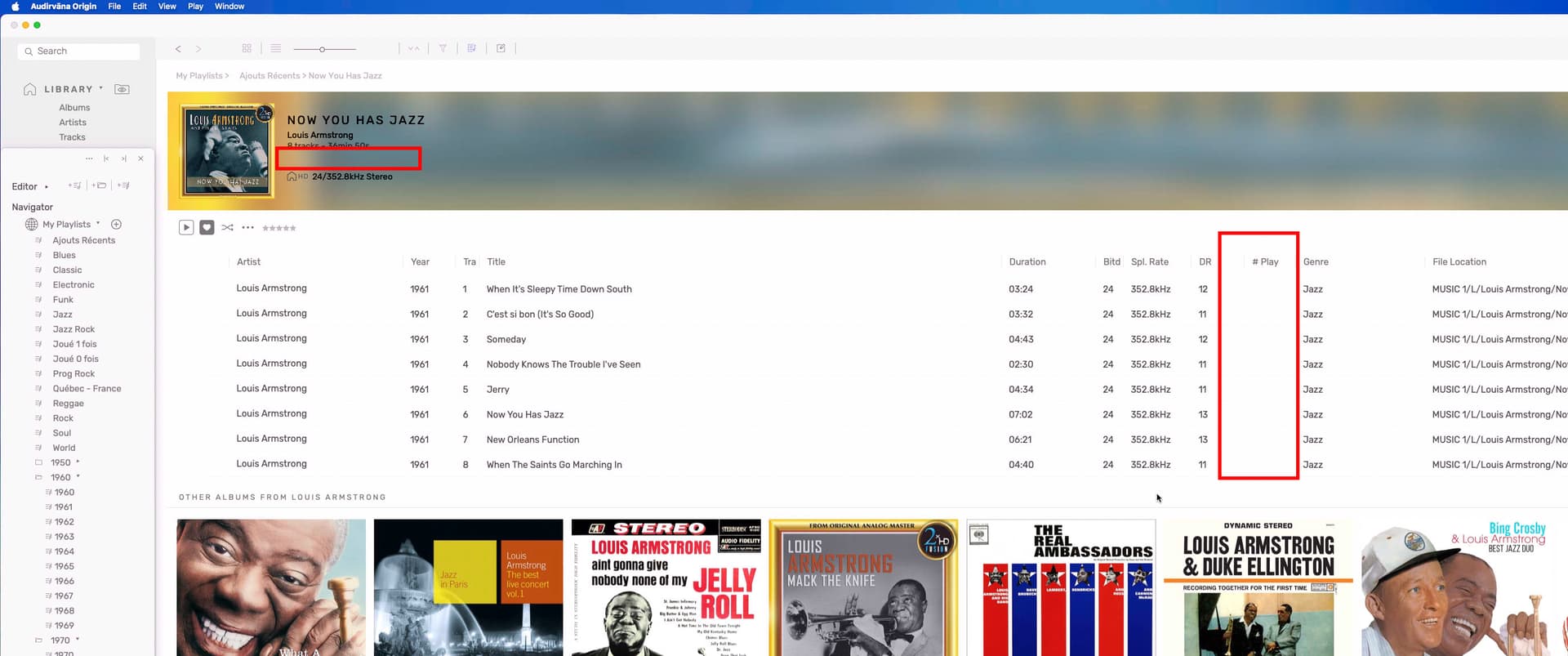
Lost my Release Date and my play counts…
and this album now is in my recents albums playlist, like new
If you do the same with an album, you will NOT lose your release date ? and play counts (if you use that)
If the audio files contain the Release Time metadata field (I use Yate for metadata editing) then you wouldn’t lose that. The trigger I added to my database reads the tracks’ tag’s value in the database and properly updates the Release date for the album in the database when you add the album (for albums <=1970).
You would lose the Play count as this info is only in the database.
I just trialed Origin again and was disappointed both issues 1 and 3 are still there. So I’ll wait, maybe until the next major update of this software?
But you’re (@dZp) saying using a “release time” tag (instead of the “year” tag that is pretty much standard with flac files) solves issue number 1? That’s something at least. Wouldn’t be too hard to fix using dBPoweramp’s tagging tools.
Unfortunately issue number 3 is major enough for me not to buy the software anyway. I want my albums to be presented in oldest to newest release date order and in the order of oldest to newest pressings/versions of any given album (based on “year” and “albumsort” tags). Origin’s way of sorting albums based on Year and Albumsort tags is a bit of a mess. 3.5 does what I want perfectly by default.
Not quite.
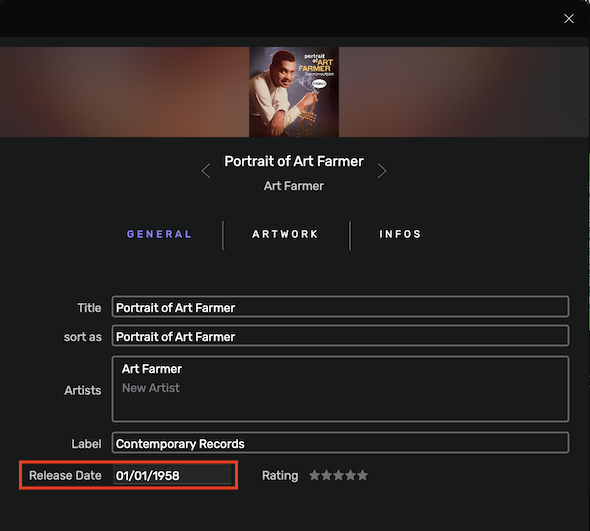
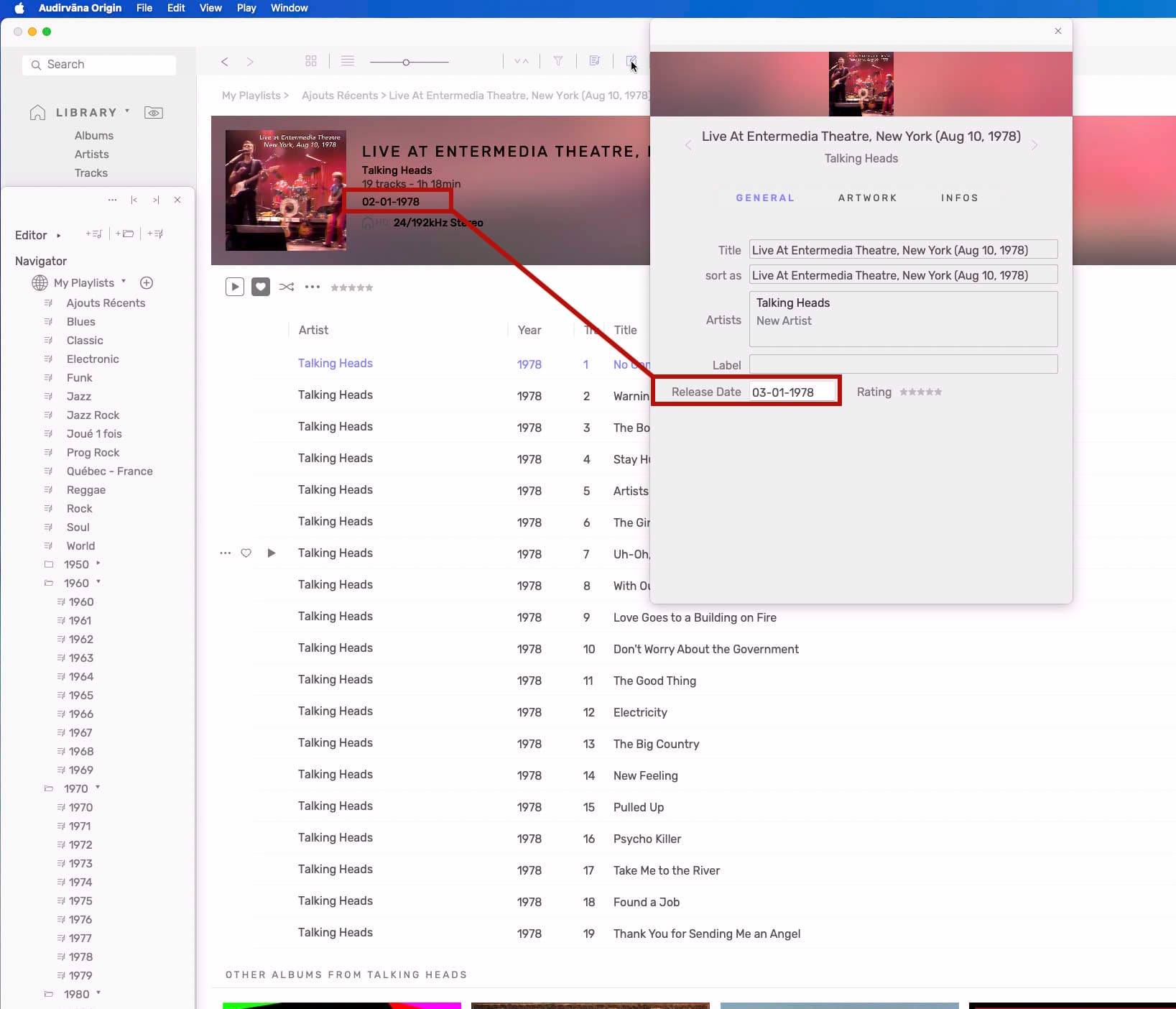
When one fills out the Release Date field in AO’s Edit metadata panel for a given album, the Release time tag is created and saved in all of that album’s tracks. This in turn also updates the tracks’ release_date field in the database. The issue is that for some seemingly unknown (and quite baffling) reason, AO doesn’t seem to want to properly update the album’s release_date field in the database itself for any album from 1970 and earlier. This is why the release date doesn’t show in the UI for those albums.
I use Yatehttps://2manyrobots.com/yate/ (superb app for macOS by a brilliant developer) to tag and maintain all my audio files, I have an action that fills the Release Time tag derived from the Year tag (ie: 1958 → 1958-01-01) automatically.
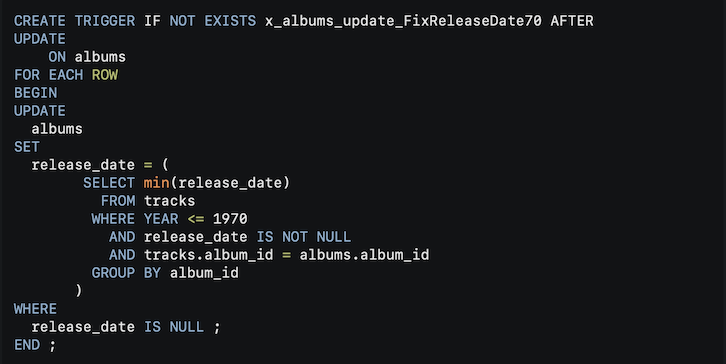
In my quest to resolve the “1970” issue, I created a new trigger in my database that properly sets the album’s release_date from the tracks release_date in the database when adding (or updating) the album to AO.
I’ll preface the rest of this post with the following:
Before editing a database, make sure the application using it is not running.
Always, ALWAYS, ALWAYS make a backup of your database before editing it, in case of mishaps.
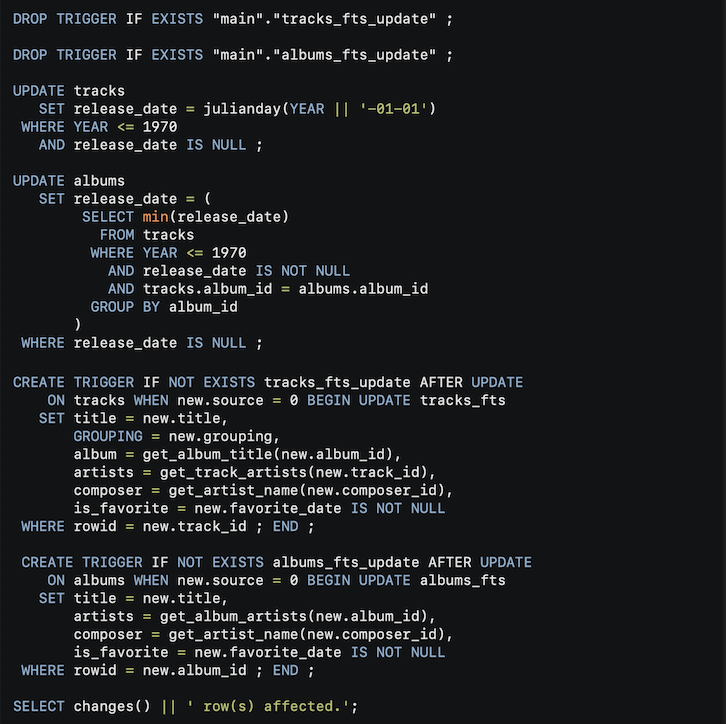
This Discourse powered forum won’t let me post the formatted SQL code (because obviously I’m attacking the server with malware!), so I provide a picture and a link to an online paste bin.
I use DB Browser for SQLitehttps://sqlitebrowser.org (free SQLite database editor for Windows, macOS and Linux) to modify the database, executing the following code:
Now, if one wants to update their existing database without having to create the Release Time tag for all their audio files, then the following SQL commands can be executed.
The following will (for albums from 1970 and earlier):
Create and populate the tracks’ release_date field computed from the Year if no release_date data exists for the tracks in the database.
Populate the albums’ release_date from the tracks’ release_date
Just a note…
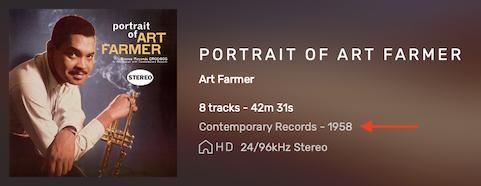
In my testing, when using something like “01-01-1958”, then only the date’s year will appear in the UI (as my pic above and my preference) whereas if using anything other than “01-01-XXXX” (ie: “03-06-1958”), then the full date will show.