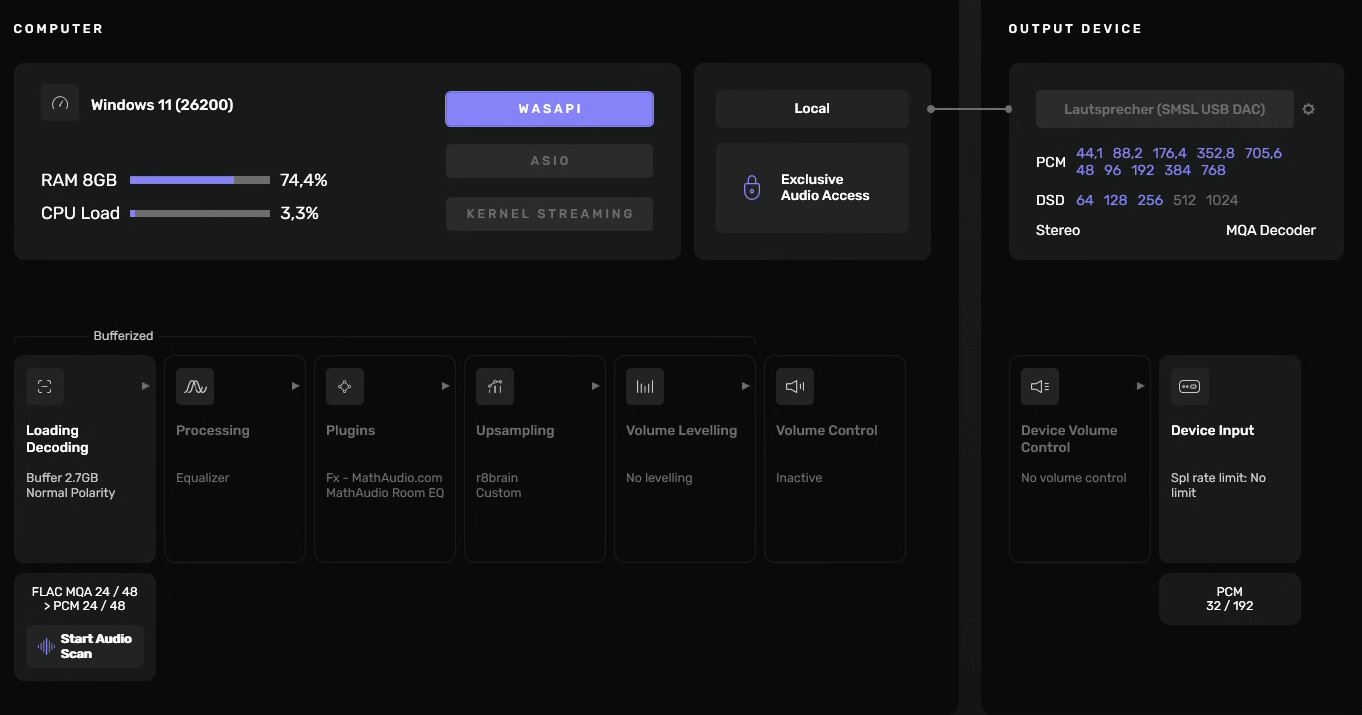
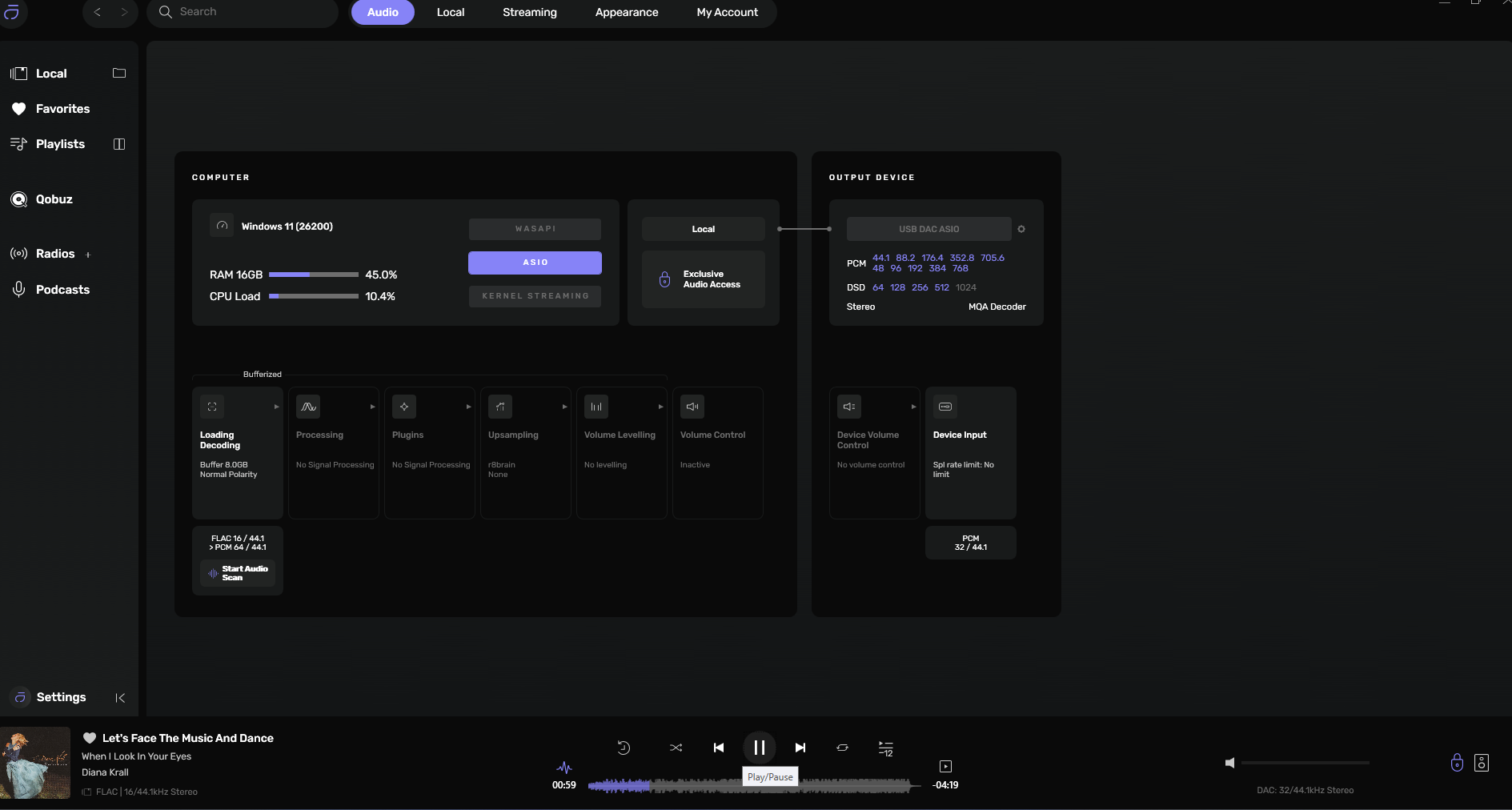
Tried two different DACs with Studio 3.0.3.0 in order to listen to decoded MQA – to no avail …
Anyone around who gets better results with this?
Same here.No MQA decoding with latest Audirvana Studio for Windows.
No matter if settings are for ASIO, WASAPi or Kernel.
Just kaput, no MQA support.
Same PC playing same MQA files using other software no problem.
Please fix this bug
Best Regards !
Ain’t MQA dead, out of business, never was a good option to start ??
For your information: Tidal is stil streaming many albums in MQA
They are marked as Flac files.
Usually 16/44.1
If you have MQA Dac this file would unfold to highier resolution.
Example: Edgar Froese The Virgin Years
Sounds fantstic in MQA
By the way
So many audiophiles are playing Mp 3 files
Maybe you have collection of Mp 3 files yourself.
Enjoy !
Nothing wrong with Mp 3 files
They aren’t dead yet 
Thanks a lot for your input. Good to know that me and my DACs are not the only ones …
Would you please name some examples? I’d like to try that out too.
Are you playing a local MQA track?
Yes.
I just had a look at audirvana_studio.log. The new portion after playback of an MQA file looks like this (some XX for privacy):
2026-04-28 09:16:36.778 [info]: ============= Started Logging, Audirvana Studio 3.0.3 (30003) Windows x86_64 =============
2026-04-28 09:16:36.906 [info]: Running on HP Laptop running Windows 11 (26200)
2026-04-28 09:16:38.227 [info]: RemoteServer: Server started and advertised on port xxxx
2026-04-28 09:16:38.239 [info]: UPnP stack initialized using default interface
2026-04-28 09:16:38.441 [info]: UPnP web server started on 192.168.xxxxxx
2026-04-28 09:16:50.946 [warning]: FLAC decoder: unexpected end of stream
2026-04-28 09:16:50.946 [warning]: FLAC decoder: unexpected end of stream
2026-04-28 09:16:50.946 [warning]: FLAC decoder: unexpected end of stream
2026-04-28 09:16:50.946 [warning]: FLAC decoder: unexpected end of stream
2026-04-28 09:16:50.946 [warning]: FLAC decoder: unexpected end of stream
2026-04-28 09:16:50.946 [warning]: FLAC decoder: unexpected end of stream
2026-04-28 09:16:50.946 [warning]: FLAC decoder: unexpected end of stream
2026-04-28 09:16:50.946 [warning]: FLAC decoder: unexpected end of stream
2026-04-28 09:16:50.946 [warning]: FLAC decoder: unexpected end of stream
2026-04-28 09:16:50.946 [warning]: FLAC decoder: unexpected end of stream
2026-04-28 09:16:50.946 [warning]: FLAC decoder: unexpected end of stream
2026-04-28 09:16:50.946 [warning]: FLAC decoder: unexpected end of stream
2026-04-28 09:16:50.946 [warning]: FLAC decoder: unexpected end of stream
2026-04-28 09:16:50.946 [warning]: FLAC decoder: unexpected end of stream
2026-04-28 09:16:50.946 [warning]: FLAC decoder: unexpected end of stream
2026-04-28 09:16:50.946 [warning]: FLAC decoder: unexpected end of stream
2026-04-28 09:16:50.946 [warning]: FLAC decoder: unexpected end of stream
2026-04-28 09:16:50.946 [warning]: FLAC decoder: unexpected end of stream
2026-04-28 09:16:50.946 [warning]: FLAC decoder: unexpected end of stream
2026-04-28 09:16:50.946 [warning]: FLAC decoder: unexpected end of stream
2026-04-28 09:16:51.780 [warning]: FLAC decoder: unexpected end of stream
2026-04-28 09:16:51.780 [warning]: FLAC decoder: unexpected end of stream
2026-04-28 09:16:51.780 [warning]: FLAC decoder: unexpected end of stream
2026-04-28 09:16:51.780 [warning]: FLAC decoder: unexpected end of stream
2026-04-28 09:16:51.780 [warning]: FLAC decoder: unexpected end of stream
2026-04-28 09:16:51.780 [warning]: FLAC decoder: unexpected end of stream
2026-04-28 09:16:51.780 [warning]: FLAC decoder: unexpected end of stream
2026-04-28 09:16:51.780 [warning]: FLAC decoder: unexpected end of stream
2026-04-28 09:16:51.780 [warning]: FLAC decoder: unexpected end of stream
2026-04-28 09:16:51.780 [warning]: FLAC decoder: unexpected end of stream
2026-04-28 09:16:51.780 [warning]: FLAC decoder: unexpected end of stream
2026-04-28 09:16:51.780 [warning]: FLAC decoder: unexpected end of stream
2026-04-28 09:16:51.780 [warning]: FLAC decoder: unexpected end of stream
2026-04-28 09:16:51.780 [warning]: FLAC decoder: unexpected end of stream
2026-04-28 09:16:51.780 [warning]: FLAC decoder: unexpected end of stream
2026-04-28 09:16:51.780 [warning]: FLAC decoder: unexpected end of stream
2026-04-28 09:16:51.780 [warning]: FLAC decoder: unexpected end of stream
2026-04-28 09:16:51.780 [warning]: FLAC decoder: unexpected end of stream
2026-04-28 09:16:51.780 [warning]: FLAC decoder: unexpected end of stream
2026-04-28 09:16:51.780 [warning]: FLAC decoder: unexpected end of stream
Hi again !
I am playing different local MQA files just to find out what is happening.
I noticed that Audirvana Studio is playng these files ok to SMSL SU-1 Dac(full decoder)
Also when streaming thru local network to Zen Stream also file is recognized by Zen Stream as MQA changing color on Zen Stream to dark blue same as on SMSL SU 1 which is connected directly to computer running Windows 11
On different PC with iFi Zen Dac ver 1 and also on another Windows PC with Zen Dac Air (two of these Dacs are MQA Renderer only) when playing same MQA files nothing is happening in terms of recognizing these files by latest Audirvana Studio for Windows.
Files are being played as Flac.
I tried different settings but no action with these particular Dacs.
Same files are working ok and being recognized by different software and lights are switching to purple color with these Dacs
I forgot to mention about Zen Stream ver1
When using different software and playing these files to Zen Stream plus ZenDac ver 1 lights are changing to purple on Zen Stream and connected to it Zen Dac ver 1
In settings of that software renderer is set for this Dac
That’s surprising to me. My current DACs are S.M.S.L D-6s and S.M.S.L SU-1. Both are not decoding MQA for me, with Audirvana Studio 3.0.3.
Using latest Audirvana Studio for Windows and sending MQA file stream to Zen Stream ver 1 plus Zen Dac ver1 light on Zen Stream is changed to dark blue but on Zen Dac ver 1 which is connected to it, stays green no matter what kind of setting is chosen in Studio
Both the The S.M.S.L D-6s and the S.M.S.L SU-1 support MQA on the USB bus…


I just tried to play MQA file on PC with Zen Dac Ver 1 connected directly to this PC using latest Audirvana Studio
Light is green and Audirvana is showing that Flac is being played ( no MQA recognition)
I tried different options in settings switching to WASAPI than ASIO and Kernel
Tried in settings switching between auto MQA or not auto than render or decoder
No difference
No recognition of MQA different types of MQA files using this older only rendering Dac
I succeeded in making foobar2000 playing back an MQA track in a way that my S.M.S.L D-6s detected it as MQA (Logo and lamp of the display were ON).
I have only SMSL SU 1 Dacs ( two) and they recognize MQA files with any software including Jriver, Audirvana and others
I have to mention here that there is few different mqa file types and they are acting different with different software.
Could you please post a screenshot of your settings window, from Audirvana 3.0.3 with decoding an MQA track per S.M.S.L SU-1 – just like the screenshot I posted at the beginning of this thread? Thanks!!
Light on Dac is blue but audirvana is showing Flac only
So you have two lamps on at your SU-1? The normal one (light-blue-ish) and the deep blue one for MQA?