Preamp has too much gain and stepped attenuators. Reducing gain in Audirvana vs. inline RCA attenuators

I have an Audible Illusions Modulus M3B going into a Prima Luna EVO 3OO power amp. The Modulus M3B has very high gain (58db) and has stepped attenuators for volume control. My speakers are also 101db sensitive. This means that not only can I only use the first 1/3 of the volume knobs before hitting 85+ db. but each increment on the stepped volume knobs results in a massive volume increase, making it difficult to find a comfortable volume.

I’m not a total idiot; I’m familiar with impedance matching and gain matching when assembling a system, but I got the Modulus for a deal too good to pass up and figured I’d resell for a profit worst-case. Problem is, the system sounds phenomenal. Good enough I really don’t want to swap out the preamp.

I tried the Rothwell -10db inline attenuators. They seem “okay,” but I’m not sure if they’re impacting dynamics / soundstage or not. It might just be in my head, but constantly analyzing the sound ruins my listening enjoyment, so I pulled them.

When it comes to Audirvana, I can reduce output gain in the parametric equalizer, or I can do it with the free Voxengo Marvel GEQ VST plugin.

I have everything upscaled to DSD 256 with a 3db reduction before upsampling. I also have ReplayGain enabled.

My gut and limited knowledge is telling me a software-based solution should be the better bet than physical attenuators (effectively just resistors), and that (when implemented properly) should be effectively transparent. But at the same time I’m thinking that a stepped attenuator volume knob is effectively just a series of different value resistors in a circle (correct me if I’m wrong), and if that’s the case, how would an inline resistor for attenuation be any different?

Can someone with more knowledge / expertise chime in and let me know if using the aforementioned software options for a -10db to -15db reduction is truly transparent, or if there are any downsides / issues I’m not aware of. And whether this route is a better option than physical attenuators. Also, I’m not sure if using the included paremetric eq or the Voxengo VST EQ would be the better bet. I’m assuming they should be basically identical.

I can’t use Equalizer APO or the like because I’m streaming to a PS Audio AirLens using Audirvana’s built-in UPnP functionality. If there are any other options besides what I’ve mentioned above, I’m all ears.

Apologies for the lengthy post. Brevity is not one of my strong points. Thanks in advance.

DEBUG INFO

Audirvana Studio 2.11.4 (21104)

Running on Micro-Star International Co., Ltd. MS-7E07
Windows 11 (26200) x86_64 with 96GB physical RAM

NETWORK
Status: available
Available network interfaces:
Ethernet ({2628f4cd-a992-47f5-bdfa-62a8daf52ec5}) is PUBLIC
Windows Defender Firewall status for this instance of Audirvana Studio
Active profile types: all
Private profile:
Firewall: enabled
Inbound: blocked
Outbound: allowed
Notifications: enabled
Public profile:
Firewall: enabled
Inbound: allowed
Outbound: allowed
Notifications: enabled

LOADING/DECODING:
Max audio buffer size: 14058MB
Polarity Inversion:
Globally: OFF
Per track: ON

SIGNAL PROCESSING:
Internal EQ: ON in offline mode
Effect Plugins: ACTIVE in offline mode
VST3 plugin #0: C:\Program Files\Common Files\VST3\Marvel GEQ.vst3
ClassID: C40CD0E0899D4484BFB44A40B57B62C4
VST3 plugin #1: None
VST3 plugin #2: None
VST3 plugin #3: None

UPSAMPLING:
r8brain to DSD256 with filter type A 4th order
r8brain filter parameters
Bandwidth = 94.5556%
Stop band attenuation 201.1dB
Phase linear

AUDIO VOLUME:
Replay Gain: by track
Max allowed volume: 100

Remote Control server:
Listening on 2600:4040:7021:6800:c13b:7ccb:96ba:d52c on port 63762

ACTIVE STREAMING SERVICES
TIDAL: Connected as PREMIUM

=================== AUDIO DEVICE ========================

Active method: UPnP

UPnP network interface
Selected Network interface: Ethernet
Available Network interfaces:
Ethernet

Preferred device: [UPnP] AirLens Model UID:PS Audio AirLens UID:uuid:ADD001DB-2C29-11EA-886E-985E1B00950E

Selected device:AirLens
Manufacturer: PS Audio
Model name: AirLens
Model UID: PS Audio AirLens
UID: uuid:ADD001DB-2C29-11EA-886E-985E1B00950E
UPnP device at http://192.168.1.191:38400/description.xml

8 available sample rates up to 384000Hz
44100
48000
88200
96000
176400
192000
352800
384000

Volume control: Yes
Max volume alert: Enabled

MQA capability
Auto-detect MQA devices: No
Not automatically detected, user set to not MQA

DSD capability
Raw DSD (msb)

Device audio channels
Preferred stereo channels L:0 R:1
Channel bitmap: Ox3, layout:
Channel 0 mapped to 0
Channel 1 mapped to 1

UPnP set capabilities
Maximum PCM frequency set: 384000Hz
Maximum PCM bitdepth set: 32
Maximum DSD rate set: DSD256
Number of channels: 2
Avoid RAW PCM streams: No
Unwanted playback stop workaround: No

DLNA 1.5: Yes
Native Gapless playback: Yes
Universal Gapless playback active: No
Missing events workaround: No
Can play native DSD: Yes
Volume Control: scalar
Number of channels: 2
Use as stereo device only: No

1 output streams:
Number of active channels: 2, in 1 stream(s)
Channel #0 :Stream 0 channel 0
Channel #1 :Stream 0 channel 1
Local

Max. memory for audio buffers: 14058MB

Local Audio Engine: ASIO 0
Driver version -1
Use max I/O buffer size: ON

Local devices found : 2
Device #0: Focusrite Thunderbolt ASIO
Manufacturer:
Model UID: Focusrite Thunderbolt ASIO
UID: Focusrite Thunderbolt ASIO
Model name: Focusrite Thunderbolt ASIO
Device #1: Focusrite USB ASIO
Manufacturer:
Model UID: Focusrite USB ASIO
UID: Focusrite USB ASIO
Model name: Focusrite USB ASIO

I think you are too much in your head to be honest.

And in the end it doesn’t matter which method works, the question is: what do YOU like the best?

Now, technically: all what attenuators do is reduce the input line level. The signal itself and the dynamics are not affected, unless the one you use are not made properly. But Rothwell definitely knows what he’s doing. The stepped attenuators of your volume control work on the same principle, so adding those Rothwell’s is just pushing down the overall line level a few db’s.

Digital processing, however, is another ball game.The hardware on which the digital processing is done matters a lot in keeping the output of the processing clean, mainly the power supplies used on the motherboard and chip(s). The software itself works perfectly fine. Bottomline: your run of the mill laptop isn’t as clean as those Rothwell attenuators are. I’d stick to adding corrections in the analogue domain and not the digital domain, although I know that many people on this forum enjoy their EQ and plugins, but you asked for ‘what is better’.

PS: if you get paranoid by analysing the sound when you apply something as simple as pair of physical attenuators, brace yourself for digital adjustments. The amount of variations you can make is endless, so that must fuel the anxiety exponentially.

I appreciate the reply. PC is an i9-14900k w/ 96GB RAM, NVMe SSDs, Platinum-rated PSU and a quality motherboard with quality VRM. But who knows, maybe that’s worse than your run of the mill laptop in terms of all the potential sources of interference.

Oddly enough, digital adjustments don’t bother me too much. When talking things like Nyquist freq. or stop band settings for upsampling, or what filter sounds best for a sigma-delta DAC chip, it’s just searching for the best compromise.

What bothers me in this case, is that I worry going either the hardware or software route could compromise an otherwise excellent system, and it’s not a necessary component. I only want to do it if I’m damn sure it’s not even the slightest bit detrimental. Otherwise, I’ll just deal with the high gain. Hopefully that makes sense.

I’ll go back to the Rothwell’s and spend a week with them to give them a fair shake. Appreciate the help.

EDIT: I just remembered the Modulus has a 31k inline resistor on the CD input (which I don’t use; only vinyl or digital for me) to reduce the gain. If it’s a good enough solution for them, then attenuators (which go a step further than a simple resistor to manage impedance) should be good enough for me.

Bets advice I can give: put the attenuators in your system. Listen to music for 2 or 3 weeks, don’t change anything else at all. That is important, just don’t change anything else and listen for a longer period.

After that periode, sit down to listen intently, remove the attenuators and then listen again. That probably tells you what it does to your system and if it is a keeper or not.

1 Like

Dynamic range in LPCM audio is calculated as: [6(dB) x (number of bits) + 1.75mv = (Theoretical Dyanic Range)… Where 1 bit = 6dB. Therefore, a 6dB reduction in gain is equal to a 1-bit reduction in resolution… However the Volume DSP in Audirvāna is calculated with 64 bit math and is decimated to 32 or 24 bit for output.

The theoretical dynamic range of a 32bit file is approximately 194dBmv and the theoretical dynamic range of a 24 bit file is approximately 146dBmv.

Typically it is best practice to use the attenuation at the pre-amp/amp and do no volume DSP in the player…

Volume control on DSD files is done by decimating to 24/352.8kHz and then modulating the signal to it’s original 1-bit sample-rate for output.

I suggest that you send only PCM signals to your Focusrite either upsampled or DSD converted to PCM… In your case, the Airlens is a bridge to the Focusrite which only supports up-to 192kHz.

:musical_notes: :eye: :nose: :eye: :musical_notes:

Thank you for the extremely detailed breakdown, and for explaining it in a way that’s easy to understand. That all makes sense to me.

I should have removed the Focusrite from my debug section. I only use that as a guitar input for GuitarRig.

My setup is Audirvana Studio –> PS AirLens via wired ethernet –> PS Stellar Gold DAC via I2S –> Modulus M3B (has the intgrated John Curl phono stage) –> PrimaLuna EVO 300.

The DAC can process native DSD, but the settings are limited to the resolution of the AirLens. I think the DAC can do 768PCM and 512 DSD but the AirLens is limited to 384 and 256

Note: I changed the Dynamic Range calculation to read properly: [ 6dB x (number of bits) + 1.75mv = Theoretical Dynamic Range ]

1 Like

I2S: PCM 16 and 24 bits at 44.1kHz, 48kHz, 88.2kHz, 96kHz, 176.4kHz, 192kHz, 352.8kHz, 705.6kHz, and 768kHz; DoP64, DoP128, DoP256, DSD64, DSD128, and DSD256

Okay, so I was off on the DSD 512. So the only limiting factor of the AirLens is PCM to 352.8 (or 384 depending on what you read) vs. 768 on the DAC. Not something I would ever use anyway.

I just read the same specs you posted and what I don’t get is that every other source says the DAC can do 32 bit PCM, but it’s not listed on PS Audio’s own site. I know its ESS 9038 Pro chip can do 768kHz / 32 bit.

I know we’re getting off topic, and none of this will ever really affect me anyway. Just found it curious.

Edit: Google tells me this:

The PS Audio Stellar Gold DAC can handle DSD 512, but only via its I²S input.

Technical Specifications and Capabilities

  • DSD Support by Input: The maximum DSD rate the Stellar Gold can process depends entirely on which input you use:

    • I²S input: Supports up to native DSD1024 and DoP256.

    • USB input: Limited to DSD128 (both native and DoP).

    • Coax input: Limited to DoP64.

    • Optical input: Does not support DSD.

Who the hell knows.

There are no 1-bit 22.4MHz (DSD512) recordings or 705.6 or 768kHz recordings… These products are iterations created by modulating or up-sampling of lower sample-rate encodings… From my point of view as one that modulates all PCM files to DSD256, you are on the right track… :wink: :+1:

Good to hear, since it’s obvious you’re more technically knowledgeable than I am. I have never looked back after settling on DSD256. Just sounds right to my ears.

I recently picked up a Korg MR-2000S DSD recorder to digitize my rare vinyls and I can’t tell the difference between the record and the DSD copy.

1 Like

Google is not your friend… It appears the machine has conflated some specs from other PS Audio DAC platforms.

:musical_notes: :eye: :nose: :eye: :musical_notes:

I’ll certainly agree with that sentiment, at least about the AI slop, which is what I quoted. I had a feeling it might be wrong, but since the 9038 Pro is natively capable of those bit rates / bit depths, I went with it.

Thanks for doing the research I was too lazy to lol.

It’s all moot to me; I see no reason to upsample beyond 192/24 PCM or DSD 256, but since you seem knowledgeable in this area, feel free to enlighten me there’s benefits I’m not aware of. My understanding is that with higher upsampling, you create more headroom for the filters to push ringing / artifacts further out of the audible range, but that you start to run into diminishing returns beyond the range I mentioned above.

I missed something about the PSA DAC…
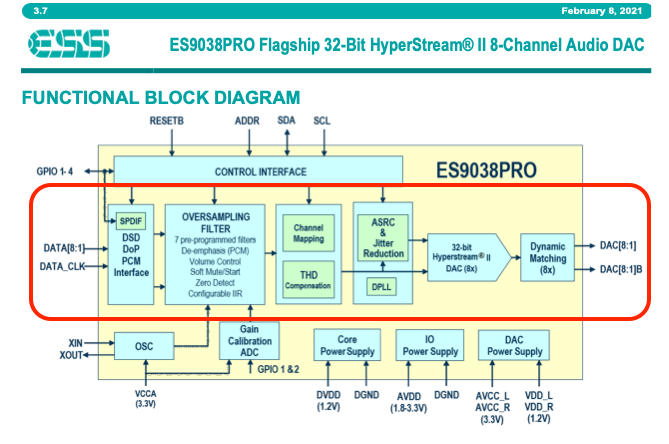
The ESS DAC chipset converts all DSD signals to multi-bit PCM, so there is really no benefit in delivering raw DSD to this DAC platform… However, you will be better served to convert all DSD files to PCM in Audirvāna, so to offload the decimation processing from the ESS chipset…

So, because of the nature of the ESS chipset architecture… I suggest that you use ‘Power of Two’ up-sampling strategy so to deliver all lower-resolution PCM files natively to the DAC and convert all native DSD files to PCM for output.

Thanks for the detailed replies. This is my first post on this forum, and I didn’t expect such helpful and detailed replies from you and the other members. Going back to read your first reply about how dynamic range is calculated until I can fully comprehend it. I’m curious why DSD decimates to 24/352.8 and not some other number, but I can research that on my own. I’ve taken enough of your time. Thanks again.

I had expected the consensus to be to use software correction, but the consensus is firmly in the attenuator camp, so I’m going to spend a few weeks with the Rothwells in place until I’m fully acclimated, then remove them and form a conclusion, as suggested.

I feel like I’m losing my mind. I searched that topic three or four times to ensure that chip processed fully native DSD with no PCM conversion anywhere in the chain and no need to use DoP. I thought I even read that on the PS Audio website. I must be losing it. Thanks for the heads up and I agree that makes sense. A bit disappointed to see that.

Decimation to 24/352.8kHz is a multiple of 44.14kHz, DSD sample-rates are multiples of the PCM base of 44.14kHz…

  • 44.1kHz x 64 = 2.8MHz (DSD64)
  • 44.14kHz x 128 = 5.6MHz (DSD128)
  • 44.14kHz x 256 = 11.2MHz (DSD256)

24/352.8kHz is the most logical factor for PCM editing, no DSP is done on 1-bit signals.

1 Like

You are prolific. Just researched for myself and the best explanation I found of the ESS 9038 is by you in another thread: DSD Compatibility - #2 by Agoldnear

A lot of people seem to really love the SGD, I’m assuming owing to the design of its output stage, but truth be told, I probably would have been better off with a used PerfectWave with its FPGA

There is no un-fettered 1-bit signal-path to output…

Doesn’t get any more black and white than that. Thanks.

1 Like