Yesterday I had the ability to use realtime eq in the beta android remote app, today the option is gone.
Exact!
Pour retouver l egaliseur,il faut retourner à traitement audio,egaliseur en temps reel ,puis configurer ! Le traitement du signal apparait et disparait aleatoirement lorsque je connecte une souris bluetooth à mon telephone,le bouton doit etre cache sur l ecran,en tout cas il n est plus sur la pochette de l album! L appli demande une mise a jour du coreplayer linux fe 2.1 vers 2.6 mais comment faire,mon streamer est un 3Dlab?merci pour votre super boulot!
Vous devriez pouvoir faire la mise à jour depuis l’application Audirvāna Remote, si ce n’est pas le cas, vous devez contacter 3D Lab.
Still no realtime eq on android remote (beta). It was there, then 3 weeks ago it disappeared. Are there plans to bring it back?
It’s still there. Have you activated real-time in the processing section of the audio settings?
Yes. Realtime eq is running on the desktop. The only options available on the app are show artists and show album.
Can you send us a copy of the "Debug Info“ when you have this issue? You can get it in Audirvana Settings>My account.
Note: When you click on the Debug Info button, Audirvana automatically copies all its content. Please paste it in response to this message.
Audirvana Studio 2.11.5 (21105)
Running on iMac (27-inch, Mid 2010)
macOS 10.13.6 x86_64 with 12GB physical RAM
Connected account of : Tom Carvalho
NETWORK
Status: available
LOADING/DECODING:
Max audio buffer size: 4130MB
Polarity Inversion:
Globally: OFF
Per track: ON
SIGNAL PROCESSING:
Internal EQ: ON in realtime mode
Effect Plugins: NOT ACTIVE
UPSAMPLING:
SoX custom frequencies
SoX filter parameters
Bandwidth at 0dB = 99.5%
Filter max length = 30000
Anti-aliasing = 100
Phase = 66%
AUDIO VOLUME:
Replay Gain: None
Max allowed volume: 100
SW volume control: ON
LIBRARY SETTINGS:
Sync list: 2 folders
AUTO: /Volumes/Audio/Audio
AUTO: /Volumes/Audio/Hi-Res Audio
Sync folders at startup: NO
iTunes/Music library synchronization: not synchronized
Sort and display order: en_US
Library database path: /Users/TC/Library/Application Support/Audirvana/AudirvanaDatabase.sqlite
Local audio files fingerprinting
Tracks with no MBID: 3604
Remote Control server:
Listening on 127.0.0.1 on port 55777
ACTIVE STREAMING SERVICES
Qobuz: Connected as Qobuz Studio
APPEARANCE SETTINGS:
UI theme: dark
Font size: regular
Language: System language
Show album covers in tracks list: no
Source list sorted:
Local
Streaming
My Music
Radios
Podcasts
Startup view: Local Library: Albums
Show local extended in source list: yes
Use media keys: yes
Use media keys for volume control: yes
Use Apple Remote: no
Number of paired remotes: 7
Remote pairing code required: yes
Screen saver disabled: no
=================== AUDIO DEVICE ========================
Active method: Local
Max. memory for audio buffers: 4130MB
Local Audio Engine: CoreAudio
Exclusive access: OFF
Integer mode: ON
Use max I/O buffer size: ON
Actual I/O buffer frame size: 4096
Preferred device:
AudioQuest AudioQuest DragonFly Black v1.5
Model UID:AudioQuest DragonFly Black v1.5:21B4:0083
UID:AppleUSBAudioEngine:AudioQuest:AudioQuest DragonFly Black v1.5:AQDFBL0100114202:1
Currently playing in standard 32bit float mode
Device: 2ch Mixable linear PCM Interleaved 32bits little endian Signed Float, 8 bytes per frame 44.1kHz
Active Sample Rate: 44.1kHz
Hog Mode is off
Bridge settings:
Sample rate limitation: none
Sample rate switching latency: none
Limit bitdepth to 24bit: OFF
Mute during sample rate change: OFF
Selected device:AudioQuest DragonFly Black v1.5
Manufacturer: AudioQuest
Model name: AudioQuest DragonFly Black v1.5
Model UID: AudioQuest DragonFly Black v1.5:21B4:0083
UID: AppleUSBAudioEngine:AudioQuest:AudioQuest DragonFly Black v1.5:AQDFBL0100114202:1
USB Vendor ID: 0x21b4
USB Product ID: 0x0083
ID 0x28
4 available sample rates up to 96000Hz
44100
48000
88200
96000
Audio buffer frame size : 29 to 4096 frames
Current I/O buffer frame size : 4096
Volume Control
Physical: Yes
Virtual: Yes
Max volume alert: Disabled
MQA capability
Auto-detect MQA devices: No
Not automatically detected, user set to MQA Renderer
DSD capability
Unhandled (PCM conversion) with boost gain of 6dB
Device audio channels
Preferred stereo channels L:1 R:2
Channel bitmap: Ox3, layout:
Channel 0 mapped to 0
Channel 1 mapped to 1
Audio channels in use
Number of channels: 2
Use as stereo device only: No
Simple stereo device: Yes
1 output streams:
Number of active channels: 2, in 1 stream(s)
Channel #0 :Stream 0 channel 0
Channel #1 :Stream 0 channel 1
Stream ID 0x29 2 channels starting at 1
8 virtual formats:
2 ch Mixable linear PCM Interleaved 32 little endian Signed Float 96kHz
2 ch Mixable linear PCM Interleaved 32 little endian Signed Float 88.2kHz
2 ch Mixable linear PCM Interleaved 32 little endian Signed Float 48kHz
2 ch Mixable linear PCM Interleaved 32 little endian Signed Float 44.1kHz
2 ch Non-mixable linear PCM Interleaved 24 little endian Signed Integer 96kHz
2 ch Non-mixable linear PCM Interleaved 24 little endian Signed Integer 88.2kHz
2 ch Non-mixable linear PCM Interleaved 24 little endian Signed Integer 48kHz
2 ch Non-mixable linear PCM Interleaved 24 little endian Signed Integer 44.1kHz
8 physical formats
2 ch Mixable linear PCM Interleaved 24 little endian Signed Integer 96kHz
2 ch Mixable linear PCM Interleaved 24 little endian Signed Integer 88.2kHz
2 ch Mixable linear PCM Interleaved 24 little endian Signed Integer 48kHz
2 ch Mixable linear PCM Interleaved 24 little endian Signed Integer 44.1kHz
2 ch Non-mixable linear PCM Interleaved 24 little endian Signed Integer 96kHz
2 ch Non-mixable linear PCM Interleaved 24 little endian Signed Integer 88.2kHz
2 ch Non-mixable linear PCM Interleaved 24 little endian Signed Integer 48kHz
2 ch Non-mixable linear PCM Interleaved 24 little endian Signed Integer 44.1kHz
Local devices found : 3
Device #0: ID 0x38 Built-in Output
Manufacturer: Apple Inc.
Model UID: AppleHDA:24
UID: AppleHDAEngineOutput:1B,0,1,2:0
Model name: Apple Inc. Built-in Output
Device #1: ID 0x28 AudioQuest DragonFly Black v1.5
Manufacturer: AudioQuest
Model UID: AudioQuest DragonFly Black v1.5:21B4:0083
UID: AppleUSBAudioEngine:AudioQuest:AudioQuest DragonFly Black v1.5:AQDFBL0100114202:1
USB Vendor ID: 0x21b4
USB Product ID: 0x0083
Model name: AudioQuest DragonFly Black v1.5
Device #2: ID 0x2c USB Audio DAC
Manufacturer: Burr-Brown from TI
Model UID: USB Audio DAC :08BB:2704
UID: AppleUSBAudioEngine:Burr-Brown from TI :USB Audio DAC :fa130000:1
USB Vendor ID: 0x08bb
USB Product ID: 0x2704
Model name: Burr-Brown from TI USB Audio DAC
UPnP
UPnP network interface
Available Network interfaces:
Wi-Fi
UPnP devices found : 0
Chromecast
Chromecast devices found : 0
Can you please try with the beta version of Audirvāna Studio?
It was a available a couple of weeks ago on 2.11.5, right? I’m not crazy. I can’t load the beta on Mac os 10.13.6, can I?
Sorry, indeed, you can’t load the beta on your OS version. Can you please send me a screenshot of the Remote audio settings when you have your issue?
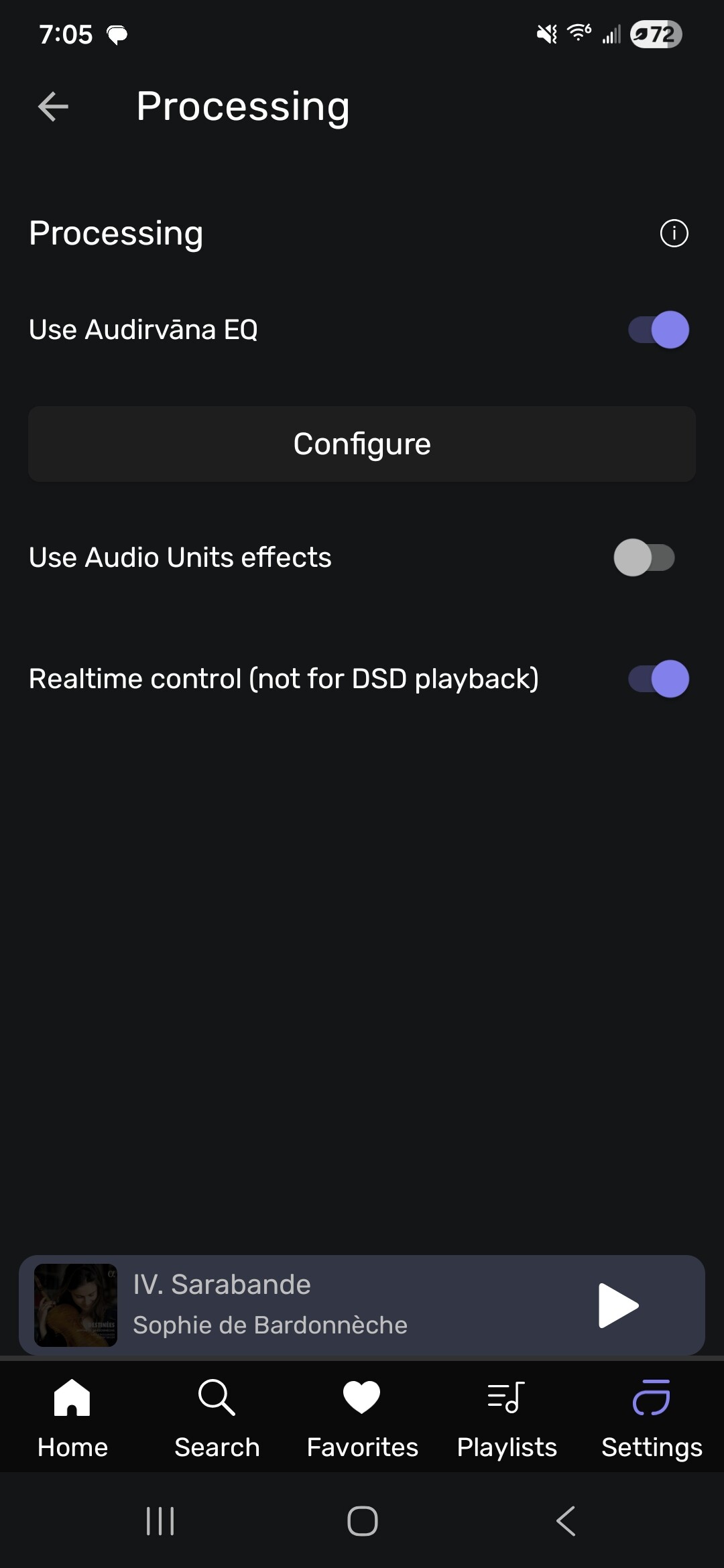
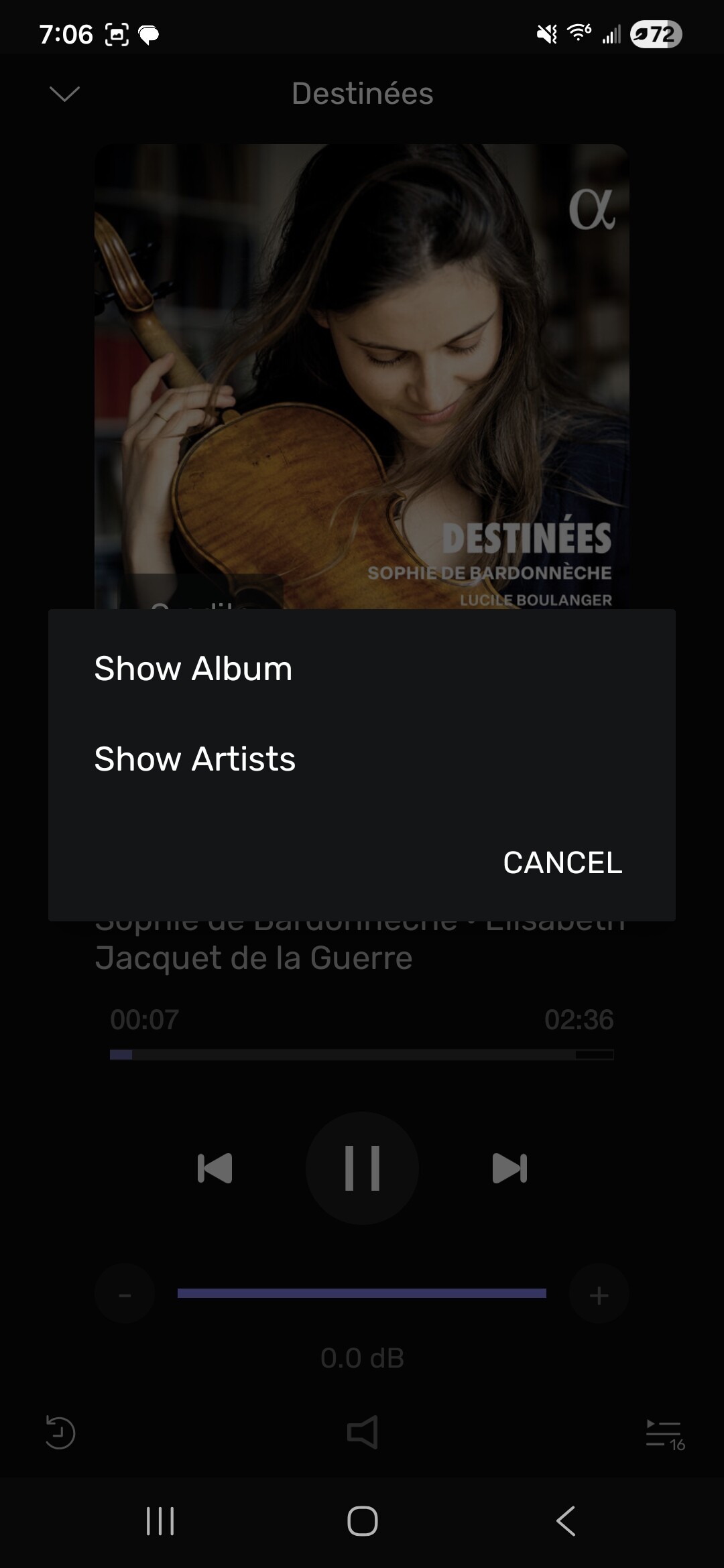
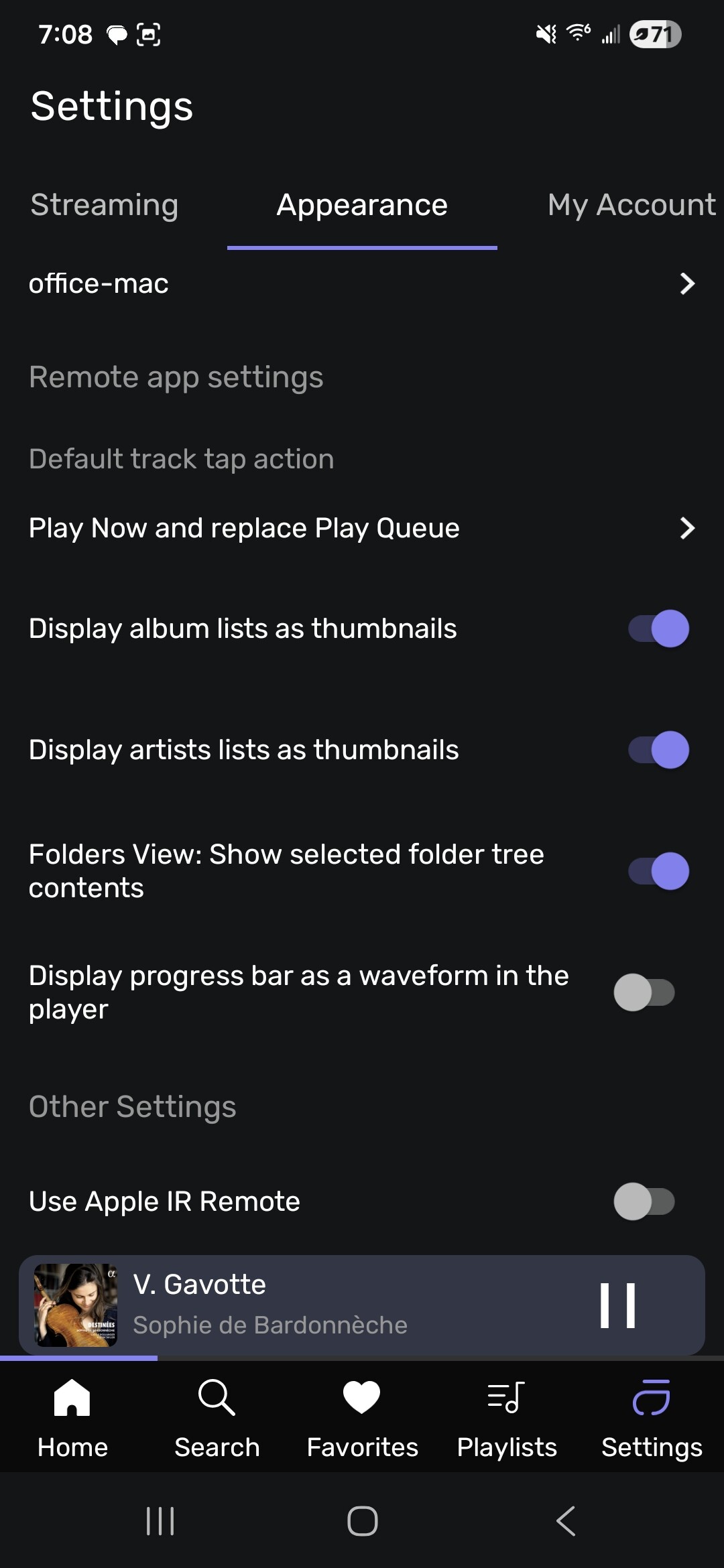
Hmm, I could reproduce this. I need to ask our developper over this.
Thank you Sir.