When ever I select “Disable Spotlight” under the settings in Audirvana Studio 3.3.3 numerous Spotlight (mdworker) - processes are immediately started. After some time of listening to music these processes come to an end (ca. 30 minutes). When I then stop Audirvana the spotlight processes start over seemingly again for ever. And of course you can not use spotlight in these time. Is that the expected behavior?
There were changes made to the way background indexing processes run in macOS 26.6. They now run more frequently in the background to reduce system strain, performance hits and battery drain in preparation for the Siri changes in macOS 27, required for the new Siri and its additional AI functions.
I would have thought that seeing as Audirvana has not been updated since the changes were implemented in 26.6 then it may explain the behaviour you are seeing. As a user I am not aware of the specifics of the functionality of the disable spotlight functions in Audirvana or what plans they have to address the changes Apple have made in the background indexing processes (mdworker, CGPDFservice etc etc) in 26.6 and the future 27. Whether they share their plans depends on whether they consider it part of their IP?
My experience of macOS 27 beta conducted after a clean install from an IPSW restore function and consequently building indexes from scratch, suggests the AI driven Siri requires a very significant increase in background indexing activity (as is to be expected with AI) resulting in very noticeable performance hits, fans spinning, enough heat to use an M5 Max Macbook Pro as a George Foreman grill, battery life measured in minutes not hours and significant memory use after a clean install (hopefully this will improve as the beta matures). The changes in 26.6 are designed to get the indexes built spread over time before users upgrade to 27 in September.
Thanks for your explanations, they seem pretty reasonable to me.
No worries, information from release notes and the Mac centric press plus experience using the Developer beta since its inception.
Let’s hope Audirvana comments on this.
A consequence of Apple choosing to go “on-device” AI wherever possible. It enhances the privacy aspects of AI (less data being uploaded to google, openAI, Anthropic etc servers) but does put a greater demand on the device.
Will see, the optimisations in indexing may reduce this load without adverse performance impacts (the beta of 27 is still in its early days and will no doubt improve). App developers, tired of Apple’s late changes in betas tend to wait to dive in and see what needs to be changed post beta or at best very late in the beta process…..
Can AI be disabled on Audirvana dedicated machines on MacOS 27? AWDL can’t in total, even when disabling scripts run.
There is an option to turn off Siri in Dev Beta 4, will see if this stays, early days in the beta so will see how it progresses. For anyone using a machine solely for Audirvana then turning off Siri and disabling indexing for the various file types is possible.
Let’s see what ends up happening. Apple has a track record of keeping low level processes alive even when the app layer is checked off - example AirDrop/Continuity/AirPlay set off and the intrusive AWDL low level processes still run.
Yes I think running AS on a standalone cut down Linux box might be about to become more appealing……
How good are common Linux machines running Audirvana noise-wise?
Would leave that to @Jud to comment. No experience myself…….
By all means, @Jud please educate us on good Linux boxes to run exclusively AS.
Hi @patsy
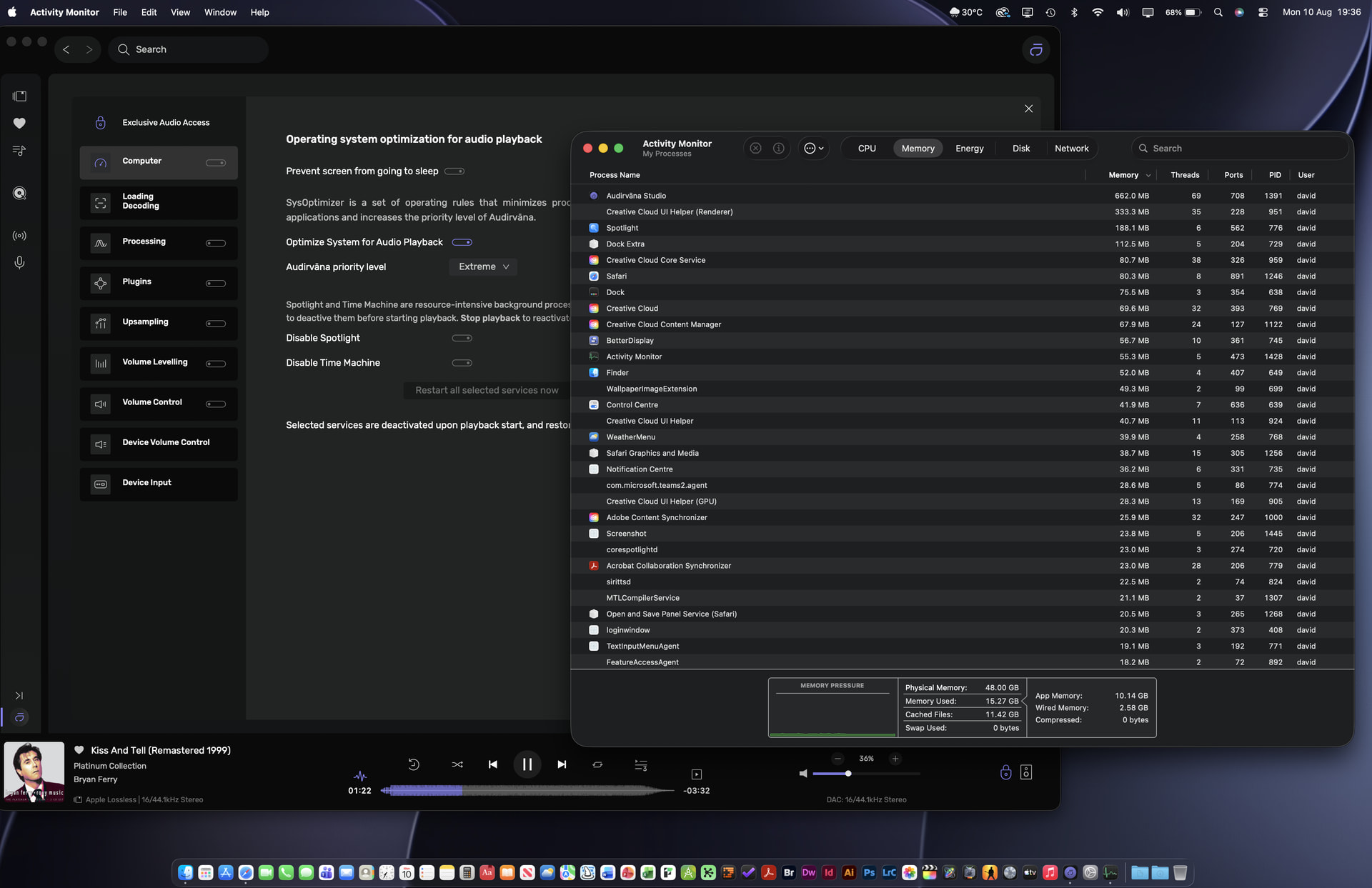
Just to confirm your suspicions. I reverted to 26.6.1 today to give my MBP some rest from the beating it was taking from macOS 27 DB4 and as you can see with 26.6.1 from the screenshot, time machine and spotlight is disabled in Audirvana 3.3.3 but spotlight is quite happily running as are several of the indexing routines during playback. Clearly this toggle no longer functions as advertised.
I don’t want to take the thread off track, so I’ll just say that I’m using UPnP. That way the desktop running Audirvana on Linux can sit in my office, and I have a small fanless Linux box I’ve turned into a streamer feeding my DAC in the listening room.
And just to confirm this issue exists in macOS27 DB 5. Currently only app open on my mac is Studio playing some Vivaldi. All RAM is used as various spotlight related process have decided to kick on again during playback. Swap file has grown to 30GB, god bless AI what would we do without it! 

Message to self….. when I next upgrade at the end of the year must take out a mortgage and buy a MacBook Pro with a minimum 128 GB RAM
Here are some screenshots of Activity Monitor while playing a 33:40 minute (6.58GB) 24/705.6kHz .FLAC file being processed with Virtual LR+C cross-feed DSP and subsequently being modulated to DSD256…
- M2 Max Mac Studio with 64GB RAM (20GB allocated for Audirvāna playback preload buffering)
- macOS 26.6.1
- Audrivāna Studio 3.3.3
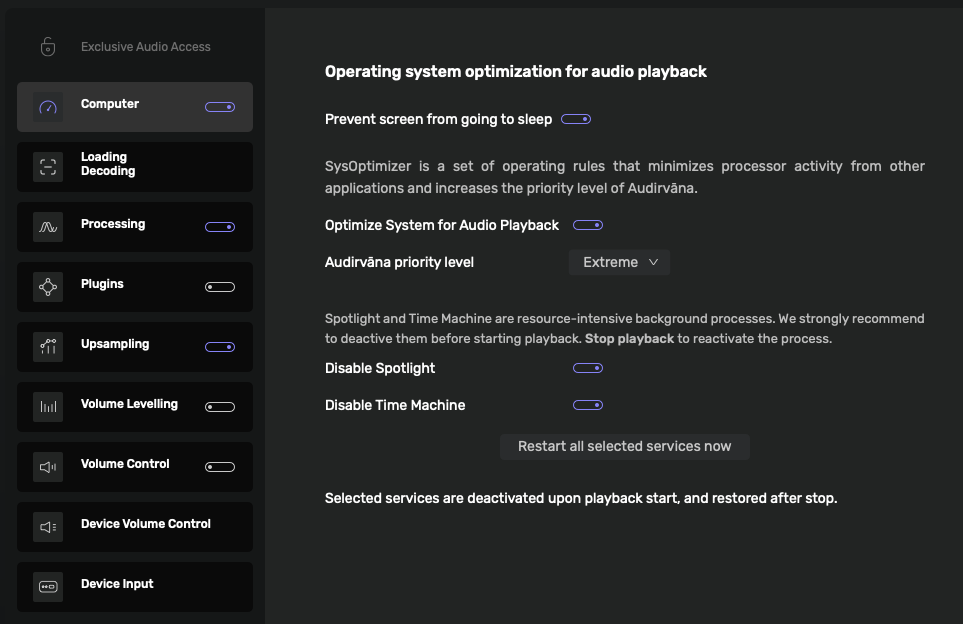
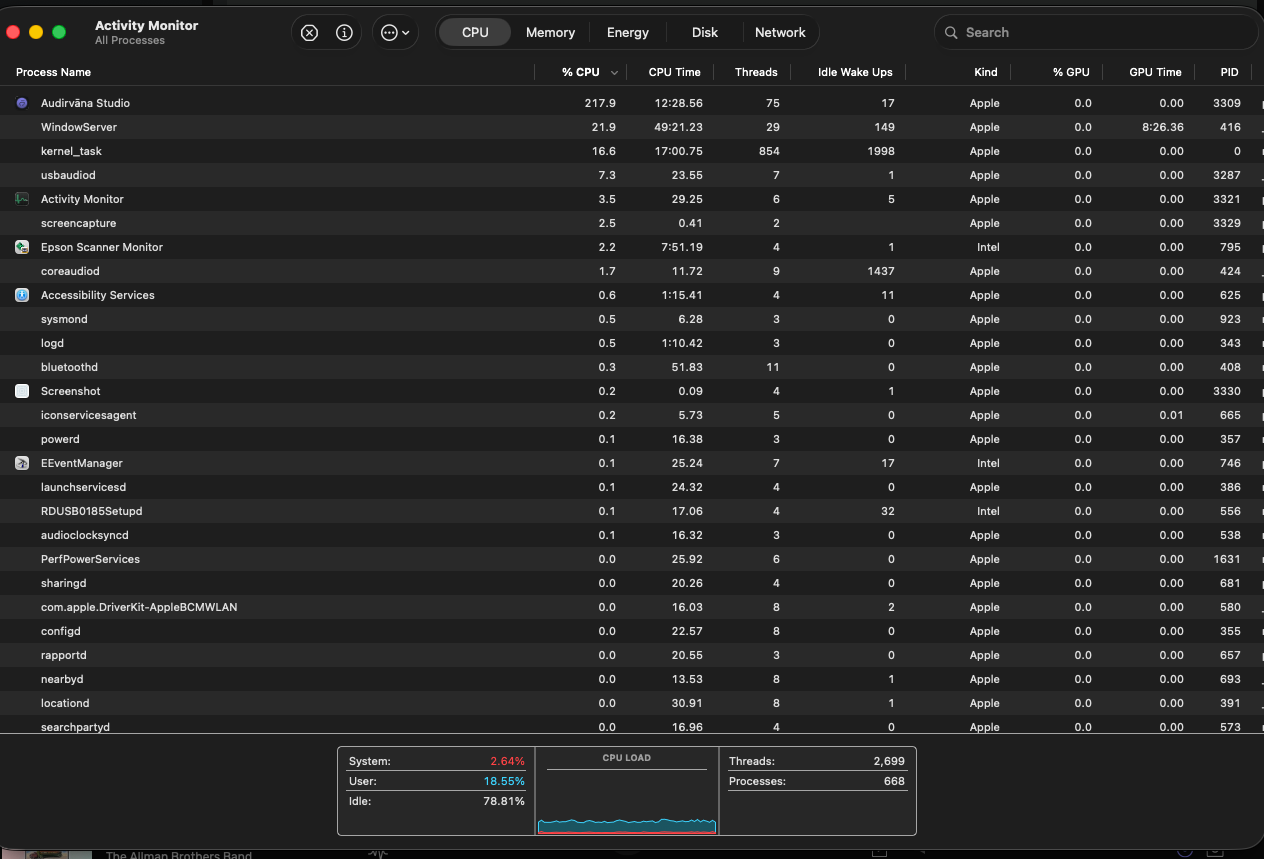

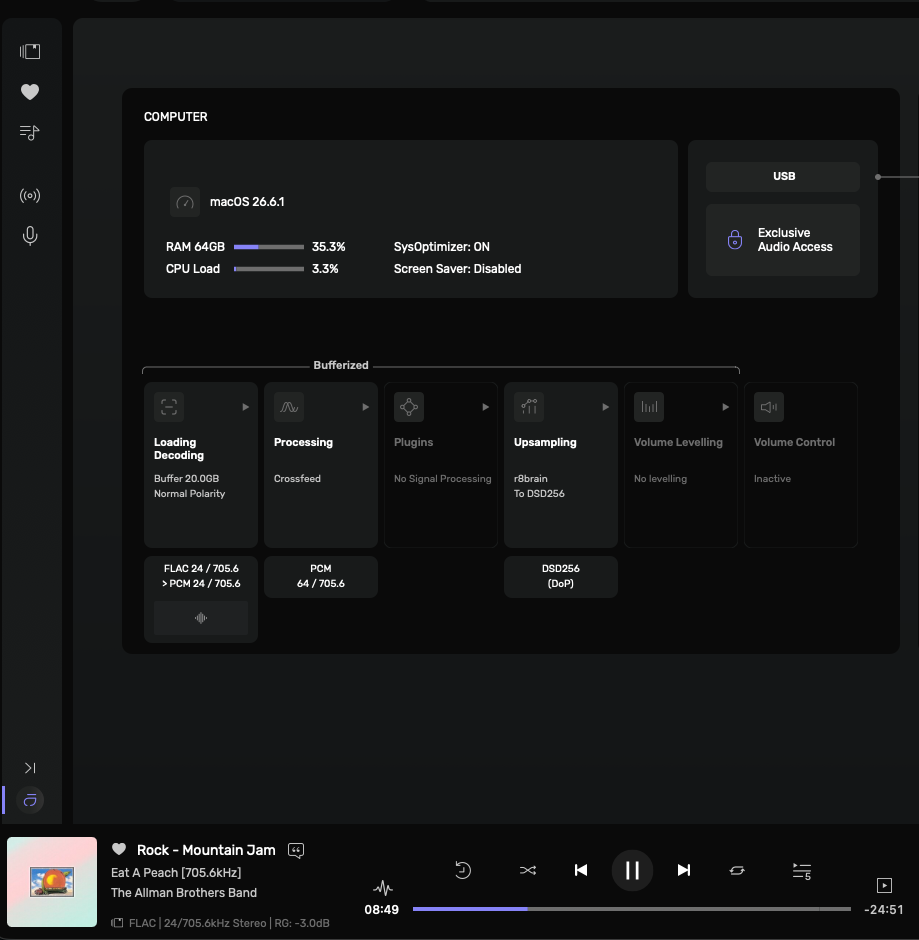
This screenshot is with playback stopped and the audio-engine is unlocked…
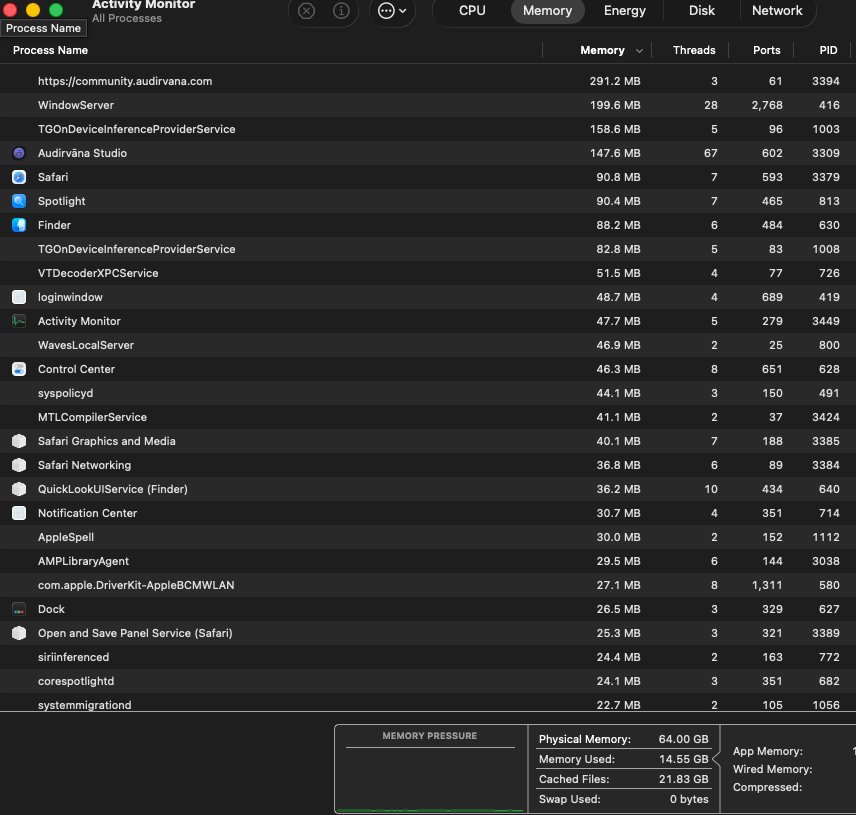


Yes Audirvana is not the issue, it’s when the spotlight/siri Ai processes kick in, then RAM use goes nuts indexing, lasts for about 15 minutes at a time then drops back to +/- 14 GB RAM. Audirvana for me only ever uses 0.5 - 1 GB RAM when playing for me (no upsampling).
The beta of 27 uses about 50% more RAM than 26.6 in normal computer use (typically 15 GB versus 10 GB in 26.6) indexing is when it spikes. For me after an install about 2 TB of music and personal/work files are added. Therfore regular bursts of indexing takes place. Should eventually settle down once it has completed indexing all files…..
Unfortunately the disable spotlight toggle no longer works with the changes in 26.6 and 27
I have Spotlight disabled in Audrivāna Studio and appears the release operation is functioning normally when the audio-engine is un-locked… What am I missing…
But you can see it is functioning for my system with 26.6.1…
Not necessarily. If you do a clean install of the OS then load a lot of data spotlight will do an initial index of all files, thereafter it is a pretty rare occurrence when new data files are added. Or macOS decides to refresh the indexes. So providing you have not added new files you will probably not see macOS indexing and it will be a rare event when the system is idling.
In 26.6 if it is an update from 26.5.2 ( eg. not an erase then reinstall) , it will not reindex but will over time turn on and “optimise” the indices as per Apples release notes which in plain English means add additional index data in preparation for SiriAI in macOS 27.
As I am switching back and forth between 26 and 27 using IPSW files which involves totally erasing the system, it always requires to conduct the “first index” after I have reloaded all my apps and data on the new installation hence why I am able to see it commonly.