A Month with Audirvana on Linux: Sonic Magic and Technical Frustration

I’ve spent a month fighting with Audirvana and wanted to write down my impressions, in case it’s useful to someone else and because I think it’s important to share.

I have a modest setup, but the quality is more than enough. Originally, my intention was to centralize everything related to music on a single server running Ubuntu Server (Debian-based Linux), thanks to the release of the Linux version. This way, my computer (an i7 7700t with 16GB of RAM) would have the music library exposed via SMB for management from the PC, and I could cast via UPnP to different endpoints. There were three: two Raspberry Pis 5 (one 8GB, one 4GB), with a Topping E30 and a Topping D10s connected; and another Pi Zero with an Allo Miniboss. But my experience with UPnP was a disaster—unsustainable over time, with constant dropouts, signal loss, and general errors all the time. On top of that, I was losing Audirvana support for the DACs. So, I decided to switch the server and set it up on the 8GB Pi, connected directly to the amplifier (a Yamaha RX-V4A), using it as a player. The 4GB Pi 5 is also a player, but the library is connected via SMB (I find SMB better than UPnP in my experience). This is a great Audirvana feature—the possibility of installing it on several machines and managing them, although it doesn’t support multi-room playback. The Pi Zero is an endpoint with gmediarender, but that’s an absolute disaster—everything cuts out all the time and there’s no way to get stable operation, so I end up using Lyrion instead. All use DietPi (Debian based, like RaspiOS and Ubuntu, so compatible).

I’ve gone through all this trouble and bought an Origin license because the sound Audirvana delivers is incredible. The software works true magic, and I haven’t found anything else that sounds this good. The sound it produces is impressive. I could have stuck with Roon, but for me, it’s worth it—even with constant errors. Plus, Audirvana Origin strips out all social features; it’s just your music and you, which is wonderful—if it doesn’t drop out, of course. But, that’s how it is.

The Linux application is a mess. In my experience, it honestly works very poorly and I don’t understand how the bugs haven’t been fixed yet. Some of the most annoying ones can be solved with the advice in this link: Step-by-Step: Headless Audirvana Studio on Raspberry Pi OS (64bit) - :desktop_computer: Audirvāna / Core Player - Audirvana Forum. It says it’s for Raspberry Pi OS, but works for RaspiOS, DietPi, and Ubuntu—especially the IPv6 reference for Avahi, which avoids a recurring Chromecast error, and inotify helps manage monitored folders. However, it doesn’t solve the rest of the problems. For example: crashes when switching machines, hangs when changing DACs, stops responding when you press play, and constant Remote app disconnections. In fact, it’s common for Remote to greet you with an error. I’ve had to reinstall the app because there was no way to remove the library, had to reboot countless times, and generally struggle to get a complete experience. I have logs of all this, in case anyone’s interested.

Regarding quality-of-life, the remote app falls short—especially on mobile screens. I don’t understand why there’s no remote app for Windows. This is a huge limitation and undermines the whole ecosystem. For example, you can’t manually edit tags directly from the app, forcing you to use Musicbrainz or idtag, which is pretty annoying and doesn’t respect the other players I have on the server. You can’t see song durations or more tags (you can in tablet mode, but, for example, the year always appears as 01/01/XX); you just see artist and album, which is frustrating. Probably the worst is that it doesn’t support multitag genre view—showing all genres on a record as one and making the genre tab useless. There’s a lot of work to do here, in my opinion.

However, the worst part is the playlists section. Given all the errors I mentioned and, especially, the difficulty in maintaining a smooth experience without absurd and unexpected dropouts, editing a playlist requires massive effort. If you make a mistake adding an album, you’d better delete and recreate the playlist rather than try to remove songs one by one—sometimes they’re not registered, then reappear, or the app freezes. It’s very time-consuming and extremely frustrating. Though, having folders is a truly interesting feature.

Lastly, the support is a disaster. I’m deeply disappointed with the service—suddenly they stop responding and you never hear back. I’ve contacted them repeatedly during this time without getting any response to anything I raised, pointing out that the problem was my setup and asking for logs without any feedback. What hurts most is that I was told to use Windows because the issues were so severe due to using Ubuntu Server, and that the app was built for Ubuntu Desktop. I wasted my time verifying this, and the errors are the same the problem may be on my side (which i doubt) but it is not a problem with the distro.

Overall, this past month I’ve spent way more time setting things up than actually using it, and I still haven’t found the definitive solution. I know I’m close, but the huge amount of ongoing errors and the difficulty in getting it all to work are very frustrating—because the sound quality is unbeatable. When it works, it’s simply the best software I’ve used over all these years. I hope that over time, the program continues to improve.

This is my personal experience, unique and non-transferable; it may not be the same for anyone else. But, the issues I’ve had with Linux—I’ve had on many other machines.

I have logs, conversation records, and plenty of information to back up everything I’ve said. If anyone is interested, just ask me for them.

thx for reading.
1 Like

To summarise it: Audirvana is not suited for the way you use it. It works best with one central installation and without switching to different Audirvana installs in the remote app.

If you would have opened a thread to ask ‘hey, I am planning to do this, any experiences?’, you probably would have heard back from several people that it would become a frustrating experience. There are many very experienced users here that could have helped you beforehand. But that’s a wisdom looking back.

Hi!
Thanks for your reply.
Responding to the first point — honestly, if you read everything I’ve written, I explained that I first tried to centralize everything into a single installation, but it was impossible to get even a decent UPnP experience. I asked on the forum, and we had a discussion for several days, and the conclusion was that Audirvana didn’t work the way I wanted and that what I finally did was the better solution. You can look up the thread.In another thread about configuring Audirvana on Linux, a user recommended to the OP (yesterday) having Linux as the player and Windows as the manager, for example.Anyway, what you’re pointing out seems minor to me and doesn’t add anything constructive. Audirvana shouldn’t be crashing all the time. Not to mention that nothing is said about everything else I have mentioned.Anyway, I’m used to these kinds of replies, and I don’t deny that the problem might be mine. That’s exactly why I share my experience as mine — unique and non-transferable.Thanks a lot for your comment.

I think you are misreading what is posted in that thread.

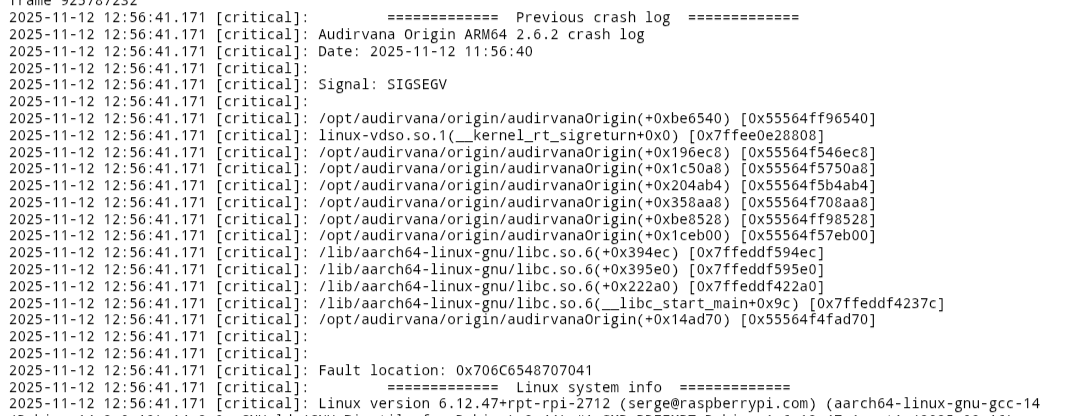
Honestly, I don’t understand your point. Nor do I understand the need to keep going around in circles about something that doesn’t bring us anything. I don’t want to get into an argument because I don’t see any sense in it. In reality, it’s perfectly feasible to use Audirvana just as I’ve explained. It’s not only that Remote supports it, allowing you to select one player or another, but since what truly makes using Audirvana distinctive is its DAC management, it seems logical that I can connect to the DAC wherever I need to, because there are countless ways to listen to music. Anyway, none of what I’m saying has anything to do with what I wrote in my initial post. Even if I don’t switch players, the errors still appear in the log. The Chromecast still disappears, Remote still disconnects, nothing changes except for one specific error (the one I included in the screenshot). Moreover, most of the inconsistencies don’t come from switching players. Still, thanks for commenting.

That IS the point. You read something on this forum and you put it all into your context.

The thread you reference to is about metadata maintenance. The suggestion was made to keep using the Windows version to edit the metadata. It has nothing to do with the problems you have encountered and still you pull it into your narrative.

As you concluded: Audirvana doesn’t suit your preferred way of managing playback. Too bad. Next.

Friend, I don’t feel comfortable at all with the terms you’re using to talk to me. In general, I feel that the whole conversation has been quite aggressive, and I don’t understand why. That’s what I was referring to, not what you pointed out.
So, much as I regret it, I’m going to mute your user. Unless, of course, we’re able to talk in different terms. To close, I want to tell you that I’ll use Audirvana or not as I please, not because you tell me to. Also, it’s fine to point things out, comment, and want things to be better, by talking and sharing experiences. Only by testing things in different environments can we make everything better. So, perhaps you should learn to read before reacting in such a violent way. There are many things in the world. Thanks for your messages.

In the context of Audirvāna… It appears that UPnP protocol implementation in the OS variant and computer CPU/platform synergy, in concert with the Ethernet digital-audio distribution system, must be tightly adhered to…

Audirvāna by its design is a high performance audio-engine, and for folks like myself, everything-else just needs to allow finding, selection and the playback of the files in my library… This is the primary premise of the software design.

A distributed digital-audio transmission scenario using UPnP over an amalgamation of network devices, presents complications in the architecture that include EMF/RF noise and wireless interference and network traffic anomalies… I highly suggest implementing the simplest playback system scenario possible, if your intention is to listen to your music at the highest level Audirvāna is capable, through your DAC, amp, and speakers or headphones…

Given your difficulties with the Remote connectivity, you may find this thread of value:

UPnP and Roon RAAT are not equal…. RAAT is a proprietary transmission protocol used by Roon and plays into the audible performance of the software… UPnP is a non-standardized transmission protocol that can be customized and used as proprietary control of any given target device (singular).

Create a very simple playback scenario first, and extrapolate from this baseline. The rewards of a simple playback scenario are great… :wink:

:musical_notes: :eye: :nose: :eye: :musical_notes:

Hi @Agoldnear !
It’s great to read you, and I appreciate you sharing all these links in the thread, since that way people who are interested in setting up a Linux-based installation will have access to all this information — which, as you know well because we’ve talked about all of this before, I’ve consulted and used extensively. In fact, it was in a conversation with you that I decided on my current setup structure. As you rightly point out, keeping the listening experience as simple as possible is key.

Generally speaking, I haven’t come across anything critical or unbearable. In fact, I use Audirvana every day, and I still believe — as I’ve insisted countless times — that the playback quality it delivers is remarkable. I don’t look for anything more than to choose the songs from my library and get the most out of my setup. That said, I do find the bugs and inconsistencies annoying, which are evident no matter how much we try to ignore them.
For example: every time I open Remote, I get the error “event websocket lost with error: Connection reset by peer”; or when an album finishes and I hit play on the album screen, playback doesn’t start, and I have to hit play from the “Now Playing” panel instead; that the interface doesn’t show the duration of tracks; that years only appear as 01/01/xx; that playlist management doesn’t allow selecting several songs at once to delete, forcing me to leave the album view and delete them from the list view — which means I have to move them all and mess up the order because of the interface lag (this is particularly problematic with long playlists); that it freezes whenever I change the output device (or crashes when switching players, forcing me to close and reopen it); that sometimes playback stops on the last track of an album; or that when nothing is playing, the progress bar remains stuck halfway through a song; that Remote’s artwork cache gets mixed up, forcing me to clear the app cache and force-stop it; that genre tags are read as a single one even when there are several; and that it only reads the “Date” tag instead of “Original Date.”
These are many small details that have nothing to do with my installation, Ubuntu, or DietPi — they’re minor inconsistencies in the configuration that, for whatever reason, no one has paid much attention to or have simply been accepted as normal. Still, they’re worth mentioning. That’s how I see it, anyway.

Since my only goal is to help make Audirvana even better, more pleasant, and more convenient to use, I won’t get tired (or intimidated) of expressing how I feel about these things. I’m not trying to criticize for the sake of it, nor do I aim to be destructive. But it’s clear there are things that need polishing — especially on Linux. On Windows, things work much better, with far fewer issues and more available options. But on Linux, and especially when using Remote together with it, there are aspects that require attention. I believe it’s healthy to point them out. The alternative would be to stop using it, but since I’ve already paid for it, that’s simply not an option.

Thank you very much for sharing all this information — I hope it proves useful to the community. Many of those links helped me reach the point where I am now: using Audirvana in daily production. Though admittedly, with many annoyances along the way.

1 Like

I am sorry that you are not taking advantage of a mature Audirvāna application running on a vertically integrated macOS ‘M’ series platform with an abundance of RAM and working through the evolutionary quirks and bugs in that context.

Oh!

I’m not.

I very much regret to read about the problems you’ve been having with Audirvana on Linux. Like you, I love the sound quality. Unlike your experience, Audirvana on Linux via UPnP has been rock solid for me (with a couple of occasional brief exceptions when the Linux UPnP software I use, upmpdcli and mpd, has had hiccups with dependencies). I don’t know whether the stability has to do with the fact that my connections are “wired” (optical Ethernet) rather than Wi-Fi, though I do feel personally that I’ve had vanishingly few network problems since switching to a fully wired setup.

Sadly I don’t know enough about Linux, particularly Linux for ARM, to help with the specific error you show in your post above. (It’s one reason the mini-PC I chose for a streamer has an Intel CPU. I at least am a little more competent there.)

I don’t know whether you’d be able to change to a wired UPnP setup, but if not, I hope someone who knows more than I do about Linux, particularly Linux ARM and networking, can assist you.

Hi Jud, thank you very much for taking the time to write.

Before using Linux on ARM, I was running a mini PC with an i7 7700T (not a NUC, but close. In fact, before switching, I had Roon ROCK installed) obviously all wired. Actually, tests have shown that ARM performs much better, at least in my case. Still, I don’t think the issue lies in whether it’s ARM or not. In that sense, I’d like to separate things a bit, because it feels like we’re going around in circles.

Most of the problems I’ve mentioned—the IPv6 connection issue that breaks Chromecast, the constant websocket error logs with Remote, and the “can’t find upnp device” logs—are not up for debate and have nothing to do with my setup or experience. They are part of Audirvana. I say this because I’ve encountered them in EVERY installation across all systems I’ve tested. I have logs proving it, as does the support team. It doesn’t matter whether it’s Ubuntu Desktop, Ubuntu Server, ARM, Debian, or Docker—those errors always occur. On the other hand, the error I shared is exclusive to ARM and almost certainly an Audirvana bug—but that’s another topic that I hope support will fix.

Also, the inconsistencies in the Remote interface aren’t exclusive to me either. Genre tags are read as a single label, playlists can’t be edited (or have multiple tracks selected), the Remote cache mixes album covers requiring cache deletion, the fact that the only way to control Audirvana is with my cell phone and it does not integrate Android player and drain my battery phone, and there are many other small things that need polishing. I’m not saying this to criticize—the truth is I’d love for those issues not to exist. In fact, many of the things I’ve mentioned are known bugs that are (supposedly) being reviewed.

Finally, UPnP is the only part that could be directly related to my network, though I don’t think that’s the case, and I haven’t found arguments to support my view. Personally, I prefer using two players because 1) UPnP is much less stable on my network than SMB, 2) it lets me keep one familiar player and one independent, and 3) it’s possible and the result is satisfactory. So I don’t think I’ll change anything in my setup right now since I doubt the result would be better through UPnP, and honestly there is nothing wrong with it. Also, this way I get far fewer log errors. By the way, I also use upmpdcli on my Pi Zero, which doesn’t have Ethernet, since it’s more stable than gmediarender. My frustration comes more from the road it took to get here

In any case, thanks for your input. Audirvana is an incredibly good piece of software for music playback, and it’s impressive what it can do—it just needs a bit of a push to fix those inconsistencies, and for that, nobody is better than the users.

Thanks :blush:

1 Like