C’est à chaque fois que vous mettez l’appareil en veille, ou c’est aléatoire?
Aléatoire, j’essaye de voir s’il y a un critère bien caché ou pas, pour le moment j’ai pas trouvé…
Est-ce qu’un message d’erreur s’affiche à un moment?
J’ai pas trop remarqué, en tout cas il n’y en a pas quand j’ai page noire
Des fois j’ai un 401
J’ai peut-être trouvé (a confirmer) si au réveil de l’android si je clique sur l’icone Audirvana avant de renter le schéma de déverrouillage j’ai écran noir sur Accueil, si je déverrouille avant puis Audiravana j’arrive sur la bonne page en cours : après moultes mises en veilles c’est bien la cas
Audirvana Origin on MacBook Pro, Audirvana Android remote on Oppo mobile phone.
- In the light version, there are no checkboxes visible in the filter menu. It’s great that there’s finally a light version.
- When you slide the playback menu up while playing an album, the player immediately skips to the next track. (This is a bug that has existed for many years and which I had hoped would be fixed in the current update.)
- The album duration display has disappeared from the album menu.
- Why is history so prominently displayed on the home page? It doesn’t seem very important to me It would be nice if users had more options to customize the home page. (More customization options applies to the entire app and the Audirvana desktop environment, in fact.)
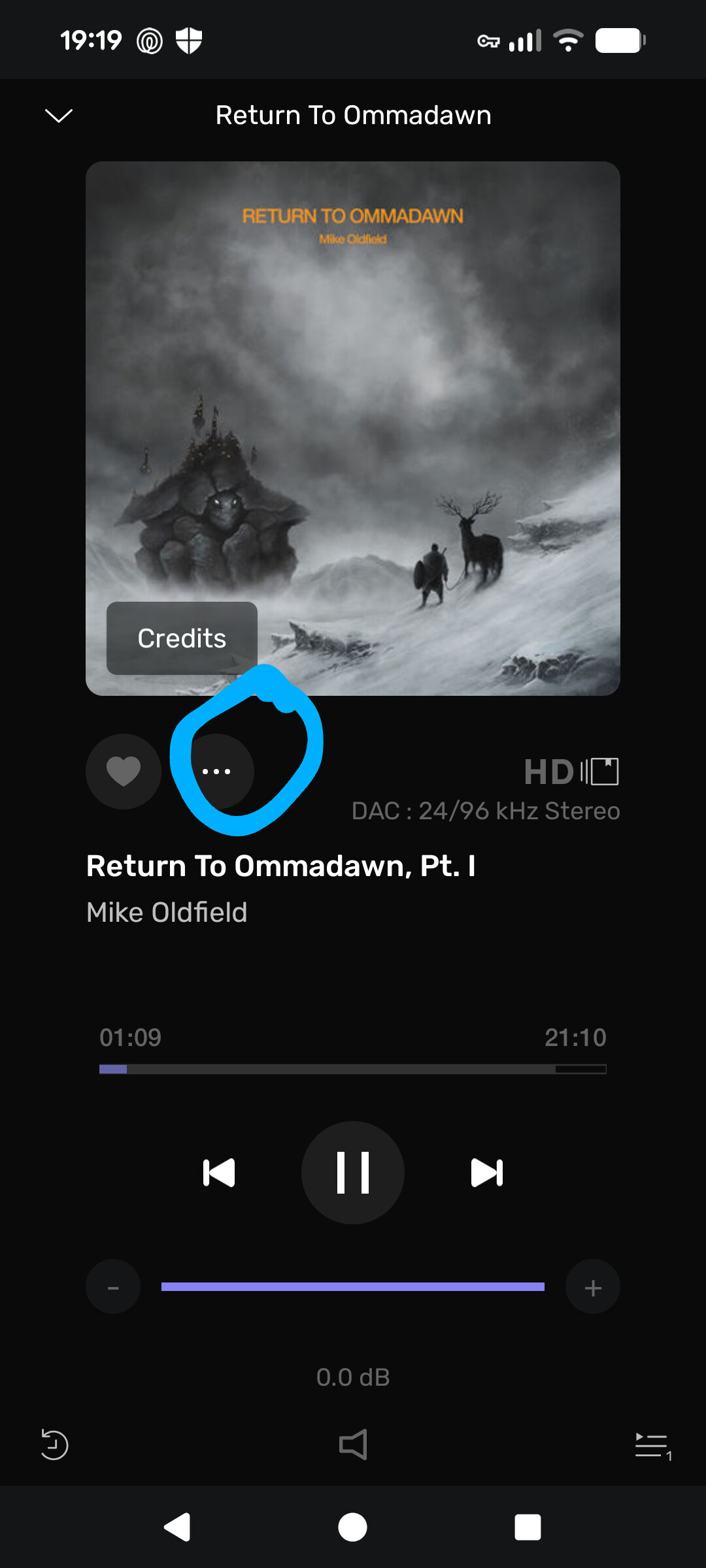
- In the playback menu, the three dots display a menu that offers a choice of album and artist. It would be easier to link the artist name to the artist. The dots could then be a link to the album.
Hi @DionD , thank you for your feedback:
I can redprocue it. I passed the information to our developer.
Are you able to reproduce this all the time? I have had it for some time, but I no longer have it, and I’m not sure what the main issue is.
It’s a UI choice we made; if many people share your view, we may bring it back.
We do have an option like this in the desktop app, but not in the Remote at the moment. We still have all the settings to change, so it’s the right time to introduce this kind of thing.
Could be an option. We plan to add more options to the three-dot menu.
Portrait
Happens all the time. I’m finding the Beta works better with Samsung tablet than with Pixel phone. The tablet has no problems starting up. The Pixel takes longer to start up.
This is one area that is difficult to see in the UI. It’s not always clear when shuffle or repeat is on or off. For example, on the Home screen on the tablet in portrait view, there is no indication of shuffle or repeat. When I click on the grey bar at the bottom, it switches to a view of the track, but still no indication of shuffle or repeat. Where is it?
When I go to album view, I can see the shuffle button, but no repeat.
With shuffle on, click on a track from history on |Home screen, then click on grey bar at bottom in portrait mode on tablet, switches to track view and swipe left or right, random tracks do show up that are not in the history. I would expect shuffling of tracks from just history not the entire music library
Apologies for my late response.
I don’t know if this is limited to the Android remote or that this goes for both remote apps and maybe even the Studio apps for Mac and Windows as well.
The three dots don’t give the option to add the track to a playlist. I think that would be logical here. Maybe it has already been mentioned, in that case consider this a +1
In general the three-dot menu is not giving enough option and it’s on our to-do list to fix this 
En complément de mon post précédent, quand android sort de veille (longue) j’ai un pop-up erreur 401 qui se ferme de suite
Speaking of error messages, when I am listing to a playlist and the tracks from the playlist are displayed then I click on the 3 dots next to a track I wish to play next and select ‘Play Next’ a message bubble opens at the bottom indicating a request error 400. Sometimes it keeps happening, sometimes it goes away after some time. Sometimes it goes away and comes back.
This happens on Android tablet and Pixel phone. I have the app running on both devices at the same time.
Can you please tell me more about the track and the playlists? Is it a playlist from a streaming service or Audirvāna?
Where is the file from? Streaming service or Local?
The playlist was generated using Audrivana Origin. All of the files are local files on a drive within the PC that Audirvana is running on.
The only way to determine if the playlist is being shuffled or repeated is to go to the play queue view. There should be buttons/indicators for shuffle and repeat on track and playlist view.
By the way, what does the speaker shaped icon at the bottom of the track view do? It’s a darker color than the other icons. Nothing happens when clicked on.
Can you please send a screenshot of it?
No need to take a screen shot as the post from Amarok1969 6 days ago shows the speaker icon at the bottom of the image. The image from Musique69 11 days ago also shows the icon.
On this one? It’s a button to mute playback.
That’s a great addition. Looking forward to when it works.
It should work at the moment
@Antoine It works on the IOS Remote, but it has a faint look!
Perhaps it is confusing some users that it may not be operational yet.
The History and Queue buttons work but the mute does not on either the Android tablet or Pixel phone. Maybe it only works in Studio and not in Origin?