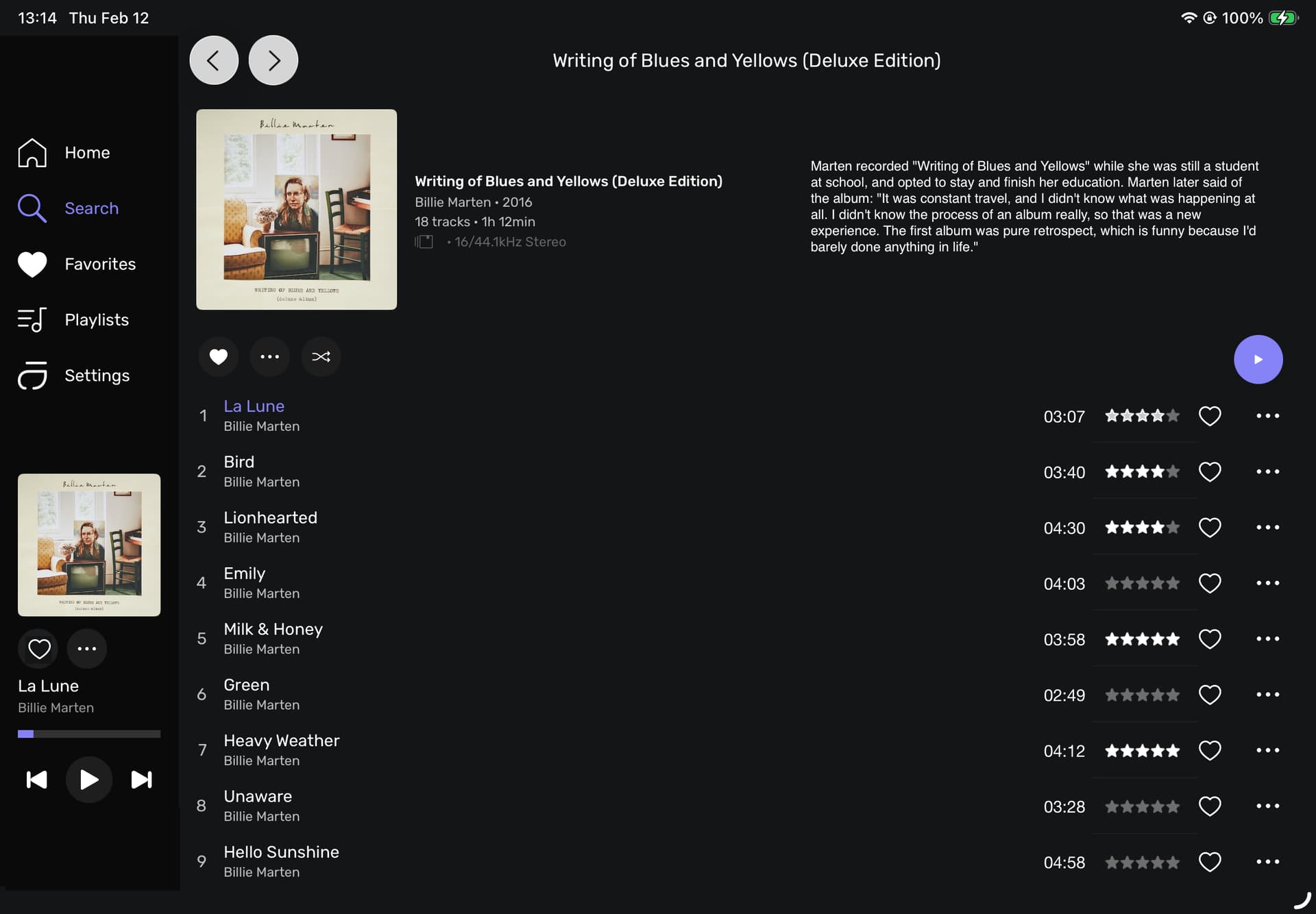
Hey, what do you think about this layout?
I’ve added the “Description” meta-data to the blank area top right, closed the gap so that more tracks are visible and added the 5  column.
Hey, what do you think about this layout?
I’ve added the “Description” meta-data to the blank area top right, closed the gap so that more tracks are visible and added the 5 column.
I really like the iOS beta Remote, Just one question: we’ll be able to uso the Remote with the AirPods? I know that local music don’t but Radio, Podcast, Tidal… Thanks
Audirvāna Remote is intrinsically tied to Audirvāna as the player… (at this point)… AirPods use AirPlay and Audirvāna should see these when they are selected as the output device on the computer platform…


But Im using the NAS Studio Beta version so, theoretically, we don’t need a computer, and using the iPhone I can see the the NAS but without sound (I want to use it outside home not via DAC) thanks btw
Apparently, you do not understand that “Audirvāna Remote” is not a player… Audirvāna Remote is a user-interface (UI) that allows control of the Audirvāna playback-engine from a portable device.
My concern with adding more complexity of data in the symbiotic relationship of Remote and the Audirvāna audio-engine, is focused on the CPU overhead demands of data buffering/display and transmission on Audirvāna playback sound-quality that audiophiles like myself have come to appreciate and expect.
It seems that sound-quality is a secondary concern for some, which is contrary to the fundamental premise of superior sound-quality, instilled in the creation of Audirvāna by Damien and the development team…
I personally, don’t care to see a bunch of superfluous information and operational complexities at the expense of the fundamental playback sound-quality. Keep it Simple…
Apple Inc. is getting tangled in the process of trying to do everything for everybody and beyond, in iOS… In my opinion, Audirvāna does not need to follow this tangent, and I hope the Apple iOS development team figures this out again soon…
We can have a different perspective on these things when the Audirvāna player is running on an iPad, iPhone or other portable device…
Do you have version 186 installed?
We are doing some improvements on the landscape version of the Remote app at the moment, and the mini-player is part of the first we are looking at 
Hi Antoine,
I have The build 180 installed apparently, if I trust TestFlight. Auto update is checked. Shall I do something else to upgrade the build version?
Eric
My bad on this, the update has been postponed. Once it is live, you will get a notification to get the update.
Ok, thanks, I will update when possible.
I don’t think that “sound-quality” is a secondary concern for any of the people here, who have searched out the brilliance of Audirvana’s performance. Small improvements to the remote will only add to the operational enjoyment.
Ok, maybe “lyrics’“, “description”, etc are icing on the cake and if they interfere with the quality, I’d rather they not be included. All I am hoping, is for the remote to provide more of what is displayed on my Laptop, so it can stay on the desk. Or better yet, not be used at all since Audirvana lives on my “headless” MacMini.
I am already experiencing improvements in the navigation of the app which is great! That is why I suggested the “forward” button. (Not sure if it’s possible)
Include the 5 option on the “Album” view and I’m done. I’ll be a happy man.
Here’s an idea; for adding things like “lyrics” & “descriptions” to the files. What about creating links to sites such as “AZLyrics.com” or “lyrics.com” or “discogs.com” or “pitchfork.com”. There may be much better sites but these are ones that I have used. Then maybe these sites will provide Audirvana with a few cents per click, from their advertising revenue. Crazy idea, but I just thought I’d put it out there. This way Audirvana is not tasked with using up valuable space on their apps.
This is a low priority for me, but I’ve seen others in the past asking for Artist Info and Lyrics to be incorporated into Audirvana. Maybe this is a simpler way. I don’t write code so I may be blowing smoke.
It is all about operational overhead that leach CPU cycles and memory space/buffering, where these operations are superfluous to the digital-audio signal flow… If these things do not impinge on the digital-audio signal flow, because of operational interrupts, etc, and inconsequential to the playback sound-quality that has been established and is expected by the discerning audiophile, and there is a consensus that these sorts of data are of value to a majority of users, in my opinion, these are the criteria for the inclusion in the applications.
We do have some projects about Lyrics, and we may have found a way to get them into the app. The work is still in the project state, but I’m sure we will be able to give you some good news very soon
Was hoping for the ability to save my current play queue as a playlist. Often I find my current queue is something I want to keep. Currently this can only be done on Studio. I use the remote apps exclusively. Please consider this.
Just found this option!!! Thanks. Can finally create playlists in Qobuz and Audirvana. Very happy camper. Love the new remote app redesigns. Thanks again 

Hi @Antoine -
I have isolated the bug to the beta remote app, not the beta Studio app.
Using the beta remote app with the latest Studio stable release (2.11.6), I got the same behavior as with the beta Studio app. So there is something in the new Remote app, at least with my system, that when the Remote app first tells Studio to start, results in this loud pop coming through the speakers.
I don’t recall this happening with the officially released Remote app.
Interesting, but since you are using Linux, you must rely on the Remote.
Can you send me your debug info in a PM?
Hi @Antoine and the team,
thank you for this beta.
I will provide some accessibility feedback. I hope this will be taken into consideration.