same here with my beloved  Origin
Why bother with gadgets and cosmetics ?
i know i know it is trendy and a company must evolve, but since the exceptional audio quality doesn’t evolve, thanks but no thanks 
same here with my beloved Origin
Why bother with gadgets and cosmetics ?
i know i know it is trendy and a company must evolve, but since the exceptional audio quality doesn’t evolve, thanks but no thanks
I believe, based on years of experience of listening for eight hours per day, the methods to get exceptional audio quality have evolved greatly over the years. We used to be limited to bit perfect audio at the output of the applications. Now we can actually get close to bit perfect at the listening position because of amazing DSP.
Sure ! but i meant between Origin and the new Studio
and i do not need any DSP or EQ as i have an ARC hardware ARC
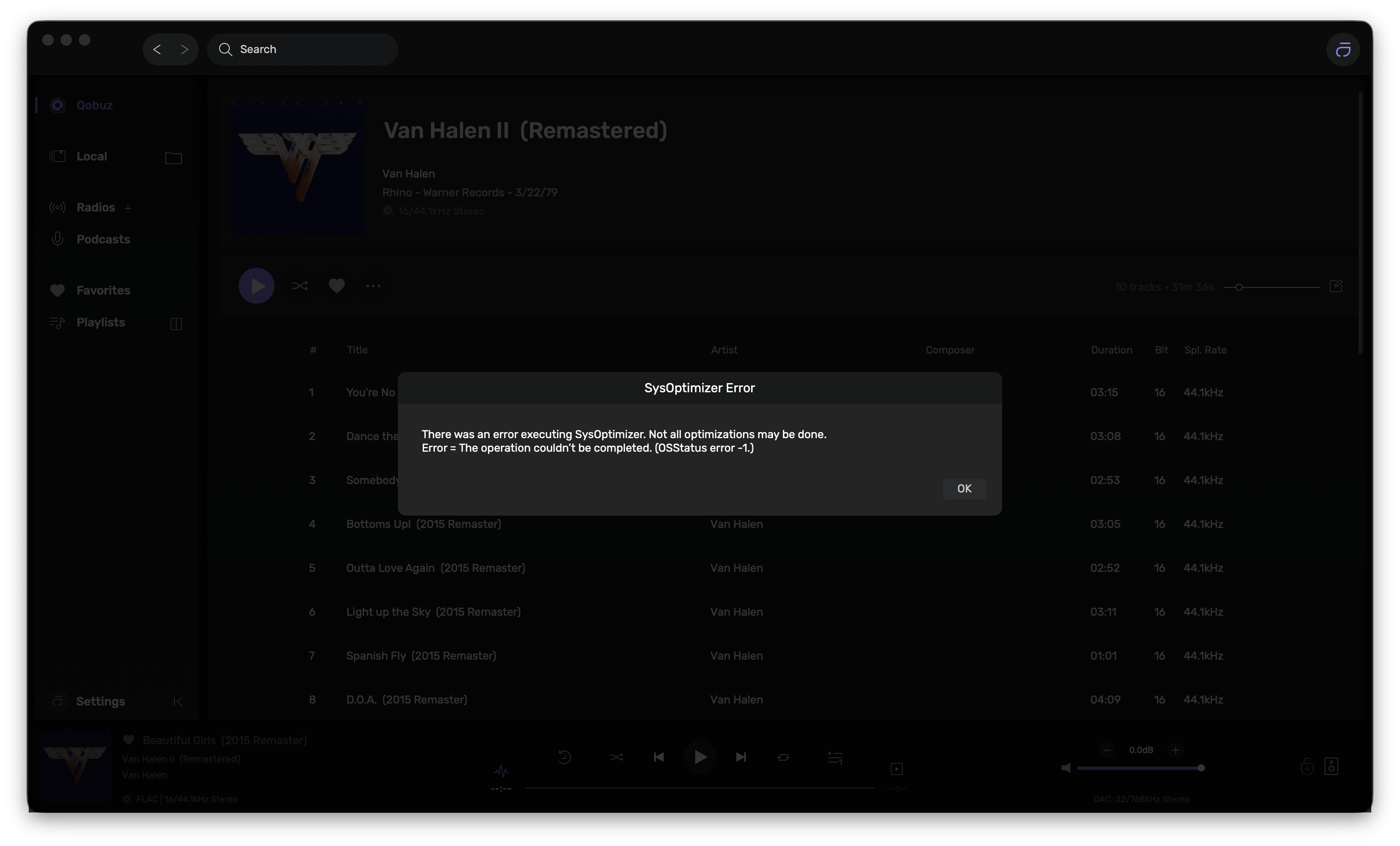
Mac Mini M4 running 26.2. I get this error every time I play something. It still plays once I quit out of the message.
That’s great you enjoy Arc. But, you could do incredibly better using room correction in Audirvana. Arc hardware is very limited and can’t control bass very well, compared to a 65,000 tap FIR filter in Audirvana’s convolution engine. The objective and subjective results aren’t even close.
But you need a special equipment (calibrated microphone) to generate a convolution file, don’t you ?
(I don’t have access to the beta so I can’t see how it works on Audirvana)
A $79 mic and free REW is a start.
Right, you’re welcome:
Audirvana Studio 2.99.13 (299013)
Running on Macmini7,1
macOS 12.7.6 x86_64 with 8GB physical RAM
Connected account of : Tomasz Lipowski
NETWORK
Status: available
REMOTE CONTROL SERVER:
Listening on 127.0.0.1 on port 49799
LOADING/DECODING:
Max audio buffer size: 7168MB
Polarity Inversion:
Globally: OFF
Per track: OFF
SIGNAL PROCESSING:
Convolver: OFF
Internal EQ: OFF
Crossfeed: OFF
Balance: OFF
PLUGINS: NOT ACTIVE
UPSAMPLING:
r8brain not in use
r8brain filter parameters
Bandwidth = 99.5%
Stop band attenuation 218dB
Phase minimum phase
AUDIO VOLUME:
Replay Gain: None
Max allowed volume: 100
SW volume control: OFF
LIBRARY SETTINGS:
Sync list: 2 folders
AUTO: /Users/User/Music
AUTO: /Volumes/TOSHIBA EXT/
Sync folders at startup: YES
iTunes/Music library synchronization: not synchronized
Sort and display order: en
Library database path: /Users/User/Library/Application Support/Audirvana/AudirvanaDatabase.sqlite
Local audio files fingerprinting
Tracks with no MBID: 4857
ACTIVE STREAMING SERVICES
TIDAL: Connected as PREMIUM
APPEARANCE SETTINGS:
UI theme: dark
Font size: regular
Language: System language
Show album covers in tracks list: yes
Source list sorted:
Radios
Podcasts
Streaming
Local
Favorites
Playlists
Startup view: Local Library: Albums
Show local extended in source list: yes
Use media keys: yes
Use media keys for volume control: no
Use Apple Remote: yes
Number of paired remotes: 1
Remote pairing code required: yes
Screen saver disabled: no
=================== AUDIO DEVICE ========================
Active method: Local
Max. memory for audio buffers: 7168MB
Local Audio Engine: CoreAudio
Exclusive access: ON
Integer mode: ON
Use max I/O buffer size: ON
Actual I/O buffer frame size: 512
Preferred device:
Gustard USB Audio 2.0
Model UID:Gustard USB Audio 2.0:20B1:3033
UID:AppleUSBAudioEngine:Gustard:Gustard USB Audio 2.0:14700000:1
Currently playing in Integer Mode:
Device: 2ch Non-mixable linear PCM Interleaved 32bits little endian Signed Integer, 8 bytes per frame 176.4kHz
Active Sample Rate: 176.4kHz
Hog Mode is on
Bridge settings:
Sample rate limitation: 192kHz
Sample rate switching latency: none
Limit bitdepth to 24bit: OFF
Mute during sample rate change: ON
Selected device: Gustard USB Audio 2.0
Manufacturer: Gustard
Model name: Gustard USB Audio 2.0
Model UID: Gustard USB Audio 2.0:20B1:3033
UID: AppleUSBAudioEngine:Gustard:Gustard USB Audio 2.0:14700000:1
Plays with Audirvāna: No
Override manufacturer settings: No
USB Vendor ID: 0x20b1
USB Product ID: 0x3033
ID 0x2a
10 available sample rates up to 768000Hz
44100
48000
88200
96000
176400
192000
352800
384000
705600
768000
Audio buffer frame size : 14 to 4096 frames
Current I/O buffer frame size : 512
Volume Control
Physical: Yes
Virtual: Yes
Max volume alert: Disabled
MQA capability
Auto-detect MQA devices: No
Not automatically detected, user set to not MQA
DSD capability
Unhandled (PCM conversion) with boost gain of 6dB
Device audio channels
Preferred stereo channels L:1 R:2
Channel bitmap: Ox3, layout:
Channel 0 mapped to 0
Channel 1 mapped to 1
Audio channels in use
Number of channels: 2
Use as stereo device only: No
Simple stereo device: Yes
1 output streams:
Number of active channels: 2, in 1 stream(s)
Channel #0 :Stream 0 channel 0
Channel #1 :Stream 0 channel 1
Stream ID 0x2b 2 channels starting at 1
30 virtual formats:
2 ch Mixable linear PCM Interleaved 32 little endian Signed Float 768kHz
2 ch Mixable linear PCM Interleaved 32 little endian Signed Float 705.6kHz
2 ch Mixable linear PCM Interleaved 32 little endian Signed Float 384kHz
2 ch Mixable linear PCM Interleaved 32 little endian Signed Float 352.8kHz
2 ch Mixable linear PCM Interleaved 32 little endian Signed Float 192kHz
2 ch Mixable linear PCM Interleaved 32 little endian Signed Float 176.4kHz
2 ch Mixable linear PCM Interleaved 32 little endian Signed Float 96kHz
2 ch Mixable linear PCM Interleaved 32 little endian Signed Float 88.2kHz
2 ch Mixable linear PCM Interleaved 32 little endian Signed Float 48kHz
2 ch Mixable linear PCM Interleaved 32 little endian Signed Float 44.1kHz
2 ch Non-mixable linear PCM Interleaved 32 little endian Signed Integer 768kHz
2 ch Non-mixable linear PCM Interleaved 32 little endian Signed Integer 705.6kHz
2 ch Non-mixable linear PCM Interleaved 32 little endian Signed Integer 384kHz
2 ch Non-mixable linear PCM Interleaved 32 little endian Signed Integer 352.8kHz
2 ch Non-mixable linear PCM Interleaved 32 little endian Signed Integer 192kHz
2 ch Non-mixable linear PCM Interleaved 32 little endian Signed Integer 176.4kHz
2 ch Non-mixable linear PCM Interleaved 32 little endian Signed Integer 96kHz
2 ch Non-mixable linear PCM Interleaved 32 little endian Signed Integer 88.2kHz
2 ch Non-mixable linear PCM Interleaved 32 little endian Signed Integer 48kHz
2 ch Non-mixable linear PCM Interleaved 32 little endian Signed Integer 44.1kHz
2 ch Non-mixable linear PCM Interleaved 24 little endian Signed Integer aligned high in 32bit 768kHz
2 ch Non-mixable linear PCM Interleaved 24 little endian Signed Integer aligned high in 32bit 705.6kHz
2 ch Non-mixable linear PCM Interleaved 24 little endian Signed Integer aligned high in 32bit 384kHz
2 ch Non-mixable linear PCM Interleaved 24 little endian Signed Integer aligned high in 32bit 352.8kHz
2 ch Non-mixable linear PCM Interleaved 24 little endian Signed Integer aligned high in 32bit 192kHz
2 ch Non-mixable linear PCM Interleaved 24 little endian Signed Integer aligned high in 32bit 176.4kHz
2 ch Non-mixable linear PCM Interleaved 24 little endian Signed Integer aligned high in 32bit 96kHz
2 ch Non-mixable linear PCM Interleaved 24 little endian Signed Integer aligned high in 32bit 88.2kHz
2 ch Non-mixable linear PCM Interleaved 24 little endian Signed Integer aligned high in 32bit 48kHz
2 ch Non-mixable linear PCM Interleaved 24 little endian Signed Integer aligned high in 32bit 44.1kHz
40 physical formats
2 ch Mixable linear PCM Interleaved 32 little endian Signed Integer 768kHz
2 ch Mixable linear PCM Interleaved 32 little endian Signed Integer 705.6kHz
2 ch Mixable linear PCM Interleaved 32 little endian Signed Integer 384kHz
2 ch Mixable linear PCM Interleaved 32 little endian Signed Integer 352.8kHz
2 ch Mixable linear PCM Interleaved 32 little endian Signed Integer 192kHz
2 ch Mixable linear PCM Interleaved 32 little endian Signed Integer 176.4kHz
2 ch Mixable linear PCM Interleaved 32 little endian Signed Integer 96kHz
2 ch Mixable linear PCM Interleaved 32 little endian Signed Integer 88.2kHz
2 ch Mixable linear PCM Interleaved 32 little endian Signed Integer 48kHz
2 ch Mixable linear PCM Interleaved 32 little endian Signed Integer 44.1kHz
2 ch Mixable linear PCM Interleaved 24 little endian Signed Integer aligned high in 32bit 768kHz
2 ch Mixable linear PCM Interleaved 24 little endian Signed Integer aligned high in 32bit 705.6kHz
2 ch Mixable linear PCM Interleaved 24 little endian Signed Integer aligned high in 32bit 384kHz
2 ch Mixable linear PCM Interleaved 24 little endian Signed Integer aligned high in 32bit 352.8kHz
2 ch Mixable linear PCM Interleaved 24 little endian Signed Integer aligned high in 32bit 192kHz
2 ch Mixable linear PCM Interleaved 24 little endian Signed Integer aligned high in 32bit 176.4kHz
2 ch Mixable linear PCM Interleaved 24 little endian Signed Integer aligned high in 32bit 96kHz
2 ch Mixable linear PCM Interleaved 24 little endian Signed Integer aligned high in 32bit 88.2kHz
2 ch Mixable linear PCM Interleaved 24 little endian Signed Integer aligned high in 32bit 48kHz
2 ch Mixable linear PCM Interleaved 24 little endian Signed Integer aligned high in 32bit 44.1kHz
2 ch Non-mixable linear PCM Interleaved 32 little endian Signed Integer 768kHz
2 ch Non-mixable linear PCM Interleaved 32 little endian Signed Integer 705.6kHz
2 ch Non-mixable linear PCM Interleaved 32 little endian Signed Integer 384kHz
2 ch Non-mixable linear PCM Interleaved 32 little endian Signed Integer 352.8kHz
2 ch Non-mixable linear PCM Interleaved 32 little endian Signed Integer 192kHz
2 ch Non-mixable linear PCM Interleaved 32 little endian Signed Integer 176.4kHz
2 ch Non-mixable linear PCM Interleaved 32 little endian Signed Integer 96kHz
2 ch Non-mixable linear PCM Interleaved 32 little endian Signed Integer 88.2kHz
2 ch Non-mixable linear PCM Interleaved 32 little endian Signed Integer 48kHz
2 ch Non-mixable linear PCM Interleaved 32 little endian Signed Integer 44.1kHz
2 ch Non-mixable linear PCM Interleaved 24 little endian Signed Integer aligned high in 32bit 768kHz
2 ch Non-mixable linear PCM Interleaved 24 little endian Signed Integer aligned high in 32bit 705.6kHz
2 ch Non-mixable linear PCM Interleaved 24 little endian Signed Integer aligned high in 32bit 384kHz
2 ch Non-mixable linear PCM Interleaved 24 little endian Signed Integer aligned high in 32bit 352.8kHz
2 ch Non-mixable linear PCM Interleaved 24 little endian Signed Integer aligned high in 32bit 192kHz
2 ch Non-mixable linear PCM Interleaved 24 little endian Signed Integer aligned high in 32bit 176.4kHz
2 ch Non-mixable linear PCM Interleaved 24 little endian Signed Integer aligned high in 32bit 96kHz
2 ch Non-mixable linear PCM Interleaved 24 little endian Signed Integer aligned high in 32bit 88.2kHz
2 ch Non-mixable linear PCM Interleaved 24 little endian Signed Integer aligned high in 32bit 48kHz
2 ch Non-mixable linear PCM Interleaved 24 little endian Signed Integer aligned high in 32bit 44.1kHz
Local devices found : 2
Device #0: ID 0x30 Built-in Output
Manufacturer: Apple Inc.
Model UID: AppleHDA:108
UID: AppleHDAEngineOutput:1B,0,1,2:0
Model name: Apple Inc. Built-in Output
Device #1: ID 0x2a Gustard USB Audio 2.0
Manufacturer: Gustard
Model UID: Gustard USB Audio 2.0:20B1:3033
UID: AppleUSBAudioEngine:Gustard:Gustard USB Audio 2.0:14700000:1
USB Vendor ID: 0x20b1
USB Product ID: 0x3033
Model name: Gustard USB Audio 2.0
UPnP
UPnP network interface
Available Network interfaces:
Wi-Fi
UPnP devices found : 0
Chromecast
Chromecast devices found : 0
Bjr.
Quelques heures d’utilisation de la nouvelle interface graphique.
Peut-on profiter de cette nouvelle version, pour agrandir les boutons de commande ?
 lls sont identiques à l’ancienne version, et ont le même défaut d’être difficilement accessible, au risque de faire une mauvaise manipulation.
Le bouton du volume est parfois délicat à attraper, & les montés / descente sont parfois ratées …
Espérant que cela soit possible …
I think you need to better define the construct of “Bit Perfect”…
The only perfect “bits” (1’s and 0’s) are those encoded in or on the storage medium before being read and lifted from the storage medium for transmission to the playback architecture…
It would better serve to define the final audition of a digital-audio signal after DSP or any playback scenario with or without DSP manipulations, as having an aesthetically pleasing, transparent quality of sound, that may subjectively represent closely, the original artistic and production intentions captured in the recording/encoding.
The subjectivity of the construct of ‘bit perfect’ demands more definition in the context of digital-audio engines and subsequent playback system amalgamation(s)
Without reference, any recorded playback is an interpretation.
I find the quality of vertically integrated DSP in Audirvāna to be excellent… the tools are relevant and meet expectations in regard to functionality and output quality and in no way, diminishes the quality of the final audition, unless mis-applied or mis-configured. The mis-application and mis-configuration of the DSP modules is the thing that must be accounted for and some-how managed, for those less versed in the use of DSP in any given playback scenario.
The application of equalization for most, is an adventure in futility and the potentials for skewing the frequency response can be like pushing on a ballon, where changing levels and harmonic bandwidth must be understood in the context of the entire frequency spectrum of the encoded music and the corollary Level/Dynamic range if not managed properly, will have direct influence on the integrity of the output signal(s).
So it is true for Convolution and Cross-feed processing, that education is key to a rationale for the application of these tools.
dude, since you were requesting logs and answering pretty much to everyone i thought you were an audirvana employee lmao youre just a audirvana groupie lol nothing personal but now i feel i wasted my time haha
You can start by lowering your playback pre-load memory to 2GB… You are allocating 7.2GB of your 8GB System memory… not a good strategy.
(Edit) Also, you are limiting playback sample-rate to 192kHz… this will impinge on the playback quality of high-resolution PCM files beyond 192kHz, including DSD file playback when converting DSD to PCM..
Also, if you are running the Mac mini headless, you may find that using an HDMI dummy plug will serve to offload the graphics support from the CPU.


Anybody is free to contribute to the Community… Your input and insights are just as valuable … If you get something from my insights, great... 
Audirvana staff has a mention next to their username (like ‘Audirvana Support’ or something like that). This is an Audirvana community forum, so 99% of the forum members you are communicating with are not Audirvana staff.
That does not mean that you are wasting your time, because there are a lot of knowledgeable forum members who can offer helpful advice.
McOS 16.2, 16” Mac Laptop
Settings > Local > Add Music to My Audirvana Library:
When I add folders to my personal library, it only shows the first 3, even though I have added 7. In the Folder view all 7 are there, but only three show up in the Settings > Local window. Can’t figure any way to see any more.
Also, how does one scroll through the albums in Album view? I see the letters on the right-side bar, those are somewhat useful. However, what if I have a large collection and want to scroll down just within the letter ‘C’, for example. I haven’t figure out a way to scroll down within the Album View. As a result, I can only see the first row or two of ‘C’ or the last row or two if I hit ‘D’ on the right-hand sidebar. However, just scrolling up/down is problematic, I can’t figure out how to do that.
I’d like you to make a button to add a custom radio URL to Favorites as below.
Click + from “Radios +” → “Add Radio URL” → Click “Play Now”
→ From the Playing screen, please add a button to add this URL to Favorites.
Hi Audirvana! This is the first time that I have experimented with Convolution. It’s a very impressive tool, even done relatively simply. I purchased a 1-year license for HouseCurve on my iPhone, uploaded their test track to my Mac, played it through Audirvana and recorded the result with my phone. First, I uploaded my test results at two sampling rates, Then, I ran the test tone again, this time running Convolution, and uploaded all of the test result sampling rates to Audirvana. I don’t know if that’s logical. I rationalized that running the test a second time, post-Convolution, would give me a “twice-baked” result that couldn’t hurt, and tried not to think too hard about what I had done.
Using Convolution is a meaningful gain in performance, especially for the combined price of a software update and $20 license. Music has better pace, rhythm and timing (P.R.A.T.). The presentation of detail is more resolute, dynamic, and in the seemingly right place. Everything is more intelligible; especially since I am a stereo, and not headphone, listener. Since the update, I am understanding the more subtle lyrics that had gotten by me for decades (Do, Re, Mi, Fa, Sol, La, Ti, Do in Punky Reggae Party, Bob Marley & The Wailers, Babylon By Bus). So, fidelity is improved!
Audirvana for the win!
If I followed what you did, you created a correction filter and placed that in Audirvana. Then, with the filter in place you measured again, and took the ensuing filter and are now using that?
I wouldn’t do that. It doesn’t make much sense because the second correction filter is only correcting for the already corrected sound.
MacOS 16.2, 16” laptop:
SIngle album edit screen defines the term ‘quirky’. It doesn’t always show up in the same place when activated, it is not always the same size. When you edit the artist, if ‘wayne bradley’ is in the database already, you can’t change to ‘Wayne Bradley’. It always defaults back to the version in the database, so you can’t fix ‘cap issues’.
Weird also the way in which the Artist and Album Artist are defined via separate screens. Why can’t album artist and artist be two separate fields in the main edit window?
Edit screen also freezes up some times, doesn’t complete. Then it leaves a greyed-out edit screen sitting there that can’t be deleted. Buggy